
1. Introduksjon
The Sigma SD14 is a 14-megapixel Digital Single-Lens Reflex (DSLR) camera designed for advanced photographers. It features the Foveon X3 direct-image sensor, which captures full RGB color information at each pixel layer, aiming for high-definition images with rich gradation. This manual provides essential information for setting up, operating, and maintaining your SD14 camera.
Key features include a 2.5-inch LCD monitor, a durable shutter mechanism rated for over 100,000 cycles, a 5-point autofocus system, and continuous shooting capabilities. The camera supports both RAW and JPEG image recording formats and includes Sigma Photo Pro 3.0 software for RAW image processing.

Figur 1.1: Foran view of the Sigma SD14 Digital SLR Camera, showing the lens mount and body design.
2. Hva er i esken
Verify that all the following items are included in your Sigma SD14 package:
- Sigma SD14 Digital SLR Camera Body
- Lithium-ion Power Battery BP-21
- Battery Charger BC-21
- USB-kabel
- video Cable
- Halsstropp
- Eye Cap
- Body Cap
- Okular Cap
- SIGMA Photo Pro 3.0 CD-ROM
- SD14 Instruction Manual (this document)
3. Oppsett
3.1. Lading og montering av batteriet
- Insert the Lithium-ion Battery BP-21 into the Battery Charger BC-21.
- Koble laderen til en stikkontakt. Ladeindikatoren vil lyse.
- Lading tar vanligvis omtrent 120 minutter for en full lading.
- Når det er fulladet, fjern batteriet fra laderen.
- Open the battery compartment cover on the camera body.
- Sett det oppladede batteriet inn i batterirommet, og sørg for at det vender riktig.
- Lukk batteridekselet godt.
A fully charged BP-21 battery can capture approximately 500 images.
3.2. Sette inn et minnekort
The SD14 uses CompactFlash (CF) Type I/II cards. Ensure the card is formatted in the camera before first use.
- Åpne dekselet til CF-kortsporet på siden av kameraet.
- Insert the CF card with the correct orientation until it clicks into place.
- Close the CF card slot cover securely.
3.3. Feste et objektiv
The Sigma SD14 uses the Sigma SA Bayonet mount. Only Sigma SA mount lenses are directly compatible.
- Fjern kamerahusdekselet fra kameraet og det bakre objektivdekselet fra objektivet.
- Align the red index mark on the lens with the red index mark on the camera body's lens mount.
- Attach the lens by rotating it clockwise until it locks into place with a click.
- For å fjerne objektivet, trykk på objektivutløserknappen på kamerahuset og roter objektivet mot klokken.
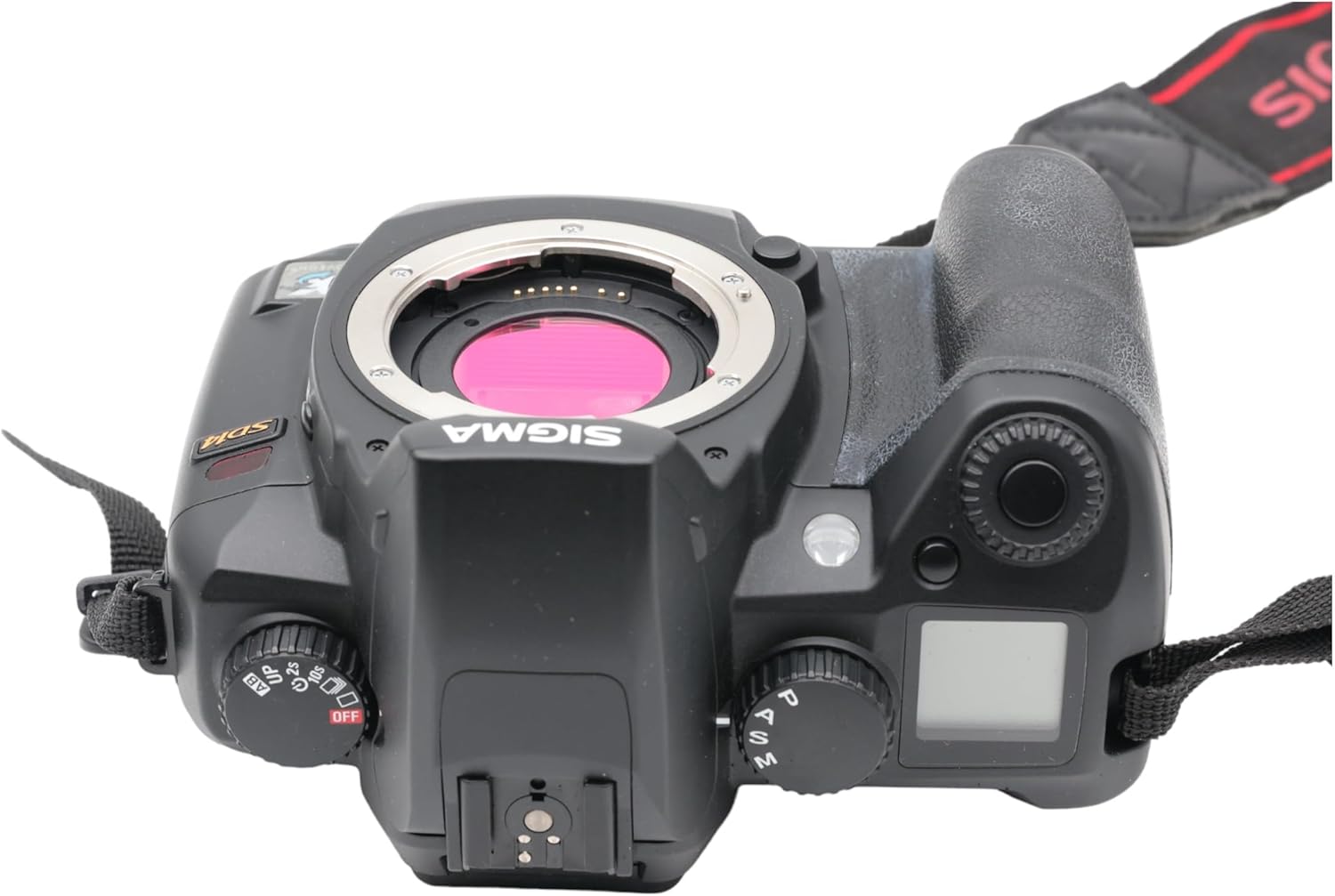
Figur 3.1: Øverst view of the Sigma SD14, illustrating the lens mount and mode dials.
4. Drift
4.1. Slå på/av
Rotate the power switch to the ON position to turn on the camera. Rotate it to OFF to power down.
4.2. Grunnleggende kontroller og skjerm
The SD14 features a 2.5-inch LCD monitor for reviewing images and navigating menus, and a pentaprism viewfinder for composing shots. The top LCD panel displays key settings such as resolution, metering mode, battery status, and remaining shots.

Figur 4.1: Bak view of the Sigma SD14, showing the LCD monitor, viewsøker og kontrollknapper.
Key buttons include MENU, ISO, WB (White Balance), and a 4-way controller with an OK button for navigation. The INFO button displays shutter speed, aperture, and other settings on the LCD.
4.3. Fokusering
The camera utilizes a 5-point autofocus (AF) system (center, left, right, up, and down). The center AF point features a cross-type sensor for enhanced precision. AF point selection can be automatic or manual.
4.4. Målemoduser
The SD14 offers three metering modes:
- 8-segment Evaluative Metering: Analyzes the entire scene for balanced exposure.
- Center Area Metering: Prioritizes the central area of the frame.
- Center Weighted Average Metering: Measures the entire frame but gives more weight to the central area.
Exposure compensation and auto bracketing functions are available for fine-tuning exposure.
4.5. Bildeopptak
The camera supports both RAW (X3F) and JPEG formats. JPEG recording offers four sizes (Super High, High, Medium, Low) and three quality settings (Fine, Normal, Basic).
- Super High (4608 x 3072 pixels): Suitable for A3 or larger prints.
- High (2640 x 1760 pixels): Suitable for A4 prints.
- Medium (1776 x 1184 pixels): Suitable for regular size prints.
- Low (1296 x 864 pixels): Egnet for web pages and email.
4.6. Kontinuerlig opptak
The SD14 can shoot continuously at 3 frames per second. The number of frames captured in a burst depends on the resolution setting:
- Høy: 6 rammer
- Medium: 12 rammer
- Lav: 24 rammer
These figures apply to both RAW and JPEG modes.
4.7. Innebygd blits
The built-in flash has a guide number of 11 (ISO 100) and covers a 17mm lens angle (28mm equivalent on 35mm format). It supports S-TTL automatic flash metering and can synchronize with shutter speeds up to 1/180 second.
4.8. Mirror Lock-up
Activate the mirror lock-up mechanism to prevent camera shake caused by mirror movement during exposure. This is particularly useful for macro photography, long telephoto shots, or scientific applications. For best results, use with a remote controller or cable release (sold separately).
4.9. Sigma Photo Pro 3.0 Software
The included Sigma Photo Pro 3.0 software is a RAW image developer. It allows for quick conversion of RAW data and offers three adjustment modes: X3F Mode (original settings), Auto Adjustment Mode, and Custom Mode for manual adjustments (exposure, contrast, shadow, highlight, saturation, sharpness, fill-light). The software supports 8-bit TIFF, 16-bit TIFF, and JPEG file formats, and sRGB, Apple RGB, Adobe RGB, and ColorMatch RGB color spaces.
5. Vedlikehold
5.1. Image Sensor Dust Protector
The SD14 features a dust protector positioned in front of the image sensor. This design prevents dust from adhering directly to the sensor, minimizing its impact on image quality. If dust accumulates on the protector, it will be out of focus and generally not visible in images.
5.2. Rengjøring av kamerahuset og objektivet
- Bruk en myk, lofri klut til å tørke av kamerahuset. For gjenstridig smuss, tørk litt avampno kluten med vann eller en mild rengjøringsløsning.
- For lenses, use a lens brush to remove loose dust, then a lens cleaning solution and a microfiber cloth. Avoid touching the lens surface with your fingers.
- Never use organic solvents like paint thinner or benzene to clean the camera or lens.
5.3. Batteripleie
- Oppbevar batteriene på et kjølig, tørt sted når de ikke er i bruk.
- Unngå å utlade batteriet helt ofte for å forlenge levetiden.
- Hvis kameraet ikke skal brukes over lengre tid, ta ut batteriet.
6. Feilsøking
| Problem | Mulig årsak | Løsning |
|---|---|---|
| Kameraet slår seg ikke på. | Batteriet er utladet eller satt inn feil. | Lad batteriet helt opp og sørg for at det er satt inn riktig. |
| Bildene er uskarpe. | Feil fokus, kamerarystelser eller skittent objektiv. | Sørg for riktig fokus. Bruk en raskere lukkertid eller stativ. Rengjør objektivet. |
| Images are too dark or too bright. | Incorrect exposure settings or metering mode. | Adjust exposure compensation. Select an appropriate metering mode for the scene. |
| Color blotching in underexposed areas. | Characteristic of the Foveon sensor when severely underexposed. | Aim to slightly overexpose images (e.g., +.7 EV) to retain shadow detail and avoid this effect. |
| Cannot record images. | Minnekortet er fullt, låst eller ikke satt inn riktig. | Insert an empty card, unlock the card, or reinsert it correctly. Format the card if necessary (this will erase all data). |
| Kameraet fryser eller slutter å reagere. | Midlertidig programvarefeil. | Ta ut batteriet og sett det inn igjen for å tilbakestille kameraet. |
For more detailed troubleshooting or error codes, please refer to the comprehensive instruction manual included with your camera or visit the Sigma support webnettstedet.
7. Spesifikasjoner
| Trekk | Detalj |
|---|---|
| Modellnavn | SD14 |
| Fotosensoroppløsning | 14 MP (Foveon X3 direct-image sensor) |
| Fotosensorstørrelse | APS-C |
| Kompatible monteringer | Sigma SA Bayonet |
| Støttes File Formater | JPEG, RAW (X3F), TIFF |
| Skjermstørrelse | 2.5 Inches (150,000 pixels) |
| Viewfinner | Optical Pentaprism (98% coverage, 0.9x magnification) |
| Autofokuspoeng | 5-point (Phase Detection) |
| Kontinuerlig opptakshastighet | 3 bilder per sekund |
| Maksimal lukkerhastighet | 1/4000 sekunder |
| Minimum lukkerhastighet | 30 sekunder |
| Utvidet ISO-område | 100 - 1600 |
| Målemoduser | 8-segment Evaluative, Center Area, Center Weighted Average |
| Built-in Flash Guide Number | 11 (ISO 100) |
| Lagringsmedier | Compact Flash (CF) Type I/II |
| Strømkilde | Lithium-ion Battery BP-21 |
| Tilkobling | USB, videoutgang |
| Varevekt | 1.65 pund (ca. 748 g) |
| Modellnummer | C23900 |
| UPC | 085126924416 |
7.1. Valgfritt tilbehør (selges separat)
- Sigma Lenses (over 40 compatible models)
- Flashguns: EF-500 DG SUPER, EF-500 DG ST, EM-140 DG
- Power Grip PG-21
- Cable Release CR-21
- Remote Controller RS-31
- AC Adapter SAC-21
8. Garanti og støtte
8.1. Garantiinformasjon
For detailed warranty terms and conditions, please refer to the warranty card included with your product or visit the official Sigma webGarantidekningen dekker vanligvis material- og produksjonsfeil i en spesifisert periode fra kjøpsdatoen.
8.2. Kundestøtte
If you encounter any issues or have questions not covered in this manual, please contact Sigma customer support. Contact information can usually be found on the official Sigma webnettstedet eller i garantidokumentasjonen.
Nettressurser: Visit the official Sigma website for product registration, firmware updates, FAQs, and additional support resources.