
1. Introduksjon
This manual provides essential instructions for the safe and efficient operation, maintenance, and troubleshooting of your Walimex Pro Powermate CY-28ZLXT CY-300 JZL. Please read this manual thoroughly before using the product and retain it for future reference.
The Walimex Pro Powermate CY-28ZLXT CY-300 JZL is designed as a power accessory for professional camera and photo equipment, providing reliable power for various applications.
2. Sikkerhetsinstruksjoner
- Always ensure the device is disconnected from the power source before cleaning or performing any maintenance.
- Ikke utsett enheten for fuktighet, regn eller ekstreme temperaturer.
- Use only Walimex Pro approved accessories and power adapters.
- Hold enheten unna brennbare materialer.
- Ikke forsøk å åpne eller reparere enheten selv. Overlat all service til kvalifisert personell.
- Sørg for god ventilasjon under drift for å unngå overoppheting.
3. Produktet er overview og komponenter
The Walimex Pro Powermate CY-28ZLXT CY-300 JZL is a robust power solution. Below is an image of the product for identification.
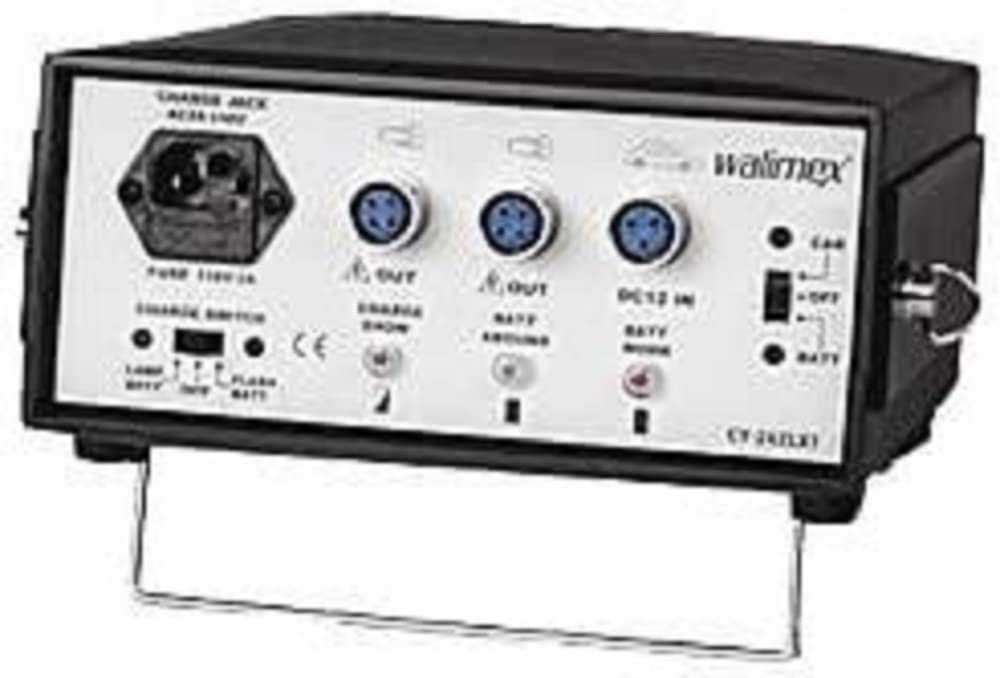
Image: Walimex Pro Powermate CY-28ZLXT CY-300 JZL. This image displays the main unit of the Powermate, showcasing its compact design and connection ports.
Viktige komponenter inkluderer vanligvis:
- Hovedenhet
- Strømkabel
- Output Cables (specific to connected devices)
- Control Panel/Indicators
4. Installasjonsinstruksjoner
- Utpakking: Fjern forsiktig alle komponenter fra emballasjen. Kontroller at alle delene som er oppført i produktet ovenforview er tilstede.
- Plassering: Place the Powermate unit on a stable, flat surface, ensuring adequate ventilation around the device. Avoid placing it near heat sources or in direct sunlight.
- Koble til strøm:
- Connect the provided power cable to the Powermate's input port.
- Koble den andre enden av strømkabelen til en passende stikkontakt.
- Sørg for at strømuttaket møter voltage requirements specified in the product specifications.
- Koble til enheter:
- Identify the correct output cable for your camera or lighting equipment.
- Connect the output cable to the appropriate port on the Powermate.
- Connect the other end of the output cable to your device. Ensure a secure connection.
5. Bruksanvisning
- Slår på: Press the main power button located on the unit. The indicator light should illuminate, signifying that the device is active.
- Sjekker status: Monitor the status indicators (if present) to ensure proper operation and battery charge levels.
- Justere innstillinger: If your model includes adjustable power output or other settings, refer to the specific controls on the unit to set them according to your equipment's requirements.
- Slår av: After use, disconnect your equipment from the Powermate. Press and hold the main power button until the indicator light turns off. Disconnect the Powermate from the wall outlet if not in use for an extended period.
Charging the Powermate (if applicable)
If your Walimex Pro Powermate CY-28ZLXT CY-300 JZL includes an internal battery, follow these steps for charging:
- Connect the Powermate to a wall outlet using the provided power cable.
- The charging indicator light will typically show the charging status (e.g., blinking for charging, solid for fully charged).
- Allow the unit to charge completely before its first use or after prolonged storage.
6. Vedlikehold
- Rengjøring: Disconnect the device from all power sources. Use a soft, dry cloth to wipe the exterior. Do not use liquid cleaners or abrasive materials.
- Lagring: Store the Powermate in a cool, dry place, away from direct sunlight and extreme temperatures. If storing for an extended period, ensure the internal battery (if present) is charged to approximately 50-70% capacity.
- Batteripleie (hvis aktuelt): For models with internal batteries, avoid complete discharge and recharge regularly to prolong battery life.
7. Feilsøking
| Problem | Mulig årsak | Løsning |
|---|---|---|
| Enheten slås ikke på. | No power from outlet; power cable loose; internal battery depleted (if applicable). | Check wall outlet with another device. Ensure power cable is securely connected. Charge the unit if it has an internal battery. |
| Tilkoblet utstyr mottar ikke strøm. | Output cable loose or incorrect; Powermate not powered on; equipment fault. | Verify output cable connection. Ensure Powermate is powered on. Test equipment with another power source if possible. |
| Overoppheting. | Blocked ventilation; excessive load. | Ensure ventilation openings are clear. Reduce the load on the Powermate. Disconnect and allow to cool down. |
If the problem persists after attempting these solutions, please contact Walimex Pro customer support.
8. Spesifikasjoner
- Merke: Walimex Pro
- Modell: 12588 (CY-28ZLXT CY-300 JZL)
- Dimensjoner (pakke): 30.2 x 28.8 x 16.8 cm
- Vekt (pakke): 5.98 kg (13.18 lbs)
- ASIN: B001UAFALI
- Produktreferanse: 4250234525886
- Produsent: Walimex
- Note: Specific electrical output and input specifications may vary. Refer to the product label on your unit for precise details.
9. Garantiinformasjon
Walimex Pro products are covered by a limited warranty against defects in materials and workmanship. The duration and terms of the warranty may vary by region and product. Please retain your proof of purchase for warranty claims.
The warranty does not cover damage caused by misuse, unauthorized modifications, accidents, or failure to follow the instructions in this manual. For detailed warranty terms and conditions, please visit the official Walimex Pro webnettstedet eller kontakt kundestøtte.
10. Kundestøtte
For technical assistance, troubleshooting beyond this manual, or warranty inquiries, please contact Walimex Pro customer support.
- Webnettsted: www.walimexpro.com (Sjekk for regionale webnettsteder)
- E-post: Se til webnettsted for kontaktskjemaer eller e-postadresser.
- Telefon: Se til webnettsted for regionale telefonnumre.
Når du kontakter kundestøtte, må du ha produktets modellnummer (12588) og kjøpsbevis lett tilgjengelig.