
1. Introduksjon
This manual provides detailed instructions for the installation, operation, maintenance, and troubleshooting of the ASRock P55 DELUXE3 motherboard. Please read this manual thoroughly before installing or using your new motherboard to ensure proper setup and optimal performance. This motherboard supports Intel LGA1156 processors and features advanced technologies such as SATA3 and USB 3.0.
2. Produktfunksjoner
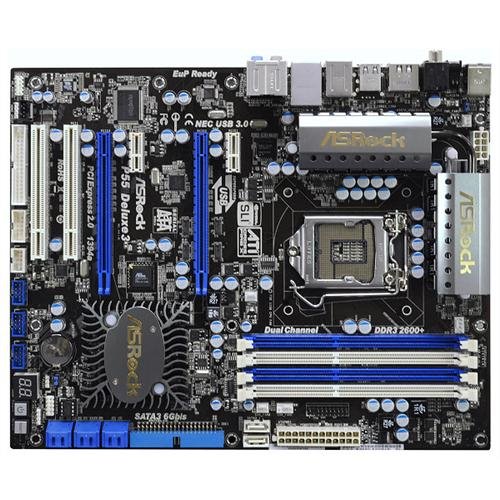
The ASRock P55 DELUXE3 motherboard is designed with the following key features:
- CPU-støtte: Socket 1156 for Intel Core i7/i5/i3 and Pentium G6950 Processors, including Intel Turbo Boost and Hyper-Threading Technology.
- Brikkesett: Intel P55.
- Hukommelse: 4x 240-pin DDR3 DIMM slots, supporting up to 16 GB of non-ECC, un-buffered dual-channel memory at speeds up to 2600+(OC)/2133(OC)/1866(OC)/1600/1333/1066 MHz.
- Utvidelsesspor: 2x PCI-Express 2.0 x16 slots (supporting ATI Quad CrossFireX and nVidia Quad SLI Technology), 2x PCI-Express 2.0 x1 slots, and 2x PCI slots.
- Lagring: 1x ATA-133 channel, 2x SATA3 ports (supporting RAID 0, 1), and 6x SATA2 ports (supporting RAID 0, 1, 5, 10, JBOD).
- Lyd: VIA VT2020 7.1-Channel Audio CODEC.
- LAN: Realtek RTL8111DL PCI-Express x1 Gigabit Ethernet Controller.
- USB-porter: 12x USB 2.0 ports (5 rear, 6 by headers, 1 by Powered eSATA3/USB Connector) and 2x USB 3.0 ports.
- Andre havner: 1x IEEE 1394 Port, 2x PS/2 Ports, 1x RJ45 LAN Port, 1x Coaxial SPDIF Out Port, 1x Optical SPDIF Out Port, and Audio I/O Jacks.
3. Oppsettveiledning
Follow these steps for the proper installation of your ASRock P55 DELUXE3 motherboard and associated components.
3.1 Utpakking og inspeksjon
Carefully remove the motherboard from its packaging. Inspect for any visible damage. Ensure all accessories listed in the product packaging are present.
3.2 Component Preparation
- CPU installasjon: Open the LGA 1156 CPU socket lever. Align the CPU with the socket, ensuring the gold triangle on the CPU matches the triangle on the socket. Gently place the CPU into the socket without force. Close the lever to secure the CPU.
- Installasjon av CPU-kjøler: Apply thermal paste to the CPU if not pre-applied on the cooler. Mount the CPU cooler according to its specific instructions, ensuring it is securely fastened and making good contact with the CPU.
- Installasjon av minne (RAM): Open the clips on both ends of the DDR3 DIMM slots. Align the memory module with the slot, ensuring the notch on the module matches the key in the slot. Press down firmly on both ends of the module until the clips snap into place. For dual-channel operation, refer to the motherboard layout for recommended slot pairings.
- Graphics Card (Optional): If installing a dedicated graphics card, open the retention clip on the PCI-Express 2.0 x16 slot. Align the card with the slot and press firmly until it is seated. Secure the card with a screw to the chassis.
3.3 Motherboard Installation into Chassis
Install the I/O shield into the rear opening of your computer case. Carefully place the motherboard into the chassis, aligning the screw holes on the motherboard with the standoffs in the case. Secure the motherboard with screws.
3.4 Tilkoblingskabler
Koble til følgende kabler:
- Strømkontakter: Connect the 24-pin ATX main power connector and the 8-pin CPU power connector from your power supply to the corresponding ports on the motherboard.
- SATA Data Cables: Connect your storage devices (HDDs, SSDs, optical drives) to the SATA2 or SATA3 ports on the motherboard.
- Frontpanelkontakter: Connect the power button, reset button, HDD LED, power LED, and front panel USB/audio headers to their respective pins on the motherboard. Refer to the motherboard diagram for correct pin assignments.
- Viftekontakter: Connect CPU fan and chassis fans to the appropriate fan headers.
4. Bruksanvisning
After physical installation, proceed with the initial boot and software setup.
4.1 Første oppstart og BIOS-oppsett
Power on your system. Press the designated key (usually DEL or F2) during startup to enter the BIOS/UEFI setup utility. In the BIOS, you can configure boot order, system time, and various hardware settings. Ensure your storage devices are detected and set the primary boot device.
4.2 Installasjon av operativsystem
Insert your operating system installation media (USB drive or DVD). Follow the on-screen prompts to install your preferred operating system. Ensure the system boots from the installation media.
4.3 Driverinstallasjon
After the operating system is installed, install the necessary drivers for your motherboard. These typically include:
- Brikkesettdrivere
- Audio Drivers (VIA VT2020)
- LAN Drivers (Realtek RTL8111DL Gigabit Ethernet)
- USB 3.0-drivere
- SATA/RAID Drivers (if using RAID configuration)
These drivers can usually be found on the ASRock support webnettstedet for din spesifikke hovedkortmodell.
4.4 Bruk av avanserte funksjoner
The ASRock P55 DELUXE3 supports advanced features:
- Quad CrossFireX & Quad SLI: For multi-GPU configurations, ensure your graphics cards are compatible and install the necessary drivers from AMD or NVIDIA.
- SATA3 (6Gb/s): Connect compatible SSDs to the SATA3 ports for maximum performance.
- USB 3.0: Utilize the blue USB 3.0 ports for high-speed data transfer with compatible devices.
5. Vedlikehold
Regelmessig vedlikehold bidrar til å sikre lang levetid og stabil drift av hovedkortet ditt.
- Støvrengjøring: Periodically clean dust from inside your computer case, especially around the CPU cooler, chipset heatsinks, and fan vents. Use compressed air for best results. Ensure the system is powered off and unplugged before cleaning.
- BIOS-oppdateringer: Sjekk ASRock-en website for BIOS updates. BIOS updates can improve compatibility, stability, and performance. Follow ASRock's specific instructions for BIOS flashing carefully to avoid system damage.
- Driveroppdateringer: Keep your motherboard drivers updated to the latest versions available on the ASRock support website. This can resolve issues and improve performance.
- Kabeladministrasjon: Ensure all cables are neatly routed to promote better airflow and prevent interference.
6. Feilsøking
Denne delen tar for seg vanlige problemer du kan støte på.
6.1 Ingen strøm / Ingen oppstart
- Kontroller at alle strømkabler (24-pinners ATX, 8-pinners CPU) er ordentlig koblet til hovedkortet og strømforsyningen.
- Sørg for at strømbryteren er i «PÅ»-posisjon.
- Sjekk tilkoblingen på strømknappen på frontpanelet til hovedkortet.
- Test strømforsyningen med et annet system eller en strømforsyningstester.
6.2 No Display / POST Errors
- Ensure the monitor is connected to the correct graphics output (either integrated or dedicated GPU).
- Sett inn grafikkortet og minnemodulene på nytt.
- Try booting with only one RAM stick installed, testing each stick individually.
- Clear the CMOS (Complementary Metal-Oxide-Semiconductor) by removing the CMOS battery for a few minutes or using the clear CMOS jumper (refer to motherboard diagram).
- Listen for beep codes from the motherboard speaker, which can indicate specific hardware issues. Consult the ASRock webnettsted for tolkning av pipekoder.
6.3 Komponent ikke oppdaget
- Lagringsstasjoner: Check SATA data and power cable connections. Verify detection in BIOS. Ensure correct drivers are installed in the operating system.
- USB-enheter: Try different USB ports. Ensure USB drivers are installed.
- Nettverk: Check LAN cable connection. Ensure LAN drivers are installed. Verify network adapter is enabled in BIOS and operating system.
For ytterligere hjelp, se ASRock-kundestøtten webnettstedet eller kontakt ASRock teknisk støtte.
7. Spesifikasjoner
Detailed technical specifications for the ASRock P55 DELUXE3 motherboard:
| Kategori | Spesifikasjon |
|---|---|
| Merke | ASRock |
| Modellnummer | P55 DELUXE3 |
| CPU-sokkel | LGA 1156 |
| Kompatible prosessorer | Intel Core i7/i5/i3, Intel Pentium |
| RAM-minneteknologi | DDR3 |
| Minnespor tilgjengelig | 4 |
| Maksimal RAM-minnestørrelse | 16 GB |
| Minne klokkehastighet | 1066 MHz, 1333 MHz, 1600 MHz, 1866(OC) MHz, 2133(OC) MHz, 2600+(OC) MHz |
| Grensesnitt for grafikkort | PCI, PCI Express |
| SATA-porter | 2x SATA3 (6Gb/s), 6x SATA2 (3Gb/s) |
| IDE-porter | 1x ATA-133 Channel |
| USB 2.0-porter | 12 (5 rear, 6 by headers, 1 by Powered eSATA3/USB) |
| USB 3.0-porter | 2 (bak) |
| Lyd | VIA VT2020 7.1-Channel Audio CODEC |
| LAN | Realtek RTL8111DL Gigabit Ethernet |
| Type hovedstrømkontakt | 24-pin ATX, 8-pin CPU |
| S/PDIF Connector Type | Optisk, koaksial |
| Formfaktor | ATX |
| ASIN | B003BTX2GG |
| GTIN | 04711140871998 |
8. Garanti og støtte
ASRock tilbyr en begrenset garanti for hovedkortene sine. De spesifikke vilkårene og varigheten av garantien kan variere avhengig av region og forhandler. Vennligst ta vare på kjøpsbeviset for garantikrav.
For teknisk støtte, drivernedlastinger, BIOS-oppdateringer og detaljert produktinformasjon, kan du besøke den offisielle ASRock-websiden. webnettsted:
When contacting support, please have your motherboard model (P55 DELUXE3) and serial number ready.