
1. Introduksjon
The D-Link DES-1008E is an 8-Port Fast Ethernet Desktop Switch designed to expand your network connectivity. This unmanaged switch provides eight 10/100 Mbps Ethernet ports, allowing you to connect multiple devices such as computers, printers, and network-attached storage (NAS) to your network. It supports full-duplex mode, delivering up to 200 Mbps throughput per port for efficient data transfer. The plug-and-play design ensures easy installation without the need for software configuration.
2. Pakkens innhold
Vennligst bekreft at pakken din inneholder følgende varer:
- D-Link DES-1008E 8-Port Fast Ethernet Desktop Switch
- Strømadapter
- Hurtiginstallasjonsveiledning
If any items are missing or damaged, please contact your local D-Link reseller for assistance.
3. Oppsett
Follow these steps to set up your D-Link DES-1008E switch:
- Position the Switch: Place the switch on a flat, stable surface or mount it to a wall using appropriate hardware (not included). Ensure adequate ventilation around the device.
- Koble til strømadapteren: Plug the provided power adapter into the power port on the back of the DES-1008E switch. Connect the other end of the power adapter to a standard electrical outlet. The power LED on the front of the switch should illuminate.
- Koble til nettverksenheter: Connect your network devices (e.g., computers, routers, game consoles) to any of the eight Ethernet ports on the switch using standard Ethernet cables. The corresponding port LED on the front of the switch will illuminate when a connection is established.
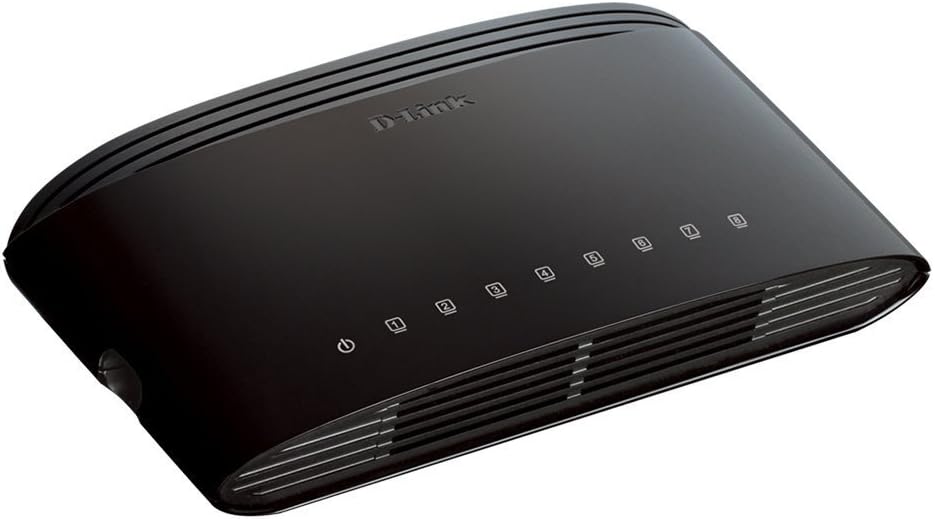
Figur 1: Foran view of the D-Link DES-1008E switch, showing the power indicator and eight port status LEDs.

Figur 2: Bak view of the D-Link DES-1008E switch, illustrating the eight Ethernet ports for device connections.
The D-Link DES-1008E is a plug-and-play device, requiring no software installation or configuration. Once connected, your devices should automatically detect the network connection.
4. Betjening av bryteren
The DES-1008E operates automatically once powered on and connected. It functions as an unmanaged switch, meaning it requires no user intervention for basic network traffic management.
LED-indikatorer:
- Strøm LED: Illuminates green when the switch is receiving power.
- Port-LED-er (1–8): Each port has an associated LED. This LED illuminates green when a device is connected to the port and flashes to indicate network activity (data transmission).
5. Vedlikehold
To ensure optimal performance and longevity of your D-Link DES-1008E switch, consider the following maintenance guidelines:
- Rengjøring: Gently wipe the exterior of the switch with a soft, dry cloth. Avoid using liquid or aerosol cleaners directly on the device.
- Ventilasjon: Ensure that the ventilation slots on the switch are not blocked. Proper airflow prevents overheating.
- Miljø: Bruk bryteren innenfor de angitte temperatur- og fuktighetsområdene. Unngå å utsette den for direkte sollys, overdreven varme eller fuktighet.
- Strømsyklus: Hvis svitsjen opplever problemer, kan en enkel av- og påslåing (trekke ut strømadapteren og sette den inn igjen) ofte løse mindre problemer.
6. Feilsøking
If you encounter issues with your D-Link DES-1008E switch, refer to the following troubleshooting tips:
- Ingen strøm:
- Sørg for at strømadapteren er ordentlig koblet til både bryteren og en fungerende stikkontakt.
- Kontroller at stikkontakten fungerer ved å koble til en annen enhet.
- Sjekk strømadapteren for synlige skader.
- Ingen lenke/aktivitet på en port:
- Confirm that the Ethernet cable is securely plugged into both the switch port and the connected device.
- Prøv en annen Ethernet-kabel for å utelukke en defekt kabel.
- Connect a different device to the same port to check if the port is functional.
- Sørg for at den tilkoblede enheten er slått på og at nettverkskortet er aktivert.
- Treg nettverksytelse:
- Verify that all connected devices are operating at their expected speeds.
- Check for excessive network traffic or bandwidth-intensive applications running on connected devices.
- Ensure your internet service provider (ISP) is delivering the expected speeds to your router.
- High-Pitched Sound from Power Adapter:
- Some users have reported a high-pitched sound from the included power adapter. If this occurs, consider using an alternative 5V power supply with compatible specifications. Ensure the replacement power supply meets the voltage and current requirements of the switch to avoid damage.
7. Spesifikasjoner
| Modellnummer | DES-1008E |
| Antall porter | 8 |
| Ethernet-standard | 10/100 Mbps Fast Ethernet |
| Dataoverføringshastighet | Up to 200 Mbps (full-duplex) |
| Byttekapasitet | 1.6 Gbps |
| MAC-adressetabellstørrelse | 1K oppføringer |
| Strøminngang | 5V DC |
| Varevekt | 9.44 unser |
| Farge | Svart |
8. Garanti og støtte
The D-Link DES-1008E 8-Port Fast Ethernet Desktop Switch comes with a Begrenset livstidsgaranti. For detailed warranty terms and conditions, please refer to the warranty information provided with your product or visit the official D-Link webnettstedet.
For technical support, product registration, or to download the latest firmware and documentation, please visit the D-Link support website or contact D-Link customer service in your region. Support contact information can typically be found on the D-Link official webnettstedet.