
1. Introduksjon
This manual provides essential instructions for the safe and efficient operation of your Sharp CD-DH950P 240W Mini-Component System. This system features a 5-disc CD changer, a cassette deck, an iPod/iPhone docking station, a USB host for digital audio playback, and an AM/FM tuner. Please read this manual thoroughly before using the system and retain it for future reference.
2. Sikkerhetsinformasjon
- Strømkilde: Koble enheten kun til en stikkontakt med angitt volum.tage.
- Ventilasjon: Sørg for tilstrekkelig ventilasjon. Ikke blokker ventilasjonsåpningene.
- Vann og fuktighet: Do not expose the unit to rain, moisture, or dripping/splashing liquids.
- Varme: Hold enheten unna varmekilder som radiatorer, varmeventiler, ovner eller andre apparater som produserer varme.
- Rengjøring: Trekk støpselet til enheten ut av stikkontakten før rengjøring. Bruk en myk, tørr klut.
- Service: Ikke prøv å utføre service på dette produktet selv. Henvis all service til kvalifisert servicepersonell.
3. Pakkens innhold
Kontroller at pakken inneholder følgende elementer:
- Main Unit (CD-DH950P)
- Venstre høyttaler
- Høyre høyttaler
- Fjernkontroll med batterier
- AM sløyfeantenne
- FM Wire-antenne
- Strømledning
4. Oppsett
4.1 Tilkobling av høyttalerne
Connect the speaker wires from the main unit to the corresponding terminals on the back of each speaker. Ensure correct polarity (red to red, black to black) for optimal sound quality. The left speaker connects to the left speaker output, and the right speaker to the right speaker output.
4.2 Connecting the Antennas
- FM-antenne: Connect the supplied FM wire antenna to the FM antenna terminal on the rear of the main unit. Extend the wire for better reception.
- AM-antenne: Connect the supplied AM loop antenna to the AM antenna terminals on the rear of the main unit. Position the antenna for best reception.
4.3 Strømtilkobling
Plug the power cord into the AC IN jack on the rear of the main unit, then plug the other end into a standard AC wall outlet.
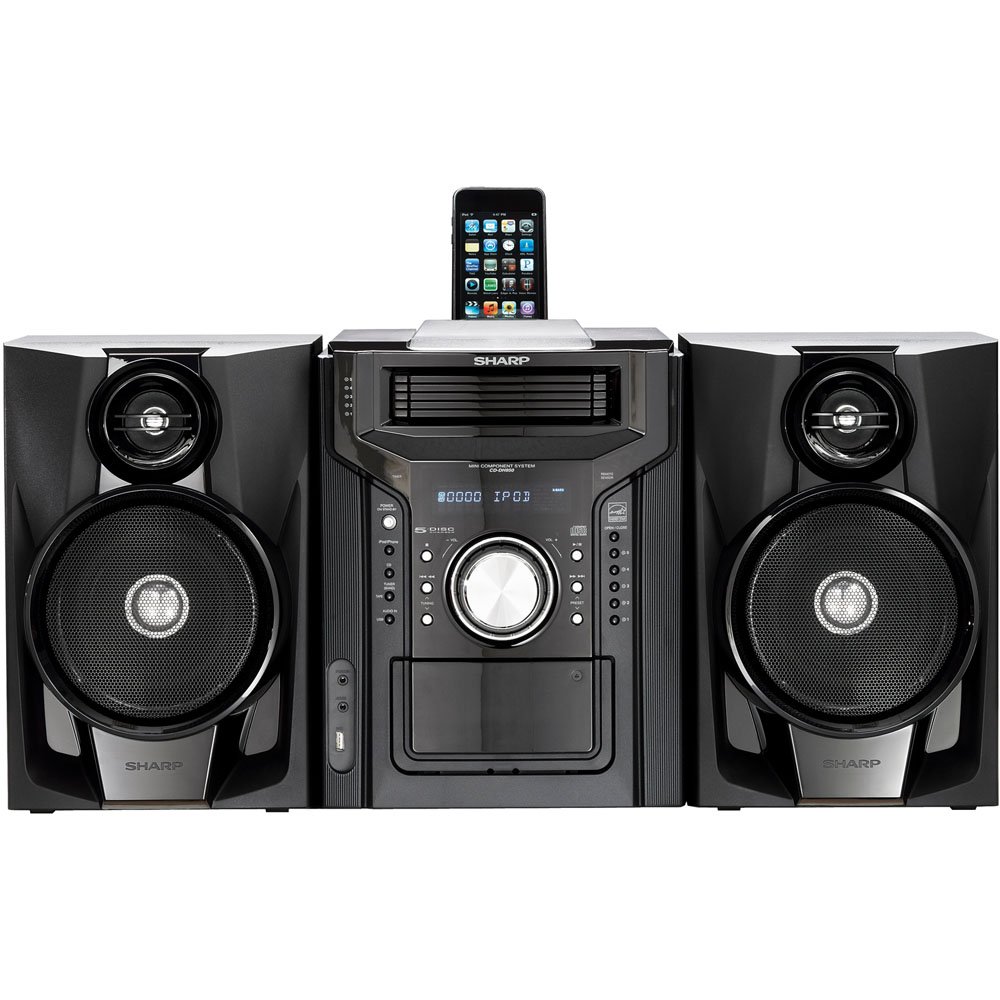
Figur 4.3.1: Totalt sett view of the Sharp CD-DH950P Mini-Component System, showing the main unit flanked by two speakers, with an iPhone docked on top of the main unit.
5. Bruksanvisning
5.1 Av/på-funksjon og volumkontroll
- Trykk på MAKT -knappen på frontpanelet eller fjernkontrollen for å slå enheten av eller på.
- Roter VOLUM knotten på frontpanelet eller bruk VOL +/- knappene på fjernkontrollen for å justere lydnivået.
5.2 CD-avspilling
This system features a 5-disc CD changer.
- Trykk på ÅPNE/LUKK for å åpne CD-skuffen.
- Place up to five CDs on the disc trays, label side up.
- Pressen ÅPNE/LUKK igjen for å lukke skuffen.
- Trykk på CD -knappen for å velge CD-funksjonen.
- Trykk på SPILL/PAUSE -knappen for å starte avspillingen.
- Bruk HOPPE OVER buttons to navigate between tracks or discs.
5.3 Bruk av kassettspiller
- Trykk på TAPE OPEN/CLOSE button to open the cassette deck.
- Sett inn et kassettbånd.
- Trykk på TEIP button to select the cassette function.
- Pressen SPILLE for å starte avspillingen.
- To record, ensure the source is selected (e.g., CD, Tuner) and press the REKORD knappen på kassettspilleren.
5.4 iPod/iPhone-dokkingstasjon
The system includes a top-mounted docking slot for compatible iPod and iPhone devices (30-pin connector).
- Carefully place your iPod or iPhone into the docking slot.
- The system will automatically switch to iPod/iPhone mode or you may need to press the iPod/iPhone knapp.
- Use the system's controls or your device's controls to play music. The device will also charge while docked.
5.5 USB Host Playback
Connect a USB storage device containing MP3 or WMA audio files to the USB port on the front panel.
- Sett USB-enheten inn i USB-porten.
- Trykk på USB button to select the USB function.
- Use the playback controls to navigate and play files.
5.6 AM/FM Tuner
- Trykk på TUNER button to select AM or FM radio.
- Bruk TUNING +/- knappene for å stille inn en stasjon manuelt.
- To auto-scan, press and hold the TUNING +/- knapper.
- To store a preset, tune to the desired station, then press HUKOMMELSE followed by a preset number.
5.7 Lydinngang
Connect an external audio device (e.g., MP3 player, smartphone) to the AUDIO IN jack on the front panel using a 3.5mm stereo cable.
- Connect your device to the AUDIO IN jack.
- Trykk på LYD INN -knappen for å velge denne kilden.
- Kontroller avspillingen fra den tilkoblede enheten.
6. Vedlikehold
6.1 Rengjøring av enheten
Wipe the exterior of the unit with a soft, dry cloth. Do not use abrasive cleaners, waxes, or solvents. Ensure the unit is unplugged before cleaning.
6.2 CD and Cassette Care
- Handle CDs by their edges to avoid fingerprints and scratches. Clean discs with a soft, lint-free cloth from the center outwards.
- Store cassette tapes away from strong magnetic fields and direct sunlight.
7. Feilsøking
| Problem | Mulig årsak | Løsning |
|---|---|---|
| Ingen strøm | Strømledningen er ikke tilkoblet; Strømuttaket er defekt | Sørg for at strømledningen er ordentlig koblet til; prøv en annen stikkontakt |
| Ingen lyd | Volumet er for lavt; Høyttalere er ikke tilkoblet; Feil kilde valgt | Øk volumet; Sjekk høyttalertilkoblingene; Velg riktig inngangskilde |
| CD-en spiller ikke | Disc inserted incorrectly; Disc is dirty or scratched | Insert disc correctly (label side up); Clean or replace disc |
| Dårlig radiomottak | Antenna not positioned correctly; Weak signal | Adjust position of AM/FM antennas; Try auto-tuning or manual fine-tuning |
| iPod/iPhone not charging/playing | Device not properly docked; Device not compatible (e.g., newer connector) | Re-dock the device; Note that this system uses a 30-pin connector, newer devices may require an adapter (not included) |
8. Spesifikasjoner
- Merke: Skarp
- Modell: CD-DH950P
- Total utgangseffekt: 240 Watts RMS (85W/ch FTC)
- Høyttalerkonfigurasjon: 2.1 kanal
- Støttede lydformater: CD, MP3, WMA
- Signal til støyforhold: 100 dB
- Kompatible enheter: MP3 Player, Smartphone (via 30-pin dock or USB/Audio In)
- Dimensjoner (L x B x H): 27.6 x 13.6 x 13.5 tommer
- Varevekt: 24.4 pund
- UPC: 074000369863, 074000369290
9. Garantiinformasjon
This product is covered by a 1-year limited warranty from the date of purchase. Please refer to the warranty card included with your product for full terms and conditions, or contact Sharp customer service for details.
10. Støtte
For further assistance, technical support, or service inquiries, please contact Sharp customer service. Contact information can typically be found on the Sharp official webnettstedet eller i dokumentasjonen som følger med produktet.