
1. Introduksjon
Takk for kjøpetasing the Caliber RMD 068-2 Car Radio USB/SD Player. This manual provides detailed instructions for the installation, operation, and maintenance of your new car radio. Please read this manual thoroughly before using the product to ensure proper functionality and safety. Keep this manual for future reference.
2. Sikkerhetsinformasjon
- Installasjon: Ensure the unit is installed by a qualified technician to prevent damage to the vehicle's electrical system. Incorrect wiring can cause fire or electrical shock.
- Strømforsyning: Koble enheten kun til et 12V DC bilbatteri med negativ jord.
- Sikringer: Always replace fuses with new ones of the specified rating. Using an incorrect fuse can cause damage to the unit or vehicle.
- Volumnivå: Do not operate the unit at excessively high volume levels, as this may impair your ability to hear external traffic sounds and could be dangerous.
- Rengjøring: Bruk en myk, tørr klut til rengjøring. Ikke bruk slipende rengjøringsmidler eller løsemidler.
- Fuktighet: Ikke utsett enheten for fuktighet eller vann.
3. Pakkens innhold
Vennligst sjekk at alle varene er til stede:
- Caliber RMD 068-2 Car Radio Unit
- Avtakbart frontpanel
- ISO ledningsnett
- Monteringsramme
- Disassembly Keys (2 pcs)
- Brukerhåndbok (dette dokumentet)
4. Produktet er overview
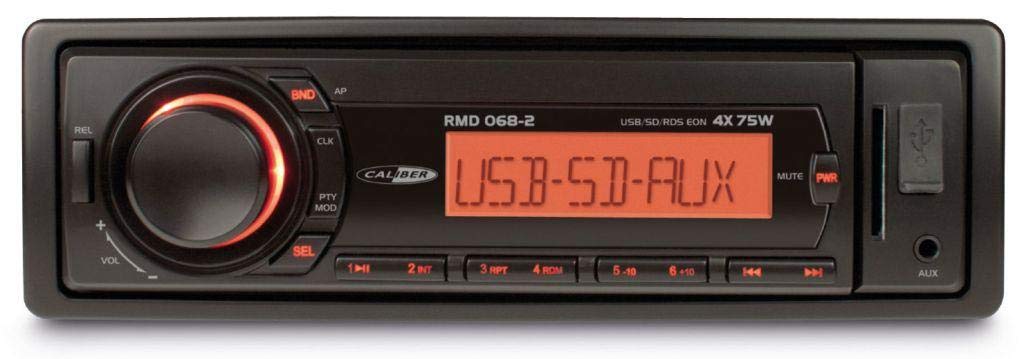
Figur 1: Foran view of the Caliber RMD 068-2 Car Radio. This image shows the main unit with its detachable front panel, including the display, control buttons, USB port, and SD card slot.
4.1 Kontroller på frontpanelet
- AV/PÅ/MODUS-knapp: Press to turn on/off. Short press to switch between Radio, USB, SD, AUX modes.
- VOLUME -knapp: Rotate to adjust volume. Press to access audio settings (Bass, Treble, Balance, Fader).
- VISE: Shows current time, radio frequency, track information, etc.
- USB-port: Koble til USB-minnepinner for avspilling av medier.
- SD-kortspor: Insert SD cards for media playback.
- AUX Input (3.5mm Jack): Koble til eksterne lydenheter.
- BAND/AMS Button: In radio mode, press to select radio band (FM1, FM2, FM3). Long press for Automatic Memory Store.
- PRESET Buttons (1-6): Store and recall radio stations. In USB/SD mode, use for direct track selection.
- PLAY/PAUSE-knapp: Spill av eller sett avspilling av media på pause.
- FORWARD/BACKWARD Buttons: Skip tracks or tune radio frequency.
- EJECT-knapp: Release the detachable front panel.
4.2 Bakre tilkoblinger
The rear of the unit features standard ISO connectors for power and speakers, along with an antenna input.
- ISO Power Connector: For connecting to the vehicle's power supply (constant 12V, ignition 12V, ground).
- ISO Speaker Connector: For connecting to the vehicle's speakers (Front Left, Front Right, Rear Left, Rear Right).
- Antenneinngang: For connecting the car's radio antenna.
5. Oppsett
5.1 Installasjon
- Koble fra batteriet: Before starting, disconnect the negative terminal of your car battery to prevent short circuits.
- Fjern gammel enhet: Fjern forsiktig den eksisterende bilradioen fra dashbordet.
- Installer monteringsramme: Insert the supplied mounting frame into the dashboard opening and bend the tabs to secure it.
- Koble til ledninger: Refer to the wiring diagram in section 5.2. Connect the ISO wiring harness to the car's wiring and then to the Caliber RMD 068-2 unit. Connect the antenna cable.
- Slide Unit In: Carefully slide the Caliber RMD 068-2 unit into the mounting frame until it clicks into place.
- Koble til batteriet igjen: Reconnect the negative terminal of your car battery.
- Fest frontpanelet: Attach the detachable front panel to the main unit.
5.2 Koblingsskjema
The Caliber RMD 068-2 uses standard ISO connectors. Ensure correct connections as shown below. If your vehicle does not have ISO connectors, an adapter may be required.
| Pin nr. | Ledningsfarge (typisk) | Funksjon |
|---|---|---|
| 4 | Gul | Konstant 12V (batteri) |
| 7 | Rød | Slått 12V (tenning) |
| 8 | Svart | Bakke |
| 5 | Blå | Antenna Remote Out |
| Pin nr. | Ledningsfarge (typisk) | Funksjon |
|---|---|---|
| 1 | Lilla | Bak høyre (+) |
| 2 | Lilla/svart | Bak til høyre (-) |
| 3 | Grønn | Bak venstre (+) |
| 4 | Grønn/svart | Bak venstre (-) |
| 5 | Grå | Foran høyre (+) |
| 6 | Grå/svart | Foran, til høyre (-) |
| 7 | Hvit | Foran til venstre (+) |
| 8 | Hvit/Sort | Foran til venstre (-) |
Note: Wire colors may vary depending on vehicle manufacturer. Always consult your vehicle's wiring diagram.
6. Bruksanvisning
6.1 Grunnleggende funksjoner
- Slå på/av: Trykk på STRØM / MODUS knappen for å slå enheten på eller av.
- Volumkontroll: Roter VOLUM med klokken for å øke volumet, mot klokken for å redusere.
- Modusvalg: Trykk kort på STRØM / MODUS button to cycle through available modes: Radio (FM), USB, SD, AUX.
- Lydinnstillinger: Trykk på VOLUM knob to enter audio settings. Rotate the knob to select settings like BASS, TREBLE, BALANCE, FADER. Press the knob again to confirm or move to the next setting.
6.2 Radiodrift
- Bandvalg: I radiomodus trykker du på BAND/AMS -knappen for å bytte mellom FM1-, FM2- og FM3-båndene.
- Manuell innstilling: Trykk kort på FREMOVER BAKOVER knappene for å finjustere frekvensen.
- Automatisk søk: Trykk lenge på FREMOVER BAKOVER knappene for å automatisk søke etter neste sterke stasjon.
- Lagre forhåndsinnstillinger: Tune to your desired station. Long press one of the PRESET (1-6) buttons until you hear a beep. The station is now stored.
- Tilbakekall forhåndsinnstillinger: Short press one of the PRESET (1-6) buttons to recall a stored station.
- Automatic Memory Store (AMS): Trykk lenge på BAND/AMS button to automatically scan and store the strongest stations into the current band's presets.
6.3 USB/SD-avspilling
- Sett inn media: Insert a USB flash drive into the USB port or an SD card into the SD card slot. The unit will automatically switch to USB/SD mode and begin playback.
- Spill av/pause: Trykk på SPILL/PAUSE for å pause eller gjenoppta avspilling.
- Hopp over spor: Trykk kort på FREMOVER BAKOVER for å hoppe til neste eller forrige spor.
- Spol fremover/bakover: Trykk lenge på FREMOVER BAKOVER knapper for å spole fremover eller bakover i et spor.
- Mappenavigasjon: Bruk FORHÅNDSINNSTILLING 5 og FORHÅNDSINNSTILLING 6 buttons to navigate between folders on your USB/SD media.
6.4 AUX-inngang
- Koble til enhet: Connect your external audio device (e.g., smartphone, MP3 player) to the 3.5mm AUX input jack on the front panel using an audio cable.
- Velg AUX-modus: Trykk på STRØM / MODUS button repeatedly until "AUX" is displayed.
- Kontroller avspilling: Control playback (play, pause, skip) directly from your connected external device. The car radio will control the volume.
7. Vedlikehold
- Rengjøring av enheten: Use a soft, dry cloth to wipe the front panel and display. Do not use harsh chemicals, cleaning sprays, or abrasive cloths, as these can damage the surface.
- Avtakbart frontpanel: When detaching the front panel, handle it carefully. Store it in a protective case (if supplied) to prevent scratches or damage.
- USB/SD-porter: Keep the USB port and SD card slot free from dust and debris.
8. Feilsøking
| Problem | Mulig årsak | Løsning |
|---|---|---|
| Ingen strøm | Sprengt sikring; Feil kabling; Løs forbindelse | Check and replace fuse; Verify wiring connections (Yellow to constant 12V, Red to ignition 12V, Black to ground); Ensure front panel is securely attached. |
| Ingen lyd | Volume too low; Mute activated; Incorrect speaker wiring; Damaged speakers | Increase volume; Check if mute is active; Verify speaker connections; Test with known good speakers. |
| Dårlig radiomottak | Antenna not connected; Damaged antenna; Weak signal area | Ensure antenna is securely connected; Check antenna for damage; Try tuning to a stronger station or move to a different location. |
| USB/SD spiller ikke av | Støttes ikke file format; Corrupted media; Incorrectly inserted media; Max capacity exceeded | Sikre files are MP3/WMA format; Try a different USB/SD card; Reinsert media correctly; Check media capacity (max 32GB recommended). |
| Front panel cannot be detached | Eject button not fully pressed; Mechanism jammed | Press the EJECT button firmly; Do not force the panel. |
If the problem persists after trying these solutions, please contact your dealer or a qualified service center.
9. Spesifikasjoner
- Modell: Caliber RMD 068-2
- Strømutgang: 4 x 75 watt maks.
- Strømforsyning: 12V DC (10.8V-15.6V), Negative Ground
- Lunte: 10A
- Støttede lydformater: MP3, WMA (via USB/SD)
- USB/SD Compatibility: Opptil 32 GB (FAT32-format)
- FM-tuner: RDS, 18 Presets
- AUX-inngang: 3.5 mm stereojack
- Avtakbart frontpanel: Ja
- Vekt: Omtrent 0.95 kg (2.09 lbs)
10. Garanti og støtte
This Caliber product is covered by a warranty in accordance with applicable European laws. For detailed warranty terms and conditions, please refer to the warranty card included with your product or visit the official Caliber website. For technical support, troubleshooting assistance, or service inquiries, please contact your authorized Caliber dealer or the customer service department in your region. Please have your product model number (RMD 068-2) and proof of purchase ready when contacting support.
Note: Specifications and design are subject to change without notice for improvement.