
Introduksjon
This manual provides instructions for the proper use and care of your Dynex Micro USB Cable, model DX-C114201. This cable is designed for connecting devices with a Micro USB port to a standard USB port for both charging and data transfer purposes.
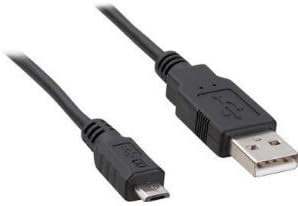
Image: Dynex Micro USB Cable. This image displays the cable with its two distinct connectors: a smaller Micro USB connector on one end, typically used for mobile devices, and a larger standard USB-A connector on the other end, commonly found on computers or wall chargers. The cable itself is black.
Oppsett
- Identifiser porter: Locate the Micro USB port on your device (e.g., smartphone, tablet, camera) and a standard USB-A port on your power source (e.g., wall adapter, computer, power bank).
- Connect Micro USB: Gently insert the Micro USB connector end of the cable into the Micro USB port on your device. Ensure the connector is oriented correctly to avoid damage. Do not force the connection.
- Connect Standard USB: Insert the standard USB-A connector end of the cable into the USB-A port on your power source or computer.
- Bekreft tilkobling: For lading skal enheten din indikere at den mottar strøm. For dataoverføring skal datamaskinen din gjenkjenne den tilkoblede enheten.
Bruksanvisning
Ladeenheter
- Koble til kabelen som beskrevet i avsnittet «Oppsett».
- Ensure the power source (wall adapter, computer USB port) is active.
- Monitor your device's screen for charging indicators. Charging times may vary depending on the device and power source.
Dataoverføring
- Connect your device to a computer using the cable.
- On your device, you may need to select a "File Transfer" or "MTP" (Media Transfer Protocol) mode from the notification panel.
- Your computer should display the connected device as a removable drive or media device. You can then drag and drop files between your computer and the device.
- Always safely eject or disconnect your device from the computer before physically removing the cable to prevent data corruption.
Vedlikehold
- Lagring: Oppbevar kabelen på et kjølig og tørt sted, unna direkte sollys og ekstreme temperaturer. Unngå å vikle kabelen tett eller bøye den kraftig, da dette kan skade de interne ledningene.
- Rengjøring: Tørk forsiktig av kabelen og kontaktene med en myk, tørr og lofri klut om nødvendig. Ikke bruk flytende rengjøringsmidler eller løsemidler.
- Håndtering: Always grasp the connector head when plugging or unplugging the cable, rather than pulling on the cable itself. This prevents strain on the cable-connector junction.
- Undersøkelse: Kontroller kabelen regelmessig for tegn på slitasje, frynsing eller skade på isolasjon eller kontakter. Avbryt bruken hvis det observeres skade.
Feilsøking
- Enheten lader ikke:
- Sørg for at begge endene av kabelen er godt tilkoblet.
- Prøv en annen USB-port eller strømadapter.
- Kontroller at enhetens ladeport er ren og fri for rusk.
- Test the cable with another compatible device if possible to determine if the issue is with the cable or the device/power source.
- Computer not recognizing device for data transfer:
- Ensure the cable is firmly connected to both the device and the computer.
- On your device, check the notification panel for USB connection options and select "File Transfer" or "MTP".
- Prøv en annen USB-port på datamaskinen.
- Start både enheten og datamaskinen på nytt.
- Ensure necessary drivers are installed on your computer for the connected device.
- Løs tilkobling:
- If the cable feels loose in the port, gently check for debris in the device's port.
- Avoid excessive wiggling or bending of the cable while connected, as this can damage the port or cable.
Spesifikasjoner
| Merke | Dynex |
| Modellnummer | DX-C114201 (Item Model Number: 4326668128) |
| Koblingstype | USB-A (Male) to Micro USB (Male) |
| Kabeltype | Mikro USB |
| Anbefalt bruk | Charging and data transfer for devices with Micro USB ports |
| Kompatible enheter | Smartphone, Tablet, Power Bank, Camera, Laptop, Personal Computer, Router, Mouse, GPS Navigation System, Docking Station, Television, Scanner, etc. |
| Antall pinner | 5 |
| Produktdimensjoner | 7 x 4 x 4 tommer (emballasjemål) |
| Varevekt | 1.6 unser |
| UPC | 600603141058 |
| ASIN | B005EYMQ2C |
Garanti og støtte
For warranty information or technical support regarding your Dynex Micro USB Cable DX-C114201, please refer to the documentation included with your purchase or visit the official Dynex website. Contact information for customer service is typically available on the manufacturer's product packaging or webnettstedet.