
Produkt overview
The iSound Twist Portable Bluetooth Wireless Speaker offers a unique design combined with superior sound quality. Its compact form factor allows for portability, while its advanced features enable wireless music streaming and hands-free calling. The speaker features full stereo sound with 6 watts total output from two 40mm drivers and a passive radiator for enhanced bass.
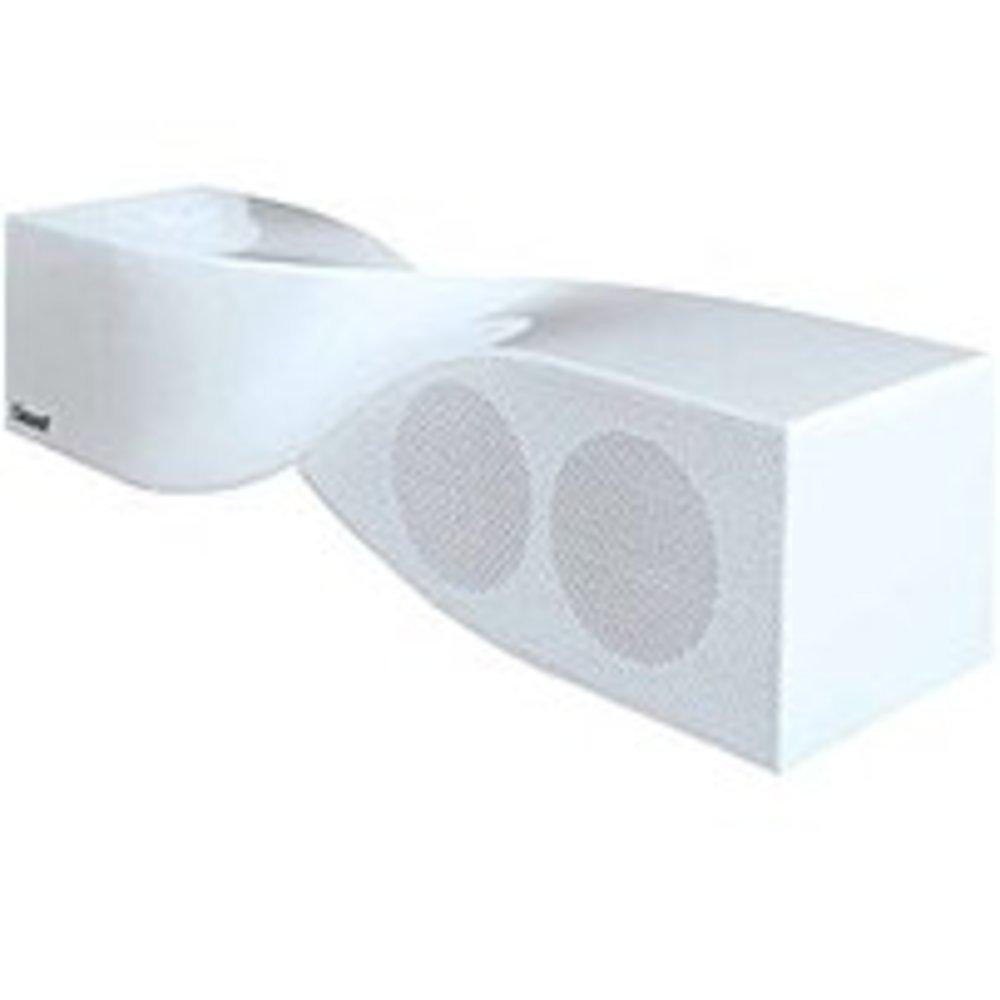
Image: The iSound Twist Portable Bluetooth Wireless Speaker in white, showcasing its unique twisted design.
Pakkeinnhold
- iSound Twist Portable Bluetooth Wireless Speaker
- USB ladekabel
- 3.5mm AUX Input Cable
- Brukerhåndbok (dette dokumentet)
Oppsett
1. Lading av høyttaleren
Before initial use, fully charge the iSound Twist speaker. Connect the provided USB charging cable to the speaker's USB charging port and the other end to a powered USB source (e.g., computer, USB wall adapter). The charging indicator light will illuminate during charging and turn off when fully charged. A full charge provides up to 5 hours of continuous play.

Image: Rear panel of the speaker, highlighting the USB charging port, ON/OFF switch, and AUX IN port.
2. Slå på/av
Locate the ON/OFF switch on the rear panel of the speaker. Slide the switch to the "ON" position to power on the device. Slide it to the "OFF" position to power off.
3. Bluetooth-paring
- Ensure the speaker is powered on and within close proximity to your Bluetooth-enabled device (e.g., smartphone, tablet, laptop).
- The speaker will automatically enter Bluetooth pairing mode. A blue indicator light will flash, indicating it is discoverable.
- Gå til Bluetooth-innstillingene på enheten din og aktiver Bluetooth.
- Søk etter available devices. The iSound Twist speaker should appear in the list, typically named "iSound Twist" or similar.
- Velg høyttaleren fra listen for å starte paringen. Hvis du blir bedt om et passord, skriv inn «0000».
- Once successfully paired, the blue indicator light on the speaker will stop flashing and remain solid. You will hear an audible confirmation.
- Your device is now connected, and you can stream audio wirelessly.
4. AUX Input Connection
For devices without Bluetooth capability, or if you prefer a wired connection, use the provided 3.5mm AUX cable.
- Connect one end of the 3.5mm AUX cable to the AUX IN port on the rear of the speaker.
- Connect the other end of the cable to the headphone jack or audio output port of your audio device.
- Høyttaleren vil automatisk bytte til AUX-inngangsmodus.
Bruksanvisning
Kontrollpanelfunksjoner
The speaker features onboard controls located on its top surface for convenient operation.
- Strøm / modus-knapp: Press and hold to power on/off. Short press to switch between Bluetooth and AUX modes.
- Spill av/pause/ring-knapp: Short press to play or pause music. During an incoming call, short press to answer or end the call. Press and hold to reject an incoming call.
- Volum opp/Neste spor-knapp: Short press to increase volume. Press and hold to skip to the next track.
- Volum ned/Forrige spor-knapp: Kort trykk for å redusere volumet. Trykk og hold inne for å gå til forrige spor.
Håndfri oppringing
When connected via Bluetooth, the iSound Twist speaker's built-in microphone allows for hands-free phone calls.
- Besvare et anrop: When a call comes in, the music will pause. Press the Play/Pause/Call button once to answer.
- Avslutte en samtale: Under en samtale trykker du på Spill av/Pause/Ring-knappen én gang for å avslutte samtalen.
- Avvise en samtale: Press and hold the Play/Pause/Call button to reject an incoming call.
Vedlikehold
- Hold høyttaleren unna vann, fuktighet og ekstreme temperaturer.
- Rengjør høyttaleren med en myk, tørr klut. Ikke bruk slipende rengjøringsmidler eller løsemidler.
- Unngå å miste eller utsett høyttaleren for sterke støt.
- Når høyttaleren ikke er i bruk over lengre tid, bør den oppbevares kjølig og tørt, og den bør lades med jevne mellomrom for å opprettholde batterilevetiden.
Feilsøking
| Problem | Løsning |
|---|---|
| Høyttaleren slår seg ikke på. | Sørg for at batteriet er ladet. Koble høyttaleren til en strømkilde med USB-kabelen og prøv på nytt. |
| Kan ikke pares via Bluetooth. |
|
| Ingen lyd eller lavt volum. |
|
| Samtalekvaliteten er dårlig. |
|
Spesifikasjoner
| Trekk | Detalj |
|---|---|
| Modellnavn | ISOUND-1691 |
| Merke | iSound |
| Høyttalertype | Tårn |
| Spesialfunksjon | Innebygd mikrofon |
| Anbefalt bruk | For Smartphones or Tablets, Music Players |
| Kompatible enheter | Stasjonær, bærbar PC, MP3-spiller, projektor, smarttelefon, nettbrett, TV |
| Surround Sound Channel Configuration | 2.0 |
| Farge | Hvit |
| Varevekt | 13.6 unser |
| Er vanntett | FALSK |
| Trådløs kommunikasjonsteknologi | Bluetooth |
| Høyttalerstørrelse | 0.75 tommer |
| Strømkilde | Batteridrevet |
| Antall batterier | 1 Lithium Ion-batterier kreves. (inkludert) |
| Type lyddriver | Dynamisk driver |
| Lyddriverstørrelse | 40 millimeter |
| Produktdimensjoner | 5 x 4 x 11.75 tommer |
| Høyttaler Maksimal utgangseffekt | 6 watt |
| Tilkoblingsteknologi | Trådløs |
| Lydutgangsmodus | Stereo |
| Monteringstype | Bordfeste |
Offisiell produktvideo
Video: Official product video for the iSound Twist Bluetooth Speaker, demonstrating its features and design. This video showcases the speaker's ability to stream audio from various devices and handle calls.
Garanti og støtte
The iSound Twist Portable Bluetooth Wireless Speaker comes with a Begrenset garanti. For specific warranty terms, conditions, and support inquiries, please refer to the warranty card included in your product packaging or visit the official iSound webnettstedet.
For further assistance, please contact iSound customer support.