
POLY M25
Plantronics M25 Bluetooth Headset User Manual
Modell: M25
Introduksjon
The Plantronics M25 Bluetooth headset is designed for convenient wireless communication and audio playback. It features an extended battery life with DeepSleep mode, ensuring readiness when needed. The headset provides whispered alerts for battery status and connection information, and allows for listening to music, internet radio, or navigation directions while managing calls.
Pakkeinnhold
Bekreft at alle varene er til stede i pakken din:
- Plantronics M25 Bluetooth-hodesett
- AC Charger (100-240v)
- Clip-on Earloop
Oppsett
1. Lading av hodesettet
Before first use, fully charge the headset. Connect the AC charger to the headset's charging port. The indicator light will change to show charging status and turn off or change color when fully charged. A full charge can provide up to 5 months of readiness in DeepSleep mode.
2. Paring med en enhet
To pair your Plantronics M25 headset with a Bluetooth-enabled device (e.g., smartphone, tablet):
- Sørg for at headsettet er ladet og slått av.
- Press and hold the Call button on the headset until the indicator light flashes red and blue, indicating pairing mode.
- Aktiver Bluetooth på enheten din og søk etter nye enheter.
- Select "Plantronics M25" from the list of available devices.
- Hvis du blir bedt om å oppgi et passord, skriv inn «0000» (fire nuller).
- Once paired, the headset's indicator light will stop flashing and a voice prompt will confirm the connection.
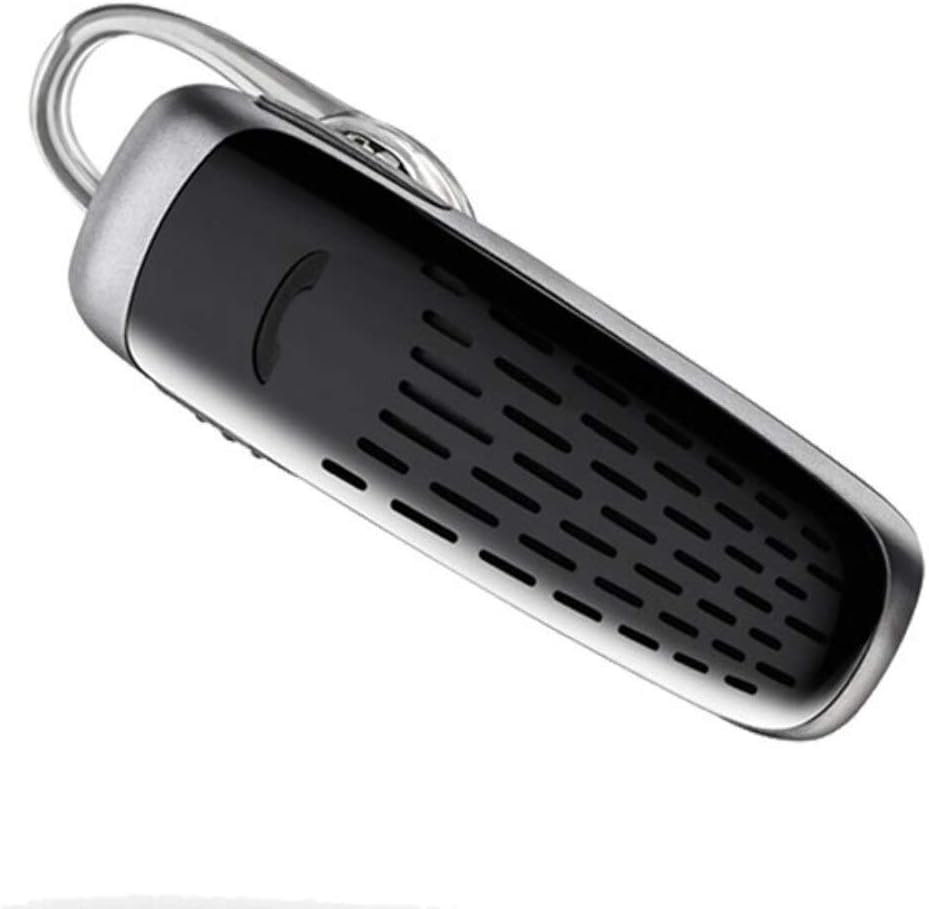
Image: The Plantronics M25 Bluetooth Headset, a compact black and silver device with an earloop, shown from an angled perspective. The call button is visible on the side.
Bruksanvisning
Slå på/av
- Strøm på: Trykk og hold inne av/på-knappen til indikatorlampen blinker blått.
- Slå av: Press and hold the Power button until the indicator light flashes red.
Ringe og motta anrop
- Svar på anrop: Trykk på ringeknappen.
- Avslutt samtale: Trykk på ringeknappen.
- Avvis anrop: Trykk og hold ringeknappen i 2 sekunder.
- Ring siste nummer på nytt: Double-press the Call button.
Lydavspilling
The headset supports streaming audio from your device, including music, podcasts, and GPS directions.
- Spill av/pause: Press the Call button during audio playback.
DeepSleep-modus
The headset enters DeepSleep power-saving mode if it is disconnected from your phone for over 90 minutes. To wake it up when it's back in range (within 33 feet), simply tap the Call button.
Vedlikehold
- Rengjøring: Bruk en myk, tørr klut til å rengjøre headsettet. Ikke bruk flytende rengjøringsmidler eller aerosoler.
- Lagring: Oppbevar headsettet på et kjølig og tørt sted, unna ekstreme temperaturer.
- Batteripleie: To preserve battery life, avoid fully discharging the battery frequently. Charge the headset regularly, even if not in use.
- Vannmotstand: Denne enheten er Ikke vannbestandigUnngå eksponering for vann eller overdreven fuktighet.
Feilsøking
| Problem | Løsning |
|---|---|
| Hodesettet slår seg ikke på. | Ensure the headset is charged. Connect it to the AC charger and allow it to charge for at least 30 minutes before attempting to power on. |
| Kan ikke pare headsettet med enheten min. |
|
| No audio or low audio volume. |
|
| Headset frequently disconnects. |
|
Spesifikasjoner
| Trekk | Detalj |
|---|---|
| Modellnavn | Plantronics M25 |
| Tilkoblingsteknologi | Bluetooth |
| Trådløs kommunikasjonsteknologi | Bluetooth |
| Kompatible enheter | Smartphones, Laptops, Desktops, Tablets, Smart Speakers, Televisions |
| Kontroll Type | Samtalekontroll |
| Varevekt | 0.3 unser (ca. 8.5 gram) |
| Vannmotstandsnivå | Ikke vannbestandig |
| Frekvensområde | 20 Hz til 20,000 XNUMX Hz |
| Battery Life (DeepSleep) | Opptil 150 dager |
| Bluetooth-rekkevidde | Opptil 10 meter (33 fot) |
| Øreplassering | In Ear |
| Formfaktor | One Ear |
| Støykontroll | Aktiv støyreduksjon |
| Produktdimensjoner | 1.85 x 0.59 x 0.35 tommer |
| Farge | Svart |
| Produsent | Plantronics |
Garanti og støtte
Garantiinformasjon: Please note that this product is sold with No Warranty or Return as per the provided information. Users are advised to verify product condition upon receipt.
For further assistance or inquiries, please refer to the official POLY support channels or visit their website. Contact information may be available on the product packaging or the manufacturer's official webnettstedet.
Disclaimer: Product specifications and features are subject to change without notice. Always refer to the latest information provided by the manufacturer.