
1. Introduksjon
This manual provides essential information for the installation, configuration, operation, and maintenance of the Juniper Networks SRX220H-POE Services Gateway. The SRX220H-POE is a high-performance security, routing, and switching platform designed for small to medium-sized branch offices. It offers 8 Gigabit Ethernet ports and 2 mini-PIM slots, with Power over Ethernet (PoE) capabilities.
Les denne håndboken nøye før du bruker enheten for å sikre at den fungerer som den skal og for å forhindre skade.
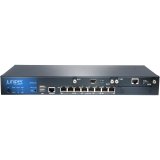
Figur 1: Foran view of the Juniper Networks SRX220H-POE Services Gateway, showing the 8 Gigabit Ethernet ports and status indicators.
2. Sikkerhetsinformasjon
Følg følgende sikkerhetsregler for å forhindre skade og skade på enheten:
- Elektrisk sikkerhet: Ensure the power source matches the device's requirements. Use only the provided power cord.
- Jording: Always connect the device to a properly grounded outlet.
- Ventilasjon: Ikke blokker ventilasjonsåpningene. Sørg for tilstrekkelig luftstrøm rundt enheten for å forhindre overoppheting.
- Plassering: Install the device in a stable, dry environment, away from direct sunlight, heat sources, and moisture.
- Service: Overlat all service til kvalifisert personell. Ikke forsøk å åpne eller reparere enheten selv.
3. Oppsett
3.1 Utpakking av enheten
Carefully remove the SRX220H-POE Services Gateway from its packaging. Verify that all components listed below are present:
- Juniper Networks SRX220H-POE Services Gateway unit
- Strømledning
- Rack-mount kit (if applicable)
- Konsollkabel
- Documentation CD/Quick Start Guide
3.2 Rackmontering (valgfritt)
The SRX220H-POE is rack-mountable. To install the device in a standard 19-inch equipment rack:
- Attach the provided rack-mount brackets to the sides of the SRX220H-POE using the screws supplied with the kit.
- Align the brackets with the rack posts and secure the device using appropriate rack screws.
- Ensure the device is level and securely fastened.
3.3 Koble til strøm
Connect the power cord to the power input on the rear panel of the SRX220H-POE, then plug the other end into a grounded electrical outlet. The device will begin its power-on self-test (POST).
3.4 Første nettverkstilkobling
Connect an Ethernet cable from your computer to one of the Gigabit Ethernet ports (e.g., ge-0/0/0) on the SRX220H-POE for initial configuration. Alternatively, use the console port with a console cable and terminal emulation software.
4. Betjening av enheten
4.1 Slå på og av
To power on the device, connect the power cord. The device will automatically start. To power off, disconnect the power cord from the electrical outlet. It is recommended to gracefully shut down the system via the command-line interface (CLI) before disconnecting power, if possible.
4.2 Grunnleggende konfigurasjon
Access the device's CLI via the console port or an Ethernet management interface. Default login credentials are typically rot with no password (for initial setup). Refer to the Juniper Networks documentation for detailed configuration guides for Junos OS.
- Setting IP Address: Configure the management interface with a static IP address.
- Brukerkontoer: Create new user accounts with strong passwords and delete or disable default accounts.
- Sikkerhetsregler: Implement appropriate security policies for your network environment.
4.3 Strøm via Ethernet (PoE)
The SRX220H-POE ports support Power over Ethernet, allowing compatible devices (e.g., IP phones, wireless access points) to receive power and data over a single Ethernet cable. Ensure connected devices are PoE-compatible and do not exceed the total power budget of the SRX220H-POE.
5. Vedlikehold
5.1 Programvareoppdateringer
Regularly check the Juniper Networks support website for the latest Junos OS software updates. Applying updates helps ensure optimal performance, security, and access to new features. Follow the provided upgrade procedures carefully.
5.2 Rengjøring
Keep the device clean and free of dust. Use a soft, dry cloth to wipe the exterior. Do not use liquid cleaners or aerosol sprays directly on the device. Ensure ventilation openings are clear of obstructions.
5.3 Backup-konfigurasjon
Periodically back up your device configuration to an external storage device or network location. This allows for quick restoration in case of a system failure or misconfiguration.
6. Feilsøking
This section provides solutions to common issues. For more complex problems, consult the Juniper Networks support documentation or contact technical support.
| Problem | Mulig årsak | Løsning |
|---|---|---|
| Enheten slås ikke på. | Ingen strøm, defekt strømledning, problem med strømforsyningen. | Check power cord connection. Verify power outlet functionality. Try a different power cord. |
| Cannot access device via network. | Incorrect IP configuration, network cable issue, firewall blocking access. | Verify IP address and subnet mask. Check network cable connections. Temporarily disable client firewall for testing. Try console access. |
| PoE-enheten mottar ikke strøm. | Device not PoE-compatible, cable issue, power budget exceeded, PoE port disabled. | Ensure device is PoE-compatible. Check Ethernet cable. Verify PoE configuration on the SRX220H-POE. Check total power consumption. |
| Treg nettverksytelse. | Network congestion, misconfiguration, faulty cable, hardware issue. | Monitor network traffic. Review configuration for bottlenecks. Test with different cables. Check device logs for errors. |
7. Spesifikasjoner
Key technical specifications for the Juniper Networks SRX220H-POE Services Gateway:
- Modell: SRX220H-POE
- Porter: 8 x Gigabit Ethernet (GE) ports
- Utvidelsesspor: 2 x Mini-PIM slots
- PoE-støtte: Yes, Power over Ethernet on specified ports
- Hukommelse: 1 GB
- Makt: 120W
- Formfaktor: Kan monteres på stativ
- Mål (omtrentlige): Refer to official Juniper documentation for precise measurements.
- Vekt: Omtrent 8.82 pund (4 kg)
- Produsent: Juniper Networks
8. Garanti og støtte
Juniper Networks products typically come with a standard limited hardware warranty. For specific warranty terms and conditions applicable to your SRX220H-POE Services Gateway, please refer to the warranty documentation included with your purchase or visit the official Juniper Networks webnettstedet.
8.1 Teknisk støtte
For technical assistance, product documentation, software downloads, and knowledge base articles, visit the Juniper Networks Support Portal. You may need your product serial number to register for support services.
Juniper Networks-støtte Webnettsted: https://www.juniper.net/support/
For information on extended protection plans, please consult your reseller or Juniper Networks sales representative.