
1. Introduksjon
This manual provides detailed instructions for the proper use and maintenance of your TFA 38.2028.02 Digital Timer and Stopwatch. This device is designed for precise timekeeping in various applications, featuring a reversible display, touch-sensitive buttons, and magnetic mounting options. Please read this manual thoroughly before operating the device.
2. Produktfunksjoner
- Reversible Display: Gjør det enkelt viewfra forskjellige vinkler.
- Berøringsfølsomme knapper: For intuitive operation.
- Bakgrunnsbelysning: Gir klar sikt under dårlige lysforhold.
- Magnetisk montering: Securely attaches to metallic surfaces.
- Wall or Tabletop Mounting: Allsidige plasseringsmuligheter.
- Tidtakerområde: Counts up to 99 minutes and 59 seconds.
- Kompakt design: Dimensions of 76 x 25 x 76 mm.
3. Pakkens innhold
- TFA 38.2028.02 Digital Timer and Stopwatch Unit
- Brukerhåndbok (dette dokumentet)
Note: 2 x 1.5V AAA batteries are required and not included in the package.
4. Oppsett
4.1 Installasjon av batteri
- Finn batteridekselet på baksiden av enheten.
- Skyv eller løft forsiktig på dekselet for å åpne rommet.
- Sett inn to (2) 1.5 V AAA-batterier, og sørg for at polariteten (+/-) er riktig veiledet som angitt inni batterirommet.
- Sett på batteridekselet igjen, og sørg for at det klikker ordentlig på plass.
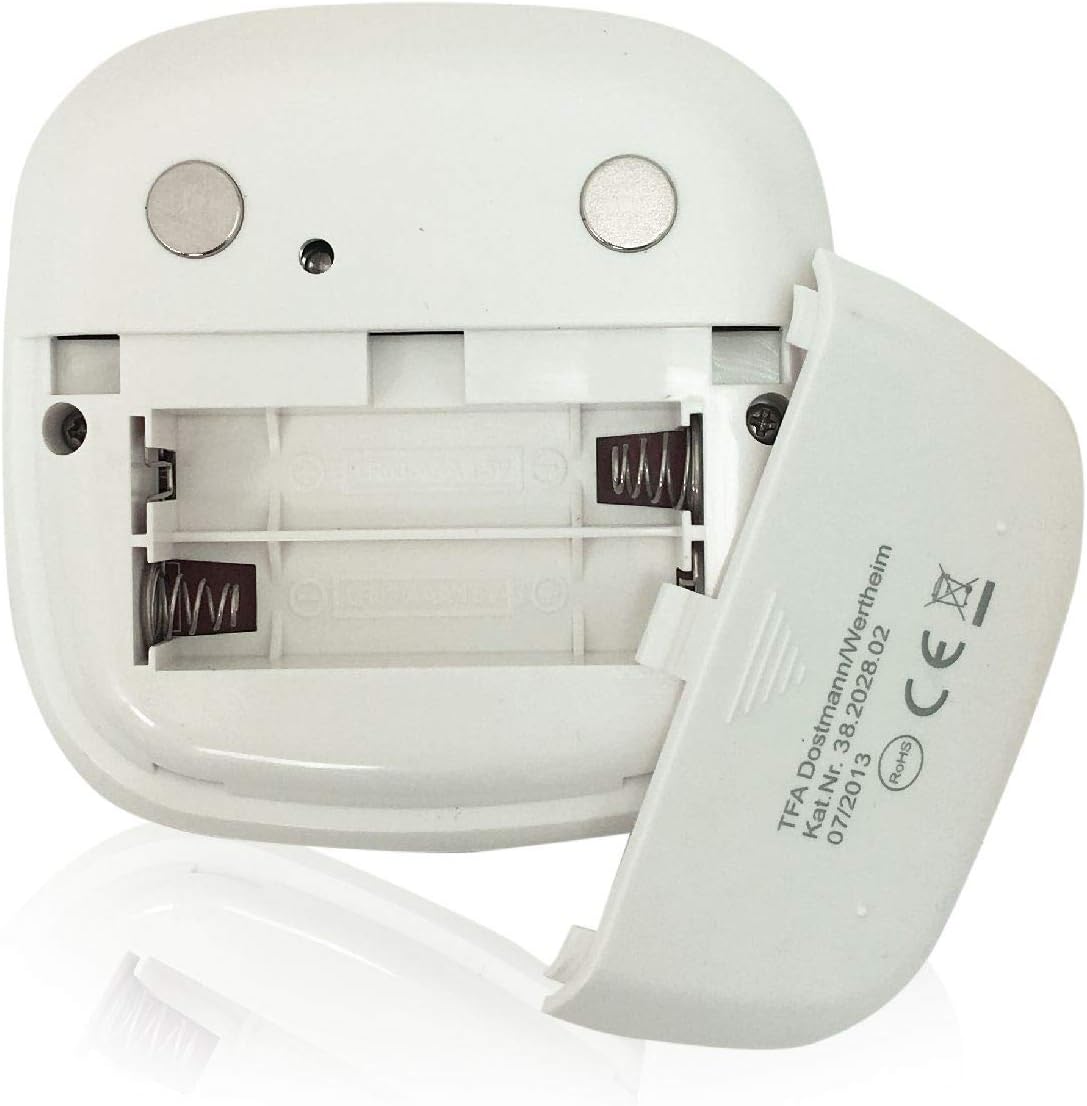
Bilde: Bak view of the timer with the battery compartment open, illustrating where to insert the two AAA batteries.
4.2 Første gangs strøm på
Once batteries are installed, the display will illuminate, and the device will be ready for use. The default display shows "00:00".
5. Bruksanvisning

Bilde: Foran view of the TFA 38.2028.02 timer, highlighting the digital display and the three touch-sensitive buttons: 'M' for minutes, 'S' for seconds, and 'S/S' for Start/Stop.
5.1 Knappefunksjoner
- M (Minutes): Press to increase minutes. Hold to rapidly increase minutes.
- S (Seconds): Press to increase seconds. Hold to rapidly increase seconds.
- S/S (Start/Stop): Press to start or stop the timer/stopwatch.
5.2 Setting the Timer (Countdown)
- Ensure the display shows "00:00". If not, press M og S simultaneously to reset.
- Trykk på M button to set the desired minutes (up to 99 minutes).
- Trykk på S button to set the desired seconds (up to 59 seconds).
- Når ønsket tid er innstilt, trykk på S/S knappen for å starte nedtellingen.
- For å sette nedtellingen på pause, trykk på S/S en gang til. trykk S/S å gjenoppta.
- When the timer reaches "00:00", an alarm will sound. Press any button to stop the alarm.
5.3 Using the Stopwatch (Count-up)
- Ensure the display shows "00:00". If not, press M og S simultaneously to reset.
- Trykk på S/S button to start the count-up. The display will begin counting from "00:00".
- Trykk på for å stoppe stoppeklokken S/S en gang til. trykk S/S å gjenoppta.
- To reset the stopwatch to "00:00", pause the stopwatch, then press M og S samtidig.
5.4 Bakgrunnsbelysningsfunksjon
The display features a backlight for improved visibility. The backlight activates automatically when buttons are pressed and typically remains on for approximately 30-40 seconds before dimming to conserve battery life.
6. Monteringsalternativer
The TFA 38.2028.02 timer offers flexible mounting solutions:
- Magnetisk feste: The back of the timer is equipped with magnets, allowing it to be securely attached to refrigerators, oven hoods, or any other metallic surface.
- Plassering av bordplater: The timer's design allows it to stand upright on a flat surface, such as a kitchen counter or desk.
- Veggmontering: The unit can also be mounted on a wall using a small hook or screw (not included) through the designated hole on the back.

Bilde: Bak view of the timer, showing the integrated magnets for secure attachment to metallic surfaces and the model number.
7. Vedlikehold
7.1 Rengjøring
To clean the timer, wipe it with a soft, damp cloth. Do not use abrasive cleaners or immerse the device in water. Avoid getting moisture into the battery compartment or display area.
7.2 Batteribytte
When the display becomes dim or the device stops responding, it is time to replace the batteries. Follow the battery installation steps in Section 4.1. Always use fresh 1.5V AAA batteries and dispose of old batteries responsibly.
8. Feilsøking
| Problem | Mulig årsak | Løsning |
|---|---|---|
| Enheten slås ikke på. | Batteriene er tomme eller feil installert. | Sjekk batteripolariteten eller bytt ut med nye AAA-batterier. |
| Skjermen er svak eller flimrer. | Lav batteristrøm. | Bytt batterier. |
| Knappene reagerer ikke. | Lavt batteri eller midlertidig programvarefeil. | Replace batteries. If problem persists, remove batteries for 1 minute and reinsert. |
| Timer alarm is too quiet. | Alarm volume is fixed and cannot be adjusted. | Ensure the timer is placed in a location where the alarm can be heard. |
9. Spesifikasjoner
| Trekk | Detalj |
|---|---|
| Modellnummer | 38.2028.02 |
| Merke | TFA |
| Dimensjoner (L x B x H) | 76 x 25 x 76 mm (approximately 2.5P x 7.6l x 7.6H cm) |
| Vekt | 92 gram |
| Materiale | Plastic with integrated magnets |
| Strømforsyning | 2 x 1.5V AAA-batterier (ikke inkludert) |
| Tidsrekkevidde | Up to 99 minutes, 59 seconds |
| Utstilling | Digital with backlight |
| Monteringsmuligheter | Magnetic, Tabletop, Wall-mountable |

Image: The timer held in a hand, visually demonstrating its compact size and indicating its dimensions (7.6 cm x 7.6 cm x 2.5 cm).
10. Garanti og støtte
TFA products are manufactured with quality and precision. For specific warranty information, please refer to the documentation provided with your purchase or visit the official TFA website. For technical support or inquiries, please contact TFA customer service through their official channels.
Ta vare på denne håndboken for fremtidig referanse.