
Infant Optics DXR-8AC
Infant Optics DXR-8 Add-on Camera Instruction Manual
Model: DXR-8AC
Produkt overview
This manual provides essential information for the Infant Optics DXR-8 Add-on Camera, designed to expand your existing Infant Optics DXR-8 (3.5" model) video baby monitor system. This camera is ikke kompatibel with the DXR-8 PRO (5.0" model).
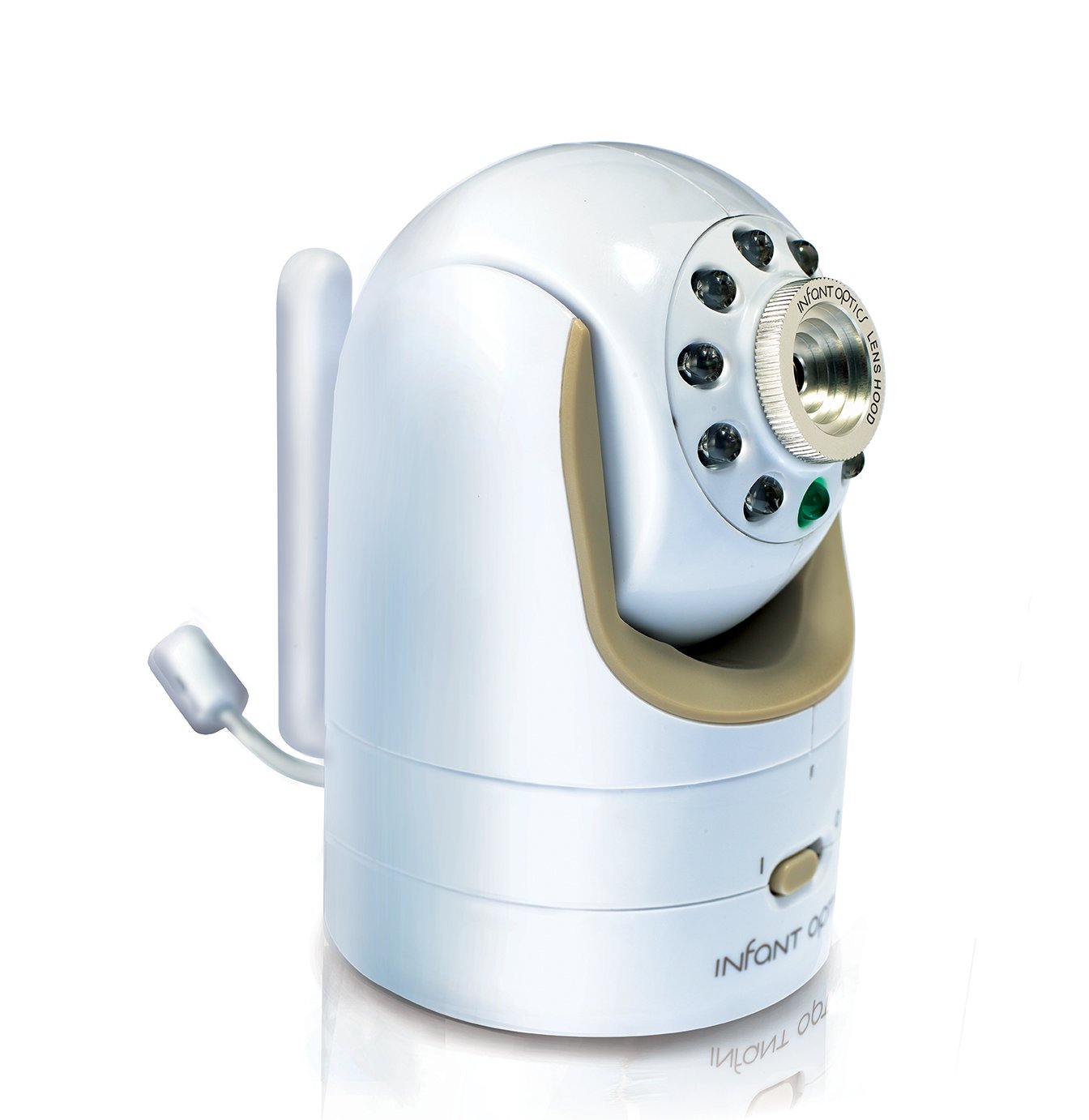
Figure 1: Infant Optics DXR-8 Add-on Camera Unit.
The DXR-8 Add-on Camera features remote pan/tilt/zoom capabilities, night vision, and a remote thermometer. It supports interchangeable optical lenses (zoom and wide-angle lenses sold separately). You can expand your DXR-8 monitor system with up to 4 camera units.
Viktig sikkerhetsinformasjon
Kvelningsfare:
- Always keep the power adapter cord out of your child's reach.
- To prevent entanglement, IKKE place the camera unit or its adapter cord within reach of your child.
Hva er i esken
- Camera Unit (DXR-8AC)
- Power Adapter for Camera Unit

Figure 2: Included Camera Unit and Power Adapter.
Oppsettinstruksjoner
1. Strømforsyning til kameraenheten
- Connect the small end of the power adapter to the DC-in port on the back of the camera unit.
- Koble den andre enden av strømadapteren til en vanlig stikkontakt.
- Ensure the camera's power switch (located on the bottom front) is in the 'ON' position (I).

Figur 3: Foran view of the camera, showing the power switch.
2. Pairing with Your DXR-8 Monitor Unit
The DXR-8 Add-on Camera is designed to pair seamlessly with your existing Infant Optics DXR-8 (3.5" model) monitor unit. The pairing process typically takes only a few seconds.
- Ensure both your DXR-8 monitor unit and the new add-on camera unit are powered on.
- On your DXR-8 monitor unit, navigate to the camera pairing menu. (Refer to your DXR-8 monitor's instruction manual for specific steps on accessing the pairing menu).
- Press and hold the pairing button on the back of the add-on camera unit until the monitor unit indicates successful pairing.
- Once paired, the camera's video feed will appear on your monitor.
The DXR-8 monitor unit can support up to 4 camera units. If you are adding more than one camera, you can assign each camera to a different channel on your monitor.
Betjening av kameraet
Fjernstyrt panorering, tilting og zooming
The DXR-8 Add-on Camera offers remote control over its pan, tilt, and digital zoom functions directly from your DXR-8 monitor unit. This allows you to adjust the camera's view without physically entering the room.

Figure 4: Camera's pan (270°) and tilt (120°) capabilities.
- Panne: Move the camera horizontally up to 270 degrees.
- Tilt: Move the camera vertically up to 120 degrees.
- Zoom: Digitally zoom in on the image for a closer view.
Refer to your DXR-8 monitor's manual for detailed instructions on using the pan, tilt, and zoom controls.
Nattsyn
The camera is equipped with automatic infrared night vision, allowing you to see clearly in low-light or dark conditions. The camera will automatically switch to night vision mode when the ambient light is insufficient.
Fjerntermometer
The camera unit includes a built-in thermometer that transmits the room temperature to your DXR-8 monitor unit, helping you ensure a comfortable environment for your child.
Utskiftbare linser
The DXR-8 Add-on Camera supports interchangeable optical lenses. The standard lens is pre-installed. Optional zoom and wide-angle lenses are sold separately and can be easily swapped to suit your monitoring needs.

Figure 5: Diagram showing the interchangeable lens feature.
To change a lens, gently twist the current lens counter-clockwise to remove it. Align the new lens with the camera's lens mount and twist clockwise until secure.
Vedlikehold
- Rengjøring: Use a soft, dry cloth to clean the camera unit. Do not use abrasive cleaners or solvents.
- Linsepleie: If the lens requires cleaning, use a lens cleaning cloth specifically designed for optical surfaces.
- Lagring: Hvis du oppbevarer kameraet over lengre tid, må du koble det fra strømmen og oppbevare det på et kjølig og tørt sted.
Feilsøking
| Problem | Mulig årsak | Løsning |
|---|---|---|
| Ingen videostrøm fra kameraet. | Camera not powered on or not paired. | Ensure camera power switch is ON. Re-pair the camera with the monitor unit (refer to Setup Instructions). |
| Dårlig videokvalitet. | Obstruction, distance, or dirty lens. | Ensure clear line of sight between camera and monitor. Reduce distance if possible. Clean the camera lens. |
| Remote pan/tilt/zoom not responding. | Interference or camera not fully connected. | Move camera closer to monitor. Power cycle both camera and monitor. |
| Temperaturavlesningen er unøyaktig. | Camera placed near heat source/vent. | Relocate the camera to a more central location in the room, away from direct sunlight, vents, or heating elements. |
Spesifikasjoner
| Trekk | Detalj |
|---|---|
| Modellnummer | DXR-8AC |
| Compatible Monitor | Infant Optics DXR-8 (3.5" model) |
| Strømkilde | AC/DC Adapter (Included) |
| Tilkoblingsteknologi | Wireless (Non-Wi-Fi for secure connection) |
| Videoopptaksoppløsning | 480p |
| Pan Angle | Opp til 270 grader |
| Tiltvinkel | Opp til 120 grader |
| Nattsyn | Automatisk infrarød |
| Inkluderte komponenter | Camera Unit, Power Adapter |
| Dimensjoner (L x B x H) | 2.5 x 2.5 x 4 tommer |
| Varevekt | 8 unser (ca. 0.5 lbs) |
| Farge | Hvit/beige |
| UPC | 858779002516 |
Garanti og støtte
For information regarding product warranty, technical support, or to purchase additional accessories (such as zoom or wide-angle lenses), please visit the official Infant Optics webnettstedet eller kontakt kundeservicen deres direkte.
Du kan også besøke Infant Optics Store on Amazon for mer produktinformasjon og støtteressurser.
Ask a question about this manual
Ask about setup, troubleshooting, compatibility, parts, safety, or missing instructions. Manuals+ will review the question and use this page’s manual context to help answer it.