
1. Introduksjon
This manual provides essential information for the safe and efficient installation, operation, and maintenance of your Delta DPS-750EB A D20850-006 750 Watt Power Supply. This power supply unit (PSU) is designed for server applications, offering reliable power delivery with a 750-watt output capacity.
2. Sikkerhetsinformasjon
WARNING: Improper installation or use can result in electric shock, fire, or damage to the equipment. Always follow these safety guidelines.
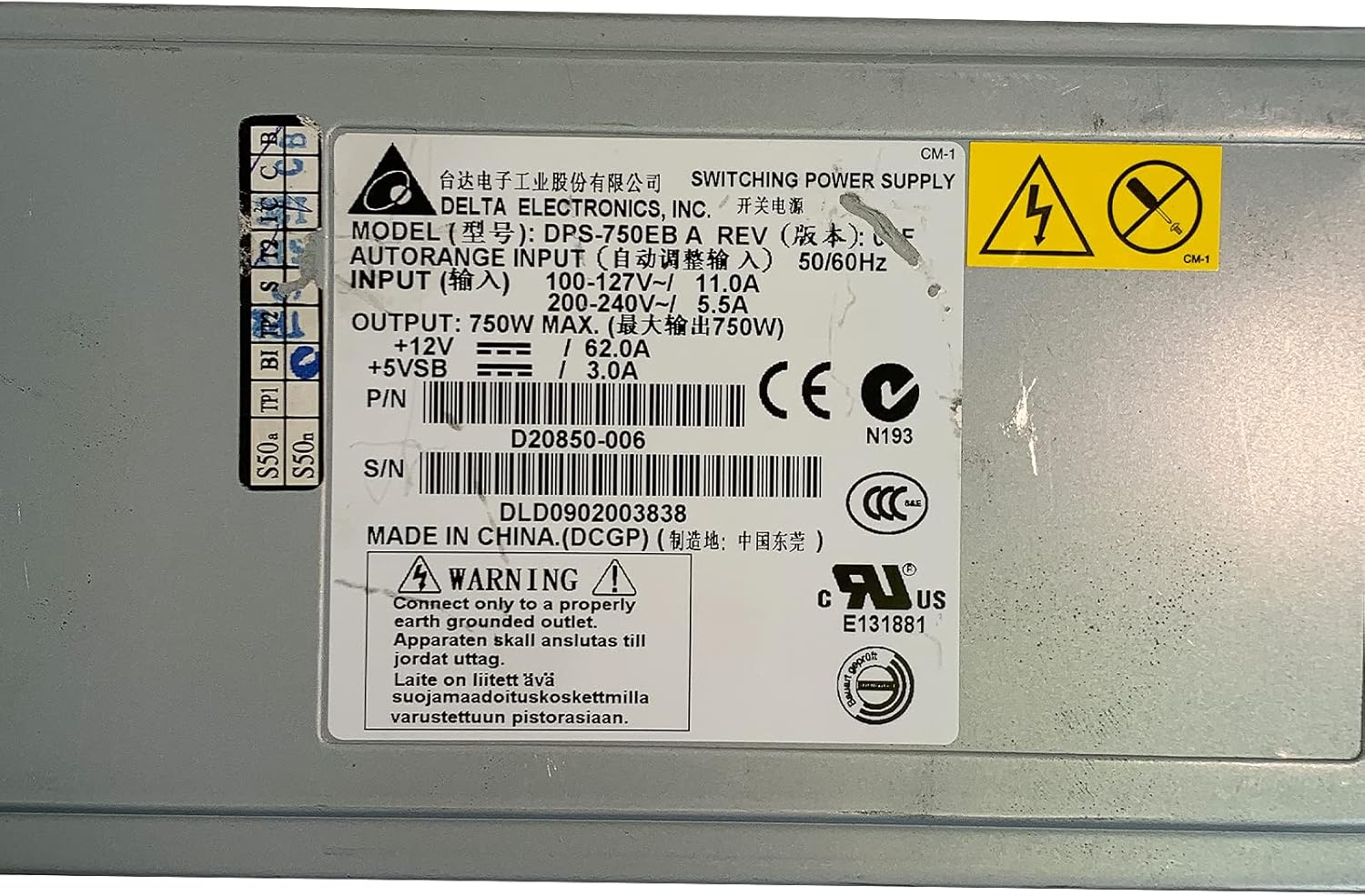
- Jording: Connect only to a properly earth grounded outlet. The apparatus must be connected to a mains socket outlet with a protective earthing connection.
- Voltage: Sørg for at inngangsvoltage matches the specifications on the power supply label (100-127V~ or 200-240V~).
- Profesjonell installasjon: Installasjonen bør utføres av kvalifisert personell.
- Ventilasjon: Ikke blokker ventilasjonsåpningene. Sørg for tilstrekkelig luftstrøm rundt enheten for å forhindre overoppheting.
- Fuktighet: Do not expose the power supply to moisture or liquids.
- Service: Ikke åpne strømforsyningen casing. Det er ingen deler inni som brukeren kan reparere. Overlat all service til kvalifisert servicepersonell.

Bilde 2.1: Product label showing input voltage, utgangswatttage, and safety warnings. Note the grounding requirement: "Connect only to a properly earth grounded outlet."
3. Produktet er overview
The Delta DPS-750EB A is a robust 750-watt power supply designed for server environments. It features a semi-modular design, allowing for flexible cable management. The unit includes active cooling with integrated fans to maintain optimal operating temperatures.
Bilde 3.1: Front view of the Delta DPS-750EB A power supply, showcasing dens kompakte formfaktor.

Bilde 3.2: Bak view of the power supply, showing the dual cooling fans and the AC power input connector.
4. Oppsett og installasjon
- Utpakking: Ta strømforsyningen forsiktig ut av emballasjen. Undersøk om den har synlige skader.
- Preparat: Ensure the server system is powered off and disconnected from the main power outlet.
- Montering: Install the power supply into the designated bay within your server chassis. Secure it using the appropriate screws.
- Kabeltilkoblinger: Connect the necessary power cables (e.g., motherboard, CPU, peripherals) from the power supply to the corresponding components. The semi-modular design allows you to connect only the cables you need.
- AC strømtilkobling: Connect the AC power cord to the power supply's input port and then to a properly grounded wall outlet.
5. Bruksanvisning
- Første oppstart: After all connections are secure, power on your server system.
- Systemsjekk: Verify that all components are receiving power and functioning correctly. Listen for normal fan operation from the power supply.
- Normal drift: The power supply will operate continuously as long as the server system is powered on. The internal fans will adjust speed based on temperature and load to maintain optimal cooling.
6. Vedlikehold
- Støvfjerning: Periodically inspect the power supply's fan vents for dust accumulation. Use compressed air to gently clean the vents and fan blades to ensure unrestricted airflow. Perform this with the system powered off and unplugged.
- Kabelinspeksjon: Regularly check all power cables for signs of wear, fraying, or loose connections. Replace any damaged cables immediately.
- Miljø: Ensure the server operates in a clean, dry, and well-ventilated environment to prevent dust buildup and overheating.
7. Feilsøking
| Problem | Mulig årsak | Løsning |
|---|---|---|
| Systemet slås ikke på. | Loose power cable, faulty outlet, power supply failure. | Check all power connections. Test the outlet with another device. If issues persist, consult a technician. |
| System powers on but is unstable/shuts down. | Overheating, insufficient power, component failure. | Ensure proper ventilation. Verify power supply wattage meets system requirements. Check for component errors. |
| Loud fan noise from PSU. | Dust accumulation, high load, fan malfunction. | Clean fan vents. Ensure system is not under excessive load. If noise is abnormal, consider professional inspection. |
8. Spesifikasjoner
| Trekk | Spesifikasjon |
|---|---|
| Modellnavn | DPS-750EB A |
| Merke | Delta |
| Kompatible enheter | Server |
| Utgang Wattage | 750 watt |
| Formfaktor | ATX |
| Kjølemetode | Air (1 Fan) |
| Design av strømforsyning | Semi-modulær |
| Minimum Input Voltage | 100 volt (AC) |
| Maksimal inngang Voltage | 230 volt (AC) |
| Øvre temperaturvurdering | 50 grader Celsius |
| Varevekt | 5 pund |
| P/N | D20850-006 |
| S/N | DLD0902003838 |
9. Garanti og støtte
For warranty information and technical support, please refer to the documentation provided with your purchase or contact Delta Electronics directly. Keep your purchase receipt and product serial number (DLD0902003838) readily available when contacting support.