
Introduksjon
This manual provides essential information for the proper use and care of your Beats Studio Wireless Over-Ear Headphones. Please read these instructions carefully before using your headphones to ensure optimal performance and longevity. The Beats Studio Wireless headphones offer a premium audio experience with wireless connectivity and Adaptive Noise Canceling technology.
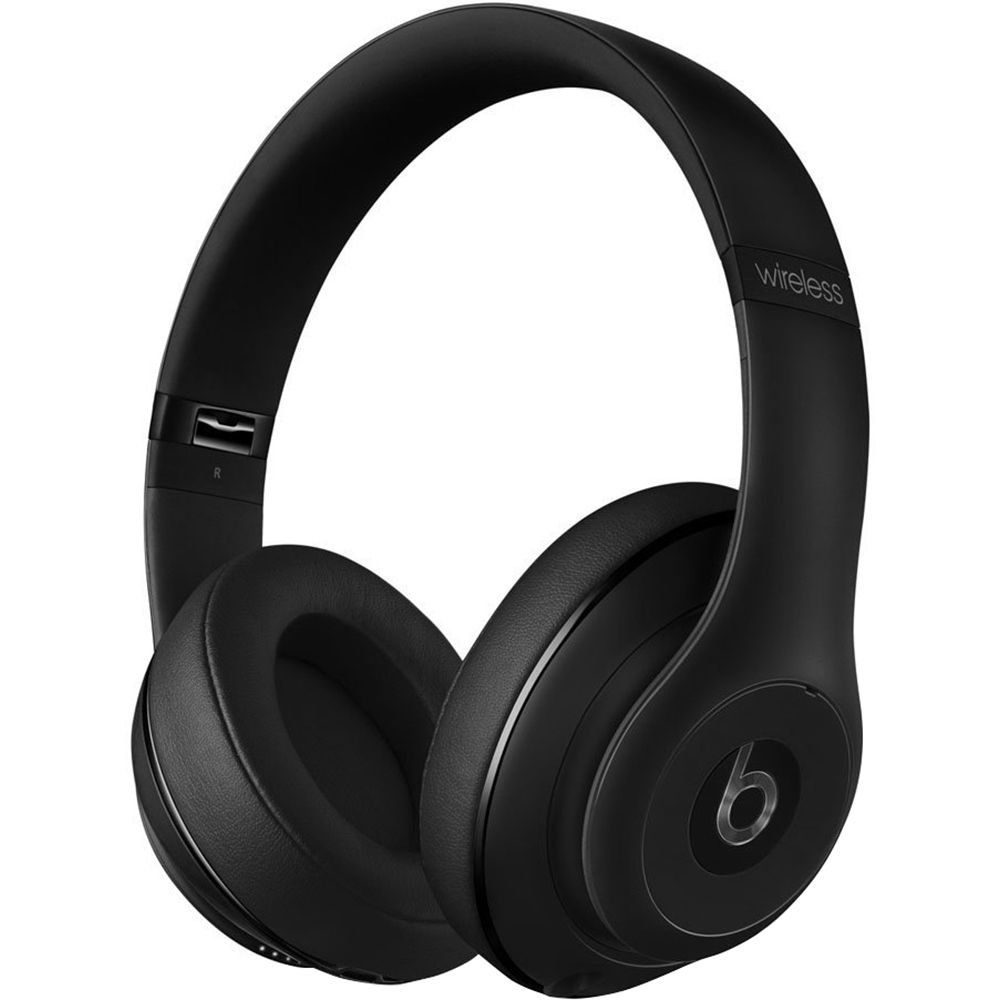
Image: Beats Studio Wireless Over-Ear Headphones in Matte Black, showcasing det elegante designet.
Hva er i esken
Bekreft at alle varene er til stede i pakken din:
- Beats Studio Wireless over-ear headphones
- 3.5mm audio cable with RemoteTalk (for wired connection and controls)
- Standard 3.5 mm audio cable (for wired connection without RemoteTalk features)
- USB 2.0 cable (USB-A to USB Micro-B) for charging
- Hard-shell carrying case with carabiner clip

Image: The Beats Studio Wireless headphones, hard-shell carrying case, and various cables laid out from the packaging.
Oppsett
1. Lading av hodetelefonene
Before first use, fully charge your Beats Studio Wireless headphones. A full charge provides approximately 12 hours of wireless playback or 20 hours of wired playback with Adaptive Noise Canceling enabled.
- Connect the small end of the USB 2.0 cable (USB-A to USB Micro-B) to the Micro-USB port on the right earcup of the headphones.
- Connect the larger end of the USB cable to a USB power adapter (not included) or a powered USB port on a computer.
- The Fuel Gauge LEDs on the right earcup will indicate charging status. When all five LEDs are solid white, the headphones are fully charged.
Note: The headphones cannot be used while charging.
2. Bluetooth-paring
Koble hodetelefonene dine til den Bluetooth-aktiverte enheten din for trådløs lyd.
- Ensure your headphones are charged and powered off.
- Press and hold the power button on the right earcup for 3-5 seconds until the Fuel Gauge LEDs begin to pulse. This indicates pairing mode.
- Gå til Bluetooth-innstillingene på enheten din og aktiver Bluetooth.
- Select "Beats Studio Wireless" from the list of available devices.
- Once paired, the Fuel Gauge LEDs will turn solid white.
The headphones have a Bluetooth range of up to 30 feet (9 meters).
3. Kablet tilkobling
For a wired connection, use the provided 3.5mm audio cables.
- Plug one end of the 3.5mm audio cable into the audio input port on the left earcup.
- Plug the other end into the 3.5mm audio output jack of your device.
The RemoteTalk cable allows for inline control of music and calls when connected to compatible devices.
Bruksanvisning
1. Slå på/av
- For å slå på: Press and hold the power button on the right earcup until the Fuel Gauge LEDs illuminate.
- Slik slår du av: Press and hold the power button until the Fuel Gauge LEDs turn off.
2. Controls (Wireless Mode)
The "b" button on the left earcup and the volume buttons control playback and calls.
- Spill av/pause: Press the "b" button once.
- Neste spor: Press the "b" button twice quickly.
- Forrige spor: Press the "b" button three times quickly.
- Volum opp: Press the top volume button.
- Volum ned: Press the bottom volume button.
- Svar/avslutt samtale: Press the "b" button once during an incoming call or active call.
- Avvis anrop: Press and hold the "b" button for 2 seconds during an incoming call.
- Aktiver stemmeassistent: Press and hold the "b" button for 2 seconds (functionality depends on device).
3. Adaptive Noise Canceling (ANC)
The Beats Studio Wireless headphones feature Dual-Mode Adaptive Noise Canceling. ANC is automatically active when the headphones are powered on. There are two modes:
- Full ANC: Engaged when listening to music or media, providing maximum noise reduction.
- ANC Only: When the audio cable is unplugged and the headphones are powered on, ANC will automatically switch to a more aggressive mode to reduce external noise without playing audio.
Vedlikehold
1. Rengjøring
To maintain the appearance and performance of your headphones:
- Tørk av øreklokkene og hodebøylen med en myk, tørr og lofri klut.
- Ikke bruk slipende rengjøringsmidler, alkohol eller kjemiske løsemidler.
- Unngå å få fuktighet inn i noen åpninger.
2. Oppbevaring
When not in use, store your headphones in the provided hard-shell carrying case to protect them from damage.
- Fold the headphones carefully to fit into the case.
- Keep headphones away from extreme temperatures and humidity.
3. Batteripleie
Slik forlenger du batterilevetiden:
- Unngå å utlade batteriet helt ofte.
- Lad hodetelefonene regelmessig, selv om de ikke brukes over lengre tid.
- Oppbevares på et kjølig, tørt sted.
Feilsøking
If you encounter issues with your Beats Studio Wireless headphones, try the following solutions:
Ingen strøm / Slår seg ikke på
- Sørg for at hodetelefonene er fulladet. Koble dem til en strømkilde med USB-kabelen.
- Sjekk USB-kabelen og ladeporten for skader.
No Sound / Intermittent Audio
- Trådløs:
- Sørg for at hodetelefonene er paret og koblet til enheten din.
- Sjekk volumnivåene på både hodetelefonene og enheten din.
- Move closer to your device to avoid interference or exceeding Bluetooth range.
- Prøv å oppheve paringen og pare hodetelefonene med enheten din på nytt.
- Wired:
- Ensure the 3.5mm audio cable is securely plugged into both the headphones and your audio source.
- Try a different 3.5mm audio cable if available.
Sammenkoblingsproblemer
- Ensure the headphones are in pairing mode (pulsing Fuel Gauge LEDs).
- Slå av og deretter på enhetens Bluetooth.
- Forget "Beats Studio Wireless" from your device's Bluetooth list and attempt to pair again.
- Sørg for at ingen andre Bluetooth-enheter forstyrrer paringsprosessen.
Adaptive Noise Canceling (ANC) Not Working
- Ensure the headphones are powered on. ANC requires power.
- Check for any obstructions around the external microphones on the earcups.
Spesifikasjoner
Key technical specifications for the Beats Studio Wireless Over-Ear Headphones:
- Modellnavn: Studio
- Tilkoblingsteknologi: Bluetooth (trådløs), 3.5 mm-kontakt (kablet)
- Trådløs kommunikasjonsteknologi: Bluetooth
- Bluetooth Range: Opptil 30 fot (9 meter)
- Støykontroll: Active Noise Cancellation (Dual-Mode Adaptive Noise Canceling)
- Batterilevetid: Approximately 12 hours (wireless), 20 hours (wired with ANC)
- Batteritype: 1 litiumionbatteri (oppladbart)
- Kontrolltype: Media Control (on-earcup "b" button, volume buttons)
- Mikrofon: Innebygd for håndfrie samtaler
- Formfaktor: Over Ear
- Øreplassering: Over Ear
- Materiale: Plast
- Varevekt: Omtrent 9.2 unser (0.26 kilogram)
- Produktdimensjoner: 9.6 x 7.3 x 4.5 tommer
- Produsent: Beats Electronics, LLC
- Dato først tilgjengelig: 1. desember 2013

Bilde: Et nærbilde view of the headphone's inner band, displaying the model number B0501.
Garanti og støtte
For warranty information and customer support, please refer to the official Beats webnettstedet eller kontakt kundeservicen deres direkte. Ta vare på kjøpsbeviset for garantikrav.
Note: This product is an older model. Specific warranty terms may vary based on purchase date and region. Please consult the manufacturer's official resources for the most accurate and up-to-date information.
For ytterligere hjelp, besøk: Beats Support