
1. Introduksjon
This manual provides essential instructions for the setup, operation, and maintenance of your Grundig Multimedia QWERTY Keyboard, Model 72845. Please read this manual thoroughly before using the product to ensure proper functionality and longevity.
2. Pakkens innhold
Sørg for at alle varene er til stede i pakken:
- Grundig Multimedia QWERTY Keyboard (Model 72845)
- Bruksanvisning (dette dokumentet)
3. Oppsett
Følg disse trinnene for å konfigurere tastaturet:
- Pakk ut tastaturet: Ta tastaturet forsiktig ut av emballasjen.
- Koble til datamaskin: The Grundig Multimedia Keyboard is a wired device. Locate an available USB port on your PC. Insert the USB connector of the keyboard firmly into the USB port.
- Driverinstallasjon: Your operating system (e.g., Windows, macOS, Linux) should automatically detect and install the necessary drivers. No additional software installation is typically required.
- Testfunksjonalitet: Åpne et tekstredigeringsprogram eller web browser and type to confirm the keyboard is working correctly.

Figur 3.1: Venstre side view of the keyboard, illustrating the QWERTY layout and dedicated function keys. This view shows the standard alphanumeric keys, function keys (F1-F4), and several quick-access buttons along the left side, including keys for 'Esc', 'Tab', 'Caps Lock', 'Shift', and 'Ctrl'.
4. Bruksanvisning
The Grundig Multimedia QWERTY Keyboard is designed for ease of use with an ergonomic layout and 13 dedicated hotkeys for quick access to multimedia and system functions.
4.1 Standard Keyboard Functions
The keyboard features a standard QWERTY layout, suitable for general typing and data entry. All standard alphanumeric keys, punctuation, and modifier keys (Shift, Ctrl, Alt) function as expected.
4.2 Multimedia and Hotkey Functions
This keyboard includes 13 quick-access hotkeys. These keys are pre-programmed to control various multimedia functions and system shortcuts, enhancing productivity.

Figur 4.1: Vinklet view of the keyboard's left side, showing the ergonomic curve and a set of dedicated hotkeys. These hotkeys are typically used for quick access to common computer functions like launching applications or navigating web sider.
Common hotkey functions may include:
- Multimediekontroller: Play/Pause, Stop, Previous Track, Next Track, Volume Up, Volume Down, Mute.
- Internet/Application Shortcuts: Home, Email, My Computer, Search.
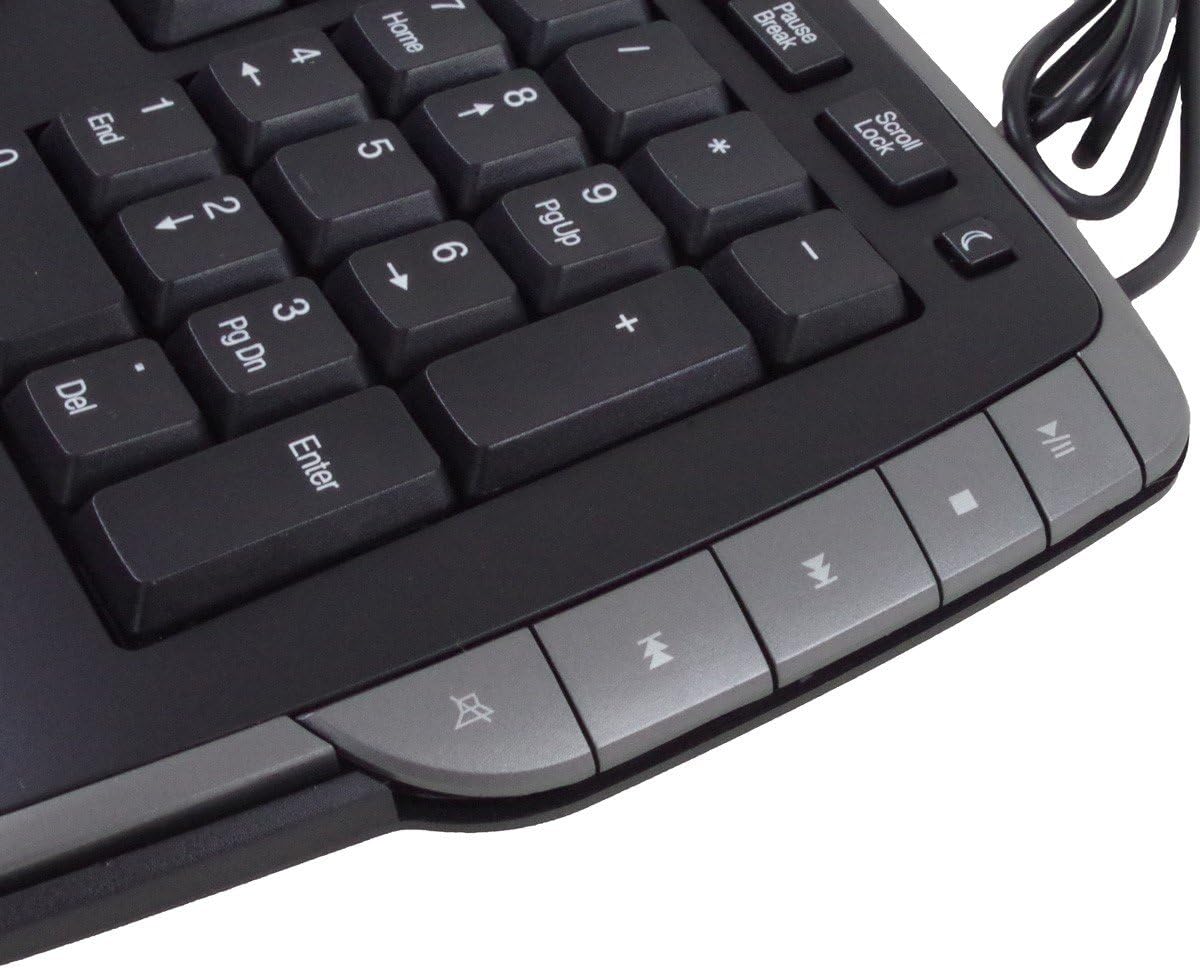
Figur 4.2: Høyre side view of the keyboard, featuring the numeric keypad and additional multimedia control hotkeys. These keys provide convenient access to media playback controls and other system functions.
Refer to the keycap legends for specific functions of each hotkey. No additional software is required for these keys to function on most operating systems.
5. Vedlikehold
Proper care and maintenance will extend the life of your keyboard.
- Rengjøring: For å rengjøre tastaturet, koble det fra datamaskinen. Bruk en myk, lofri klut som er lett dytt.amprengjøres med vann eller et mildt rengjøringsmiddel. Unngå overdreven fuktighet. Ikke spray rengjøringsmidler direkte på tastaturet.
- Væskeeksponering: Dette tastaturet er ikke vanntett. Avoid spilling liquids on it. If liquid spills occur, immediately disconnect the keyboard and allow it to dry completely before reconnecting.
- Støv og rusk: Bruk trykkluft til å fjerne støv og rusk mellom tastene.
- Lagring: Oppbevar tastaturet på et rent og tørt sted når det ikke er i bruk.
6. Feilsøking
If you encounter issues with your keyboard, try the following troubleshooting steps:
- Tastaturet svarer ikke:
- Sørg for at USB-kabelen er ordentlig koblet til både tastaturet og datamaskinens USB-port.
- Prøv å koble tastaturet til en annen USB-port på datamaskinen.
- Start datamaskinen på nytt.
- Test the keyboard on another computer, if available, to determine if the issue is with the keyboard or the computer.
- Hotkeys Not Working:
- Sørg for at tastaturet er riktig tilkoblet.
- Some hotkeys may require specific software or operating system settings to be enabled. Check your computer's control panel or system preferences for keyboard settings.
- Feil tegnutdata:
- Verify that your operating system's keyboard language settings match the QWERTY layout of your keyboard.
7. Spesifikasjoner
| Merke: | Grundig |
| Modellnummer: | 72845 |
| Tilkoblingsteknologi: | Kablet |
| Tastaturoppsett: | QWERTY |
| Antall nøkler: | Standard keys + 13 Hotkeys |
| Spesialfunksjon: | Ergonomisk design |
| Kompatible enheter: | PC |
| Materiale: | Polybutylentereftalat |
| Farge: | Silver (Note: Product images show a dark grey/black with silver accents) |
| Vannmotstandsnivå: | Ikke vanntett |
8. Garanti og støtte
Information regarding specific warranty terms and availability of spare parts is not provided. For product support or warranty inquiries, please contact your retailer or the manufacturer directly. Keep your purchase receipt as proof of purchase.
9. Sikkerhetsinformasjon
- Do not attempt to disassemble or modify the keyboard.
- Keep the keyboard away from extreme temperatures, direct sunlight, and high humidity.
- Unngå å miste tastaturet eller utsette det for harde støt.
- Dispose of the product responsibly according to local regulations at the end of its life cycle.