
1. Introduksjon
Welcome to the user manual for your new Salora SM508 mobile phone. This guide provides essential information to help you set up, operate, maintain, and troubleshoot your device. Please read this manual carefully to ensure proper use and to maximize the performance and longevity of your phone.
2. Produktet er overview
The Salora SM508 is a compact and reliable basic mobile phone designed for essential communication. It features a color display, a comfortable keypad, and dual SIM support.
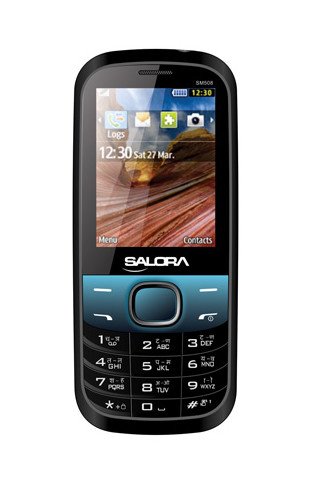
Dette bildet viser fronten view of the Salora SM508 mobile phone. It features a color display at the top, a central navigation button, and a standard alphanumeric keypad below. The phone has a black body with blue accents around the navigation cluster.
3. Oppsett
3.1 Sette inn SIM-kort
- Turn off the phone and remove the back cover.
- Fjern batteriet forsiktig.
- Locate the SIM card slots. The Salora SM508 supports dual SIM cards.
- Insert your SIM card(s) into the designated slot(s) with the gold contacts facing down. Ensure they are securely seated.
3.2 Inserting Battery
- Juster batterikontaktene med kontaktene i telefonens batterirom.
- Gently press the 1800 mAh Li-Ion battery into place until it clicks.
- Sett bakdekselet på igjen, og sørg for at det er ordentlig festet.
3.3 Inserting Memory Card (Optional)
- With the back cover and battery removed, locate the memory card slot.
- Insert a microSD card (up to 8GB) into the slot with the gold contacts facing down.
- Bytt batteri og bakdeksel.
3.4 Lading av enheten
- Koble laderen til ladeporten på telefonen.
- Koble laderen til en stikkontakt.
- The battery indicator on the screen will show the charging status. Charge the phone fully before first use.
3.5 Førstegangs av/på-start
- For å slå på: Trykk og hold inne av/på-knappen til skjermen lyser opp.
- Slik slår du av: Trykk og hold inne av/avslutt samtale-knappen til av/på-alternativene vises, og velg deretter «Slå av».
4. Bruksanvisning
4.1 Grunnleggende navigering
- Bruk navigasjonstastene (opp, ned, venstre, høyre) for å navigere gjennom menyer og alternativer.
- Press the central 'OK' or 'Select' button to confirm a selection.
- Use the 'Back' or 'Clear' button to return to the previous screen or delete characters.
4.2 Foreta og motta anrop
- Slik ringer du: Skriv inn telefonnummeret ved hjelp av tastaturet og trykk på den grønne ringeknappen.
- Slik mottar du et anrop: Når telefonen ringer, trykker du på den grønne ringeknappen for å svare.
- Slik avslutter du en samtale: Trykk på den røde avslutt-knappen.
4.3 Sende og motta SMS
- Naviger til «Meldinger»-menyen.
- Select 'Write Message' or 'New SMS'.
- Skriv inn meldingen din ved hjelp av tastaturet.
- Add the recipient's number or select from contacts.
- Trykk på «Send».
4.4 Kamerabruk
- Få tilgang til kameraapplikasjonen fra hovedmenyen.
- The phone features a 1.3 MP primary (rear) camera.
- Komponer bildet ditt ved hjelp av skjermen.
- Trykk på «OK»- eller «Ta bilde»-knappen for å ta et bilde.
4.5 Multimedia og tilkobling
- Lydkontakt: The phone includes a 3.5 mm audio jack for connecting headphones or external speakers.
- Bluetooth: Enable Bluetooth from the settings menu to connect to compatible devices for file transfer or hands-free communication.
- GPRS: The phone supports GPRS for basic internet connectivity. Consult your network provider for data plan details.
5. Vedlikehold
5.1 Rengjøring av enheten
- Bruk en myk, tørr og lofri klut til å rengjøre telefonens skjerm og kabinett.
- Unngå bruk av sterke kjemikalier, rengjøringsmidler eller sterke rengjøringsmidler.
- Do not allow water or liquids to enter the phone.
5.2 Batteristell
- Unngå å utsette batteriet for ekstreme temperaturer (varme eller kalde).
- Ikke punkter, demonter eller kortslut batteriet.
- If the battery is damaged or swollen, discontinue use immediately and replace it with an authorized Salora battery.
5.3 Oppbevaring
- Oppbevar telefonen på et kjølig og tørt sted, unna direkte sollys og fuktighet.
- If storing for an extended period, ensure the battery is partially charged (around 50%) to preserve its lifespan.
6. Feilsøking
If you encounter issues with your Salora SM508, please refer to the following common solutions:
- Telefonen slår seg ikke på:
Ensure the battery is charged. Connect the charger and wait a few minutes before attempting to power on. Check if the battery is properly inserted. - Ikke noe nettverkssignal:
Check if your SIM card is correctly inserted. Ensure you are in an area with network coverage. Try restarting the phone. - Kan ikke ringe/motta anrop:
Verify that your SIM card is active and has sufficient balance/plan. Check network signal strength. Ensure call barring or flight mode is not enabled. - Ladeproblemer:
Ensure the charger is properly connected to both the phone and the power outlet. Try using a different compatible charger. Check the charging port for any debris. - Tastaturet reagerer ikke:
Restart the phone. If the issue persists, ensure no physical damage to the keypad.
If the problem persists after trying these steps, please contact Salora customer support.
7. Spesifikasjoner
Below are the detailed technical specifications for the Salora SM508 mobile phone:
| Trekk | Spesifikasjon |
|---|---|
| Merke | Salora |
| Modell | SM508 |
| Operativsystem | Android 5.1, Android v5 1 OS (Note: This specification appears to be an error in the source data for a basic phone with a keypad interface. The phone operates on a proprietary feature phone OS.) |
| Skjermstørrelse | 6.1 Centimetres (2.4" TFT Screen) |
| Oppløsning | 320 x 240 piksler |
| Primært kamera | 1.3 MP (bak) |
| Batteri | 1800 mAh, Li-Ion |
| Minnelagringskapasitet | Kan utvides opptil 8 GB |
| SIM-støtte | Dobbelt SIM |
| Tilkoblingsteknologier | Bluetooth, GPRS |
| Lydkontakt | 3.5 mm |
| Enhetsgrensesnitt - Primær | Tastatur |
| Formfaktor | Bar |
| Farge | Svart, blå |
| Varevekt | 140 g |
| Pakkedimensjoner | 14 x 9.4 x 6.2 cm |
| Dato først tilgjengelig | 18. februar 2014 |
8. Garanti og støtte
8.1 Garantiinformasjon
The Salora SM508 comes with a 1 års produsentgaranti for enheten fra kjøpsdatoen. Tilbehør som følger med i esken, inkludert batterier, dekkes av en 6 måneders produsentgaranti fra kjøpsdatoen. Denne garantien dekker produksjonsfeil og problemer som oppstår ved normal bruk.
Vennligst ta vare på kjøpskvitteringen som kjøpsbevis for garantikrav.
8.2 Kundestøtte
For any technical assistance, warranty claims, or further inquiries regarding your Salora SM508 mobile phone, please contact Salora customer support directly. Refer to the packaging or the official Salora webnettstedet for den mest oppdaterte kontaktinformasjonen.