
Introduksjon
This manual provides comprehensive instructions for the VIZIO XRT112 Replacement Remote Control. Designed to function seamlessly with a wide range of VIZIO televisions, this remote offers a direct replacement solution without the need for complex programming. Please read this manual carefully to ensure proper setup and operation of your new remote control.
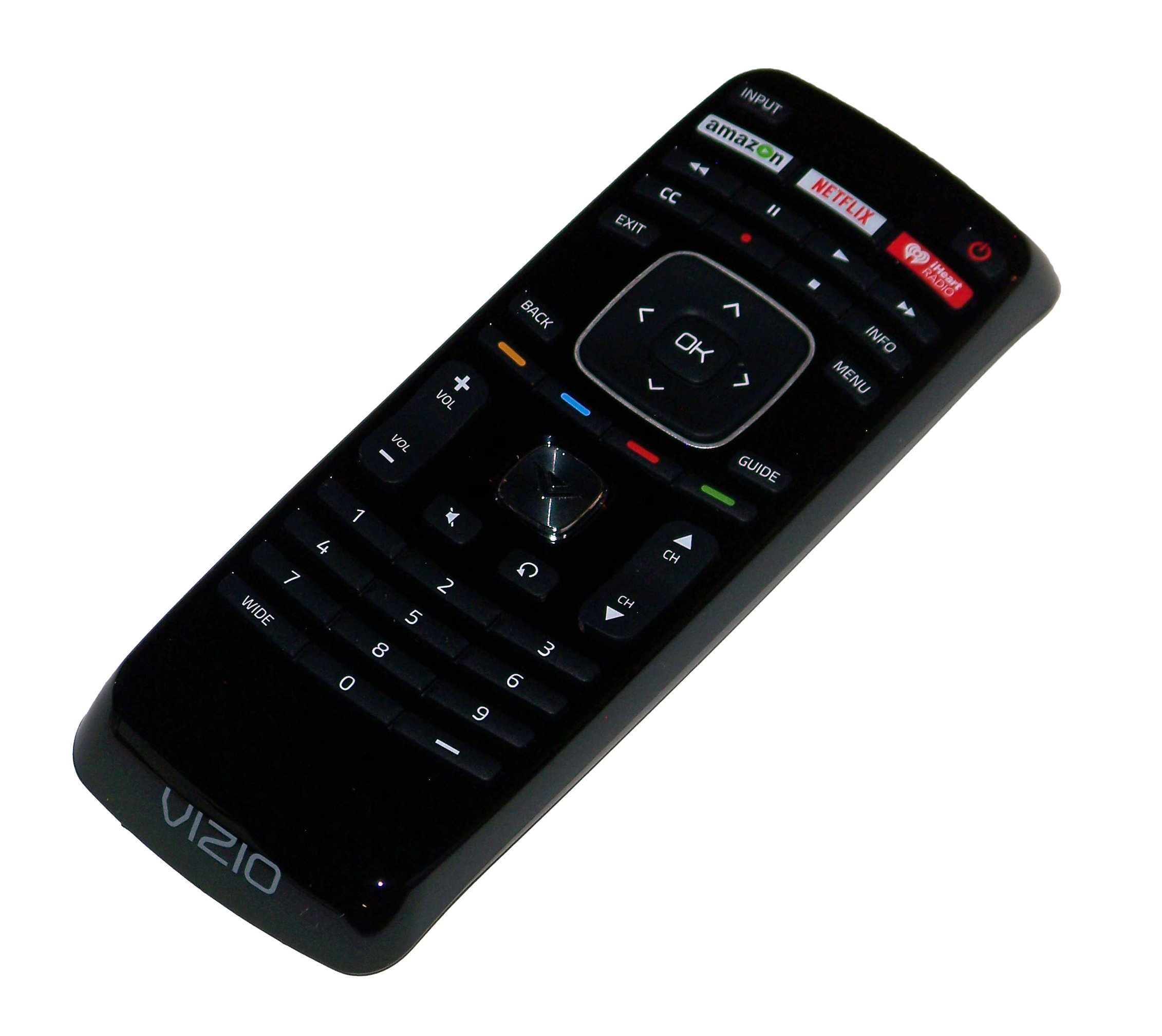
An image showing the VIZIO XRT112 Replacement Remote Control, featuring its ergonomic design and dedicated app buttons for Amazon, Netflix, and iHeart Radio.
Kompatibilitet
The VIZIO XRT112 Replacement Remote Control is compatible with a broad range of VIZIO brand Television sets manufactured after 2012. It is designed to replace original remotes for many VIZIO LCD and LED TV models.
Key Compatible Models Include:
- E502AR, E550IA0, E550I-A0, E550IB2, E550I-B2, E600IB3, E600I-B3
- E370VP, E320VT, E370VT, E420VT, E422VLE, M370SL
- E322AR, E422AR, E472VLE, E552VLE
- E472VL, E552VL, E460ME
- M420SR, M420SV, M470SV, M550SV, M320SR, M370SR
- E3D320VX, E3D420VX, E3DB420VX, E3D470VX
- M3D421SR, M3D550SR, M3D460SR, M3D420SR
- XVT3D474SV, XVT3D650SV, XVT3D554SV
- E390i-A1, E500i-A1, M501-A2R
- E241IA1, E241I-A1W, E280IA1, E291IA1, E320IA2, E390IA1, E390IB1, E401IA2, E420A1, E420IA0, E500DA0, E500IB1E, E551IA2
This list is not exhaustive. The remote is generally compatible with most VIZIO LCD and LED TVs from 2012 onwards that originally used a similar XRT-series remote.
Funksjoner
- Direkte erstatning: Functions immediately without programming for compatible VIZIO TVs.
- Dedikerte appknapper: Quick access to popular streaming services including Amazon, Netflix, and iHeart Radio.
- Ergonomisk design: Komfortabel å holde og enkel å bruke.
- Infrarød teknologi: Reliable communication with your television.
- Omfattende kontroll: Full functionality for power, volume, channel, input selection, menu navigation, and more.
Oppsett
1. Installasjon av batteri
- Finn batterirommet på baksiden av fjernkontrollen.
- Skyv batteridekselet nedover eller utover for å åpne det.
- Insert two (2) new AAA Alkaline batteries, ensuring the positive (+) and negative (-) terminals match the diagrams inside the compartment.
- Sett batteridekselet på igjen ved å skyve det tilbake på plass til det klikker ordentlig.
The remote control is now ready for use. No additional programming is typically required for compatible VIZIO televisions.
Bruksanvisning
Point the remote control directly towards the infrared sensor on your VIZIO television. Ensure there are no obstructions between the remote and the TV.
- På-knapp (MAKT): Trykk for å slå TVen på eller av.
- Volum opp/ned (VOL +/-): Justerer lydnivået.
- Kanal opp/ned (CH +/-): Bytter TV-kanal.
- Inndata (INNGANG): Blar gjennom tilgjengelige inngangskilder (HDMI, AV osv.).
- Meny (MENY): Accesses the TV's main menu for settings and options.
- Navigasjonsknapper (PILER): Use the directional arrows (Up, Down, Left, Right) to navigate through menus and options.
- OK/Select (OK): Bekrefter valg i menyer.
- Back/Exit (TILBAKE / UTGANG): Går tilbake til forrige skjermbilde eller avslutter gjeldende meny.
- Dedicated App Buttons (AMAZON, NETFLIX, IHEART RADIO): Press these buttons for direct access to the respective streaming applications.
- Demp (STUM): Demper TV-lyden.
Vedlikehold
Batteribytte
Replace batteries when the remote's response becomes inconsistent or stops working. Always replace both batteries at the same time with new AAA Alkaline batteries. Do not mix old and new batteries, or different types of batteries.
Rengjøring
For å rengjøre fjernkontrollen, tørk forsiktig av overflaten med en myk, tørr klut. For gjenstridig smuss, tørk littampskyll kluten med vann. Unngå å bruke sterke kjemikalier, slipende rengjøringsmidler eller overdreven fuktighet, da disse kan skade fjernkontrollen.
Feilsøking
- Fjernkontrollen svarer ikke:
- Sørg for at nye batterier er riktig installert.
- Check for any obstructions between the remote and the TV's infrared sensor.
- Kontroller at fjernkontrollen er rettet direkte mot TV-en.
- Spesifikke knapper fungerer ikke:
- This may indicate a faulty button or low battery power. Try replacing batteries.
- Remote does not control TV:
- Verify your VIZIO TV model is listed in the compatibility section or is a VIZIO LCD/LED TV manufactured after 2012.
- Ensure the TV's infrared sensor is not blocked or damaged.
Spesifikasjoner
| Merke | VIZIO |
| Modellnavn | XRT112 (Replacement for XRT100 and others) |
| Model Number (Mfr Part Number) | 4330251959 |
| Tilkoblingsteknologi | Infrarød |
| Batteritype | 2 x AAA alkaliske batterier |
| Maksimal rekkevidde | 10 meter (ca. 33 fot) |
| Knapp Antall | 45 |
| Spesialfunksjon | Ergonomic Design, Dedicated App Buttons (Amazon, Netflix, iHeart Radio) |
| Kompatible enheter | VIZIO Televisions (LCD and LED models manufactured after 2012) |
| UPC | 741271833972 |
Garanti og støtte
This product is typically covered by a limited warranty provided by the seller or manufacturer. For specific warranty details, please refer to the product packaging or contact your point of purchase. For technical support or further assistance, please reach out to the seller or VIZIO customer service.
For more information, you may visit the official VIZIO support webnettsted: www.vizio.com/en/support