
1. Introduksjon
This manual provides comprehensive instructions for the setup, operation, and maintenance of the EDUP EP-3701 USB WiFi Disk. The EP-3701 is a portable wireless storage device designed to expand storage and facilitate data sharing for iOS and Android smartphones and tablets without the need for cables or a computer.
Les denne håndboken nøye før du bruker enheten for å sikre at den fungerer som den skal og for å forhindre skade.
2. Produktet er overview
The EDUP EP-3701 acts as a bridge between your USB storage devices (like USB flash drives or external hard drives) and your mobile devices via a Wi-Fi connection. It creates its own Wi-Fi hotspot, allowing multiple devices to connect and access stored files samtidig.
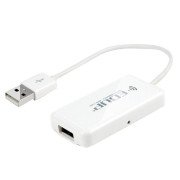
Bilde 2.1: Foran view of the EDUP EP-3701 USB WiFi Disk, showing the USB host port and the integrated USB cable.
3. Nøkkelfunksjoner
- Wireless Data Access: Adgang files on connected USB storage devices wirelessly from smartphones, tablets, and computers.
- Flerbrukerstøtte: Allows multiple users to connect and stream/access data simultaneously.
- Bærbar design: Compact and lightweight, ideal for travel and on-the-go use.
- Strømkilde: Powered via USB, can be connected to a USB wall adapter, power bank, or computer USB port.
- Appkontroll: Dedicated mobile application for easy file management and device configuration.
4. Pakkens innhold
Bekreft at alle varene er til stede i pakken:
- EDUP EP-3701 USB WiFi Disk
- Hurtigstartveiledning (denne håndboken)
5. Oppsett
5.1. Slå på enheten
- Connect the integrated USB cable of the EP-3701 to a USB power source (e.g., a 5V/1A USB wall adapter, a power bank, or a computer's USB port).
- Strømindikatorlampen på enheten vil lyse, noe som indikerer at den er slått på.
5.2. Connecting USB Storage
- Insert your USB flash drive or external hard drive into the USB host port on the EP-3701.
- Ensure the USB storage device is properly seated.
5.3. Connecting Mobile Device
- On your smartphone or tablet, go to Wi-Fi settings.
- Locate and connect to the Wi-Fi network named "EDUP_XXXXXX" (XXXXXX will be the last six digits of the device's MAC address).
- The default password is "12345678". It is recommended to change this password after initial setup.
- Download and install the "WiFi Disk" application from your device's app store (App Store for iOS, Google Play Store for Android).
- Open the "WiFi Disk" app. The app will automatically detect and connect to the EP-3701.
6. Bruksanvisning
6.1. File Ledelse
- Bla gjennom Files: Within the "WiFi Disk" app, navigate through the folders and files on the connected USB storage.
- Last opp Files: Overføre files from your mobile device to the USB storage connected to the EP-3701.
- Last ned Files: Overføre files from the USB storage to your mobile device.
- Strømmedier: Spill av videoer, musikk og view photos directly from the USB storage without downloading.
6.2. Nettverksinnstillinger
The "WiFi Disk" app allows you to configure network settings:
- Change Wi-Fi Name (SSID): Modify the name of the EP-3701's Wi-Fi network.
- Endre Wi-Fi-passord: Update the password for the Wi-Fi network.
- Internet Passthrough (Bridge Mode): Connect the EP-3701 to an existing Wi-Fi network to provide internet access to connected devices while still allowing access to the USB storage.
7. Vedlikehold
- Rengjøring: Bruk en myk, tørr klut til å rengjøre utsiden av enheten. Ikke bruk flytende rengjøringsmidler eller aerosoler.
- Lagring: Oppbevar enheten på et kjølig og tørt sted, unna direkte sollys og ekstreme temperaturer.
- Fastvareoppdateringer: Periodically check the "WiFi Disk" app or the EDUP official webnettsted for fastvareoppdateringer for å sikre optimal ytelse og sikkerhet.
- Sikker fjerning: Always ensure data transfer is complete before disconnecting the USB storage device or powering off the EP-3701.
8. Feilsøking
8.1. Enheten slår seg ikke på
- Ensure the USB cable is securely connected to a working USB power source.
- Prøv en annen USB-port eller strømadapter.
8.2. Kan ikke koble til Wi-Fi-nettverk
- Verify you are selecting the correct "EDUP_XXXXXX" network.
- Double-check the Wi-Fi password (default is "12345678").
- Restart the EP-3701 device and your mobile device.
8.3. USB Storage Not Detected
- Ensure the USB storage device is properly inserted into the EP-3701's USB host port.
- Check if the USB storage device is formatted in a supported file system (FAT32, NTFS, exFAT).
- Some high-power consumption external hard drives may require an external power source.
- Try a different USB storage device to rule out a faulty drive.
8.4. App Not Functioning Correctly
- Ensure your mobile device is connected to the EP-3701's Wi-Fi network.
- Close and reopen the "WiFi Disk" app.
- Reinstall the "WiFi Disk" app.
- Se etter appoppdateringer i enhetens appbutikk.
9. Spesifikasjoner
| Trekk | Beskrivelse |
|---|---|
| Modell | EP-3701 |
| Grensesnitt | USB 2.0 (Host), USB 2.0 (Power Input) |
| Wireless Standard | IEEE 802.11b/g/n |
| Frekvensbånd | 2.4 GHz |
| Sikkerhet | WPA / WPA2, WPA-PSK / WPA2-PSK |
| Støttes File Systemer | FAT32, NTFS, exFAT |
| Strøminngang | DC 5V/1A (via USB) |
| Dimensjoner | (Approximate, based on typical USB dongle size) 60mm x 25mm x 10mm |
| Driftstemperatur | 0 °C til 40 °C (32 °F til 104 °F) |
10. Garanti og støtte
EDUP products typically come with a limited warranty. Please refer to the warranty card included with your purchase or visit the official EDUP webnettstedet for detaljerte garantivilkår og -betingelser som er spesifikke for din region.
For technical support, product inquiries, or warranty claims, please contact EDUP customer service through their official webnettstedet eller kontaktinformasjonen som er oppgitt på produktemballasjen.
Webnettsted: www.szedup.com