
1. Introduksjon
The Sony SBH54 is a versatile Stereo Bluetooth Headset designed for wireless communication and audio playback. It offers both handset and headset functionalities, allowing you to take and make calls, view messages, listen to music, and tune into FM radio directly from its display. Crafted from premium metal with a splash-proof design, it combines elegance with durability.
Key features include Bluetooth Wireless 3.0, NFC technology for easy pairing, an OLED display, and built-in noise cancellation for clear audio during calls. The headset supports A2DP profile and can connect to two devices simultaneously.
2. Produktet er overview
The SBH54 features a compact design that fits comfortably in your hand. It includes an OLED display for information at a glance and physical controls for media and call management.
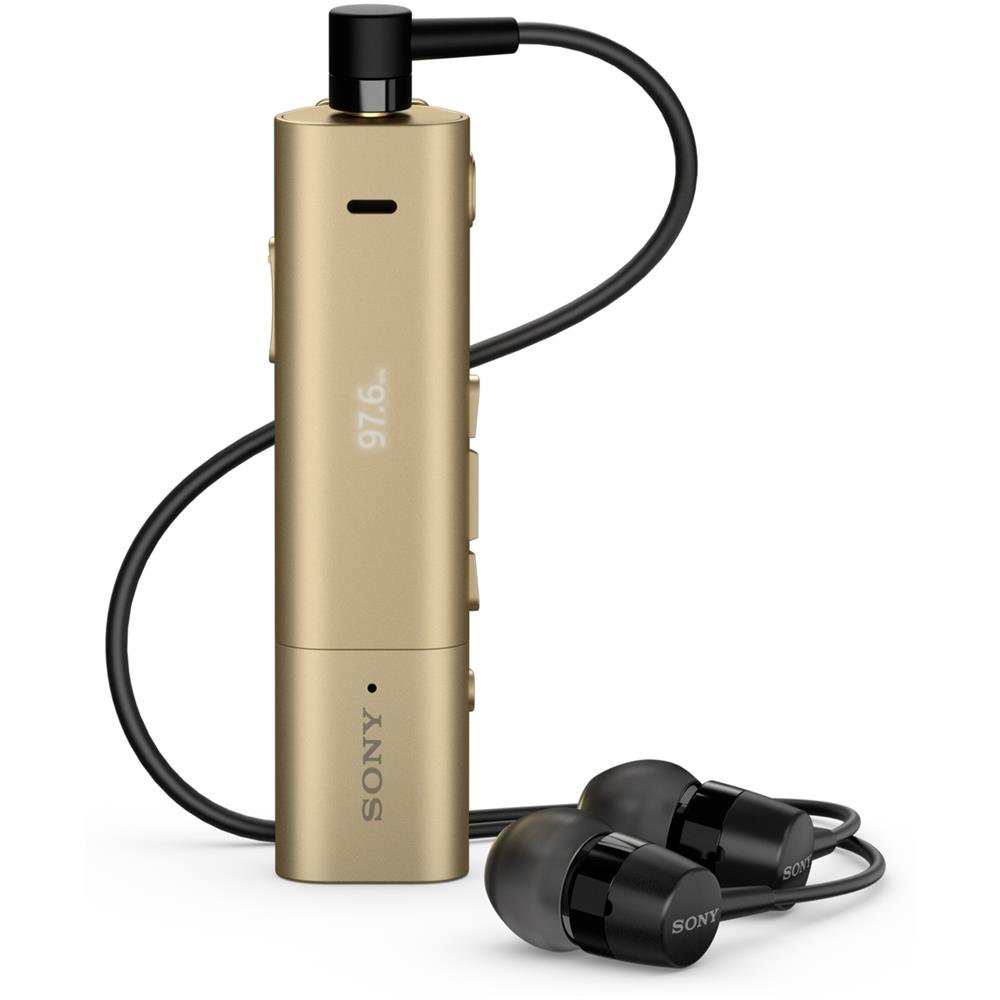
Image: Sony SBH54 Gold Stereo Bluetooth Headset. This image displays the compact, gold-colored headset with its integrated clip and display screen.
Kontroller og indikatorer:
- OLED-skjerm: Shows caller ID, messages, music track information, and FM radio frequency.
- Multifunksjonsknapp: For call answering/ending, play/pause music.
- Volumknapper: Juster lydvolumet.
- Navigasjonsknapper: For menu navigation and track skipping.
- Mikrofon: Integrert for taleanrop.
- Hodetelefonkontakt: 3.5mm port for connecting the included premium headphones.
- Ladeport: Mikro-USB-port for lading av enheten.
3. Oppsett
3.1 Lade hodesettet
- Connect the supplied USB cable to the headset's charging port and to a USB power adapter or a computer's USB port.
- Batteriindikatoren på displayet vil vise ladestatus.
- Lad headsettet helt før første gangs bruk.
3.2 Pairing with a Device (Bluetooth)
- Sørg for at headsettet er ladet og slått av.
- Press and hold the power button until the headset enters pairing mode (indicated by a specific light pattern or message on the display).
- Aktiver Bluetooth på smarttelefonen eller en annen Bluetooth-aktivert enhet og søk etter tilgjengelige enheter.
- Select "SBH54" from the list of found devices.
- If prompted, enter the passcode "0000" (four zeros).
- Når paringen er fullført, vil headsettet indikere en vellykket tilkobling.
3.3 Pairing with a Device (NFC)
For devices with NFC (Near Field Communication):
- Ensure NFC is enabled on your smartphone and the screen is unlocked.
- Touch the NFC detection area of your smartphone to the NFC detection area on the SBH54 headset.
- Følg eventuelle instruksjoner på skjermen for å fullføre sammenkoblingsprosessen.
4. Bruk av hodesettet
4.1 Strøm på/av
- For å slå på: Trykk og hold inne strømknappen til skjermen lyser.
- Slik slår du av: Trykk og hold inne av/på-knappen til skjermen slår seg av.
4.2 Foreta og motta anrop
- Besvare et anrop: When a call comes in, press the multi-function button.
- Avslutte en samtale: During a call, press the multi-function button.
- Avvise en samtale: Press and hold the multi-function button when a call comes in.
- Ringe: Dial the number on your phone. The call will automatically route to the headset. You can also use voice commands if supported by your phone.
- Handset Function: The compact SBH54 can be used as an unobtrusive handset for calls.
- Støyavbestilling: The headset features echo, wind, and noise cancellation for clear voice transmission.
- HD Voice: Enhances voice clarity for both parties during a call.
4.3 Musikkavspilling
- Spill av/pause: Press the multi-function button.
- Neste spor: Press the forward navigation button.
- Forrige spor: Press the backward navigation button.
- Volumkontroll: Bruk volum opp/ned-knappene.
4.4 FM-radio
- Aktiver FM-radio: Navigate through the headset menu to select the FM Radio function.
- Still inn stasjoner: Use the navigation buttons to scan or manually tune to FM frequencies.
- Lagre forhåndsinnstillinger: The headset may allow saving favorite stations (refer to on-screen prompts).
5. Vedlikehold
- Rengjøring: Tørk av headsettet med en myk, tørr klut. Unngå bruk av sterke kjemikalier eller slipende materialer.
- Vannmotstand: The SBH54 has a splash-proof design. This means it can withstand light splashes of water but should not be submerged or exposed to heavy rain. Ensure the charging port cover is securely closed.
- Lagring: Oppbevar headsettet på et kjølig og tørt sted, unna direkte sollys og ekstreme temperaturer.
- Batteripleie: For å forlenge batterilevetiden, unngå å utlade batteriet helt ofte. Lad det opp regelmessig.
6. Feilsøking
Vanlige problemer og løsninger:
- Hodesettet slår seg ikke på: Sørg for at batteriet er ladet. Koble til en strømkilde og prøv på nytt.
- Kan ikke pares med en enhet:
- Sørg for at headsettet er i paringsmodus.
- Sørg for at Bluetooth er aktivert på enheten din.
- Flytt headsettet nærmere enheten.
- Start både headsettet og enheten på nytt.
- Fjern tidligere Bluetooth-tilkoblinger på enheten din og prøv å koble sammen på nytt.
- Ingen lyd eller dårlig lydkvalitet:
- Sjekk volumnivåene på både headsettet og den tilkoblede enheten.
- Sørg for at headsettet er innenfor rekkevidden til enheten din.
- Koble fra og koble til Bluetooth-tilkoblingen igjen.
- Ensure the headphones are properly plugged into the 3.5mm jack.
- FM-radioen fungerer ikke: Ensure you are in an area with good FM signal reception.
7. Spesifikasjoner
| Trekk | Detalj |
|---|---|
| Merke | Sony |
| Modellnummer | SBH54GD |
| Farge | Gull |
| Øreplassering | In Ear |
| Formfaktor | In Ear |
| Støykontroll | Aktiv støyreduksjon |
| Varevekt | 0.1 kilo |
| Type lyddriver | Dynamisk driver |
| Frekvensområde | 20 Hz–20 000 Hz |
| Innkapslingsmateriale | Metall |
| Kompatible enheter | Smartphones, Laptops, Tablets, Bluetooth-enabled Devices |
| Vannmotstandsnivå | Water Resistant (Splash-proof) |
| Tilkoblingsteknologi | Bluetooth, NFC |
| Trådløs teknologi | Bluetooth, NFC |
| Bluetooth-versjon | 3.0 |
| Kontroll Type | Mediekontroll |
| Kontrollmetode | Fjernkontroll |
8. Garanti og støtte
For warranty information and customer support, please refer to the documentation included with your purchase or visit the official Sony support webSpesifikke garantivilkår kan variere avhengig av region og forhandler.
Online støtte: www.sony.com/electronics/support