
1. Introduksjon
This manual provides instructions for the installation, operation, and maintenance of your RAM Mounts RAM-B-400-A-HOL-UN7BU. This product is a versatile mounting solution designed to securely hold smartphones and other handheld devices. It consists of a Tough-Claw rail clamp base, a short double socket arm, and a universal spring-loaded X-Grip cradle.
2. Pakkens innhold
Kontroller at alle komponentene som er oppført nedenfor er tilstede i pakken din:
- RAM Tough-Claw Rail Clamp Base
- RAM Short Double Socket Arm
- RAM X-Grip Universal Phone Cradle
- Device Tether (for outdoor applications)

Image: All components of the RAM-B-400-A-HOL-UN7BU mount, including the Tough-Claw base, short double socket arm, X-Grip cradle, and a safety tether.
3. Produktet er overview
The RAM-B-400-A-HOL-UN7BU is engineered for secure device retention in various environments. Key features include:
- Tough-Claw Base: En robust kl.amp designed for quick, tool-less installation and removal on round, square, or odd-shaped rails and bars. It accommodates diameters from 0.625" to 1.14".
- Double Socket Arm: Connects the Tough-Claw base to the X-Grip cradle, allowing for flexible positioning and angle adjustment. This model includes a short length arm.
- X-Grip Cradle: A spring-loaded, universal cradle that expands and contracts to provide a custom fit for your smartphone. It features rubber-coated tips for secure grip and easy access grip knobs for quick device insertion and release.

Image: A smartphone held firmly within the RAM X-Grip cradle, showcasing the rubber-coated gripping arms.
4. Installasjonsinstruksjoner
Follow these steps to assemble and install your RAM Mount:
- Attach X-Grip to Arm: Loosen the knob on the double socket arm. Insert one of the 1-inch rubber balls (from the X-Grip cradle) into one end of the double socket arm. Tighten the knob to secure.
- Attach Tough-Claw to Arm: Insert the 1-inch rubber ball of the Tough-Claw base into the other end of the double socket arm. Tighten the knob to secure.
- Mount the Tough-Claw: Identify a suitable mounting surface (e.g., handlebar, rail) with a diameter between 0.625" and 1.14". Open the jaws of the Tough-Claw by rotating the large knob. Position the Tough-Claw around the chosen surface and tighten the knob until the clamp is firmly secured and does not move.
- Juster posisjon: Loosen the knob on the double socket arm to adjust the angle and orientation of the X-Grip cradle for optimal viewing. Once positioned, tighten the knob firmly.
- Install Device Tether: For added security, especially in outdoor or high-vibration environments, stretch the included device tether over the corners of your device once it is placed in the X-Grip.
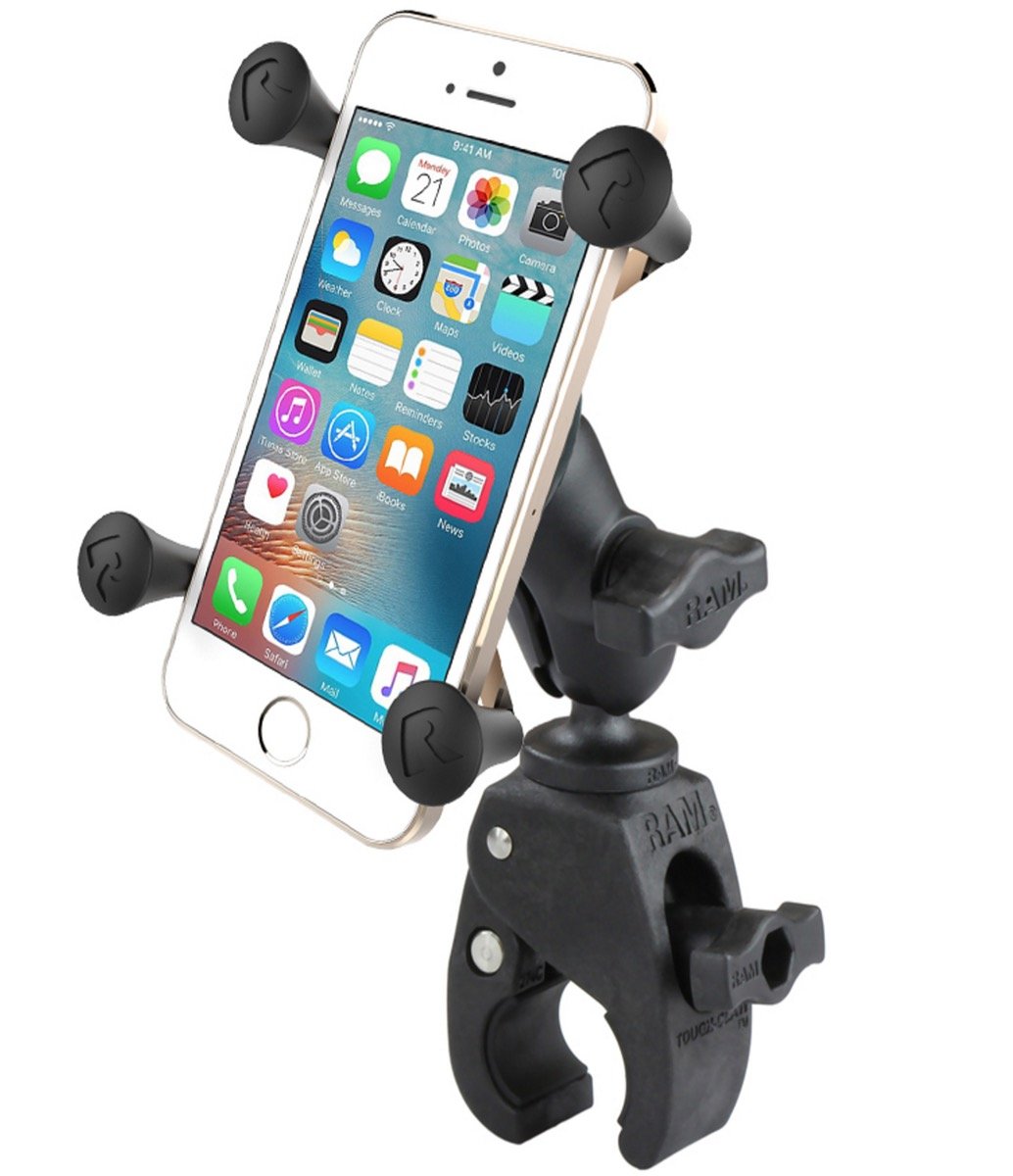
Image: The RAM X-Grip mount securely installed on a motorcycle handlebar, holding a smartphone in place.
5. Bruksanvisning
To use your RAM X-Grip mount:
- Inserting a Device: Gently pull back one of the spring-loaded arms of the X-Grip cradle. Carefully slide your smartphone or device into the cradle, ensuring all four rubber-coated tips securely grip the device. The spring mechanism will hold the device firmly.
- Fjerne en enhet: Grasp your device firmly. Gently pull back one of the spring-loaded arms of the X-Grip cradle and lift the device out.
- Using the Safety Tether: If using the tether, stretch it over the corners of your device after it is placed in the X-Grip. This provides an additional layer of security against accidental dislodgement, particularly during vigorous activity or on rough terrain.

Image: A smartphone being inserted into the RAM X-Grip cradle, demonstrating the spring-loaded mechanism.
6. Vedlikehold
Regular maintenance ensures the longevity and optimal performance of your RAM Mount:
- Rengjøring: Wipe down the mount components with a damp cloth to remove dirt and grime. Avoid harsh chemicals that may damage the rubber or plastic parts.
- Undersøkelse: Periodically check all connections and knobs to ensure they are tight. Inspect the rubber tips of the X-Grip and the Tough-Claw for wear or damage. Replace any worn components as necessary.
- Smøring: The moving parts of the Tough-Claw and the X-Grip are designed for maintenance-free operation. Do not apply lubricants unless specifically instructed by RAM Mounts support.
7. Feilsøking
If you encounter issues with your RAM Mount, refer to the following:
- Device Not Secure: Ensure the X-Grip arms are fully gripping your device. Verify that the device dimensions are within the compatible range for the X-Grip. Always use the safety tether for outdoor applications.
- Mount Slipping: Check that the Tough-Claw knob is tightened sufficiently. Ensure the mounting surface diameter is within the specified range (0.625" - 1.14"). Clean the mounting surface and the inside of the Tough-Claw jaws to remove any slippery residue.
- Arm Not Holding Position: Ensure the knob on the double socket arm is fully tightened. If the arm continues to slip, inspect the rubber ball ends and the socket for wear.
8. Spesifikasjoner
| Trekk | Spesifikasjon |
|---|---|
| Modellnummer | RAM-B-400-A-HOL-UN7BU |
| Varevekt | 9.2 unser |
| Tough-Claw Rail Diameter Range | 1.59–2.9 cm (0.625–1.14 tommer) |
| Armlengde | Short Double Socket Arm |
| Kompatible enheter | Smartphones (e.g., Xperia L1) |
| Monteringstype | Handlebar, Rail, Bar |
| Spesielle funksjoner | Heat Resistant, Rust Resistant |
9. Garanti og støtte
RAM Mounts products are known for their durability and quality. For specific warranty information and customer support, please refer to the official RAM Mounts webnettstedet eller kontakt kundeservicen deres direkte. Ta vare på kjøpskvitteringen som kjøpsbevis.