
1. Introduksjon
This manual provides detailed instructions for the installation, operation, and maintenance of your Alpine CDE-163BT Advanced Bluetooth CD Receiver. Please read this manual thoroughly before using the unit to ensure proper operation and to prevent damage. Keep this manual for future reference.
The Alpine CDE-163BT is a versatile car stereo receiver featuring advanced Bluetooth connectivity for hands-free calling and audio streaming, CD playback, USB input, and FM/AM tuner capabilities. It is designed to deliver high-quality audio performance and user-friendly control.
2. Oppsett og installasjon
2.1 Pakkeinnhold
Før du starter installasjonen, må du kontrollere at alle komponentene er til stede:
- Alpine CDE-163BT Head Unit
- Ledningsnett
- Mounting Sleeve and Trim Ring
- Mikrofon for Bluetooth håndfri samtale
- Brukerhåndbok (dette dokumentet)
- Monteringsutstyr (skruer, braketter)
2.2 Koblingsskjema
Refer to the wiring diagram provided with the unit's installation guide for specific connections. Key connections include:
- Makt: Yellow (constant 12V), Red (switched 12V), Black (ground).
- Høyttalere: White/White-Black (Front Left), Gray/Gray-Black (Front Right), Green/Green-Black (Rear Left), Purple/Purple-Black (Rear Right).
- Antenne: Blue (power antenna/amplifier remote turn-on).
- Mikrofon: Connect the supplied microphone to the dedicated input for hands-free calling.
Forsiktighet: Incorrect wiring can cause damage to the unit or vehicle's electrical system. If you are unsure about any wiring connections, consult a qualified professional installer.
2.3 Første gangs strøm på
After installation, turn on your vehicle's ignition. The unit should power on. Follow any on-screen prompts for initial setup, such as language selection or clock setting.
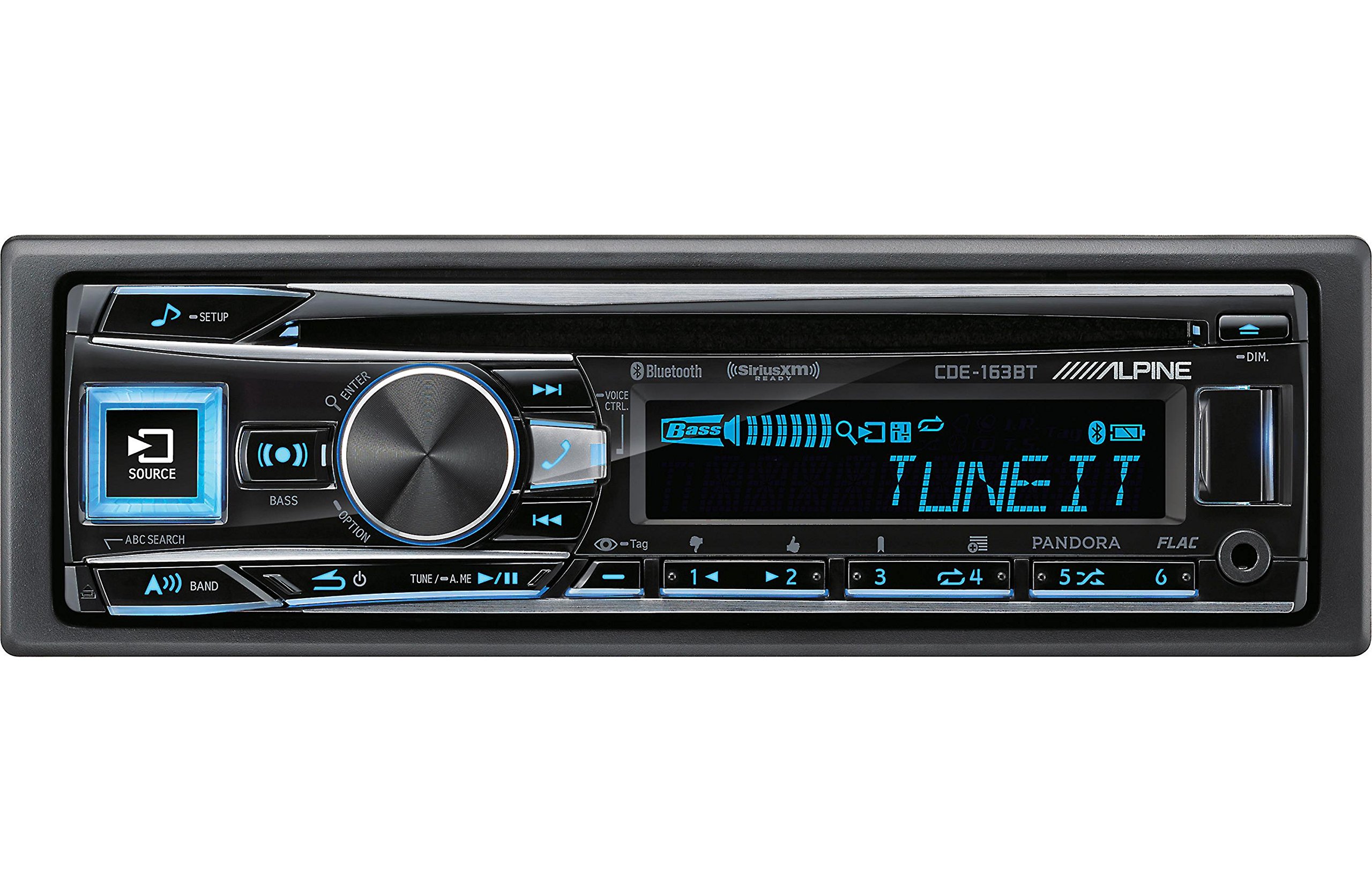
Figure 2.3.1: Front panel of the Alpine CDE-163BT receiver. This image displays the main controls, including the large rotary knob, source button, setup button, and display screen showing "TUNEIT" and "Bass" indicators.
3. Drift
3.1 Front Panel Controls Overview
Gjør deg kjent med hovedkontrollene på frontpanelet:
Figur 3.1.1: Detaljert view of the Alpine CDE-163BT front panel. Key controls include the SOURCE button (left, illuminated), SETUP button (top left), large central rotary knob for volume and selection, BASS/OPTION button, VOICE CTRL button, and various preset/track skip buttons along the bottom.
- SOURCE-knapp: Selects the audio source (CD, Tuner, USB, Bluetooth Audio, AUX).
- SETUP-knapp: Accesses the main setup menu for system adjustments.
- Rotary Knob (Volume/ENTER): Turns to adjust volume. Press to confirm selections in menus.
- BASS/OPTION Button: Provides quick access to bass settings or other options depending on the current mode.
- TALEKONTROLL-knapp: Activates voice control features on connected smartphones.
- BAND-knapp: Switches between FM1, FM2, FM3, and AM bands in tuner mode.
- TUNE/A.ME/II Buttons: Used for manual tuning, auto memory, and play/pause functions.
- Track Skip/Preset Buttons (1-6): Used for skipping tracks or selecting radio presets.
- DIM-knapp: Justerer skjermens lysstyrke.
3.2 Power On/Off and Source Selection
- For å snu enheten ON, press any button (e.g., SOURCE or the Rotary Knob).
- For å snu enheten AV, press and hold the power button (often integrated with the TUNE/A.ME button).
- Trykk på KILDE button repeatedly to cycle through available audio sources: CD, Tuner, USB, Bluetooth Audio, AUX.
3.3 Volumkontroll
Rotate the large central Dreieknott clockwise to increase volume and counter-clockwise to decrease volume.
3.4 Lydinnstillinger
Trykk på BASS/OPTION button or navigate through the SETUP menu to adjust audio settings such as Bass, Treble, Balance (left/right), and Fader (front/rear). Use the Rotary Knob to adjust values and press it to confirm.
3.5 Radiodrift (FM/AM-tuner)
- Select "Tuner" as the source using the KILDE knapp.
- Trykk på BÅND -knappen for å bytte mellom FM1-, FM2-, FM3- og AM-båndene.
- Manuell innstilling: Trykk på MELODI buttons (◀ / ▶) to manually tune frequencies.
- Søk etter innstilling: Trykk og hold inne MELODI knappene for å automatisk søke etter neste stasjon med sterkt signal.
- Forhåndsinnstilte stasjoner: To store a station, tune to the desired frequency, then press and hold one of the numbered preset buttons (1-6) until you hear a beep. To recall a preset, simply press the corresponding numbered button.
3.6 CD-avspilling
- Sett inn en CD i platesporet. Enheten vil automatisk bytte til CD-kilde og starte avspilling.
- Use the ◀ / ▶ buttons to skip tracks.
- Trykk på TUNE/A.ME/II button for Play/Pause.
- Trykk på ABC SEARCH button to search for tracks by name.
3.7 Bluetooth-tilkobling
The CDE-163BT features built-in Bluetooth for hands-free calling and audio streaming.
3.7.1 Pare en Bluetooth-enhet
- Sørg for at Bluetooth er aktivert på mobilenheten din.
- On the CDE-163BT, go to the SETUP menu and select "Bluetooth Setup".
- Choose "Pairing" or "Device Search".
- On your mobile device, search for available Bluetooth devices and select "Alpine CDE-163BT".
- Confirm the pairing code if prompted. Once paired, the Bluetooth icon on the receiver's display will illuminate.
3.7.2 Håndfri telefonering
- Når et anrop kommer inn, vil enheten vise nummerpresentasjonen. Trykk på GÅ button (Rotary Knob) to answer.
- For å avslutte en samtale, trykk på GÅ knappen igjen.
- Use the supplied microphone for clear communication.
- Trykk på TALEKONTROLL button to activate your smartphone's voice assistant.
3.7.3 Bluetooth-lydstrømming
- Select "Bluetooth Audio" as the source.
- Start playback on your paired mobile device. Audio will stream through the receiver.
- Use the ◀ / ▶ buttons on the receiver to skip tracks.
3.8 USB-avspilling
- Connect a USB storage device (e.g., USB flash drive) to the USB port.
- Select "USB" as the source. The unit will automatically detect and begin playing compatible audio files (including FLAC format).
- Use the ◀ / ▶ buttons to skip tracks.
- The unit supports various audio formats.
3.9 Pandora and SiriusXM Ready
- Pandora: Connect your iPhone or Android smartphone via USB or Bluetooth and launch the Pandora app. Select Pandora as the source on the receiver to control the app.
- SiriusXM: This unit is SiriusXM Ready. An optional SiriusXM Connect Vehicle Tuner and subscription are required for satellite radio reception. Connect the tuner and select SiriusXM as the source.
3.10 Skjerminnstillinger
- Trykk på DIM button to adjust the display brightness.
- Access the SETUP menu to customize display colors for buttons and the screen.
4. Vedlikehold
4.1 Rengjøring av enheten
Wipe the front panel with a soft, dry cloth. For stubborn stains, dampen the cloth lightly with water. Avoid using harsh chemicals, abrasive cleaners, or solvents as they can damage the finish.
4.2 Skivepleie
Handle CDs by their edges. Keep discs clean and free of scratches. If a disc is dirty, wipe it gently from the center outwards with a soft, lint-free cloth. Do not use solvents or abrasive cleaners on discs.
5. Feilsøking
If you experience issues with your CDE-163BT, refer to the table below for common problems and solutions.
| Problem | Mulig årsak | Løsning |
|---|---|---|
| Ingen strøm | Feil kabling; Sikring gått; Bilens tenning av. | Check power connections; Replace fuse; Turn vehicle ignition on. |
| Ingen lyd | Volumet er for lavt; Demping er aktivert; Feil høyttalerkabling; Amplivligere av. | Øk volumet; Deaktiver demping; Sjekk høyttalertilkoblingene; Sjekk amplifier kraft. |
| Bluetooth kobler ikke til | Device not in pairing mode; Bluetooth off on phone; Interference. | Ensure phone Bluetooth is on and discoverable; Re-attempt pairing; Move closer to unit. |
| CD skips or won't play | Dirty or scratched disc; Disc inserted incorrectly. | Clean disc; Insert disc correctly; Try a different disc. |
| USB-enheten gjenkjennes ikke | Inkompatibelt format; Skadet USB-enhet; Løs forbindelse. | Sikre files are compatible; Try a different USB device; Reconnect USB device. |
If the problem persists after attempting these solutions, please contact Alpine customer support.
6. Spesifikasjoner
Below are the technical specifications for the Alpine CDE-163BT Advanced Bluetooth CD Receiver:
- Modellnummer: 79380
- Produktdimensjoner: 5 x 11 x 10 tommer
- Varevekt: 4.05 pund (4.1 pund)
- Trådløs kommunikasjonsteknologi: Bluetooth
- Tilkoblingsteknologier: Bluetooth
- Spesielle funksjoner: Built-In Bluetooth, FM Tuner
- Andre skjermfunksjoner: Trådløs
- Farge: SVART
- Produsent: Alpint
- Tilkoblingsteknologi: Bluetooth
- Kompatible enheter: Smarttelefon
- Koblingstype: 3.5 mm jack, USB
- Lydutgangsmodus: Mono, stereo
- Surround Sound Channel-konfigurasjon: 4 kanal
- Wattage: 200 watt
- Dato først tilgjengelig: 19. januar 2016
7. Garanti og kundestøtte
7.1 Garantiinformasjon
Alpine products are manufactured to the highest quality standards. This product is covered by a limited warranty. Please refer to the separate warranty card included with your purchase for specific terms, conditions, and duration of coverage. Retain your proof of purchase for warranty claims.
7.2 Kundestøtte
For technical assistance, troubleshooting beyond this manual, or warranty service, please contact Alpine customer support:
- Webnettsted: Besøk den offisielle Alpine-butikken webnettsted for støtteressurser, vanlige spørsmål og kontaktskjemaer.
- Telefon: Se Alpine website or your warranty card for regional customer service phone numbers.
- Autoriserte servicesentre: For repairs, locate an authorized Alpine service center through the official webnettstedet.
When contacting support, please have your product model number (CDE-163BT) and serial number ready.