
Vogel's MA4000
Vogel's MA4000 Flat Screen Wall Mount Instruction Manual
Model: MA4000 (8554000)
Introduksjon
This manual provides comprehensive instructions for the safe and proper installation, operation, and maintenance of your Vogel's MA4000 Flat Screen Wall Mount. Please read all instructions carefully before installation and retain this manual for future reference.
The Vogel's MA4000 is designed to securely mount flat screen televisions ranging from 40 to 80 inches (102-203 cm) with a maximum weight capacity of 80 kg (176 lbs). It features a slim profile and a tilt function to optimize viewing angles and reduce glare.
Sikkerhetsinformasjon
ADVARSEL:
- Ensure the mounting surface can safely support the combined weight of the mount and the television.
- Always use appropriate tools and follow all installation steps precisely.
- Ikke overskrid den maksimale vektkapasiteten på 80 kg (176 lbs).
- Verify VESA compatibility with your television before installation.
- Hvis du er usikker på noen del av installasjonen, bør du kontakte en kvalifisert fagperson.
Pakkeinnhold
Before beginning installation, please verify that all components are present and undamaged. Refer to the included parts list in your product packaging for a complete inventory.

Bildebeskrivelse: En overhead view of the Vogel's MA4000 Flat Screen Wall Mount, showing the main wall plate and the two vertical TV brackets. The mount is black and designed for flat panel televisions.
The image above displays the primary components of the Vogel's MA4000 wall mount: the wall plate and the two TV interface bars. Additional hardware such as screws, washers, and spacers are included in the retail package.
Spesifikasjoner
| Modellnummer | MA4000 (8554000) |
| Merke | Vogel's |
| Monteringstype | Flat, Tilting |
| Materiale | Rustfritt stål |
| Farge | Svart |
| Kompatible TV-størrelser | 40–80 tommer (102–203 cm) |
| Maksimal vektkapasitet | 80 kg (176 lbs) |
| VESA-kompatibilitet | Min 100x100 mm, Max 600x400 mm |
| Maksimal helningsvinkel | 12 grader |
| Veggavstand | Omtrent 30 mm (1.2 tommer) |
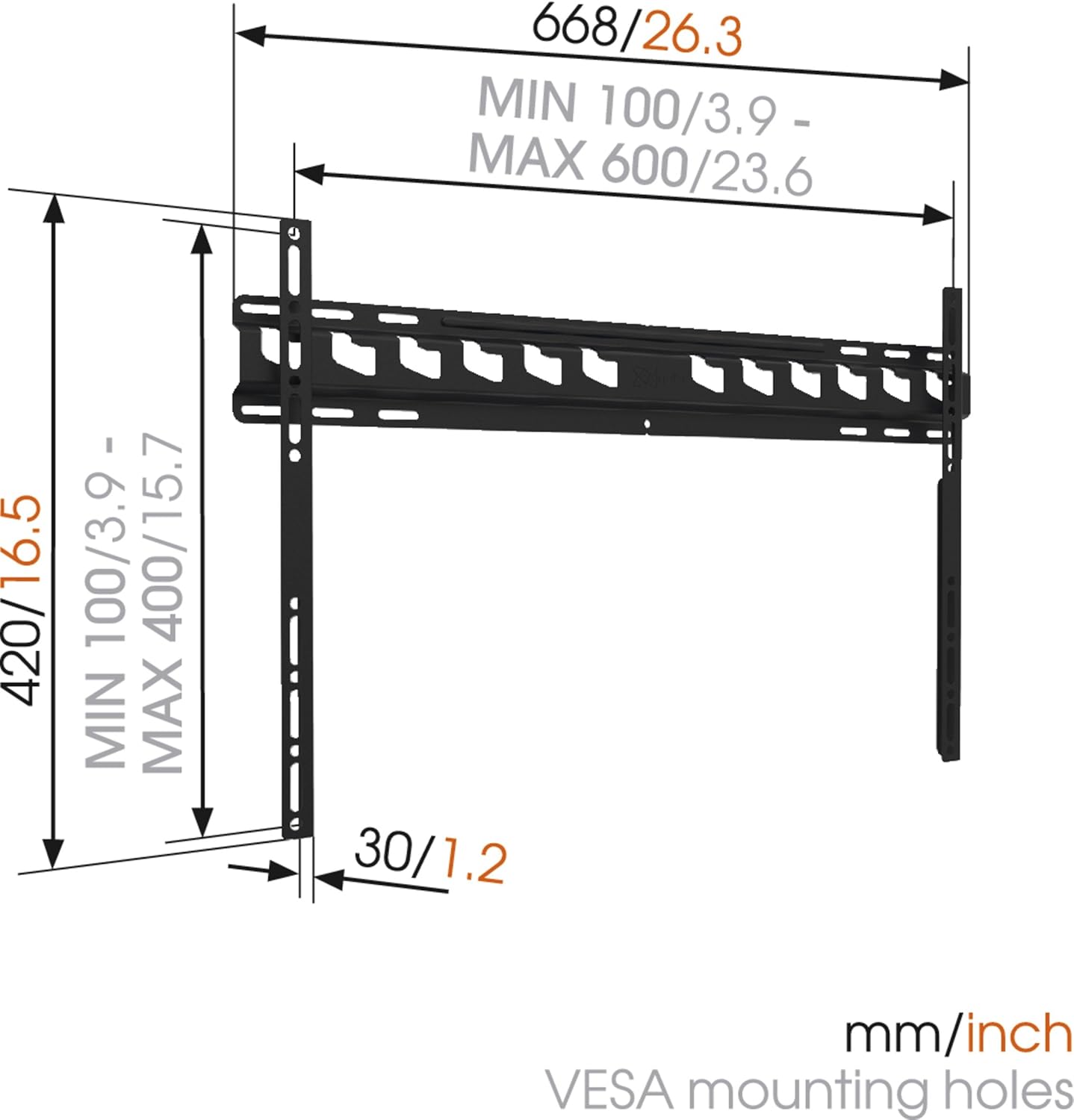
Bildebeskrivelse: A technical diagram illustrating the dimensions of the Vogel's MA4000 wall mount. It shows the overall width (668mm / 26.3 inches), height (420mm / 16.5 inches), and the minimum and maximum VESA mounting hole patterns (100-600mm horizontally, 100-400mm vertically). The distance from the wall is indicated as 30mm (1.2 inches).
Oppsett og installasjon
This section outlines the general steps for installing your Vogel's MA4000 wall mount. Always refer to the detailed graphical instructions included with your product for specific drilling templates and hardware usage.
Nødvendig verktøy (ikke inkludert):
- Bore
- Drill bits appropriate for your wall type (wood, concrete, brick, etc.)
- Stud finder (for wood stud walls)
- Nivå
- Blyant
- Målebånd
- Skrutrekker eller skiftenøkkel
Installasjonstrinn:
- Bestem monteringssted: Choose a suitable location on your wall, ensuring it is structurally sound and free from electrical wires or plumbing. Use a stud finder if mounting to wood studs.
- Merk borehull: Hold the wall plate against the wall at the desired height and use a level to ensure it is straight. Mark the drilling holes with a pencil.
- Bore hull: Drill pilot holes according to the marked positions and your wall type. Insert wall anchors if required.
- Fest veggplate: Secure the wall plate to the wall using the provided screws and washers. Ensure it is firmly attached and level.
- Fest TV-brakettene til TV-en: Attach the two vertical TV interface bars to the back of your television using the appropriate screws, washers, and spacers from the hardware kit. Ensure the brackets are centered and securely fastened to the VESA mounting points.
- Monter TV-en på veggplaten: Carefully lift the television and hook the TV brackets onto the wall plate. Ensure both brackets are properly seated.
- Sikker TV: Engage the safety locking mechanism (if applicable) to prevent the TV from accidentally dislodging from the wall plate.

Bildebeskrivelse: En sideprofffile view of a flat screen television mounted flush against a white wall, demonstrating the slim design and minimal wall distance achieved with the Vogel's MA4000 wall mount. The mount itself is barely visible behind the television.
Operating Instructions (Tilting Function)
The Vogel's MA4000 wall mount allows for a slight tilt to optimize your viewing experience and reduce glare.
- Justere tilt: Gently push or pull the bottom edge of the television to achieve the desired tilt angle. The mount supports a maximum tilt of 12 degrees.
- Securing Tilt: Some models may have a locking mechanism for the tilt. Refer to your product's specific instructions for details on securing the tilt position if available.
Vedlikehold
The Vogel's MA4000 wall mount requires minimal maintenance to ensure long-term performance and safety.
- Regelmessig inspeksjon: Kontroller regelmessig alle skruer og tilkoblinger for å sikre at de sitter godt fast. Stram til om nødvendig.
- Rengjøring: Rengjør festet med en myk, tørr klut. Unngå slipende rengjøringsmidler eller løsemidler som kan skade overflaten.
- Vektgrense: Never exceed the maximum weight capacity of 80 kg (176 lbs).
Feilsøking
| Problem | Mulig årsak | Løsning |
|---|---|---|
| TV-en er ikke i vater etter montering. | Wall plate was not installed level. | Remove TV, adjust wall plate, and remount. Ensure a level is used during installation. |
| TV feels unstable on the mount. | Screws are loose; TV not properly seated; safety lock not engaged. | Ensure all screws are tightened. Verify TV brackets are fully engaged with the wall plate. Engage safety lock. Do not exceed weight capacity. |
| Kan ikke oppnå ønsket helningsvinkel. | Obstruction; maximum tilt angle reached. | Check for cables or other obstructions. The mount has a maximum tilt of 12 degrees. |
Garanti og støtte
For warranty information and customer support, please refer to the documentation included with your product or visit the official Vogel's webnettstedet. Ta vare på kjøpsbeviset for garantikrav.
Vogel's Official Webnettsted: www.vogels.com