
Introduksjon
This manual provides detailed instructions for the setup, operation, maintenance, and troubleshooting of your EZCAP284 HD 1080P Capture HDMI YPbPr Recorder. Please read this manual thoroughly before using the device to ensure proper functionality and to prevent damage.
Sikkerhetsinformasjon
- Ikke utsett enheten for fuktighet, regn eller ekstreme temperaturer.
- Unngå å miste eller utsette enheten for sterke støt.
- Bruk kun den spesifiserte strømadapteren.
- Ikke forsøk å demontere eller modifisere enheten. Dette vil ugyldiggjøre garantien.
- Hold enheten unna barn.
Pakkeinnhold
Bekreft at alle varene er til stede i pakken din:
- EZCAP284 HD 1080P Capture Device
- Fjernkontroll
- Strømadapter (ikke eksplisitt oppført, men underforstått for drift)
- Brukerhåndbok (dette dokumentet)
Produkt overview
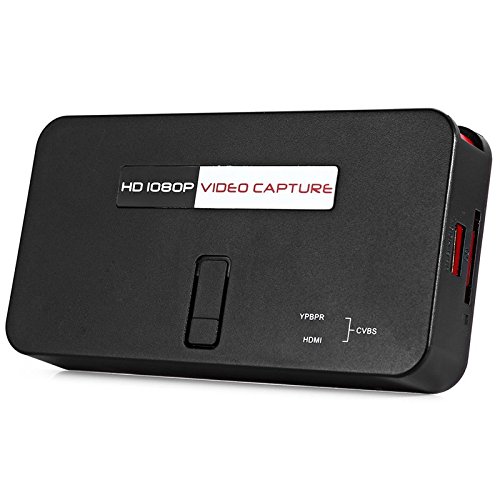
The EZCAP284 is a standalone HD video capture device designed for recording gameplay and other HDMI/YPbPr sources directly to a USB storage device without the need for a PC. It features HDMI pass-through for real-time viewing.

Figur 1: Øverst view of the EZCAP284 device, featuring a prominent record button.

Figur 2: Detaljert view of the input and output ports on the EZCAP284.
Figur 3: Nederst view of the EZCAP284 device, indicating model and certification information.
Oppsett
- Koble til videokilde: Connect your game console (e.g., PS3) or other video source to the HDMI-IN or YPbPr IN port on the EZCAP284 using the appropriate cables.
- Koble til skjermen: Koble TV-en eller skjermen til HDMI UT port on the EZCAP284. This allows you to view your gameplay in real-time while recording.
- Connect USB Storage: Insert a USB flash drive or external hard drive (formatted as FAT32 or NTFS) into the USB 2.0 port on the EZCAP284. This is where your recordings will be saved.
- Koble til strøm: Connect the power adapter to the DC IN port on the EZCAP284 and then plug it into a power outlet. The device will power on.
- Optional Audio Input: If you wish to record live commentary, connect a microphone to the 3.5 mm lydinngang havn.
Bruksanvisning
Recording Gameplay
- Ensure all connections are secure as described in the Setup section.
- Turn on your video source (e.g., game console) and your display.
- Trykk på REC button on the EZCAP284 device or the remote control to start recording. The indicator light will change to show recording is in progress.
- Trykk på REC button again to stop recording. The indicator light will revert to its standby state.
- Your recorded video file will be saved to the connected USB storage device.
Adding Live Commentary
To record your voice along with the gameplay:
- Koble en mikrofon til 3.5 mm lydinngang port before starting your recording.
- The device will automatically mix the microphone audio with the video source audio during recording.
Avspilling
Til view your recorded videos, safely remove the USB storage device from the EZCAP284 and connect it to a computer or a media player that supports the recorded video format.
Vedlikehold
- Rengjøring: Bruk en myk, tørr klut til å rengjøre utsiden av enheten. Ikke bruk flytende rengjøringsmidler eller løsemidler.
- Lagring: Oppbevar enheten på et kjølig og tørt sted, unna direkte sollys og ekstreme temperaturer når den ikke er i bruk.
- Fastvare: Sjekk produsentens webnettstedet regelmessig for eventuelle fastvareoppdateringer som kan forbedre ytelsen eller legge til funksjoner.
Feilsøking
| Problem | Mulig årsak | Løsning |
|---|---|---|
| Ingen videoutgang på skjermen. | Incorrect cable connection; input source not active; display input not selected. | Check HDMI/YPbPr connections. Ensure video source is on. Select correct input on your TV/monitor. |
| Opptaket mislykkes eller stopper uventet. | USB storage full; USB drive not compatible; power interruption. | Ensure USB drive has sufficient space. Try a different USB drive (FAT32/NTFS). Check power connection. |
| No audio in recording. | Audio cables not connected; source audio muted; microphone not connected or faulty. | Verify audio connections from source. Ensure source audio is not muted. Check microphone connection and functionality. |
| Fjernkontrollen virker ikke. | Batteries low or inserted incorrectly; IR sensor blocked. | Replace batteries. Ensure line of sight to the device's IR sensor. |
Spesifikasjoner
| Trekk | Beskrivelse |
|---|---|
| Modell | EZCAP284 |
| Type | Adapter / Video Capture Device |
| Materiale | Kobber (indre komponenter) |
| Grensesnitt | 3.5mm Audio In, HDMI In, HDMI Out, YPbPr In, USB 2.0 |
| Videoopptaksoppløsning | Opptil 1080p |
| Plattformkompatibilitet | PlayStation (and other HDMI/YPbPr sources) |
| Inkluderte komponenter | Fjernkontroll |
| Farge | Svart |
| Dimensjoner (L x B x H) | 14.00 x 7.40 x 2.00 cm (omtrentlig) |
| Vekt | 0.463 kg (omtrentlig pakkevekt) |
Garanti og støtte
For garantiinformasjon og teknisk støtte, se dokumentasjonen som fulgte med kjøpet, eller kontakt selgeren/produsenten direkte. Ta vare på kjøpsbeviset for garantikrav.