
Bios BBYCA10300783
BIOS Weather Indoor/Outdoor Wireless Thermometer & Hygrometer
Model: 312BC (BBYCA10300783)
Brand: Bios
Introduksjon
This manual provides detailed instructions for the setup, operation, and maintenance of your BIOS Weather Indoor/Outdoor Wireless Thermometer & Hygrometer. Please read this manual thoroughly before using the device to ensure proper function and longevity.
The BIOS Weather Indoor/Outdoor Wireless Thermometer & Hygrometer is designed to provide accurate readings of indoor temperature and humidity, as well as outdoor temperature. It features wireless connectivity for the outdoor sensor, a moon phase display, and the capability to connect with up to three sensors (additional sensors sold separately).
- Wireless range up to 30 meters (100 feet) from the outdoor sensor.
- Indoor monitor includes a hygrometer sensor for RH percentage readings (20% to 95%).
- Displays temperature from up to 3 sensors (Model No. 312TX, sold separately).
- Tracks relative indoor humidity and moon phase.
Pakkeinnhold
Når du åpner pakken, må du kontrollere at alle komponentene er til stede og i god stand:
- 1 x Main Display Unit (Indoor Monitor)
- 1 x trådløs utendørssensor
- 1 x bruksanvisning (dette dokumentet)

Image: The main display unit (left) and the wireless outdoor sensor (right). The main unit shows indoor temperature, humidity, moon phase, time, and outdoor temperature. The outdoor sensor displays its current temperature.
Oppsettveiledning
1. Installasjon av batteri
Both the main display unit and the wireless outdoor sensor require batteries (not included).
- Open the battery compartment on the back of both the main display unit and the outdoor sensor.
- Insert the required batteries (e.g., AA or AAA, refer to the battery compartment markings for correct type and polarity).
- Lukk batterirommene godt.
Note:
- It is recommended to insert batteries into the outdoor sensor first, then the main display unit, to facilitate immediate pairing.
- Use high-quality alkaline batteries for optimal performance, especially in cold weather for the outdoor sensor.
2. Sensorplassering
Proper placement of both units is crucial for accurate readings and reliable wireless communication.
- Hovedskjermenhet: Place indoors, away from direct sunlight, heat sources, or drafts that could affect temperature and humidity readings. Ensure it is within 30 meters (100 feet) of the outdoor sensor.
- Trådløs utendørssensor:
- Mount in a shaded area to avoid direct sunlight, which can cause artificially high temperature readings.
- Protect from direct rain and snow. An overhang or a weather-resistant enclosure is ideal.
- Avoid placing near large metal objects, electrical appliances, or thick walls that could interfere with the wireless signal.
- Ensure it is within the 30-meter (100-foot) wireless range of the main unit.
3. Innledende sammenkobling
The main display unit and outdoor sensor should automatically pair upon battery installation. If pairing does not occur:
- Sørg for at begge enhetene har nye batterier.
- Bring the outdoor sensor closer to the main display unit.
- Press the "CH" (Channel) button on the main display unit to cycle through channels or initiate a search for the sensor.
- If issues persist, remove batteries from both units, wait a few minutes, and reinsert them, starting with the outdoor sensor.
Bruksanvisning
1. Vis overview
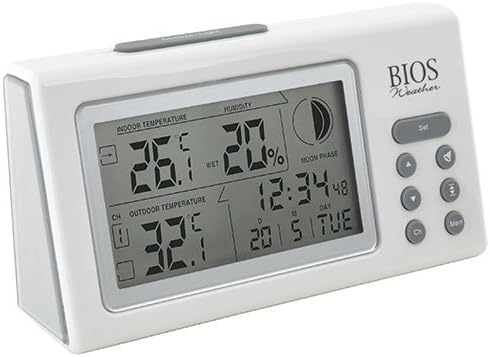
Bilde: Vinklet view of the main display unit, highlighting the various segments for indoor temperature, humidity, moon phase, time, and outdoor temperature.
The main display unit provides the following information:
- Innendørs temperatur: Displays the current temperature inside the room where the main unit is located.
- Fuktighet: Shows the relative indoor humidity percentage.
- Utetemperatur: Displays the temperature from the connected wireless outdoor sensor.
- Tid og dato: Nåværende tid og dato.
- Måne fase: An icon indicating the current moon phase.
- Kanalindikator: Shows which outdoor sensor channel is currently displayed (if multiple sensors are used).
2. Knappefunksjoner
The main display unit features several buttons for configuration and viewing data:
| Knapp | Funksjon |
|---|---|
| SETT | Enters setup mode for time, date, and other settings. Press to confirm settings. |
| ▲ / ▼ (Up/Down) | Adjusts values during setup. Cycles through channels for outdoor sensors. |
| CH (kanal) | Switches between outdoor sensor channels (1, 2, 3) or initiates a search for sensors. |
| MEM (minne) | Displays maximum and minimum temperature/humidity readings. Press again to clear. |
3. Stille inn tid og dato
- Trykk og hold inne SETT knappen til tidsdisplayet blinker.
- Bruk ▲ or ▼ knapper for å justere timen.
- Pressen SETT to confirm and move to the next setting (minutes, year, month, day).
- Gjenta trinn 2 og 3 til alle innstillingene er konfigurert.
- Pressen SETT one last time to exit setup mode.
4. Viewing Max/Min Readings
Trykk på MEM knappen til view the maximum recorded indoor temperature, humidity, and outdoor temperature. Press MEM igjen til view the minimum readings. To clear the memory, press and hold the MEM button while the max/min readings are displayed.
Vedlikehold
1. Rengjøring
To clean the display unit and outdoor sensor, use a soft, damp cloth. Do not use abrasive cleaners, solvents, or harsh chemicals, as these may damage the plastic casing eller elektroniske komponenter.
2. Batteribytte
When the battery indicator appears on the display, it is time to replace the batteries in the respective unit (main unit or outdoor sensor). Always replace all batteries in a unit at the same time with new, high-quality batteries of the correct type.
Viktig:
- Kast gamle batterier på en ansvarlig måte i henhold til lokale forskrifter.
- If the unit will not be used for an extended period, remove the batteries to prevent leakage and damage.
Feilsøking
If you experience issues with your BIOS Weather Thermometer & Hygrometer, please refer to the following common problems and solutions:
| Problem | Mulig årsak/løsning |
|---|---|
| No outdoor temperature reading or "---" displayed. |
|
| Unøyaktige temperatur-/fuktighetsavlesninger. |
|
| Skjermen er svak eller tom. |
|
| Tid/dato er feil. |
|
Produktspesifikasjoner

Image: The main display unit with indicated dimensions: 21.59 cm (length), 7.62 cm (width), and 19.05 cm (height).
| Trekk | Detalj |
|---|---|
| Modellnummer | BBYCA10300783 (312BC) |
| Type | Indoor/Outdoor Thermometer and Hygrometer |
| Materiale | Plast |
| Farge | Hvit |
| Dimensjoner (hovedenhet) | Høyde: 19.05 cm, Bredde: 7.62 cm, Dybde: 21.59 cm |
| Vekt | 0.30 kg |
| Wireless Range | Opptil 30 meter (100 fot) |
| Innendørs fuktighetsområde | 20 % til 95 % RF |
| Sensor Capability | Supports up to 3 outdoor sensors (additional sensors Model No. 312TX, sold separately) |
| Spesielle funksjoner | Wireless connectivity, Multi-Sensor support, Humidity Tracking, Moon Phase Display |
| Strømkilde | Batteridrevet |
Garantiinformasjon
This BIOS Weather product comes with a 1 års garanti på deler fra kjøpsdatoen. Denne garantien dekker material- og produksjonsfeil ved normal bruk. Den dekker ikke skader som følge av feilbruk, ulykke, uautorisert modifikasjon eller feil installasjon.
Ta vare på kjøpsbeviset for garantikrav.
Kundestøtte
If you have any questions, require technical assistance, or need to make a warranty claim, please contact Bios customer support. For more information and resources, you may also visit the official Bios store on Amazon:
Visit the Bios Store on Amazon
Please have your product model number (BBYCA10300783) and purchase date ready when contacting support.