
1. Introduksjon
This manual provides essential information for the safe and efficient operation of your Cotek SP-3000-112 High Frequency Pure Sine Wave Inverter. This device converts 12V DC power from batteries into 120V AC power, suitable for a wide range of electronic appliances. Please read this manual thoroughly before installation and use, and retain it for future reference.
2. Sikkerhetsinformasjon
Unnlatelse av å følge disse sikkerhetsinstruksjonene kan føre til elektrisk støt, brann, alvorlig personskade eller død. Vær alltid forsiktig når du arbeider med elektrisk utstyr.
- Les alle instruksjoner: Before operating the inverter, read all instructions and cautionary markings on the inverter, the batteries, and all appropriate sections of this manual.
- Kvalifisert personell: Installation and servicing should be performed by qualified personnel familiar with batteries and inverters.
- Ventilasjon: Ensure adequate ventilation around the inverter. Do not install in a zero-clearance compartment.
- Unngå vann: Do not expose the inverter to rain, snow, spray, or bilge water.
- Riktig jording: The inverter must be properly grounded.
- Batterisikkerhet: Work near lead-acid batteries is dangerous. Batteries generate explosive gases during normal operation. Ensure proper ventilation and wear appropriate personal protective equipment.
- Koble fra strømmen: Always disconnect the battery supply before performing any maintenance or troubleshooting.
- Riktig voltage: Sørg for at DC-inngangsvoltage matches the inverter's specifications (12VDC for this model).


3. Produktet er overview
3.1 Nøkkelfunksjoner
- Ren sinusbølgeutgang for sensitiv elektronikk.
- Power ON / OFF remote control capability (Green Terminal).
- Input & output fully isolated for enhanced safety.
- Temperature & load controlled cooling fan for optimal performance.
- User-friendly interface with 3-color LED status indicators.
- Multiple protection features: Reverse Polarity (Fuse), Under Voltage / Over Voltage, Output Protection (Short Circuit / Overload / Over Temperature).
- E-13 / UL / CE / FCC approved.
3.2 Omformerkomponenter

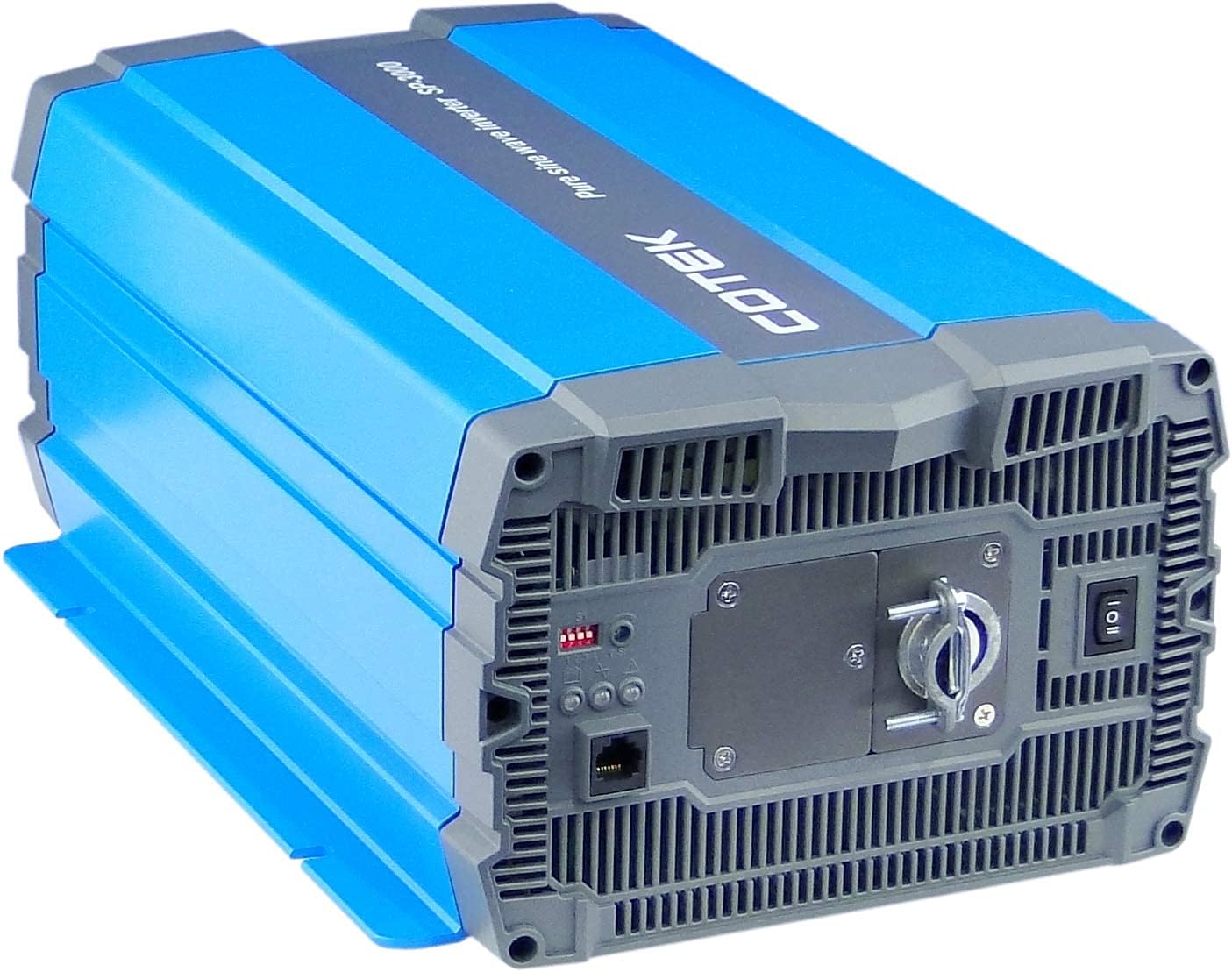
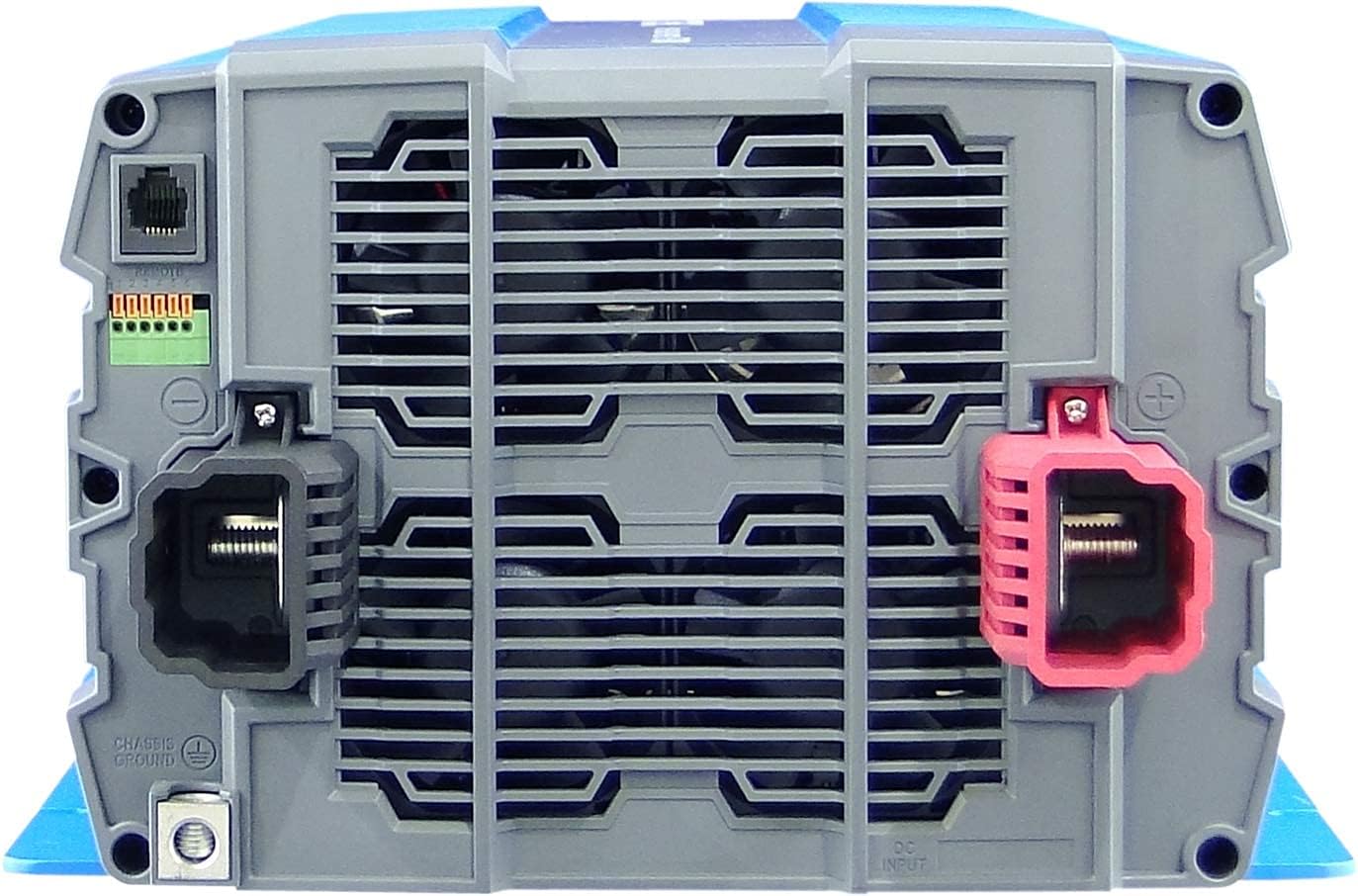
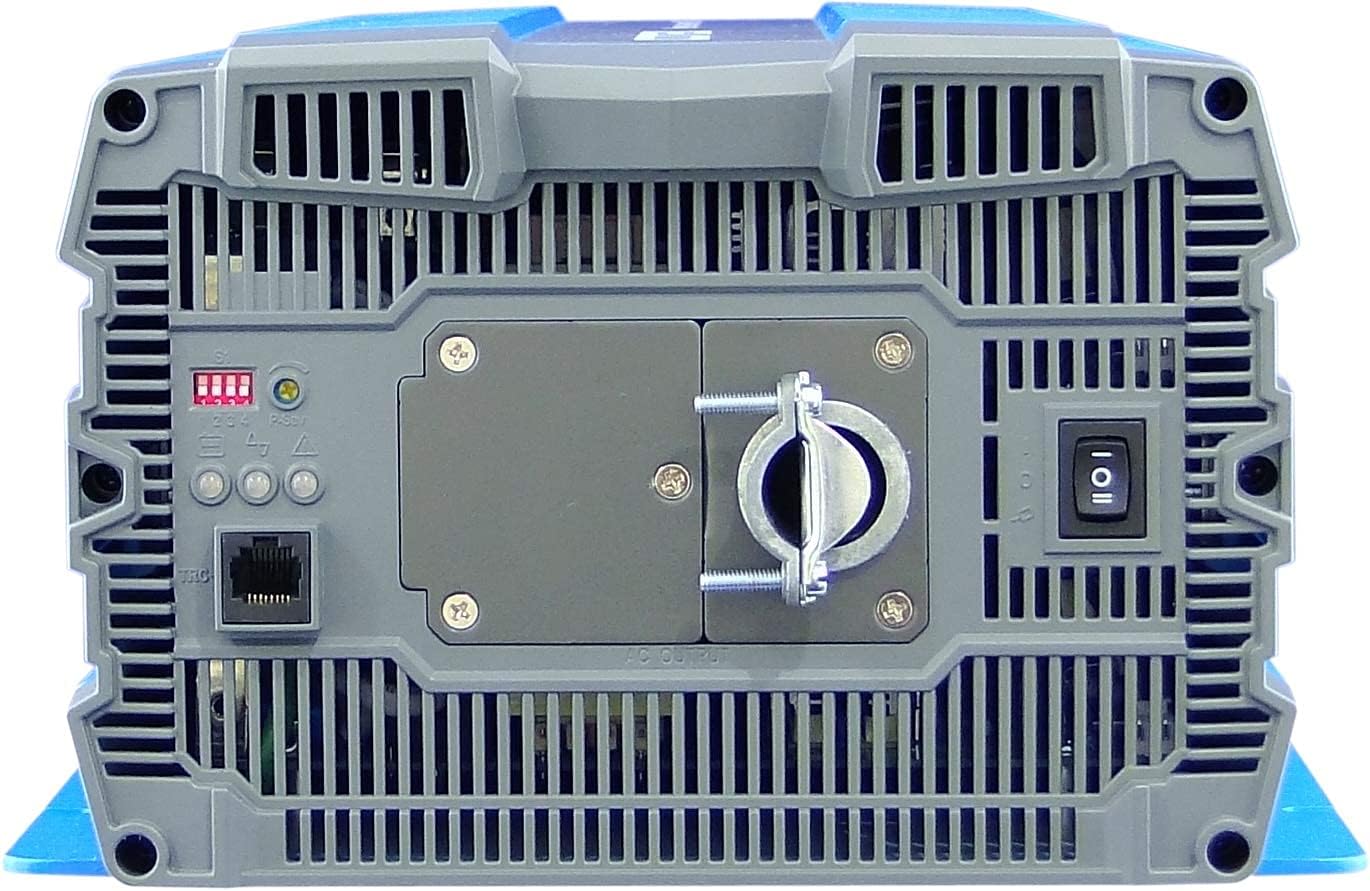
4. Oppsett og installasjon
Proper installation is crucial for the safe and efficient operation of your inverter. Refer to local electrical codes and standards.
4.1 Plassering
- Install the inverter in a dry, well-ventilated area, away from direct sunlight, heat sources, and flammable materials.
- Ensure sufficient clearance around the inverter for proper airflow, especially around the cooling fan vents.
- Mount the inverter securely on a stable, non-combustible surface.
- Avoid areas where dust, moisture, or corrosive fumes are present.
4.2 Kabling
All wiring must comply with applicable electrical codes and be performed by a qualified electrician.
- Jording: Connect the inverter's chassis ground terminal to a reliable earth ground using appropriate gauge wire.
- DC-inngangstilkobling:
- Sørg for at batteribankens volumtage er 12VDC.
- Use appropriately sized cables for the DC input to minimize voltage drop and ensure safety. Refer to cable sizing charts based on current and distance.
- Connect the positive (+) terminal of the battery bank to the red (+) terminal on the inverter.
- Connect the negative (-) terminal of the battery bank to the black (-) terminal on the inverter.
- Install a DC-rated fuse or circuit breaker between the battery bank and the inverter's positive terminal, as close to the battery as possible.
- AC-utgangstilkobling:
- Connect your AC loads to the hardwire AC output terminal block.
- Ensure the total load does not exceed the inverter's continuous power rating (3000W).
- Fjernkontroll (valgfritt): Connect the remote control unit to the RJ45 port or use the green terminal for external ON/OFF control if desired.
5. Bruksanvisning
5.1 Slå på/av
- For å slå på: Ensure all DC and AC connections are secure. Flip the main power switch on the inverter's rear panel to the 'ON' position. The Power LED indicator should illuminate.
- Slik slår du av: Disconnect all AC loads from the inverter. Flip the main power switch to the 'OFF' position.
5.2 LED-indikatorer
The inverter features 3-color LED status indicators on the control panel (refer to Figure 4) to provide operational feedback:
- Grønn LED: Indicates normal operation and power output.
- Gul LED: Indicates a warning condition, such as low battery voltage or high temperature. The inverter may continue to operate but requires attention.
- Rød LED: Indicates a fault condition, such as overload, short circuit, or severe over/under voltage. The inverter will shut down to protect itself and connected devices.
5.3 DIP-bryterinnstillinger
The DIP switches on the control panel allow for customization of certain inverter parameters, such as output voltage, frequency, and power saving mode. Refer to the detailed specifications table (Figure 5) or the product datasheet for specific configurations. Always adjust DIP switches when the inverter is powered off.
6. Vedlikehold
Regelmessig vedlikehold sikrer lang levetid og pålitelig drift av omformeren din.
- Rengjøring: Periodically clean the exterior of the inverter with a dry cloth. Ensure ventilation openings are free from dust and debris. Do not use liquid cleaners.
- Tilkoblinger: Regularly check all electrical connections (DC input, AC output, ground) for tightness and corrosion. Loose connections can cause overheating and poor performance.
- Batteriinspeksjon: Inspect batteries for signs of damage, corrosion, or electrolyte leakage. Ensure battery terminals are clean and tight.
- Miljø: Kontroller at driftsmiljøet holder seg innenfor de angitte temperatur- og fuktighetsområdene.
7. Feilsøking
Denne delen inneholder løsninger på vanlige problemer du kan støte på. Hvis problemet vedvarer, kontakt kundestøtte.
| Problem | Mulig årsak | Løsning |
|---|---|---|
| Omformeren slår seg ikke på. | No DC input power; Loose battery connections; Blown DC fuse/breaker; Inverter switch OFF. | Sjekk batterivoltage; Tighten connections; Replace fuse/reset breaker; Turn inverter switch ON. |
| Ingen vekselstrømutgang. | Overload; Short circuit; Over-temperature shutdown; Low/High DC input voltage. | Reduce AC load; Check for short circuits in wiring/appliances; Allow inverter to cool; Check battery voltage. |
| Yellow LED illuminated. | Lavt batteri voltage warning; High temperature warning. | Recharge batteries; Ensure adequate ventilation, reduce load. |
| Red LED illuminated / Inverter shut down. | Overload; Short circuit; Over-temperature; Under/Over voltage. | Identify and correct the fault (e.g., reduce load, fix short, allow cooling, check battery voltage), then restart the inverter. |
| Cooling fan runs constantly or loudly. | High internal temperature due to heavy load or poor ventilation. | Reduce load; Improve ventilation around the inverter. |
8. Spesifikasjoner
The following table outlines the technical specifications for the Cotek SP-3000 Series Pure Sine Wave Inverter, specifically for the SP-3000-112 model.

| Kategori | Parameter | SP-3000-112 |
|---|---|---|
| Produksjon | AC Voltage | 100 / 110 / 115 / 120VAC ±5 % |
| Nominell effekt | 3000W | |
| Surge Power (1 Sec.) | 6000W | |
| Maksimal utgangseffekt (1 min) | 3450W | |
| Utgangsbølgeform | Pure Sine Wave (THD<3%) | |
| Hyppighet | 50 / 60 Hz ±0.5 % | |
| Inndata | DC Voltage | 12VDC |
| Voltagog rekkevidde | 10.5 ~ 16.5 VDC | |
| Ingen belastningsstrøm | <3.0A@12VDC | |
| Strømsparingsmodus | <0.4A@12VDC | |
| Effektivitet (maks.) | 90 % | |
| Beskyttelse | Input Under - Voltage Beskyttelse | 10.5 ±0.3VDC |
| Input Under - Voltage Alarm | 11.0 ±0.3VDC | |
| Input Under - Voltage Gjenoppretting | 12.0 ±0.3VDC | |
| Input Over - Voltage Beskyttelse | 16.5 ±0.3VDC | |
| Input Over - Voltage Gjenoppretting | 14.5 ±0.3VDC | |
| Utgang overbelastning | Avstengning utgang voltage, start på nytt for å gjenopprette | |
| Utgang kort | Avstengning utgang voltage, start på nytt for å gjenopprette | |
| Miljø | Driftstemp. | -20°C ~ +40°C |
| Lagringstemp. & Luftfuktighet | -30°C ~ +70°C, 10 ~ 95% RH | |
| General | Dimensjoner (B x H x D) | 442 x 214 x 102 mm (17.4 x 8.4 x 4.0 tommer) |
| Vekt | 8.2 kg (18.1 lbs) | |
| Avkjøling | Temperatur- og laststyrt kjølevifte |

9. Garanti og støtte
9.1 Garantiinformasjon
The Cotek SP-3000-112 Pure Sine Wave Inverter comes with a 2 års produsentgarantiDenne garantien dekker material- og produksjonsfeil ved normal bruk. Vennligst ta vare på kjøpsbeviset for garantikrav.
9.2 Kundestøtte
For technical assistance, troubleshooting beyond this manual, or warranty inquiries, please contact Cotek customer support through their official website or your point of purchase. Provide your model number (SP-3000-112) and a detailed description of the issue to expedite service.