
1. Introduksjon
Thank you for choosing the UNIC UC18 Mini Projector. This compact and portable projector is designed to provide a versatile viewing experience for home entertainment, presentations, and more. Featuring an LED lighting system, built-in speaker, and multiple input options, the UC18 offers convenience and functionality. Please read this manual thoroughly to ensure proper setup, operation, and maintenance of your device.
2. Sikkerhetsinformasjon
- Strømforsyning: Bruk kun den spesifiserte strømadapteren. Sørg for at volumettage matches the projector's requirements.
- Ventilasjon: Ikke blokker ventilasjonsåpningene. Sørg for tilstrekkelig plass rundt projektoren for riktig luftstrøm for å forhindre overoppheting.
- Fuktighet: Keep the projector away from water, rain, and excessive humidity. Do not operate with wet hands.
- Rengjøring: Disconnect power before cleaning. Use a soft, dry cloth. Avoid liquid or aerosol cleaners.
- Håndtering: Håndter projektoren forsiktig. Unngå å miste den i bakken eller utsette den for harde støt.
- Øyebeskyttelse: Ikke se direkte inn i projektorlinsen når lamp is on, as the bright light can cause eye strain or damage.
- demontering: Ikke forsøk å demontere eller reparere projektoren selv. Overlat all service til kvalifisert personell.
3. Pakkens innhold
Sjekk innholdet i pakken når du pakker ut den. Kontakt forhandleren din hvis noen av delene mangler eller er skadet.
- UNIC UC18 Mini Projector
- Strømkabel
- 3-i-1 AV-kabel
- Remote Control (requires lithium battery, not included)
- Brukerhåndbok
4. Produktet er overview
Projektoroppsett
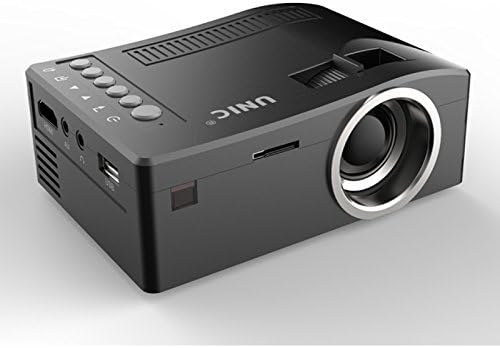
Foran og siden view of the UNIC UC18 Mini Projector, showing the lens, ventilation, and various ports.
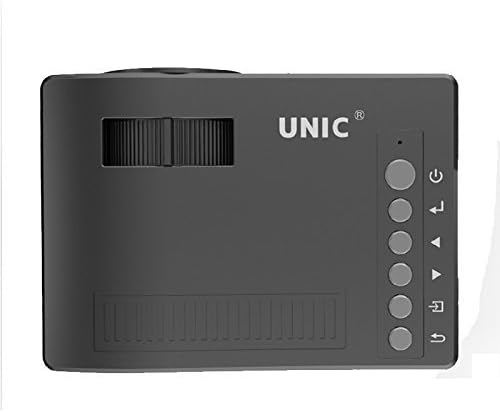
Topp view of the UNIC UC18 Mini Projector, highlighting the control buttons and focus wheel.
Porter og kontroller
The UNIC UC18 Mini Projector features a range of ports and controls for easy connectivity and operation:
- Linse: Projiserer bildet på skjermen.
- Fokushjul: Manual adjustment for image clarity.
- Strømknapp: Slår projektoren på eller av.
- Menyknapp: Gir tilgang til projektorens innstillingsmeny.
- Navigasjonsknapper (opp/ned/venstre/høyre): Brukes til å navigere i menyer og justere innstillinger.
- OK -knapp: Bekrefter valg i menyen.
- Kildeknapp: Selects the input source (HDMI, USB, AV, TF).
- USB-port: Kobler til USB-lagringsenheter for avspilling av medier.
- HDMI-port: Connects to HDMI-enabled devices like laptops, gaming consoles, or media players.
- AV-port: Connects to devices using the included 3-in-1 AV cable.
- TF-kortspor: Inserts a TF (Micro SD) card for media playback.
- 3.5 mm hodetelefonkontakt: Connects external headphones or speakers.
- IR-mottaker: Mottar signaler fra fjernkontrollen.
5. Oppsett
5.1 Strømtilkobling
- Koble strømkabelen til projektorens strøminngang.
- Koble den andre enden av strømkabelen til et passende strømuttak.
- Strømindikatorlampen på projektoren vil lyse.
5.2 Koble til inndataenheter
- HDMI: Connect an HDMI cable from your source device (e.g., laptop, DVD player) to the projector's HDMI port.
- USB: Sett inn en USB-minnepinne i USB-porten.
- AV: Use the provided 3-in-1 AV cable to connect to devices with AV output. Match the yellow, white, and red connectors.
- TF-kort: Insert a TF (Micro SD) card into the TF card slot.
5.3 Positioning the Projector
Place the projector on a stable, flat surface. For optimal image quality, position the projector perpendicular to the projection surface (wall or screen). The throw distance can range from 0.48 to 2.43 meters, producing a picture size from 12 to 66 inches.
6. Bruksanvisning
6.1 Slå på/av
Press the Power button on the projector or the remote control to turn the device on or off.
6.2 Justere fokus
After powering on, if the image appears blurry, rotate the manual focus wheel located near the lens until the image becomes clear and sharp.

Close-up of the manual focus wheel on the UNIC UC18 Mini Projector, located near the lens.
6.3 Valg av inngangskilde
Press the 'Source' button on the projector or remote control. Use the navigation buttons to select your desired input source (HDMI, USB, AV, TF) and press 'OK' to confirm.
6.4 Menynavigasjon
Press the 'Menu' button to access the projector's settings. Use the navigation buttons to browse options and 'OK' to select. Press 'Menu' again to exit.
6.5 Lydutgang
The projector has a built-in speaker. For private listening or connecting to external audio systems, plug headphones or external speakers into the 3.5mm headphone jack.
7. Vedlikehold
7.1 Rengjøring av linsen
Bruk en myk, lofri klut som er spesielt utviklet for optiske linser. Tørk forsiktig av linsen for å fjerne støv eller flekker. Unngå bruk av slipende materialer eller sterke kjemikalier.
7.2 Rengjøring av projektorhuset
Tørk av utsiden av projektoren med en myk, tørr klut. Ikke bruk flytende rengjøringsmidler eller løsemidler.
7.3 Oppbevaring
Når projektoren ikke er i bruk over lengre tid, bør den oppbevares kjølig og tørt, unna direkte sollys og ekstreme temperaturer. Dekk til linsen for å beskytte den mot støv.
8. Feilsøking
| Problem | Mulig årsak | Løsning |
|---|---|---|
| Ingen bilder vises | Power not connected; Incorrect input source; Loose cable connection | Check power cable; Select correct input source; Reconnect cables securely |
| Bildet er uklart | Fokus ikke justert; Projektoren er for nær/langt unna | Adjust the focus wheel; Reposition the projector within recommended throw distance |
| Ingen lyd | Volume too low; Muted; Audio cable not connected; Source device audio issue | Increase volume; Unmute; Check audio cable connection; Verify audio output on source device |
| Fjernkontrollen virker ikke | Batteries low/incorrectly inserted; Obstruction between remote and projector | Replace batteries (lithium battery required); Ensure clear line of sight to IR receiver |
| Projektoren overopphetes | Blocked ventilation; Prolonged use in hot environment | Ensure ventilation openings are clear; Operate in a well-ventilated area; Allow to cool down |
9. Spesifikasjoner
Tekniske spesifikasjoner
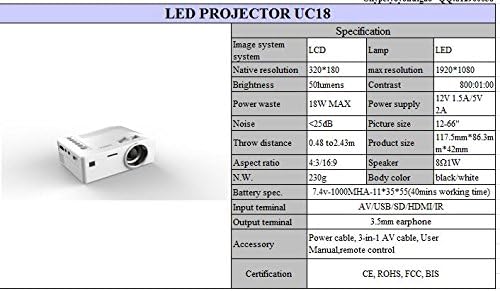
Detailed technical specifications for the UNIC UC18 Mini Projector, including resolution, contrast, and dimensions.
| Trekk | Spesifikasjon |
|---|---|
| Merke | UNIC |
| Modellnavn | UC18 |
| Skjermteknologi | QVGA (LCD) |
| Innfødt oppløsning | 320 x 240 piksler |
| Maksimal støttet oppløsning | 1920 x 1080 pixels (1080P) |
| Lysstyrke | 50 lumen |
| Kontrastforhold | 500:1 |
| Aspektforhold | 16:9 (also supports 4:3) |
| Kasteavstand | 0.48m - 2.43m (1.57ft - 7.97ft) |
| Bildestørrelse | 12–66 tommer |
| Inngangsterminaler | AV, USB, SD (TF), HDMI, IR |
| Utgangsterminal | 3.5mm hodetelefonkontakt |
| Spesielle funksjoner | Innebygd høyttaler, bærbar |
| Strømforbruk | 24 watt (maks 18 W) |
| Strømforsyning | 12V 1.5A / 5V 2A |
| Støynivå | <25dB |
| Produktdimensjoner (L x B x H) | 117.5 mm x 86.3 mm x 42 mm |
| Nettovekt | 230 g |
| Monteringstype | Veggfeste |
| Fjernkontroll | Yes (battery not included) |
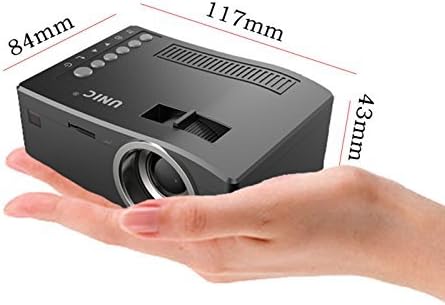
The UNIC UC18 Mini Projector held in a hand, illustrating its compact size and dimensions (117mm x 84mm x 43mm).
10. Garanti og støtte
For garantiinformasjon eller teknisk støtte, se dokumentasjonen som fulgte med ved kjøpstidspunktet, eller kontakt forhandleren din. Ta vare på kjøpsbeviset for eventuelle garantikrav.