
UNIC UC46 IDSP-011
Brukerhåndbok for UNIC UC46 miniprojektor
Model: UC46 IDSP-011
1. Introduksjon
This user manual provides detailed instructions for the operation, setup, and maintenance of your UNIC UC46 Mini Projector. Please read this manual thoroughly before using the product to ensure proper and safe operation. Keep this manual for future reference.
Sikkerhetsinformasjon
- Ikke se direkte inn i projektorlinsen når lamp er på.
- Ensure proper ventilation around the projector to prevent overheating. It is recommended to rest the projector after 4-5 hours of continuous operation.
- Keep the projector away from water or any liquids.
- Bruk kun strømadapteren som følger med projektoren.
- Ikke forsøk å demontere eller reparere projektoren selv. Kontakt kvalifisert servicepersonell for å få hjelp.
- This projector is designed for home entertainment and is not suitable for professional teaching, meetings, or business presentations.
2. Produktfunksjoner
- Bærbar design: Compact and lightweight, ideal for home use, camping, and outdoor parties.
- Høy lysstyrke: 1200 lumens LED lamp for clear and vibrant images.
- Innebygd oppløsning: 800x480 pixels, supporting up to 1920x1080 (Full HD) via input.
- Stor projeksjonsstørrelse: Projects images from 34 to 130 inches.
- Flere tilkoblingsalternativer: HDMI, VGA, USB, AV, SD Card, and IR.
- Trådløs tilkobling: Supports WiFi, Miracast, and DLNA for seamless smartphone integration (iOS, Android, Windows).
- Lang LED-levetid: Lamp levetid på ca. 20,000 timer.
3. Pakkens innhold
Vennligst kryss av i boksen for følgende elementer:
- UNIC UC46 Mini Projector
- Strømkabel
- 3-i-1 AV-kabel
- Fjernkontroll
- Brukerhåndbok (dette dokumentet)
4. Produktet er overview
Familiarize yourself with the different parts and controls of your UNIC UC46 Mini Projector.
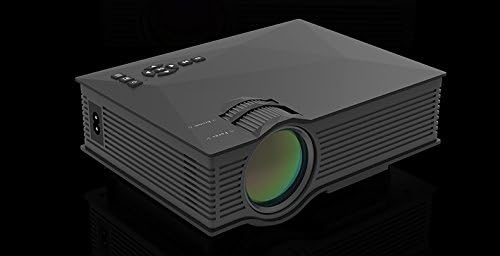
Figur 4.1: Forside og side View of the UNIC UC46 Mini Projector. Shows the main lens, focus wheel, and ventilation grilles.

Figur 4.2: Bak View of the Projector. Displays various input ports including HDMI, USB, AV, SD card slot, and audio output.

Figur 4.3: Øverst View of the Projector. Shows the control panel buttons for navigation, power, and input selection.

Figure 4.4: Lens Focus and Keystone Adjustment Diagram. Illustrates the location of the lens focus and keystone correction wheels, along with a diagram of the remote control functions.
5. Oppsett
5.1 Plassering
Place the projector on a stable, flat surface. Ensure there is adequate space around the projector for ventilation. The projection distance will determine the screen size. Refer to the specifications for recommended distances.
5.2 Strømtilkobling
- Connect the power cable to the projector's AC power input port.
- Plug the other end of the power cable into a standard electrical outlet (100-240V, 50/60Hz).
- Strømindikatorlampen på projektoren vil lyse.
5.3 Første gangs strøm på
- Press the Power button on the projector or the remote control to turn on the device.
- The projector will display the startup screen.
5.4 Bildejustering
- Fokus: Rotate the focus wheel (located near the lens) until the projected image is clear and sharp.
- Keystone-korreksjon: If the image appears trapezoidal, adjust the keystone correction wheel (usually next to the focus wheel) to square the image.
6. Bruksanvisning
6.1 Koble til enheter
The UNIC UC46 projector supports various input sources:
- HDMI: Connect a PC, laptop, DVD player, game console (PS3, PS4), or Smart TV box using an HDMI cable. Select "HDMI" as the input source.
- VGA: Connect a PC or laptop using a VGA cable. Select "VGA" as the input source.
- USB: Sett inn en USB-minnepinne for å spille av medier files (videos, photos, music, text). Select "USB" as the input source and navigate through the files.
- AV: Use the included 3-in-1 AV cable to connect devices with AV output (e.g., older DVD players, VCRs). Select "AV" as the input source.
- SD-kort: Insert an SD card into the slot to play media files. Select "SD" as the input source.
6.2 Trådløs tilkobling (WiFi)
The projector supports WiFi connectivity for screen mirroring from smartphones (iOS, Android, Windows) and DLNA.
- Go to the "WiFi" or "Wireless" menu on the projector.
- Select your WiFi network and enter the password to connect the projector to your home network.
- For screen mirroring (Miracast/AirPlay):
- Ensure your smartphone and the projector are connected to the same WiFi network.
- On your smartphone, enable screen mirroring (e.g., "Screen Mirroring," "Smart View," "AirPlay," "Wireless Display").
- Velg projektoren fra listen over tilgjengelige enheter.
- For DLNA:
- Ensure your smartphone and the projector are connected to the same WiFi network.
- Use a DLNA-compatible app on your smartphone to stream media to the projector.
6.3 Lydutgang
The projector has a built-in speaker. For enhanced audio, you can connect external speakers or a sound system via the 3.5mm audio output port.
7. Vedlikehold
7.1 Rengjøring av linsen
Bruk en myk, lofri klut som er spesielt utviklet for optiske linser til å tørke forsiktig av projektorlinsen. Ikke bruk slipende rengjøringsmidler eller løsemidler.
7.2 Rengjøring av projektorhuset
Tørk av utsiden av projektoren med en myk, tørr klut. For gjenstridig smuss, bruk en lett tørr klut.amp klut kan brukes, etterfulgt av en tørr klut.
7.3 Ventilasjon
Regularly check that the ventilation grilles are not blocked by dust or debris. Use a soft brush or compressed air to clean them if necessary. Proper airflow is crucial for preventing overheating and extending the projector's lifespan.
7.4 Lamp Liv
LED lamp has an estimated life of 20,000 hours. To maximize lamp life, avoid frequent on/off cycles and allow the projector to cool down properly after use.
8. Feilsøking
| Problem | Mulig årsak | Løsning |
|---|---|---|
| Ingen bilde projisert | Power cable not connected; Projector not turned on; Incorrect input source selected; Input device not connected or powered on. | Check power connection; Press power button; Select correct input source (HDMI, VGA, USB, AV, SD); Ensure input device is connected and powered on. |
| Bildet er uklart | Lens out of focus; Incorrect projection distance. | Adjust the focus wheel; Adjust the projection distance. |
| Bildet er trapesformet | Projektoren er ikke vinkelrett på lerretet. | Adjust the keystone correction wheel. |
| Ingen lyd | Volume too low; Muted; External audio device not connected or powered on; Audio format not supported. | Increase volume; Unmute; Check external audio connection; Ensure audio format is supported. |
| Fjernkontrollen virker ikke | Batteries dead or incorrectly inserted; Obstruction between remote and IR receiver. | Replace batteries; Ensure clear line of sight to the projector's IR receiver. |
| Overheating / Shuts down automatically | Blocked ventilation; Prolonged use. | Ensure ventilation grilles are clear; Allow projector to rest after 4-5 hours of use. |
9. Spesifikasjoner

Figure 9.1: Detailed Specifications of the UNIC UC46 Mini Projector.
| Trekk | Detalj |
|---|---|
| Bildesystem | LCD |
| Lamp | LED |
| Innfødt oppløsning | 800 x 480 piksler |
| Støttet maksimal oppløsning | 1920 x 1080 piksler (Full HD) |
| Lysstyrke | 1200 lumen |
| Kontrastforhold | 800:1 |
| Strømforbruk | 50-55 watt |
| Strømforsyning | 100-240V, 50/60Hz |
| Støynivå | <25dB |
| Projeksjonsstørrelse | 34–130 tommer |
| Kasteavstand | 1.07 til 3.8 meter (3.51 til 12.47 fot) |
| Aspektforhold | 4:3 / 16:9 |
| Nettovekt | 1 kg |
| Linse | Multi-layer coated glass lens |
| Inngangsterminaler | USB, SD, HDMI, AV, VGA, IR |
| Utgangsterminal | Hodetelefon, høyttaler |
| Trådløs | 2.4G WiFi |
| Produktdimensjoner | 201 mm x 153 mm x 67.5 mm |
10. Garanti og støtte
For garantiinformasjon og teknisk støtte, se produktemballasjen eller kontakt forhandleren din. Ta vare på kjøpskvitteringen som kjøpsbevis.