
Introduksjon
Takk for kjøpetasing the QUMOX L165U 2.4GHz Wireless Gamepad. This high-quality game controller is designed for use with PC and Android devices, offering a reliable 2.4GHz wireless connection for an enhanced gaming experience. Please read this manual carefully to ensure proper setup and operation of your new gamepad.

Figure 1: QUMOX L165U Gamepad with included USB adapter and OTG connection kit.
Pakkeinnhold
Sørg for at alle varene er til stede i pakken din:
- 1x QUMOX L165U Gamepad
- 1x 2.4GHz USB Wireless Adapter
- 1x OTG Connection Kit (Micro USB to USB-A adapter)
Oppsett
1. Installasjon av batteri
The QUMOX L165U Gamepad is powered by 2 AAA batteries (not included). To install the batteries:
- Locate the battery compartment on the back of the gamepad.
- Skyv opp batteridekselet.
- Sett inn 2 AAA-batterier, og sørg for riktig polaritet (+/-).
- Lukk batteridekselet godt.

Figure 2: Open battery compartment for AAA battery installation.
2. Koble til en PC
- Plug the 2.4GHz USB Wireless Adapter into an available USB port on your PC.
- Turn on the gamepad by pressing the 'START' button. The gamepad will automatically attempt to connect.
- The PC should recognize the gamepad and install necessary drivers automatically.
- If the gamepad does not connect, press the 'MODE' button on the gamepad to cycle through connection modes until it is recognized by your PC.
3. Connecting to an Android Device (with OTG support)
- Connect the OTG Connection Kit to your Android device's Micro USB port.
- Plug the 2.4GHz USB Wireless Adapter into the USB-A end of the OTG Connection Kit.
- Turn on the gamepad by pressing the 'START' button. The gamepad will automatically attempt to connect.
- Your Android device should recognize the gamepad.
- If the gamepad does not connect, press the 'MODE' button on the gamepad to cycle through connection modes until it is recognized by your Android device.
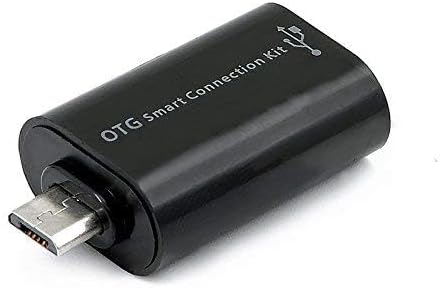
Figure 3: OTG Connection Kit for Android device connectivity.
Bruksanvisning
Once connected, your QUMOX L165U Gamepad is ready for use. The layout is standard for most game controllers.
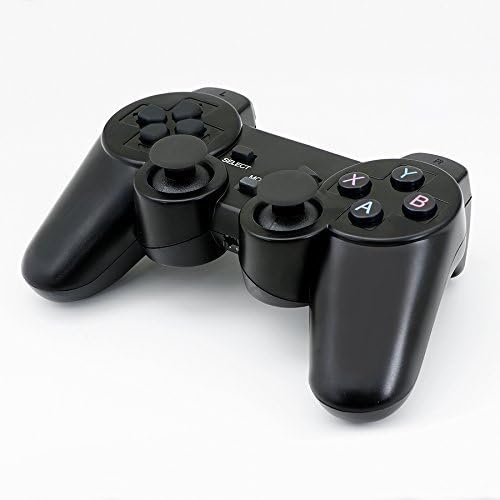
Figur 4: Øverst view of the QUMOX L165U Gamepad, highlighting button layout.
- Retningstast (D-pad): For presis retningsinngang.
- Analoge joysticks: Two analog sticks for 360-degree movement and camera control.
- Handlingsknapper (A, B, X, Y): Standard handlingsknapper for kommandoer i spillet.
- Skulderknapper (L1, R1) og avtrekkere (L2, R2): Located on the top of the gamepad for additional actions.
- SELECT/BACK Button: Typically used for menu navigation or specific in-game functions.
- Start knapp: Used to pause games or confirm selections.
- MODUS-knapp: Cycles through different operating modes (e.g., Android, PC) if automatic detection fails.
Video demonstrasjon
Video 1: A seller-provided overview of a 2-pack wireless controller, demonstrating its features and compatibility. While showing a similar product, it illustrates general wireless controller usage and setup.
Vedlikehold
- Rengjøring: Bruk en myk, tørr klut til å rengjøre gamepaden. Unngå bruk av sterke kjemikalier eller slipende materialer.
- Lagring: Oppbevar gamepaden på et kjølig og tørt sted, unna direkte sollys og ekstreme temperaturer.
- Batteripleie: Remove batteries if the gamepad will not be used for an extended period to prevent leakage.
Feilsøking
| Problem | Mulig årsak | Løsning |
|---|---|---|
| Gamepaden kobler seg ikke til. | Low batteries, incorrect mode, adapter not properly inserted. | Replace batteries. Press the 'MODE' button to cycle through modes. Ensure USB adapter is fully inserted into PC or OTG adapter. |
| Knapper eller joysticks reagerer ikke. | Connection issue, game incompatibility, physical damage. | Reconnect the gamepad. Check game settings for controller support. If issue persists, contact support. |
| Android device does not recognize gamepad. | Android device lacks OTG support, OTG adapter issue. | Verify your Android device supports OTG. Ensure OTG adapter is functioning correctly. |
Spesifikasjoner
| Trekk | Detalj |
|---|---|
| Modellnummer | L165U |
| Tilkoblingsteknologi | 2.4GHz Wireless (via USB Adapter) |
| Kompatible enheter | PC, Android (with OTG support) |
| Strømkilde | 2x AAA batterier |
| Varevekt | 5.3 unser |
| Pakkedimensjoner | 8.07 x 5.63 x 2.95 tommer |
| Farge | Svart |
Garanti og støtte
For warranty information or technical support, please refer to the contact details provided with your purchase or visit the official QUMOX webnettstedet. Ta vare på kjøpsbeviset for eventuelle garantikrav.