
Introduksjon
This manual provides comprehensive instructions for the setup, operation, and maintenance of your UNIVERSAL REMOTE X-8. This remote control is designed to operate up to 200 different audio/video devices from various manufacturers. Please read this manual thoroughly before using your new remote control to ensure proper functionality and to maximize your user experience.
Oppsett
1. Installasjon av batteri
The UNIVERSAL REMOTE X-8 requires batteries for operation. Ensure you use the correct type and insert them with the correct polarity.
- Åpne batterirommet på baksiden av fjernkontrollen.
- Insert the required batteries (e.g., 2 x AAA or 2 x AA, specific type not provided in JSON, but typically standard batteries for universal remotes) according to the polarity indicators (+ and -) inside the compartment.
- Lukk batteridekselet godt.
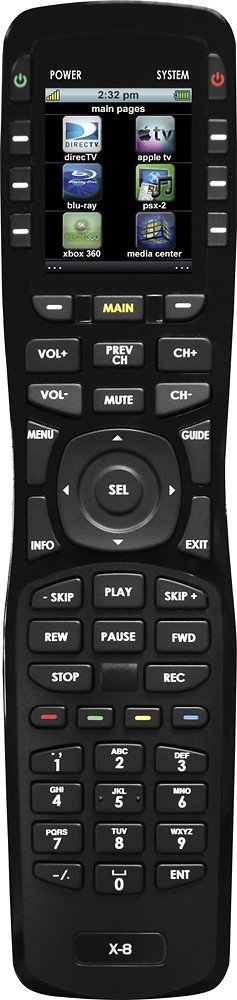
Image: The UNIVERSAL REMOTE X-8, showing the general design. The battery compartment is typically located on the rear of the device.
2. Device Code Programming
To control your devices, you must program the remote with the correct device codes. Refer to the code list provided with your remote (not included in this digital manual) or use the auto-search function.
2.1 Direkte kodeoppføring
- Slå på enheten du vil programmere (f.eks. TV, DVD-spiller).
- Trykk og hold inne SETT button (or equivalent) on the remote until the indicator light illuminates.
- Trykk på enhetsknappen (f.eks. TV, DVD) for the device you are programming. The indicator light will flash.
- Enter the 4-digit code for your device's brand from the code list. The indicator light should turn off.
- Rett fjernkontrollen mot enheten og trykk på MAKT button. If the device turns off, the code is correct. If not, repeat the process with the next code for your brand.
2.2 Auto kodesøk
- Slå på enheten du vil programmere.
- Trykk og hold inne SETT button until the indicator light illuminates.
- Trykk på enhetsknappen (f.eks. TV, DVD) for the device you are programming.
- Trykk på MAKT button repeatedly (or CH+) until your device turns off. This may take several minutes as the remote cycles through codes.
- Når enheten slår seg av, trykker du umiddelbart på SETT button to save the code.
Bruke fjernkontrollen
1. Grunnleggende funksjoner
- Enhetsvalg: Press the corresponding device button (e.g., TV, DVD, CBL) to select the device you wish to control. The indicator light will illuminate briefly.
- Slå på/av: Trykk på MAKT -knappen for å slå den valgte enheten av eller på.
- Volumkontroll: Bruk VOL+ og VOL- knappene for å justere volumet. STUM button will silence the audio.
- Kanalkontroll: Bruk CH+ og CH- buttons to change channels. Enter specific channel numbers using the numeric keypad.
- Inndata/kilde: Trykk på INNGANG or KILDE button to cycle through available input sources on your TV or receiver.
2. Advanced Functions (Macro Programming)
The UNIVERSAL REMOTE X-8 may support macro programming, allowing a sequence of commands to be executed with a single button press. Refer to the full product manual (if available) for detailed instructions on macro setup, as this functionality can vary significantly between universal remote models.
Vedlikehold
1. Rengjøring
- Tørk av fjernkontrollen med en myk, tørr klut.
- For gjenstridig smuss, litt dampRengjør kluten med vann eller et mildt, ikke-slipende rengjøringsmiddel. Ikke spray rengjøringsmiddel direkte på fjernkontrollen.
- Avoid using harsh chemicals, solvents, or abrasive cleaning pads, as these can damage the remote's finish and buttons.
2. Batteribytte
If the remote's indicator light does not illuminate or if commands become unresponsive, the batteries may need replacement. Follow the battery installation steps outlined in the Setup section.
Feilsøking
| Problem | Mulig årsak | Løsning |
|---|---|---|
| Remote does not operate any device. | Batteries are dead or incorrectly inserted. No device is selected. Remote is not programmed. | Check and replace batteries. Press the desired device button (e.g., TV, DVD). Reprogram the remote for your devices. |
| Remote operates some functions but not others. | Incorrect device code programmed. | Try programming a different code for your device's brand from the code list. |
| Indikatorlampen lyser ikke. | Døde batterier. | Bytt batterier. |
| Fjernkontrollen svarer ikke. | Obstruction between remote and device. Remote is too far from device. | Ensure a clear line of sight. Move closer to the device. |
Spesifikasjoner
- Modell: X-8
- Merke: UNIVERSAL FJERN
- Enhetskapasitet: Opptil 200 enheter
- Tilkoblingsteknologi: Infrarød (IR)
- Kompatible enheter: Home Theater components (TVs, DVD/Blu-ray players, Cable/Satellite boxes, Audio Receivers, etc.)
- Kontrolltype: Knappkontroll
- Batteritype: Lithium (Note: Specific battery format for user replacement may vary; refer to physical product for details.)
- ASIN: B01M0EX6TP
- GTIN/UPC: 656787100886
Garanti og støtte
For warranty information and technical support, please refer to the documentation included with your purchase or visit the official UNIVERSAL REMOTE webnettstedet. Ta vare på kjøpsbeviset for garantikrav.
This product is covered by a 30-day money-back guarantee from the seller, as per the product description. For issues beyond this period, please contact the manufacturer directly.