
Introduksjon
This manual provides essential information for the safe and efficient operation of your Amazon Basics 15-Sheet Cross-Cut Paper, CD, and Credit Card Shredder. Please read all instructions carefully before use and retain this manual for future reference.
Sikkerhetsinformasjon
For å sikre sikker drift, følg alltid følgende retningslinjer:
- Hold hender, hår og løse klær unna papirinnføringssporet.
- Ikke spray eller oppbevar aerosolprodukter i eller rundt makuleringsmaskinen.
- Do not shred items like metallic credit cards, adhesive labels, or continuous forms.
- Trekk ut støpselet til makuleringsmaskinen når den ikke er i bruk eller før rengjøring.
- Keep the shredder out of reach of children and pets.
- Ikke bruk makuleringsmaskinen hvis strømledningen er skadet.
Produkt overview
The Amazon Basics 15-Sheet Cross-Cut Shredder is designed for efficient document destruction, offering a high level of security for personal and office use.

Figur 1: Foran view of the Amazon Basics 15-Sheet Cross-Cut Shredder.
Nøkkelfunksjoner:
- 15-arks kapasitet: Shreds up to 15 sheets of 20 lb. paper at once.
- Cross-Cut Shredding: Shreds paper into 3/16" x 1-7/32" (4.7 x 31mm) particles for enhanced security (Security Level P-4).
- Multi-Material Shredding: Also destroys CD/DVDs, credit cards, staples, and small paper clips.
- Utvidet kjøretid: Features a 20-minute continuous run time.
- Sikkerhetsfunksjoner: Includes Overheat / Overload protection.
- LED-indikatorer: Provides visual alerts for Standby, Overheat, Overload, Door open, and Bin full status.
- Large Capacity Bin: Equipped with a 6-gallon pull-out basket for easy waste disposal.
- Mobilitet: Casters included for convenient movement.
- 4-Mode Switch: Auto/Off/Forward/Reverse settings for versatile control.
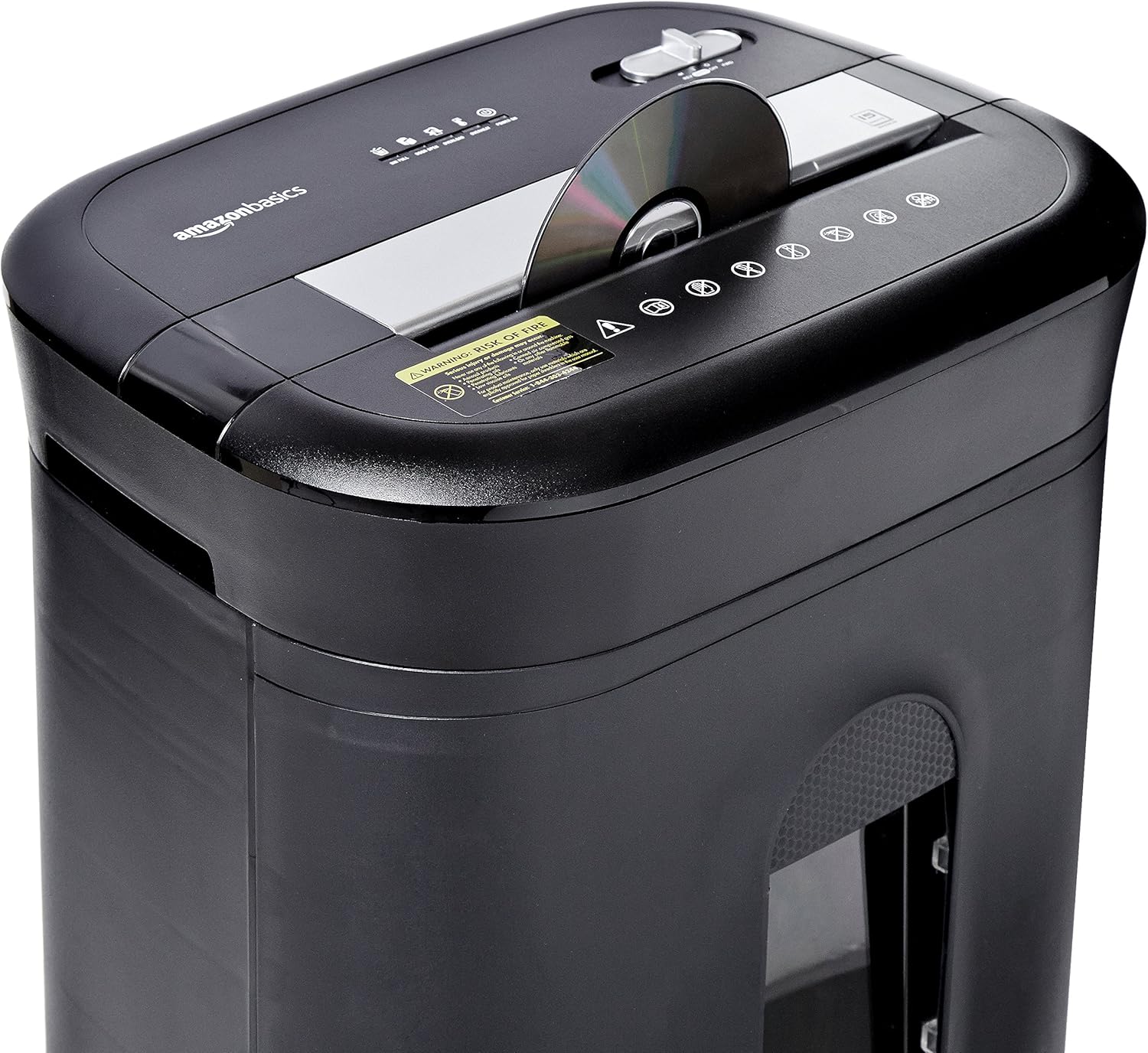
Figure 2: Diagram illustrating key features of the shredder.
Oppsett
Følg disse trinnene for å sette opp makuleringsmaskinen:
- Pakke ut: Fjern forsiktig alle komponenter fra emballasjen.
- Posisjon: Place the shredder on a flat, stable surface. Ensure the waste bin is securely closed and properly inserted into the main unit.
- Koble til strøm: Plug the power cord into a standard 120-volt AC outlet.
Video 1: Official product video demonstrating the setup and basic operation of the Amazon Basics 15-Sheet Cross-Cut Shredder.
Bruksanvisning
Strømmodusbryter:
The shredder features a 4-mode slide switch located on the top panel:
- AUTO (I): Makuleringsmaskinen starter automatisk når papir legges inn og stopper når makuleringen er fullført. Dette er anbefalt innstilling for normal bruk.
- AV (O): Turns off all shredder functions. Always select this setting when emptying the waste bin or when the shredder is not in use.
- FORWARD (▶▶): Manually activates the shredder to continuously cut. Useful for clearing minor jams.
- REVERSE (◀◀): Reverses the shredder mechanism to help clear paper jams.

Figure 3: Close-up of the control panel with the 4-mode switch.
Makulering av papir:
- Ensure the power mode switch is set to AUTO (I).
- Insert up to 15 sheets of paper (20 lb. bond) straight into the paper entry slot. The shredder will automatically start and stop.
- Do not force paper into the shredder. If the shredder struggles, reduce the number of sheets.

Figure 4: Inserting paper into the shredder.
Makulering av kredittkort og CD-er/DVD-er:
- Ensure the power mode switch is set to AUTO (I).
- Insert one credit card or CD/DVD at a time into the dedicated slot.
- The shredder will automatically start and stop.

Figure 5: Shredding a credit card.
Vedlikehold
Emptying the Shredder Bin:
Regularly empty the waste bin to prevent paper jams and ensure optimal performance.
- Set the power mode switch to AV (O) og koble fra makuleringsmaskinen.
- Trekk ut avfallsbeholderen fra forsiden av makuleringsmaskinen.
- Kast det revne materialet.
- Skyv avfallsbeholderen tilbake i makuleringsmaskinen til den klikker sikkert på plass.

Figure 6: Pull-out waste bin for easy emptying.
Smøring av makuleringsmaskinen:
To maintain the shredder's performance and longevity, it is recommended to oil the cutting blades periodically, especially after emptying the bin multiple times or if performance decreases.
- Apply shredder oil (or vegetable oil) in a zigzag pattern across the paper entry slot.
- Set the power mode switch to FORWARD (▶▶) for 2-3 seconds to distribute the oil.
- Then, set the switch to REVERSE (◀◀) i 2-3 sekunder.
- Shred a few sheets of paper to remove any excess oil.
Feilsøking
The shredder is equipped with LED indicators to help diagnose common issues:
- Standby (Green): Indikerer at makuleringsmaskinen er slått på og klar til bruk.
- Overoppheting (rød): The shredder has exceeded its maximum operating temperature. Allow it to cool down for approximately 20-30 minutes before resuming use.
- Overbelastning (rød): Too much material has been inserted. Use the REVERSE (◀◀) function to clear the jam, then reduce the amount of material.
- Dør åpen (rød): The waste bin is not properly closed or inserted. Ensure the bin is fully pushed in.
- Beholder full (rød): Søppelbøtten er full og må tømmes.
| Problem | Mulig årsak | Løsning |
|---|---|---|
| Makuleringsmaskinen slår seg ikke på. | Not plugged in; Power switch in OFF position; Waste bin not properly inserted. | Check power connection; Set switch to AUTO; Re-insert waste bin securely. |
| Makuleringsmaskinen stopper under drift. | Overheat protection activated; Overload protection activated; Bin full. | Allow to cool down; Clear jam using REVERSE, then reduce material; Empty bin. |
| Papirstopp. | Too much paper inserted; Paper inserted at an angle. | Use REVERSE function; Reduce paper quantity; Insert paper straight. |
Spesifikasjoner
| Trekk | Spesifikasjon |
|---|---|
| Merke | Grunnleggende om Amazon |
| Modellnummer | PBH-49976 |
| Makuleringstype | Cross Cut |
| Makuleringsstørrelse | 3/16" x 1-7/32" (4.7 x 31mm) |
| Sikkerhetsnivå | P-4 |
| Arkkapasitet | 15 sheets (20 lb. paper) |
| Kontinuerlig kjøretid | 20 minutter |
| Nedkjølingstid | 30 minutter |
| Kapasitet for avfallsbeholder | 6 liter |
| Varevekt | 22 pund |
| Produktdimensjoner | 11 x 14.4 x 20.9 tommer |
| Farge | Svart |
Garanti og støtte
For warranty information or technical support, please refer to the documentation included with your product or contact Amazon Basics customer service.
Kundeservice: 1-844-303-4244
For ytterligere ressurser, besøk Amazon Basics Store.