
Introduksjon
This manual provides detailed instructions for the safe operation and maintenance of your Contixo F3 RC Drone. Please read this manual thoroughly before operating the drone to ensure proper use and to prevent damage or injury. The Contixo F3 features an integrated 720p WiFi FPV camera, Altitude Hold, 2.4GHz control, 6-Axis Gyro, and One-Key Landing/Take-Off functions.
Sikkerhetsretningslinjer
- Bruk alltid dronen i åpne områder, unna mennesker, dyr og hindringer.
- Do not fly near airports, power lines, or restricted airspace.
- Sørg for at dronens batteri er fulladet før hver flytur.
- Hold fingre og hår unna roterende propeller.
- Voksentilsyn anbefales for brukere under 14 år.
- Ikke bruk i sterk vind eller ugunstige værforhold.
- Turn off the drone and remote control when not in use.
Pakkeinnhold
Kontroller at alle komponentene er tilstede i pakken din:
- Contixo F3 RC Drone
- Fjernkontrollsender
- USB ladekabel
- Reservepropeller
- Propellvakter
- Landingsutstyr
- Skrujern
- Brukerhåndbok

Image: Contixo F3 Drone, remote control, and packaging. This image shows the drone, its remote, and the retail box, indicating the main components included.
Oppsett
1. Drone Battery Installation & Charging
- Finn batterirommet på undersiden av dronen.
- Insert the drone battery, ensuring correct polarity.
- Lukk batterirommet godt.
- Connect the USB charging cable to the drone battery and a USB power source (e.g., computer, USB adapter).
- La batteriet lades helt opp før første gangs bruk. Ladetiden kan variere.
2. Installasjon av fjernkontrollbatteri
- Åpne batteridekselet på baksiden av fjernkontrollen.
- Sett inn 3 AAA-batterier (ikke inkludert) i henhold til polaritetsmarkeringene.
- Lukk batteridekselet.
3. Propeller Guard and Landing Gear Installation
- Attach the propeller guards to each motor arm for protection.
- Securely attach the landing gear to the drone's underside.

Image: Contixo F3 Drone with propeller guards and landing gear installed. This image displays the drone fully assembled with its protective propeller guards and landing gear.
4. Paring av dronen og fjernkontrollen
- Plasser dronen på et plant, plant underlag.
- Turn on the drone. The indicator lights will flash.
- Slå på fjernkontrollen.
- Push the left joystick (throttle) all the way up, then all the way down. The drone lights will become solid, indicating successful pairing.
5. App Download and FPV Setup
- Download the Contixo FPV app from your smartphone's app store (iOS or Android).
- Turn on the drone and connect your smartphone to the drone's Wi-Fi network (usually named "Contixo-F3-XXXX").
- Open the Contixo FPV app to view the live camera feed and access advanced controls.

Image: Contixo F3 Drone, remote control, and a smartphone showing the FPV app interface. This image illustrates the complete setup for FPV flight.
Bruksanvisning
Basic Controls (Remote Control)
- Venstre joystick (gass): Up/Down for altitude, Left/Right for yaw (rotation).
- Høyre styrespak: Up/Down for forward/backward flight, Left/Right for left/right sideward flight.
- One-Key Take-Off/Landing Button: Press once to automatically take off or land.
- Trimknapper: Adjust for stable hovering if the drone drifts.
- Hastighetsmodusknapp: Cycle through different flight speeds (beginner, intermediate, advanced).
- 360° vippeknapp: Press and then move the right joystick in the desired direction to perform a flip.

Image: Contixo F3 Drone remote control. This image shows the layout of the remote control with its various buttons and joysticks.
Avanserte funksjoner
- Høydehold: The drone maintains its current altitude automatically, allowing for easier control and stable video recording.
- FPV (førstepersons View) Camera: Stream live 720p video to your smartphone via the Contixo FPV app. Record videos and capture photos directly to your device.
- G-Sensor Control (via App): Use your smartphone's accelerometer to control the drone's flight direction by tilting your phone.
- Track-Controlled Flight (via App): Draw a flight path on your smartphone screen, and the drone will follow the designated route automatically.
Vedlikehold
- Rengjøring: Bruk en myk, tørr klut til å rengjøre dronehuset og kameralinsen. Unngå å bruke væsker.
- Bytte propell: If a propeller is damaged, carefully remove it and replace it with a new one, ensuring the correct propeller type (A or B) is installed in the corresponding position.
- Batteripleie: Oppbevar batterier på et kjølig og tørt sted. Ikke overlad eller overutlad.
- Lagring: When not in use for extended periods, remove batteries from both the drone and remote control.
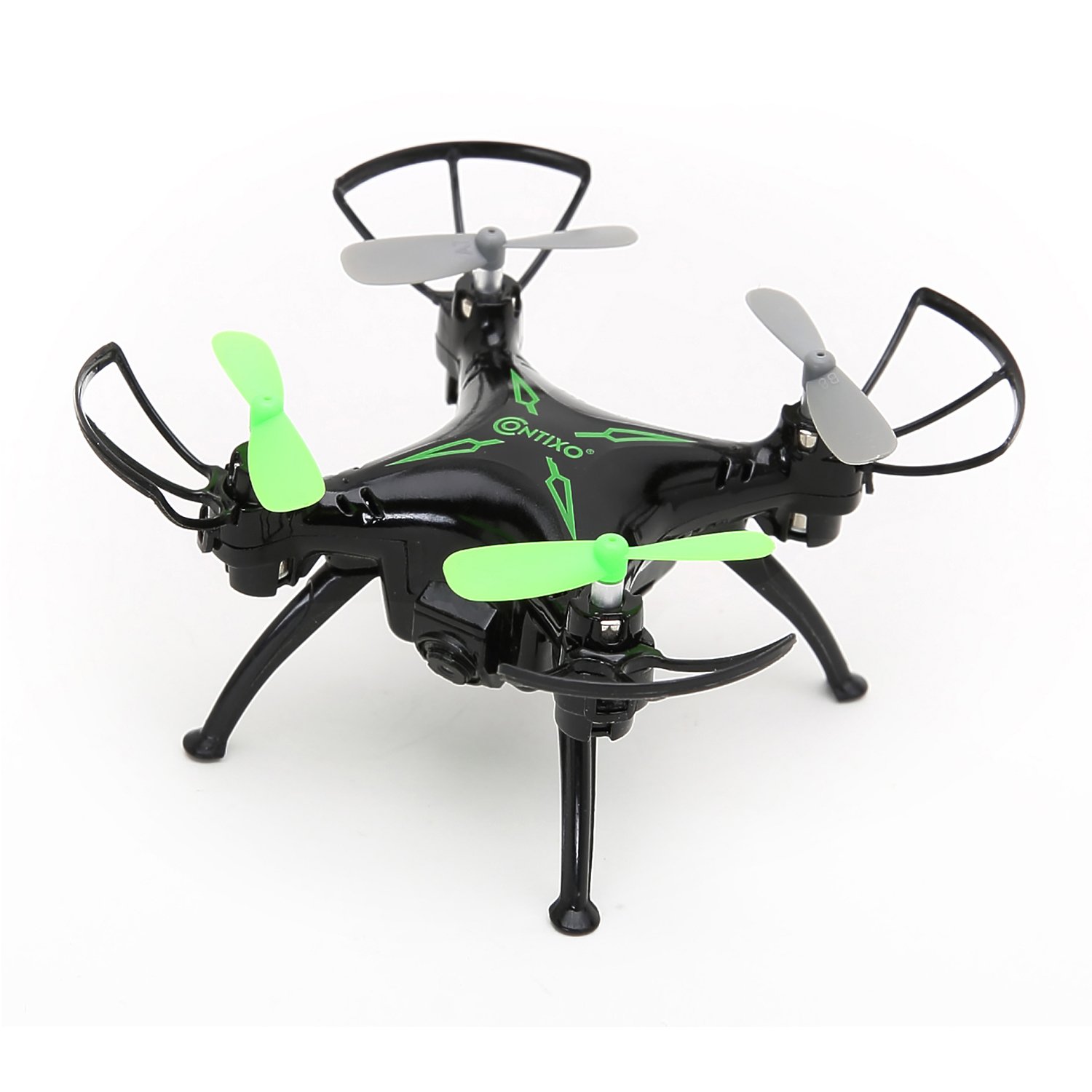
Bilde: Topp view of the Contixo F3 Drone. This image provides a clear view of the drone's propellers and body for maintenance reference.
Feilsøking
| Problem | Mulig årsak | Løsning |
|---|---|---|
| Dronen reagerer ikke på fjernkontrollen. | Ikke paret; lavt batteri; interferens. | Re-pair the drone and remote; charge batteries; move to an open area. |
| Drone driver under flyturen. | Not calibrated; trim settings incorrect. | Calibrate the drone on a flat surface; use trim buttons to adjust. |
| FPV video is choppy or disconnected. | Svakt Wi-Fi-signal; for langt fra dronen; appproblem. | Ensure strong Wi-Fi connection; fly closer to the drone; restart app/drone. |
| Dronen tar ikke av. | Low battery; propellers blocked; not paired. | Charge battery; check for obstructions; re-pair drone. |
Spesifikasjoner
- Merke: Contixo
- Modell: F3
- Farge: Svart
- Ferdighetsnivå: Nybegynner, profesjonell
- Varevekt: 3.52 unser (omtrent 100 gram)
- Batterikapasitet: 220 millioneramp Timer (litiumpolymer)
- Kontrolltype: Fjernkontroll
- Videoutgangsoppløsning: 1280x720 Pixels (720p HD FPV)
- Tilkobling: 2.4GHz (Remote Control), Wi-Fi (FPV)
- Gyroskop: 6-akset gyro
- Spesielle funksjoner: Altitude Hold, One-Key Landing/Take-Off, FPV Camera, G-Sensor Control, Track-Controlled Flight
Garanti og støtte
For warranty information, technical support, or replacement parts, please visit the official Contixo webnettstedet eller kontakt kundeservicen deres. Ta vare på kjøpskvitteringen som kjøpsbevis.
Contixo Official Webnettsted: www.contixo.com
Merk: Spesifikke garantivilkår kan variere avhengig av region og forhandler.