
Introduksjon
This manual provides comprehensive instructions for the setup, operation, and maintenance of your GPX Digital AM/FM Clock Radio, model C224B. Please read this manual thoroughly before using the device to ensure proper functionality and to maximize your user experience. Keep this manual for future reference.
Produkt overview
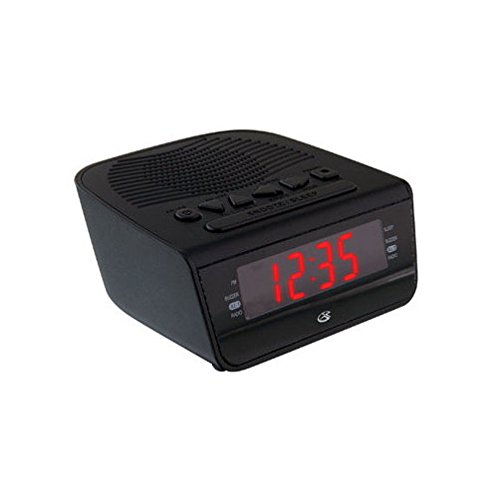
Figur 1: Front view of the GPX Digital AM/FM Clock Radio. This image shows the compact black unit with its digital display and control buttons.
The GPX Digital AM/FM Clock Radio (C224B) is designed for reliable timekeeping and audio entertainment. Key features include a clear multi-display clock, AM/FM radio tuner, dual alarm functionality, and a battery backup option to ensure continuous operation during power interruptions. Its compact and modern design makes it suitable for various indoor settings.
Oppsett
1. Pakker ut
Carefully remove the clock radio from its packaging. Ensure all components are present: the clock radio unit and the power adapter.
2. Strømtilkobling
- Plug the power adapter into the DC input jack located on the back of the clock radio.
- Plug the other end of the power adapter into a standard wall outlet (AC 120V, 60Hz).
- The display will illuminate, indicating the unit is receiving power.
3. Installasjon av batteribackup (valgfritt)
For reservestrøm underveistages, install batteries (not included).
- Finn batterirommet på undersiden av enheten.
- Åpne batteridekselet.
- Insert the required batteries (e.g., 2 x AAA, check unit for specific type) according to the polarity markings (+ and -).
- Lukk batteridekselet godt.
Note: Batteries are for backup only and will not power the display or radio functions continuously. They preserve time and alarm settings during a power interruption.
Bruksanvisning
1. Stille inn tid
- Trykk og hold inne TIDEN SATT knappen til displayet blinker.
- Bruk TIME og MINUTT knappene for å justere tiden.
- Pressen TIDEN SATT igjen for å bekrefte og avslutte tidsinnstillingsmodus.
2. Stille inn alarmer (Alarm 1 og Alarm 2)
This unit features dual alarms, allowing you to set two independent wake-up times.
- Trykk og hold inne ALARM 1 SET (eller ALARM 2 SET) button until the alarm time flashes.
- Bruk TIME og MINUTT buttons to adjust the desired alarm time.
- Pressen ALARM 1 SET (eller ALARM 2 SET) again to confirm the time.
- Immediately after confirming the time, use the ALARM-MODUS button to select the alarm source: SUMMER or RADIO.
- The alarm icon (e.g., AL1 or AL2) will appear on the display, indicating the alarm is active.
To turn off an alarm, press the corresponding ALARM 1 PÅ/AV (eller ALARM 2 PÅ/AV) button. The alarm icon will disappear.
3. AM/FM-radiodrift
- Trykk på RADIO PÅ/AV knappen for å slå på radioen.
- Trykk på BÅND -knappen for å bytte mellom AM- og FM-båndene.
- Bruk TUNE + or STEMME - knappene for å manuelt stille inn på ønsket stasjon.
- To automatically scan for the next available station, press and hold TUNE + or STEMME - i noen sekunder.
- Juster volumet med VOLUM + or VOLUM - knapper.
- For å slå av radioen, trykk på RADIO PÅ/AV knappen igjen.
4. Snooze-funksjon
Når en alarm lyder, trykk på SLUM knappen for å midlertidig slå av alarmen i omtrent 9 minutter. Alarmen vil lyde igjen etter slumreperioden.
5. Dvalefunksjon
Søvnfunksjonen lar radioen spille av i en angitt tid før den slår seg av automatisk.
- Mens radioen spiller, trykk på SOVE -knappen gjentatte ganger for å bla gjennom tilgjengelige søvntider (f.eks. 90, 60, 30, 15 minutter, AV).
- Radioen vil automatisk slå seg av etter den valgte tiden.
Vedlikehold
1. Rengjøring
To clean the unit, wipe the exterior with a soft, slightly damp cloth. Do not use abrasive cleaners or solvents, as these may damage the finish. Ensure the unit is unplugged before cleaning.
2. Batteribytte
If the battery backup function is not working, or if the unit loses time during a power outage, the backup batteries may need replacement. Follow the "Battery Backup Installation" steps in the Setup section to replace them.
Feilsøking
| Problem | Mulig årsak | Løsning |
|---|---|---|
| Enheten slås ikke på. | Strømadapteren er ikke tilkoblet, eller stikkontakten er defekt. | Sørg for at strømadapteren er ordentlig koblet til enheten og en fungerende stikkontakt. Prøv en annen stikkontakt. |
| Alarmen lyder ikke. | Alarm ikke innstilt, alarmvolumet er for lavt, eller alarmen er slått av. | Verify alarm time and source (buzzer/radio) are set correctly. Ensure alarm is activated (icon visible). Increase radio volume if alarm source is radio. |
| Dårlig radiomottak. | Svak signal eller interferens. | Adjust the position of the unit or the antenna (if external). Move away from other electronic devices that may cause interference. |
| Tid/innstillinger tapt etter strømbruddtage. | Reservebatteriene er døde eller ikke installert. | Install fresh backup batteries or replace existing ones. |
Spesifikasjoner
- Modell: C224B
- Strømkilde: AC 120V, 60Hz (main); Battery Powered (backup)
- Visningstype: LED digital skjerm
- Radioband: AM/FM
- Dimensjoner (ca.): 5.12 cm B x 5.12 cm H
- Vekt (ca.): 3 pund
- Farge: Svart
- Materiale: Plast
Garanti og støtte
For warranty information or technical support, please refer to the warranty card included with your product or visit the official GPX website. Do not attempt to repair this unit yourself, as this may void your warranty.
GPX-offisiell Webnettsted: www.gpx.com