
Introduksjon
The MOOER PE100 is a compact, portable multi-effects processor designed for guitarists. It integrates a wide range of effects, amp models, a tuner, and a drum machine into a single unit, offering a versatile tool for practice and performance. This manual provides detailed instructions for setting up, operating, and maintaining your PE100 unit.
Oppsett
1. Utpakking og innledende inspeksjon
Carefully remove the PE100 from its packaging. Inspect the unit for any signs of damage. Ensure all components are present.
2. Slå på enheten
The PE100 can be powered by either a DC 9V power adapter (not included) or two AAA batteries.
- DC 9V Adapter: Connect a compatible DC 9V, 300mA (center negative) power adapter to the DC IN jack on the side of the unit.
- AAA batterier: Open the battery compartment on the bottom of the unit and insert two AAA batteries, observing correct polarity. Note that battery life can be limited, especially with headphones and high volume.
Viktig: To conserve battery power, always disconnect the input cable when the unit is not in use, as the input jack acts as a power switch for battery operation.
3. Koble til utstyret ditt
Refer to the image below for connection points.

Bilde: Side view of the MOOER PE100, illustrating the various input and output jacks including Guitar Input, Output, AUX IN, Phones, and DC 9V power input.
- Gitarinngang: Connect your guitar to the 'INPUT' jack.
- Produksjon: Connect the 'OUTPUT' jack to your amplifier, mikser eller lydgrensesnitt.
- AUX IN: Connect an external audio player (e.g., smartphone, MP3 player) to the 'AUX IN' jack to play along with backing tracks.
- TELEFON: Koble hodetelefoner til 'PHONES'-kontakten for stille øving.
Operating the PE100
1. Kontroller overview
The PE100 features a clear LCD display, two rotary knobs (MODE and VALUE), and several touch-sensitive buttons for navigation and effect control.
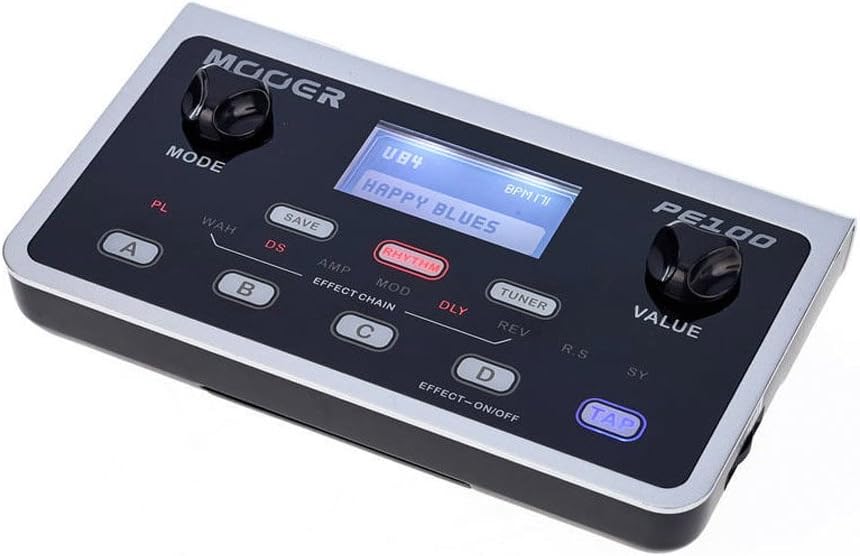
Bilde: Foran view of the MOOER PE100, highlighting the MODE and VALUE control knobs, the central LCD display, and the touch-sensitive buttons for preset selection (A, B, C, D), saving, rhythm, tuner, and tap tempo.
- MODUS-knapp: Used to navigate through different menus and effect categories.
- VALUE Knob: Used to adjust parameters and values within selected menus.
- A, B, C, D Buttons: These are touch-sensitive buttons used to select presets or turn individual effects on/off within a preset.
- LAGRE-knapp: Used to store your customized presets.
- RHYTHM-knapp: Activates the drum machine.
- TUNER-knapp: Activates the built-in tuner.
- TAP-knapp: Used for tap tempo functions, primarily for delay and rhythm.
2. Vis informasjon
The LCD display provides visual feedback on the current preset, effect parameters, and other settings.

Bilde: Nærbilde view of the MOOER PE100's LCD screen, displaying a preset name such as 'U84 HAPPY BLUES' and BPM information, indicating the unit's operational status.
3. Preset Selection and Editing
- Valg av forhåndsinnstillinger: Use the A, B, C, D buttons to quickly switch between four user-defined presets. Rotate the MODE knob to browse through the 99 available presets (factory and user).
- Editing Effects: Rotate the MODE knob to select an effect category (e.g., WAH, DS, AMP, MOD, DLY, REV). Once a category is selected, use the VALUE knob to adjust its parameters.
- Turning Effects On/Off: While an effect category is highlighted, press the D button (EFFECT-ON/OFF) to toggle that specific effect on or off within the current preset.
- Lagre forhåndsinnstillinger: After adjusting parameters, press the SAVE button. Use the MODE knob to select a user preset slot (U01-U99) and the VALUE knob to confirm. Press SAVE again to store.
4. Tuner Function
Press the TUNER button to activate the built-in chromatic tuner. Play a single note on your guitar, and the display will show the note and indicate if it is sharp, flat, or in tune. Press the TUNER button again to exit.
5. Drum Machine and Metronome
Press the RHYTHM button to activate the drum machine. Use the MODE knob to select from over 40 drum patterns. The VALUE knob adjusts the tempo (BPM). Press the TAP button to set the tempo by tapping. Press RHYTHM again to stop.
Vedlikehold
1. Rengjøring
Wipe the unit with a soft, dry cloth. Do not use liquid cleaners or solvents, as they may damage the finish or internal components.
2. Batteribytte
When using batteries, replace them promptly when the low battery indicator appears or when the unit's performance degrades. Ensure correct polarity when inserting new AAA batteries.
3. Oppbevaring
If storing the unit for an extended period, remove the batteries to prevent leakage and potential damage.
Feilsøking
- Ingen lyd:
- Sjekk alle kabeltilkoblinger (gitar, utgang, strøm).
- Sørg for at amplifier or headphones are turned on and volume is up.
- Verify the PE100 is powered on. If using batteries, ensure they are fresh and the input cable is connected.
- Check the master output volume on the PE100.
- Display Not Working / No Backlight:
- This can indicate a power issue. Try a different power source (adapter or fresh batteries).
- Perform a factory reset (refer to the official MOOER support for specific instructions if needed, as this is not detailed in the product description).
- Poor Sound Quality / Unwanted Noise:
- Sørg for at alle kablene er i god stand og skikkelig skjermet.
- Check for ground loops if using multiple powered devices.
- Adjust gain staging within the PE100's effects chain.
- Kort batterilevetid:
- The PE100 uses two AAA batteries, which have limited capacity. Consider using a DC 9V power adapter for extended use.
- Always disconnect the input cable when not in use to prevent battery drain.
Spesifikasjoner
| Vare modellnummer | PE100 |
| Dimensjoner | 1.75 x 4.25 x 2.25 tommer |
| Varevekt | 10.6 unser (0.3 kilo) |
| Strømkilde | Battery Powered (2x AAA), Corded Electric (DC 9V) |
| Voltage | 9 volt |
| Maskinvaregrensesnitt | USB |
| Signalformat | Analog |
| Amp Modeller | 7 |
| Overdrive/Distortion Effects | 10 |
| Auto Wah Effects | 2 |
| Modulasjonseffekter | 11 |
| Forsinkelseseffekter | 5 |
| Reverb effekter | 4 |
| Tuner | Ja |
| Trommemaskin | Yes (40+ patterns) |
Garanti og støtte
For garantiinformasjon, teknisk støtte eller serviceforespørsler, vennligst se den offisielle MOOER-siden website or contact your authorized MOOER dealer. Keep your purchase receipt as proof of purchase.