
1. Introduksjon
Takk for kjøpetasing the iHome IB90 Bluetooth Headphones. These headphones are designed to provide rich, detailed sound with an enhanced bass response, offering a comfortable listening experience with wireless freedom and extended battery life. This manual will guide you through the setup, operation, and maintenance of your new headphones.
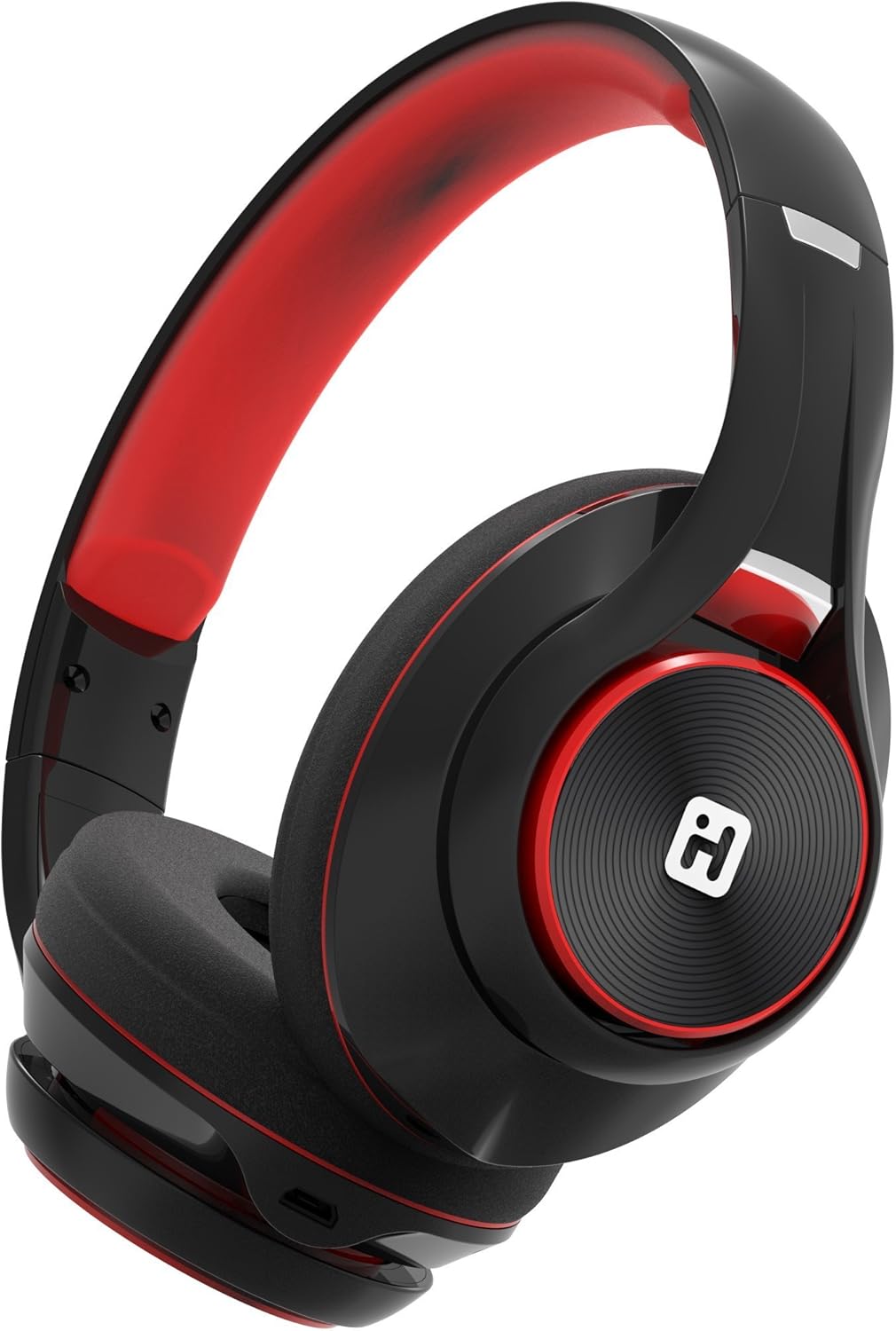
Image: iHome IB90 Bluetooth Headphones, featuring a comfortable over-ear design in black and red.
2. Pakkens innhold
- iHome IB90 Bluetooth Headphones
- Audio Cable (for wired mode)
- USB Charging Cable (not explicitly listed but implied for rechargeable battery)
3. Oppsett
3.1 Lade hodetelefonene
Before initial use, fully charge your headphones. The extra-long life rechargeable battery provides up to 46 hours of continuous use on a single charge. A 10-minute charge can provide 1 hour of play when the battery is low.
- Koble den medfølgende USB-ladekabelen til ladeporten på hodetelefonene.
- Koble den andre enden av USB-kabelen til en strømførende USB-port (f.eks. datamaskin, veggadapter).
- Ladeindikatorlampen lyser under lading og slukker når den er fulladet.
3.2 Bluetooth-paring
Pair your iHome IB90 headphones with your Bluetooth-enabled device to enjoy wireless audio.
- Sørg for at hodetelefonene er ladet og slått av.
- Press and hold the Power/Bluetooth button on the headphones until the indicator light flashes, indicating pairing mode. Voice prompts will confirm Bluetooth connection status.
- Gå til Bluetooth-innstillingene på enheten din (smarttelefon, nettbrett, datamaskin) og aktiver Bluetooth.
- Select "iHome IB90" (or similar model name) from the list of available devices.
- Once connected, a voice prompt will confirm successful pairing, and the indicator light will change.
3.3 Melody Voice Assistant Setup
The iHome IB90 headphones are compatible with the free Melody voice-powered personal music assistant app, allowing you to control music from services like Spotify and iHeartRadio using voice commands. The voice control button on the earcup also works with Siri and Google Assistant.
Image: Melody Personal Music Assistant app logo.
- Download the Melody app from your device's app store (App Store for iOS, Google Play for Android).
- Open the Melody app and follow the on-screen instructions to set up your account and link your preferred music streaming services.
- Ensure your headphones are paired with your device.
- Use the voice control button on the earcup to activate Melody or your device's native voice assistant (Siri/Google Assistant) and issue commands.
Video: This video demonstrates the features and functionality of the Melody voice-powered personal music assistant, highlighting its integration with iHome products for hands-free music control and access to various streaming platforms.
4. Bruk av hodetelefonene
4.1 On-Ear Remote Control
The earcup features convenient controls for managing your audio and calls:
- Spill av/pause: Press the designated button to play or pause audio.
- Valg av spor: Use the track buttons to skip forward or backward.
- Volumkontroll: Juster volumet med volumknappene.
- Besvare/avslutte anrop: The built-in echo-cancelling microphone allows for hands-free phone calls. Press the call button to answer or end a call.

Image: Close-up of the iHome IB90 headphone earcup, illustrating the location of control buttons.
4.2 Stemmekontroll
Activate your personal voice assistant (Melody, Siri, or Google Assistant) by pressing the dedicated voice control button on the earcup. You can then use voice commands to:
- Play specific songs, artists, albums, or playlists.
- Check weather, set reminders, and make phone calls (via Siri/Google Assistant).
- Access music from various streaming platforms (via Melody app).
4.3 Kablet modus
The headphones can also be used in wired mode with the provided audio cable, ensuring you can continue listening even if the battery is depleted. Simply connect the audio cable to the headphone's audio input and your device's audio output.
5. Vedlikehold
5.1 Rengjøring
Slik opprettholder du hodetelefonenes tilstand:
- Tørk av øreklokkene og hodebøylen med en myk, tørr klut.
- Unngå bruk av slipende rengjøringsmidler, løsemidler eller sterke kjemikalier.
- Do not immerse the headphones in water, as they are not water-resistant.
5.2 Oppbevaring
When not in use, store your headphones in a cool, dry place away from direct sunlight and extreme temperatures. The foldable design allows for compact storage and portability.
6. Feilsøking
If you encounter issues with your iHome IB90 headphones, refer to the following common solutions:
- Ingen strøm: Sørg for at hodetelefonene er fulladet. Koble dem til en strømkilde med USB-ladekabelen.
- Kan ikke pares via Bluetooth: Make sure the headphones are in pairing mode (flashing indicator light). Turn off and on your device's Bluetooth, then try re-pairing. Ensure the headphones are not already connected to another device.
- Ingen lyd eller lavt volum: Check the volume levels on both the headphones and your connected device. Ensure the headphones are properly paired. If using wired mode, ensure the audio cable is securely connected.
- Mikrofonen virker ikke: Verify that the headphones are properly connected via Bluetooth. Check your device's audio input settings to ensure the headphone microphone is selected.
- Lydlekkasje: The iHome IB90 headphones feature passive noise isolation, not active noise cancellation (ANC). While they provide an immersive sound environment, they may not completely block out all external noise, and some sound may be audible to others at higher volumes.
7. Spesifikasjoner
| Trekk | Detalj |
|---|---|
| Merke | iHome |
| Modellnummer | IB90v2BRC |
| Øreplassering | Over Ear |
| Formfaktor | On Ear |
| Støykontroll | None (Passive Noise Isolation) |
| Tilkoblingsteknologi | Bluetooth |
| Trådløs teknologi | Bluetooth |
| Kontroll Type | Fjernkontroll |
| Innebygd media | Hodetelefoner |
| Varevekt | 0.5 pund |
| Innkapslingsmateriale | Plast |
| Spesifikke bruksområder for produktet | Reise |
| Vannmotstandsnivå | Ikke vannbestandig |
8. Garanti og støtte
For garantiinformasjon og kundestøtte, se dokumentasjonen som følger med produktet, eller besøk den offisielle iHome-siden webDenne håndboken inneholder ikke spesifikke garantidetaljer.