
1. Introduksjon
Thank you for choosing the EJEAS V8 Bluetooth Intercom Motorcycle Helmet Headset. This device is designed to enhance your riding experience by providing seamless communication and entertainment. It supports full-duplex communication among up to 5 riders simultaneously, with a communication range of up to 1200 meters under ideal conditions. Featuring Bluetooth 3.0, NFC functionality, FM radio, and a convenient remote control, the V8 offers a comprehensive solution for motorcycle communication.
2. Sikkerhetsinformasjon
Please read all safety information carefully before using the EJEAS V8. Improper use may result in damage to the device or personal injury.
- Always prioritize road safety. Do not operate the device in a way that distracts you from riding.
- Adjust volume to a safe level. Excessive volume can damage your hearing and prevent you from hearing important traffic sounds.
- Ikke forsøk å demontere eller modifisere enheten. Dette kan ugyldiggjøre garantien og forårsake skade.
- Keep the device away from extreme temperatures, moisture, and corrosive substances.
- Ensure the device is securely mounted to your helmet and the remote control to your handlebar to prevent detachment during riding.
3. Pakkens innhold
Bekreft at alle varene som er oppført nedenfor er inkludert i pakken din:
- 1 x EJEAS V8 Intercom Unit
- 1 x fjernkontroll
- 1 x Stereo Speaker with Microphone
- 1 x Clamp Monter
- 1 x skrutrekker
- 2 x skruer
- 2 x Velcro Tapes (for speaker/microphone attachment)
- 1 x USB-ladekabel
- 1 x brukerhåndbok

Figure 3.1: Contents of the EJEAS V8 Intercom package. This image displays the main intercom unit, the remote control, the stereo speaker and microphone assembly, mounting clamps, a screwdriver, screws, Velcro tapes, a USB cable, and the user manual, all neatly arranged.
4. Produktet er overview
Familiarize yourself with the main components and controls of your EJEAS V8 intercom system.
4.1. Intercom Unit
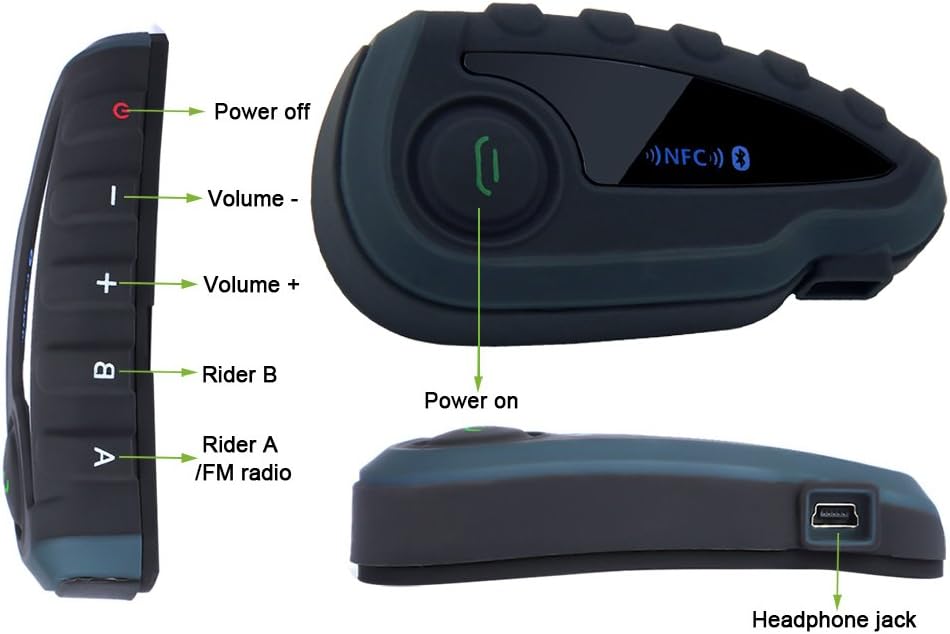
Figur 4.1: Forside og side views of the EJEAS V8 intercom unit with key controls labeled. Labels include Power off, Volume -, Volume +, Rider B, Rider A/FM radio, Power on, and Headphone jack.

Figur 4.2: Eksploderte view of the EJEAS V8 intercom unit connected to its headset and microphone. Labels indicate Rider A, Rider B, Volume+, Phone/Play button, Volume-, Power off button, Headphone jack, Earpiece, and Microphone.
4.2. Fjernkontroll

Figure 4.3: The EJEAS V8 remote control unit, designed for handlebar mounting. It features large, easy-to-press buttons for safe operation while riding.
5. Oppsett
5.1. Lading av enheten
Before first use, fully charge the V8 intercom unit. Connect the supplied USB cable to the charging port on the intercom unit and plug the other end into a USB power adapter (not included) or a computer USB port. The charging indicator will show the charging status. A full charge takes approximately 3 hours.
5.2. Hjelmmontering
- Fest clamp mount to the side of your helmet. Ensure it is securely fastened.
- Slide the V8 intercom unit onto the clamp mount until it clicks into place.
- Position the stereo speakers inside the helmet, aligning them with your ears. Use the provided Velcro tapes to secure them.
- Attach the microphone to the inside of the helmet, ensuring it is close to your mouth for clear audio pickup.
- Connect the speaker and microphone cable to the headphone jack on the V8 intercom unit.

Figure 5.1: The EJEAS V8 intercom unit securely mounted on the side of a motorcycle helmet, ready for use.
5.3. Fjernkontrollinstallasjon
Install the remote control on your motorcycle's handlebar for easy access during rides.
- Åpne clamp på fjernkontrollen.
- Position the remote control on a suitable section of your handlebar.
- Stram clamp to ensure the remote control does not move during operation.

Figure 5.2: The EJEAS V8 remote control unit mounted on a motorcycle handlebar, providing convenient access to controls while riding.
6. Bruksanvisning
6.1. Slå på/av
- Strøm på: Press and hold the Power On button (refer to Figure 4.1) until the indicator light illuminates.
- Slå av: Press and hold the Power Off button (refer to Figure 4.1) until the indicator light turns off.
6.2. Bluetooth-paring
The V8 supports pairing with smartphones, GPS devices, and MP3 players via Bluetooth.
- NFC-paring: If your smartphone supports NFC, enable NFC on your phone and simply tap it against the NFC area on the V8 intercom unit. The devices will automatically recognize and pair.
- Manuell sammenkobling: Put the V8 into pairing mode (refer to specific instructions in the included user manual for button combinations). On your device (phone, GPS, MP3), search for Bluetooth devices and select "EJEAS V8" from the list.
6.3. Intercom-kommunikasjon
The V8 allows full-duplex communication among up to 5 riders. The communication range is up to 1200 meters in open terrain.
- To initiate an intercom call with Rider A, press the 'Rider A' button.
- To initiate an intercom call with Rider B, press the 'Rider B' button.
- Follow the specific pairing instructions in the detailed user manual to connect multiple V8 units for group intercom.
6.4. Telefonsamtaler
Once paired with your smartphone, the V8 supports hands-free calling.
- Svar på anrop: Press the Phone/Play button once.
- Avslutt samtale: Press the Phone/Play button once during a call.
- Avvis anrop: Press and hold the Phone/Play button.
- Ring siste nummer på nytt: Double-press the Phone/Play button.
6.5. Musikkavspilling
Control music from your paired device directly through the V8.
- Spill av/pause: Press the Phone/Play button once.
- Neste spor: Trykk på Volum + -knappen.
- Forrige spor: Trykk på Volum --knappen.
6.6. FM-radio
The V8 features a built-in FM radio.
- Slå FM-radioen av/på: Press the 'Rider A/FM radio' button (refer to Figure 4.1) to toggle the FM radio on or off.
- Skann kanaler: Refer to the detailed user manual for specific button combinations to scan and save FM channels.
6.7. Volumkontroll
Adjust the volume for all audio outputs.
- Øk volumet: Trykk på Volum + -knappen.
- Senk volum: Trykk på Volum --knappen.
7. Vedlikehold
Proper maintenance ensures the longevity and optimal performance of your EJEAS V8 intercom.
- Rengjøring: Bruk en myk, damp cloth to wipe the surface of the intercom unit and remote control. Do not use harsh chemicals or abrasive cleaners.
- Lagring: Når enheten ikke er i bruk over lengre tid, må den oppbevares kjølig og tørt, unna direkte sollys og ekstreme temperaturer.
- Batteripleie: To preserve battery life, avoid fully discharging the battery frequently. Charge the device regularly, even if not in use.
8. Feilsøking
If you encounter issues with your EJEAS V8, refer to the following common troubleshooting steps:
| Problem | Mulig årsak | Løsning |
|---|---|---|
| Enheten slås ikke på | Lavt batteri; Enheten fryser | Charge the device fully; Perform a hard reset (refer to manual for specific steps). |
| Cannot pair with phone/other device | Device not in pairing mode; Bluetooth off on phone; Too many paired devices | Ensure V8 is in pairing mode; Turn on Bluetooth on your phone; Clear previous pairings on V8 and try again. |
| Intercom range is short or connection is unstable | Obstructions; Interference; Too far apart | Ensure line of sight between units; Move away from sources of strong electromagnetic interference; Reduce distance between riders. |
| Ingen lyd fra høyttalerne | Høyttalere ikke tilkoblet; Volumet er for lavt; Defekte høyttalere | Check speaker connection to the V8 unit; Increase volume; Test with another headset if possible. |
Hvis problemet vedvarer etter at du har prøvd disse løsningene, kan du kontakte kundestøtte.
9. Spesifikasjoner
Detailed technical specifications for the EJEAS V8 intercom system:
| Trekk | Spesifikasjon |
|---|---|
| Bluetooth-versjon | 3.0 |
| Batteritype | Litium polymer |
| Batterikapasitet | 530mAh |
| Taletid | Opptil 8 timer |
| Standby-tid | 120 timer |
| Ladetid | Omtrent 3 timer |
| Intercom rekkevidde | Up to 1200 meters (under ideal conditions) |
| Max Riders (Intercom) | 5 riders simultaneously |
| Tilkoblingsteknologi | Bluetooth, NFC |
| Dimensjoner (produkt) | 23 x 4.8 x 16 cm |
| Vekt (produkt) | 0.5 g (likely unit weight, not package) |
| Sertifiseringer | CE, RoHS |
10. Garanti og støtte
EJEAS provides a warranty for the V8 Bluetooth Intercom Motorcycle Helmet Headset.
- Garantiperiode: Dette produktet leveres med 12 måneders garanti fra kjøpsdatoen.
- Garantidekning: Garantien dekker produksjonsfeil og funksjonsfeil ved normal bruk. Den dekker ikke skader forårsaket av feilbruk, ulykker, uautoriserte modifikasjoner eller naturkatastrofer.
- Kundestøtte: If you experience any issues with your product or have questions not covered in this manual, please contact EJEAS customer support through the retailer where you purchased the product or visit the official EJEAS website for contact information. Please have your purchase receipt and product model number ready when contacting support.