
Cambridge Soundworks SWOA3UBLK
Brukerhåndbok for OontZ Angle 3 Ultra Portable Bluetooth-høyttaler
Model: SWOA3UBLK
Introduksjon
Takk for kjøpetasing the OontZ Angle 3 Ultra Portable Bluetooth Speaker by Cambridge Soundworks. This manual provides essential information for setting up, operating, maintaining, and troubleshooting your speaker. Designed for superior sound quality and durability, the OontZ Angle 3 Ultra features a 14-watt output, rich bass, IPX7 waterproofing, and an impressive 30-meter Bluetooth range. Enjoy up to 20 hours of playtime on a single charge.

Image: The OontZ Angle 3 Ultra Portable Bluetooth Speaker, showcasing its sleek black, triangular design with control buttons on one end.
Oppsett
1. Inkluderte varer
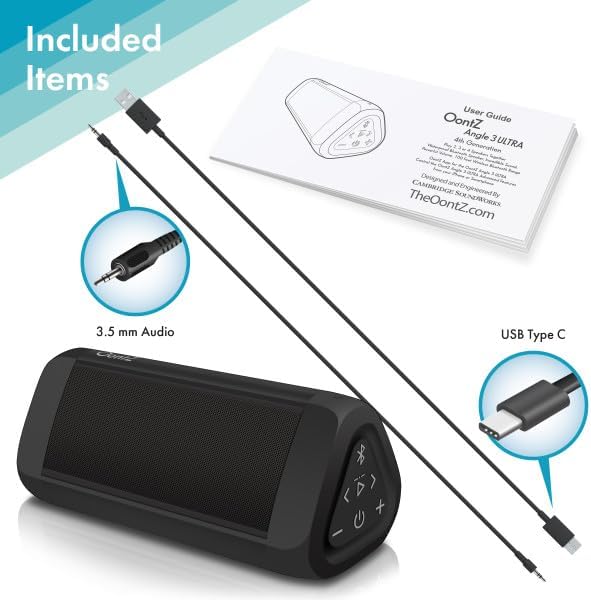
Image: The OontZ Angle 3 Ultra speaker along with its accessories: a Quick Start Guide, a 3.5mm audio cable, and a USB Type-C charging cable.
Før første gangs bruk, sørg for at alle komponentene er til stede:
- OontZ Angle 3 Ultra Bluetooth Speaker
- Quick Start Guide (Full manual available online)
- 3.5 mm lydkabel
- USB Type-C ladekabel
2. Lading av høyttaleren
The speaker comes with a built-in rechargeable Lithium-ion battery. For optimal performance, fully charge the speaker before first use.
- Locate the charging port on the side of the speaker, protected by a rubber flap.
- Connect the supplied USB Type-C charging cable to the speaker's charging port.
- Connect the other end of the USB cable to a USB wall charger (not included) or a computer USB port.
- The charging indicator light will illuminate. A full charge takes approximately 20 hours for the first charge, and subsequent charges will be faster.

Bilde: Et nærbilde view of the speaker's side, showing the 3.5mm AUX input and the USB-C charging port, typically protected by a waterproof flap.
3. Bluetooth-paring
Pair your OontZ Angle 3 Ultra with your Bluetooth-enabled device (smartphone, tablet, laptop).
- Slå på høyttaleren ved å trykke og holde inne strømknappen (⏻) until the indicator light flashes blue.
- Gå til Bluetooth-innstillingene på enheten din og sørg for at Bluetooth er aktivert.
- Look for "OontZ Angle 3 Ultra" in the list of available devices and select it.
- Once paired, the speaker will emit a confirmation tone, and the indicator light will turn solid blue.
4. Tilkobling via AUX-inngang
You can connect non-Bluetooth devices using the 3.5mm audio cable.
- Connect one end of the 3.5mm audio cable to the AUX IN port on the speaker.
- Koble den andre enden til hodetelefonkontakten eller lydutgangen på enheten din.
- Høyttaleren vil automatisk bytte til AUX-modus.
5. Pairing Two Speakers for Stereo Sound (OontZ Dual Wireless Stereo)
Enhance your audio experience by wirelessly connecting two OontZ Angle 3 Ultra speakers for impressive stereo separation.

Image: Two OontZ Angle 3 Ultra speakers positioned to provide stereo sound, with two individuals enjoying music in an outdoor setting.
- Ensure both OontZ Angle 3 Ultra speakers are charged and powered on.
- Disconnect both speakers from any previously paired Bluetooth devices.
- On one speaker (this will be the Left Channel), press and hold the Bluetooth button (Ⓑ) for 3 seconds until you hear a tone.
- On the second speaker (this will be the Right Channel), press and hold the Bluetooth button (Ⓑ) for 3 seconds until you hear a tone.
- The speakers will automatically connect to each other. Once connected, you will hear a confirmation tone, and the indicator lights on both speakers will turn solid blue.
- Now, connect your audio device to the Left Channel speaker via Bluetooth as described in "Bluetooth Pairing" above.
- For video audio, connect your device or TV to the Left Channel speaker using the 3.5mm audio cable.
Bruksanvisning
1. Kontroller overview
| Knapp/indikator | Funksjon |
|---|---|
| ⏻ (Makt) | Trykk og hold inne for å slå på/av. |
| + (Volum opp) | Trykk for å øke volumet. |
| - (Volum ned) | Trykk for å redusere volumet. |
| ▷ (Spill av/pause) | Trykk for å spille av/pause musikk. |
| < (Previous Track) | Trykk for å gå til forrige spor. |
| > (Next Track) | Trykk for å gå til neste spor. |
| Ⓑ (Blåtann) | Press to disconnect current Bluetooth device and enter pairing mode. Press and hold for 3 seconds to initiate OontZ Dual Wireless Stereo pairing. |
| Indikatorlys | Flashes blue for pairing, solid blue for connected, red for charging. |
2. Håndfri samtale
The OontZ Angle 3 Ultra has a built-in microphone for hands-free calls.
- Når du kommer inn, vil musikken settes på pause. Trykk på ▷ knappen for å svare på anropet.
- For å avslutte en samtale, trykk på ▷ knappen igjen.
- For å avvise en samtale, trykk og hold inne ▷ knappen i 2 sekunder.
- To activate Siri or Google Assistant, press and hold the ▷ button for 2 seconds when not on a call.
3. Waterproof Features (IPX7)
The OontZ Angle 3 Ultra is IPX7 certified, meaning it is fully waterproof and can be immersed in water up to 1 meter (3.3 feet) for up to 30 minutes.
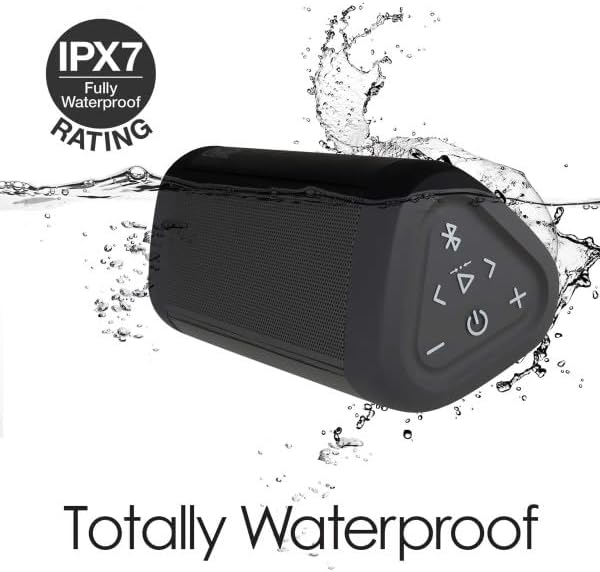
Image: The OontZ Angle 3 Ultra speaker shown partially submerged in water, illustrating its IPX7 waterproof capability.
- Ensure the rubber flap covering the charging and AUX ports is securely closed before exposing the speaker to water.
- Ideal for use by the pool, at the beach, or in the shower.
- Do not expose to salt water or chemicals. Rinse with fresh water after exposure to chlorinated water.
Vedlikehold
1. Rengjøring
For å rengjøre høyttaleren, bruk en myk klutamp klut. Ikke bruk skurende rengjøringsmidler eller løsemidler.
2. Oppbevaring
Oppbevar høyttaleren på et kjølig og tørt sted, unna direkte sollys og ekstreme temperaturer.
3. Batteripleie
Slik forlenger du batterilevetiden:
- Unngå å utlade batteriet helt ofte.
- Lad høyttaleren regelmessig, selv om den ikke er i bruk, for å opprettholde batterilevetiden.
- Do not expose the speaker to temperatures above 60°C (140°F).
Feilsøking
| Problem | Løsning |
|---|---|
| Høyttaleren slår seg ikke på. | Sørg for at batteriet er ladet. Koble høyttaleren til en strømkilde med USB-C-kabelen. |
| Ingen lyd eller lavt volum. | Check the volume level on both the speaker and your connected device. Ensure the speaker is properly paired via Bluetooth or connected via AUX. |
| Kan ikke pares via Bluetooth. | Ensure the speaker is in pairing mode (flashing blue light). Turn off and on Bluetooth on your device. Move the speaker closer to your device. Disconnect from other Bluetooth devices. |
| Lydforvrengning ved høyt volum. | Reduce the volume on the speaker or your connected device. Ensure the audio source is not distorted. |
| OontZ Dual Wireless Stereo not connecting. | Ensure both speakers are disconnected from other Bluetooth devices. Follow the pairing steps carefully, ensuring both speakers are in pairing mode for stereo connection. |
Spesifikasjoner
Key technical specifications for the OontZ Angle 3 Ultra Portable Bluetooth Speaker:
- Modellnummer: SWOA3UBLK
- Dimensjoner (L x B x H): 16.26 x 7.11 x 7.11 cm (6.4 x XUMX x 2.8 inches)
- Vekt: 480 gram (1.06 lbs)
- Høyttalerutgangseffekt: 14 watt
- Bluetooth-versjon: 4.2
- Trådløs rekkevidde: Opptil 30 meter (100 fot) uhindret
- Batterilevetid: Up to 20 hours (at 2/3 volume)
- Vanntetthetsvurdering: IPX7 (Nedsenkbar ned til 1 meter i 30 minutter)
- Tilkobling: Bluetooth, 3.5mm AUX Input, USB-C Charging
- Komponenter inkludert: Speaker, 3.5mm Audio Cable, USB-C Charging Cable, Quick Start Guide

Image: Diagram showing the dimensions of the OontZ Angle 3 Ultra speaker: 6.5 inches in length, 3 inches in width, and 2.75 inches in height.
Garanti og støtte
For detailed warranty information and customer support, please visit the official OontZ website. The full localized manual is also available there.
Offisiell Webnettsted: www.theoontz.com
Cambridge Soundworks is committed to providing high-quality audio products and customer satisfaction.