
Introduksjon
This manual provides detailed instructions for the installation, configuration, and operation of your Multilaser RE085 Dual Band Wireless Router. Please read this guide carefully to ensure proper setup and optimal performance of your device. The RE085 router offers dual-band connectivity (2.4GHz and 5GHz) with speeds up to 750 Mbps, featuring three external antennas and four LAN ports for reliable network access.
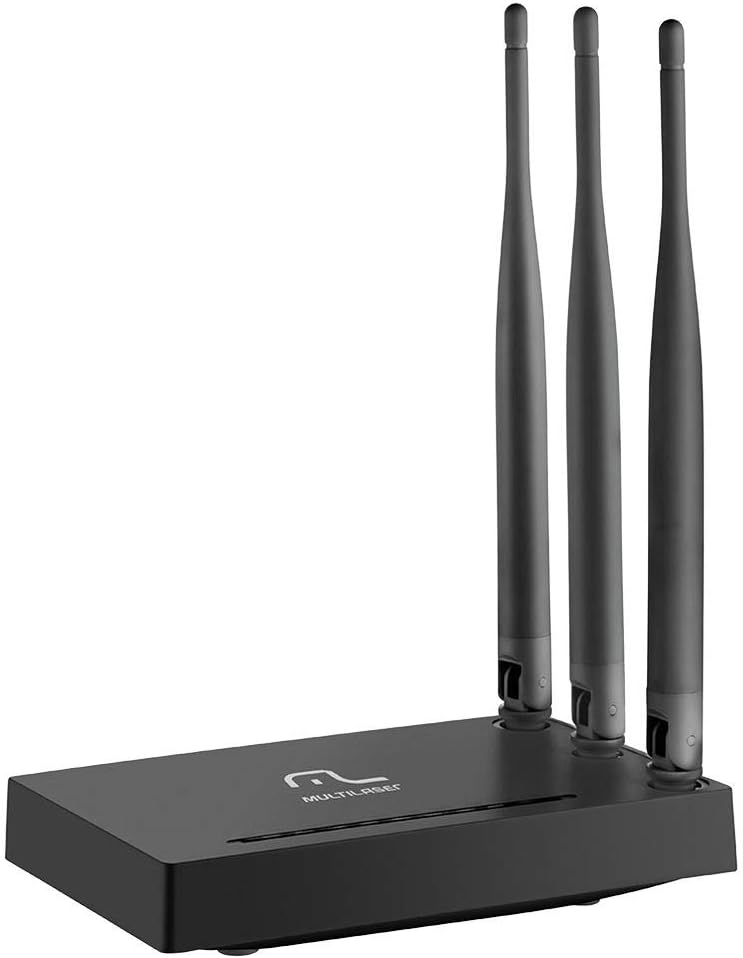
Bilde: Foran view of the Multilaser RE085 router with its three external antennas in an upright position, showcasing dens kompakte design.
Pakkeinnhold
Før du fortsetter med installasjonen, må du kontrollere at pakken inneholder følgende:
- Multilaser RE085 Dual Band Wireless Router
- Strømadapter
- Ethernet-kabel
- Quick Installation Guide (this document serves as a comprehensive guide)
Oppsett og installasjon
Follow these steps to set up your Multilaser RE085 router:
1. Fysisk forbindelse
- Plassering: Place the router in a central location in your home or office, away from obstructions and devices that may cause interference (e.g., cordless phones, microwaves).
- Koble til antennene: Ensure the three external antennas are securely attached and oriented for optimal signal coverage.
- Koble til strøm: Plug the power adapter into the router's power port and then into a wall outlet. The power indicator LED on the router should light up.
- Koble til modemet: Connect one end of the provided Ethernet cable to the WAN port (often colored differently, e.g., blue) on the Multilaser RE085 router. Connect the other end to the LAN port on your modem or existing internet source.
- Koble til enheter (valgfritt): For wired connections, connect one end of an Ethernet cable to any of the four LAN ports (usually yellow) on the router and the other end to your computer or other network device.

Bilde: Bak view of the Multilaser RE085 router, highlighting the WAN port (typically blue) and four yellow LAN ports for wired connections.
2. Innledende konfigurasjon (Web Grensesnitt)
- Koble til ruteren: Connect your computer to the router either via an Ethernet cable (to a LAN port) or wirelessly using the default Wi-Fi network name (SSID) printed on the router's label.
- Adgang Web Nettleser: Åpne a web browser (e.g., Chrome, Firefox, Edge) and type the default IP address of the router into the address bar. This is typically
192.168.0.1or192.168.1.1. Refer to the label on your router for the exact address. - Logg inn: Enter the default username and password. Common defaults are
adminfor both username and password. If these do not work, check the router's label or the quick installation guide. - Kjør oppsettveiviseren: Upon successful login, you will likely be prompted to run a Quick Setup Wizard. Follow the on-screen instructions to configure your internet connection type (e.g., PPPoE, Dynamic IP, Static IP). Your Internet Service Provider (ISP) can provide this information if you are unsure.
- Konfigurer trådløse innstillinger:
- SSID (nettverksnavn): Change the default Wi-Fi network names for both 2.4GHz and 5GHz bands to something unique and easily identifiable.
- Password (Security Key): Set a strong, secure password for each Wi-Fi network. Use a combination of uppercase and lowercase letters, numbers, and symbols.
- Sikkerhetstype: WPA2-PSK (AES) is recommended for optimal security.
- Lagre innstillinger: After configuring, save your settings. The router may restart to apply the changes.
Bruksanvisning
Once your Multilaser RE085 router is set up, you can connect your devices and manage your network.
Koble til enheter
- Trådløse enheter: On your smartphone, tablet, laptop, or smart TV, search for available Wi-Fi networks. Select the SSID you configured (e.g., "MyHomeNetwork_2.4GHz" or "MyHomeNetwork_5GHz") and enter the password.
- Kablede enheter: Connect devices like desktop computers, gaming consoles, or smart TVs directly to the router's LAN ports using Ethernet cables for a stable and fast connection.
Dual Band Functionality
The RE085 supports both 2.4GHz and 5GHz wireless bands:
- 2.4 GHz bånd: Offers wider coverage and better penetration through walls, suitable for general internet use, browsing, and devices further away from the router.
- 5 GHz bånd: Provides faster speeds and lower latency, ideal for bandwidth-intensive activities like online gaming, 4K video streaming, and devices closer to the router.
You can connect different devices to the band that best suits their needs and location.
Gjestenettverk
The router allows you to create up to 6 additional guest networks. This feature provides internet access to guests while isolating them from your main network, enhancing security. Access the router's web interface to configure guest networks.
Repeater funksjon
The Multilaser RE085 can also function as a wireless repeater, extending the range of an existing Wi-Fi network. Refer to the advanced settings in the router's web interface for repeater mode configuration.
Vedlikehold
Regelmessig vedlikehold bidrar til å sikre ruterens levetid og optimal ytelse.
- Vanlig omstart: Periodically restart your router (unplug from power for 10 seconds, then plug back in) to clear its memory and refresh network connections. This can resolve minor performance issues.
- Fastvareoppdateringer: Check the Multilaser official website for firmware updates. Keeping your router's firmware up-to-date can improve performance, add new features, and enhance security. Follow the instructions provided by Multilaser carefully when performing updates.
- Fysisk rengjøring: Keep the router free from dust. Use a soft, dry cloth to gently clean the exterior. Ensure ventilation holes are not blocked.
- Passordbehandling: Change your Wi-Fi and router login passwords periodically for enhanced security.
Feilsøking
If you encounter issues with your Multilaser RE085 router, try the following troubleshooting steps:
Ingen Internett-tilkobling
- Sjekk kabler: Ensure all Ethernet cables (WAN, LAN) are securely connected to both the router and your modem/devices.
- Sjekk modemet: Kontroller at modemet fungerer som det skal og at det har en aktiv internettforbindelse. Prøv å starte modemet på nytt.
- Statuslamper for ruteren: Check the LED indicators on the front of the router. The internet/WAN light should be solid or blinking, indicating an active connection.
- Start ruteren på nytt: Power cycle the router (unplug, wait 10 seconds, plug back in).
- Internettleverandørinnstillinger: Confirm your internet connection type and settings (PPPoE, Dynamic IP, Static IP) in the router's web interface match those provided by your ISP.
Svak eller ustabil Wi-Fi-signal
- Plassering av ruter: Flytt ruteren til et mer sentralt sted, vekk fra vegger, store metallgjenstander og andre elektroniske enheter som kan forårsake forstyrrelser.
- Antenneretning: Adjust the antennas for better signal direction.
- Bandvalg: For devices closer to the router, try connecting to the 5GHz band for faster speeds. For devices further away, the 2.4GHz band might offer better range.
- Interferens: Identify and minimize sources of interference (e.g., microwaves, cordless phones, Bluetooth devices).
- Kanalvalg: I ruterens web interface, try changing the Wi-Fi channel for both 2.4GHz and 5GHz bands to a less congested one.
Forgotten Wi-Fi Password or Router Login Password
- Check Router Label: The default Wi-Fi password and router login credentials are often printed on a label on the bottom or back of the router.
- Tilbakestill til fabrikkinnstillinger: Hvis du ikke får tilgang til ruterens web interface or have forgotten your Wi-Fi password and cannot retrieve it, you may need to perform a factory reset. Locate the small reset button (often recessed) on the router. With the router powered on, use a paperclip or pin to press and hold the reset button for about 10-15 seconds until the lights flash. The router will restart with its factory default settings, including default Wi-Fi names and passwords. You will then need to reconfigure it from scratch.
Spesifikasjoner
Key technical specifications for the Multilaser RE085 Dual Band Wireless Router:
| Trekk | Spesifikasjon |
|---|---|
| Merke | Multilaser |
| Modellnummer | RE085 |
| Standard for trådløs kommunikasjon | 802.11ac |
| Frekvensbåndklasse | Dobbeltbånd (2.4 GHz og 5 GHz) |
| Dataoverføringshastighet | Opptil 750 megabit per sekund |
| Antall porter | 4 (LAN) |
| Tilkoblingsteknologi | Wi-Fi |
| Kompatible enheter | Gaming Consoles, Tablets, Smart Televisions |
| Anbefalt bruk | Hjem |
Garanti og støtte
For warranty information, technical support, or further assistance, please refer to the official Multilaser webnettstedet eller kontakt kundeservicen deres direkte. Ta vare på kjøpskvitteringen som kjøpsbevis for garantikrav.
Multilaser Official Webnettsted: www.multilaser.com.br