
1. Introduksjon
Thank you for choosing the Multilaser TC190 2.4 GHz Wireless Keyboard with Integrated Touchpad. This device is designed to provide a convenient and efficient input solution for your PC or Smart TV, combining a full keyboard with a multi-touch touchpad. This manual will guide you through the setup, operation, and maintenance of your new keyboard to ensure optimal performance and longevity.
2. Sikkerhetsinformasjon
- Hold enheten unna vann, fuktighet og ekstreme temperaturer.
- Ikke forsøk å demontere eller reparere enheten selv. Overlat all service til kvalifisert personell.
- Use only specified batteries (if applicable) and dispose of them properly.
- Unngå å miste eller utsette enheten for sterke støt.
- Rengjør enheten med en myk, tørr klut. Ikke bruk flytende rengjøringsmidler eller aerosoler.
3. Pakkens innhold
Vennligst sjekk innholdet i pakken nøye. Hvis noen deler mangler eller er skadet, kontakt forhandleren din.
- Multilaser TC190 Wireless Keyboard with Integrated Touchpad
- USB 2.4 GHz-mottaker
- Brukerhåndbok
- (Batteries may or may not be included depending on the region/retailer)
4. Produktet er overview
Familiarize yourself with the components of your Multilaser TC190 keyboard.
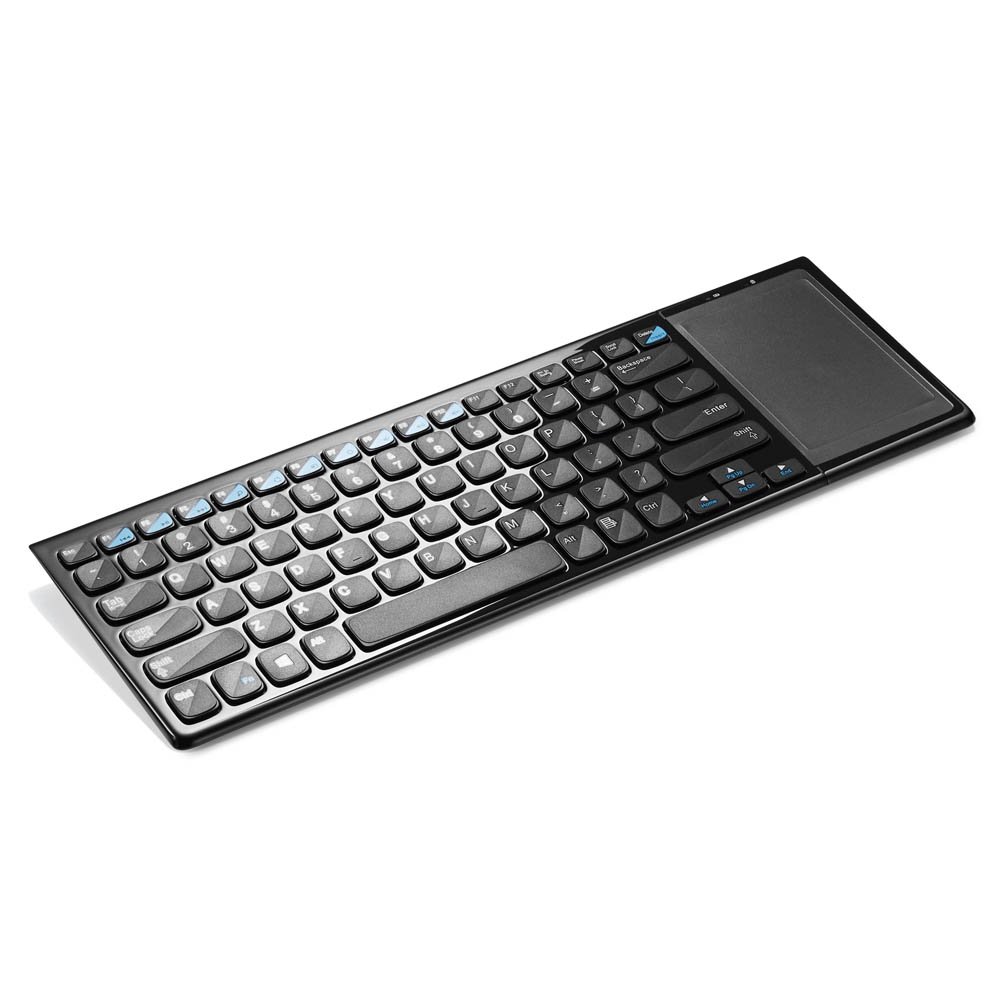
Figur 1: Multilaser TC190 Wireless Keyboard with Integrated Touchpad. This image shows the full keyboard layout with the touchpad located on the right side, indicating its compact design and integrated functionality.
- Tastaturoppsett: Standard QWERTY layout with multimedia function keys.
- Integrert berøringsplate: Located on the right side, supporting multi-touch gestures.
- USB-mottakerrom: Usually located in the battery compartment for storage.
- Strømbryteren: On/Off switch to conserve battery life.
- Batterirom: For inserting required batteries.
5. Oppsett
- Installer batterier: Open the battery compartment cover on the back of the keyboard. Insert the required batteries (typically AAA, refer to the compartment for exact type and polarity). Close the cover securely.
- Koble til USB-mottaker: Locate the USB 2.4 GHz receiver, usually stored inside the battery compartment. Plug the USB receiver into an available USB port on your PC or Smart TV.
- Strøm på: Slide the power switch on the keyboard to the "ON" position.
- Automatisk tilkobling: The keyboard should automatically connect to your device within a few seconds. No additional drivers are typically required for most operating systems.
6. Bruksanvisning
6.1. Tastaturfunksjoner
The Multilaser TC190 features a standard keyboard layout. Use the keys as you would with any conventional keyboard for typing text, navigating menus, and executing commands.
- Funksjonstaster (Fn): Some keys may have secondary functions (e.g., volume control, media playback) accessible by pressing the Fn tasten samtidig med ønsket funksjonstasten.
- Multimedietaster: Dedicated multimedia keys (if present) allow quick access to media controls.
6.2. Pekeplatefunksjoner
The integrated multi-touch touchpad replaces a traditional mouse. Below are common gestures:
- Enkelt fingertrykk: Venstre klikk.
- Tofingertrykk: Høyreklikk.
- Dra med én finger: Flytt markøren.
- Tofingerskrolling: Scroll up or down in documents and web sider.
- Klyp for å zoome: Use two fingers to zoom in or out (application dependent).
7. Vedlikehold
- Rengjøring: Use a soft, lint-free cloth to wipe the keyboard and touchpad. For stubborn dirt, slightly dampen the cloth with water or a mild, non-abrasive cleaner. Ensure no liquid enters the device.
- Batteribytte: When the keyboard's performance degrades or it stops responding, replace the batteries. Always use fresh batteries of the correct type.
- Lagring: If storing the keyboard for an extended period, remove the batteries to prevent leakage. Store in a cool, dry place.
8. Feilsøking
| Problem | Mulig løsning |
|---|---|
| Keyboard is unresponsive. |
|
| Touchpad is not working correctly. |
|
| Connection issues / Lag. |
|
9. Spesifikasjoner
| Trekk | Detalj |
|---|---|
| Merke | Multilaser |
| Modell | TC190 |
| Tilkobling | 2.4 GHz trådløs (USB-mottaker) |
| Kompatible enheter | PC, Smart TV |
| Tastaturbeskrivelse | Multimedia |
| Spesielle funksjoner | Wireless, Integrated Multi-touch Touchpad |
| Strømkilde | Batteridrevet |
| Varevekt | 800 gram |
10. Garanti og støtte
Multilaser products are manufactured to high-quality standards. For information regarding warranty terms and conditions, please refer to the warranty card included with your product or visit the official Multilaser website. For technical support or customer service, please contact Multilaser customer support through their official channels.
Offisiell Webnettsted: www.multilaser.com.br (Sjekk din region webstedet)