
Introduksjon
Takk for kjøpetasing the Klip Xtreme BluWave II KWS-616 2.1 Channel Stereo System. This system is designed to provide a rich audio experience for music, games, and movies. It features Bluetooth connectivity, USB and SD card playback, and an auxiliary input for versatile audio sources. Please read this manual thoroughly before operating the device to ensure proper use and to maximize your listening experience.
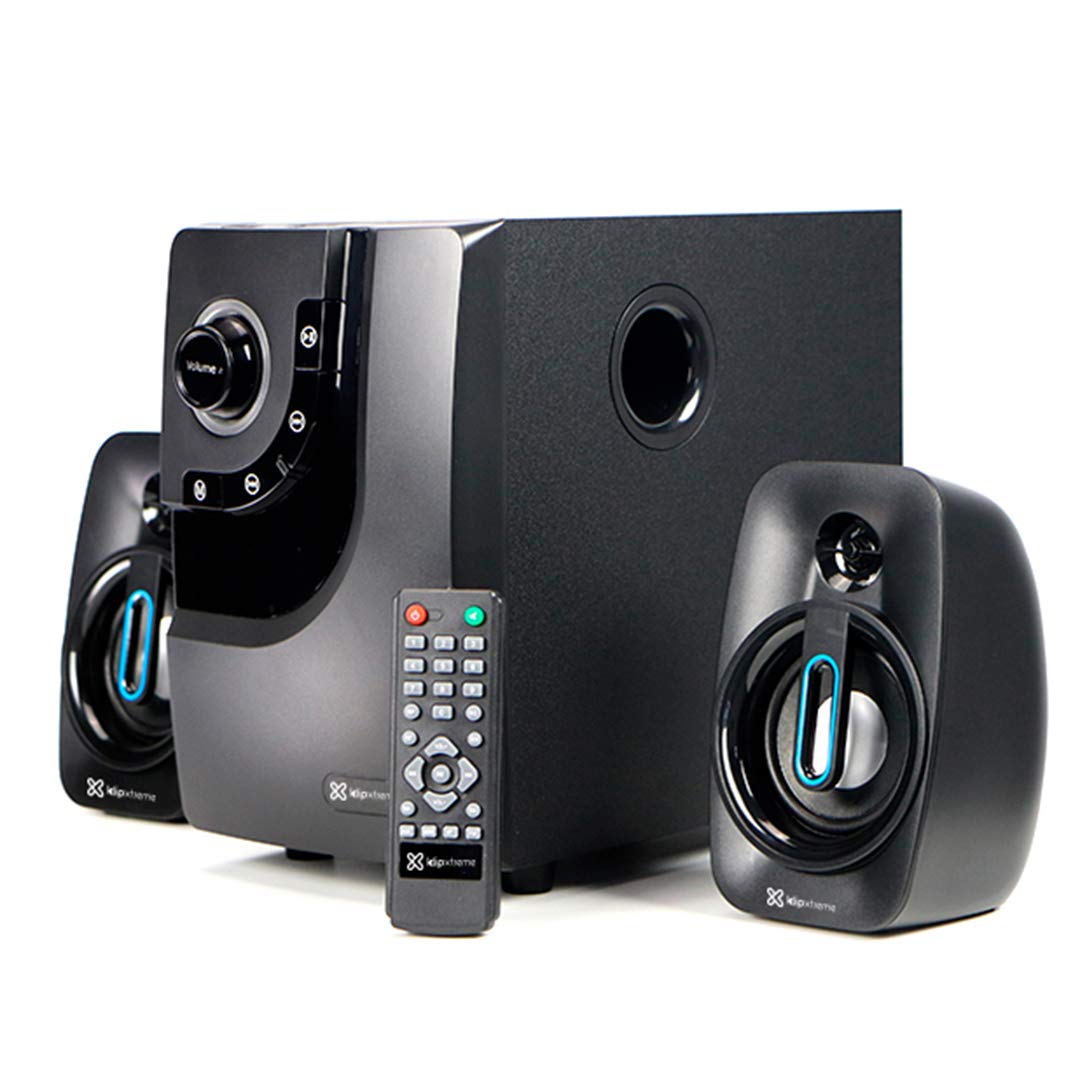
Image: The Klip Xtreme BluWave II KWS-616 system, including the subwoofer, two satellite speakers, and remote control, shown with its packaging and connecting cables.
Pakkeinnhold
Sørg for at alle varene er til stede i pakken:
- Subwoofer-enhet
- Satellitthøyttalere (x2)
- Fjernkontroll
- 3.5 mm lydkabel
- Brukerhåndbok (dette dokumentet)

Image: The Klip Xtreme BluWave II KWS-616 system components, including the subwoofer, satellite speakers, remote, and cables, displayed alongside its retail packaging.
Produkt overview
Subwoofer Front Panel Controls

Bilde: En detaljert view of the subwoofer's front panel, showing the volume knob with blue LED illumination, mode button, playback controls, and digital display.
- Volumknapp: Rotate to adjust the master volume. Press to change input mode (Bluetooth, USB, SD, AUX).
- Bassknapp: Justerer bassnivået.
- Avspillingskontroller: Spill av/pause, forrige spor, neste spor.
- Digital skjerm: Shows current mode, track number, or volume level.
Subwoofer Rear Panel Connections

Image: The rear panel of the subwoofer, displaying input and output ports, power switch, and AC power input.
- Input (R/L): RCA stereoinngang for tilkobling av eksterne lydkilder.
- Output (R/L): Connects to the satellite speakers.
- USB-port: For USB-minnepinner.
- SD-kortspor: For SD memory cards.
- Strømbryteren: Turns the system ON or OFF.
- AC-inngang: Kobles til strømledningen.
Oppsett
1. Høyttalertilkobling
- Connect the cables from the satellite speakers to the "Output (R/L)" ports on the rear panel of the subwoofer. Ensure correct polarity.
- Position the satellite speakers to the left and right of your listening area for optimal stereo separation. The subwoofer can be placed on the floor or a sturdy surface.
2. Strømtilkobling
- Ensure the power switch on the rear of the subwoofer is in the OFF position.
- Connect the AC power cord to the "AC Input" on the subwoofer's rear panel.
- Plug the other end of the power cord into a standard wall outlet (110V/220V 60Hz/50Hz auto-sensing).
Bruksanvisning
Slå på/av
Flip the power switch on the rear panel of the subwoofer to the ON position to power on the system. Flip it to the OFF position to power off.
Volume and Bass Control
- Volum: Rotate the large knob on the front of the subwoofer or use the volume buttons on the remote control to adjust the overall volume.
- Bass: Use the dedicated bass knob on the front of the subwoofer or the bass control buttons on the remote to adjust the bass intensity.
Inndatamoduser
Press the Volume knob on the front panel or the "Mode" button on the remote control to cycle through available input modes: Bluetooth, USB, SD, and AUX.
Bluetooth-paring
- Switch the system to Bluetooth mode. The digital display will show "BT" and an indicator light may flash, indicating it's in pairing mode.
- On your Bluetooth-enabled device (smartphone, tablet, computer), enable Bluetooth and search for available devices.
- Select "Klip Xtreme KWS-616" (or similar name) from the list of devices.
- Once paired, the system will confirm the connection, and you can begin playing audio from your device. The effective wireless range is approximately 33 feet (10 meters).
USB/SD-avspilling
- Insert a USB flash drive or an SD card containing audio files into the respective port on the subwoofer's rear panel.
- Switch the system to USB or SD mode. The system will automatically detect and begin playing audio files.
- Use the playback controls on the front panel or remote control to play, pause, skip tracks, or adjust volume.
AUX-tilkobling
- Connect one end of the provided 3.5mm audio cable to the "Input (R/L)" RCA ports on the subwoofer (using an adapter if necessary).
- Connect the other end of the 3.5mm audio cable to the headphone jack or audio output of your external audio device (e.g., TV, DVD player, gaming console, MP3 player).
- Switch the system to AUX mode.
- Spill av lyd fra den tilkoblede enheten.
Fjernkontrollfunksjoner
The included remote control provides convenient access to all major functions:
- Makt: Turns the system on/off (standby).
- Modus: Cycles through input sources (Bluetooth, USB, SD, AUX).
- Volum +/-: Justerer mastervolumet.
- Bass +/-: Justerer bassnivået.
- Stum: Demper/slår på lyd.
- Spill av/pause: Controls playback for USB/SD/Bluetooth.
- Forrige neste: Skips tracks for USB/SD/Bluetooth.
Vedlikehold
- Hold systemet unna direkte sollys, varmekilder og fuktighet.
- Clean the exterior surfaces with a soft, dry cloth. Do not use abrasive cleaners or solvents.
- Ensure proper ventilation around the subwoofer to prevent overheating.
- Do not block the subwoofer's bass port.
Feilsøking
| Problem | Mulig løsning |
|---|---|
| Ingen strøm |
|
| Ingen lyd |
|
| Bluetooth-sammenkobling mislykkes |
|
| Forvrengt lyd |
|
Spesifikasjoner

Image: The Klip Xtreme BluWave II KWS-616 subwoofer and satellite speakers displayed with rulers to indicate their physical dimensions.
| Enhetstype | 2.1 speaker system with Bluetooth technology |
| Maksimal effekt (RMS) | 40 W (80 W toppeffekt) |
| AC-inngang | 110V/220V 60Hz/50Hz (autosensing) |
| Satellittdriverenhet | 3 tommer (76 mm) |
| Satellitt RMS-kraft | 10W each (20W total) |
| Satellite Frequency Response | 120Hz-18kHz |
| Satellittimpedans | 8Ω |
| Subwoofer-driverenhet | 4 tommer (102 mm) |
| Subwoofer RMS-effekt | 20W |
| Subwoofer frekvensrespons | 20Hz-150Hz |
| Subwoofer-impedans | 4Ω |
| Signal til støy-forhold | 60dB |
| Tilkobling | Bluetooth, SD, USB, 3.5mm (via RCA input) |
| Wireless Range | Opptil 33 fot (10 meter) |
| Subwoofer dimensjoner (BxHxD) | 6.1 x 9.8 x 10.8 tommer (15.5 x 24.9 x 27.4 cm) |
| Satellite Dimensions (WxHxD) | 3.9 x 6.3 x 3.8 tommer (9.9 x 16.0 x 9.7 cm) |
| Produktvekt | 6.8 lbs (3.08 kg) |
| Kabellengde | 4.9 fot (1.5 meter) |
| Modellnummer | KWS-616 |
Garanti og støtte
The Klip Xtreme BluWave II KWS-616 system comes with a ett års begrenset garanti fra kjøpsdatoen. Denne garantien dekker material- og produksjonsfeil ved normal bruk. Den dekker ikke skader forårsaket av feilbruk, ulykker, uautoriserte endringer eller eksterne årsaker.
For technical support or warranty claims, please contact your local Klip Xtreme authorized dealer or visit the official Klip Xtreme webnettsted for kontaktinformasjon.