
1. Introduksjon
Takk for kjøpetasing the Capello Play it All Bluetooth Wireless Home Stereo Speaker CI302. This device offers versatile audio playback options including Bluetooth wireless streaming, CD player functionality, and FM digital radio. This manual provides detailed instructions for setup, operation, maintenance, and troubleshooting to ensure optimal performance and longevity of your speaker system.
2. Viktig sikkerhetsinformasjon
- Les alle instruksjonene før du bruker enheten.
- Ta vare på denne håndboken for fremtidig referanse.
- Ikke utsett enheten for regn eller fuktighet for å forhindre brann eller støt.
- Sørg for tilstrekkelig ventilasjon; ikke blokker noen ventilasjonsåpninger.
- Plasser enheten på en stabil, flat overflate.
- Bruk kun tilbehør/tilbehør spesifisert av produsenten.
- Koble fra enheten under tordenvær eller når den ikke skal brukes i lengre perioder.
- Overlat all service til kvalifisert servicepersonell.
3. Pakkens innhold
Vennligst sjekk at alle varene er til stede:
- Capello Play it All Bluetooth Wireless Home Stereo Speaker CI302
- Fjernkontroll
- Strømadapter
- Brukerhåndbok (dette dokumentet)
4. Produktet er overview
Familiarize yourself with the main components and controls of your Capello Play it All speaker.
Front View

Figur 4.1: Front view of the Capello Play it All speaker, showing the speaker grille, digital clock display, and subtle branding.
Kontroller på toppanelet

Figur 4.2: Top panel of the Capello Play it All speaker, illustrating the CD compartment, 'capello' logo, and various control buttons including PRESET, MODE, PAIRING, PROGRAM/CLOCK SET, SKIP, PLAY/PAUSE, STOP, REPEAT, and VOLUME.
- PRESET +/-: Navigate through saved FM radio stations.
- Veibeskrivelse: Switch between Bluetooth, CD, FM Radio, and Line-In modes.
- SAMMENKOBLING: Start Bluetooth-paringsmodus.
- PROGRAM/CLOCK SET: Program CD tracks or set the clock.
- SKIP ◀◀ / ▶▶: Skip tracks on CD or adjust FM frequency.
- PLAY/PAUSE ▶▶: Play or pause CD playback.
- STOP ■: Stop CD playback.
- GJENTA: Repeat current track or all tracks on CD.
- VOL +/-: Juster volumnivået.
- ÅPNE LUKKE: Open or close the CD compartment.
- VENT LITT: Power on/off the unit.
Rear Panel (Typical)
The rear panel typically includes the AC power input, FM antenna connection, and Line-In jack.
5. Oppsett
5.1 Strømtilkobling
- Connect the AC power adapter to the DC IN jack on the rear of the speaker.
- Koble den andre enden av adapteren til en standard stikkontakt.
- The unit will enter standby mode, and the digital clock display will illuminate.
5.2 FM Antenna Setup
For optimal FM radio reception, extend the FM wire antenna fully and position it for the best signal. Avoid placing it near other electronic devices that may cause interference.
5.3 Stille klokken
- I standby-modus, trykk og hold nede PROGRAM/CLOCK SET knapp.
- The hour digits will begin to flash. Use the SKIP ◀◀ / ▶▶ knapper for å justere timen.
- Pressen PROGRAM/CLOCK SET igjen for å bekrefte timen.
- Minuttsifrene vil blinke. Bruk SKIP ◀◀ / ▶▶ knapper for å justere minuttene.
- Pressen PROGRAM/CLOCK SET one last time to save the setting.
6. Bruksanvisning
6.1 Strøm på/av og modusvalg
- Trykk på VENT LITT button on the unit or the remote control to turn the speaker on or off.
- Trykk på MODUS button repeatedly to cycle through available modes: Bluetooth, CD, FM Radio, and Line-In.
6.2 Trådløs Bluetooth-strømming
- Slå på høyttaleren og velg Bluetooth-modus ved hjelp av MODUS button. The display will show 'BT' and flash, indicating it's in pairing mode.
- On your Bluetooth-enabled device (smartphone, tablet, computer), enable Bluetooth and search for available devices.
- Select 'Capello CI302' (or similar) from the list of devices.
- Once paired, the speaker will emit a confirmation tone, and 'BT' on the display will stop flashing.
- You can now play audio from your device through the speaker. Use your device or the speaker's controls for volume and track navigation.
6.3 CD-avspilling
- Trykk på ÅPNE/LUKK knappen for å åpne CD-skuffen.
- Carefully place an audio CD (CD, CD-R/-RW) with the label side facing up into the compartment.
- Lukk CD-skuffen. Enheten vil lese platen.
- If not already in CD mode, press the MODUS -knappen for å velge CD -modus.
- Trykk på SPILL/PAUSE -knappen for å starte avspillingen.
- Bruk SKIP ◀◀ / ▶▶ to skip tracks, STOPP ■ to stop, and GJENTA to cycle through repeat options.
6.4 FM Digital Radio
- Trykk på MODUS button to select FM radio mode. The current frequency will be displayed.
- Automatisk skanning: Trykk og hold inne SPILL/PAUSE button to automatically scan and save available FM stations as presets.
- Manuell innstilling: Pressen SKIP ◀◀ / ▶▶ briefly to fine-tune the frequency. Press and hold to scan for the next strong station.
- Tilgang til forhåndsinnstillinger: Bruk FORHÅNDSINNSTILLING +/- knappene for å bla gjennom lagrede stasjoner.
6.5 Line-In Operation
- Connect an audio cable (not included) from the headphone jack or line-out of an external audio device to the LINE-IN kontakten på høyttaleren.
- Trykk på MODUS button to select Line-In mode.
- Play audio from your connected device. Volume can be controlled via the speaker or the external device.
6.6 USB -lading
The speaker features a USB port for charging compatible devices (e.g., smartphones, tablets). Connect your device's USB charging cable (not included) to the USB port on the speaker. The speaker does not need to be in a specific mode for USB charging to function.
6.7 Bruk av fjernkontroll
The included remote control provides convenient access to all functions. Ensure the remote has working batteries and is pointed towards the front of the speaker.
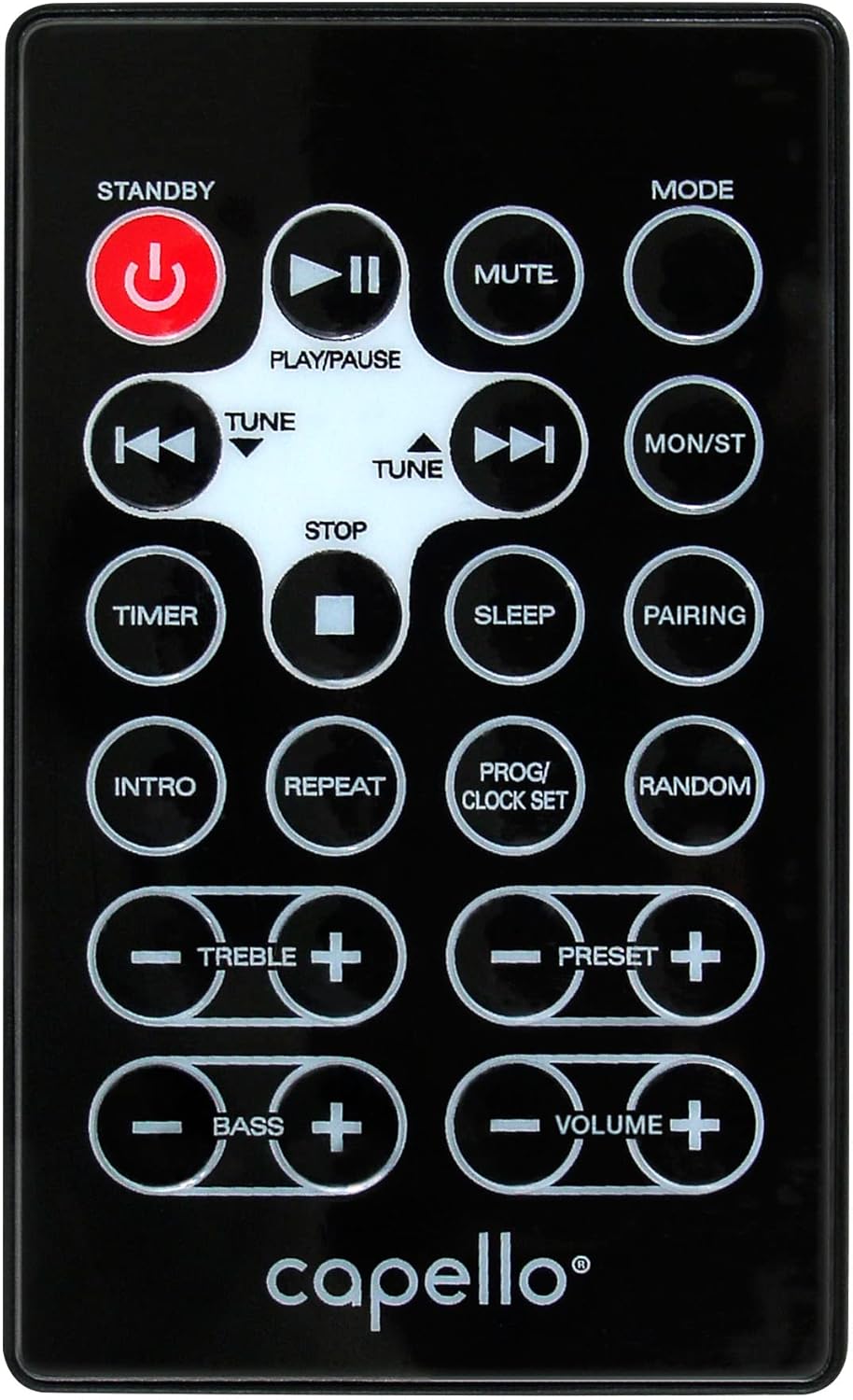
Figur 6.1: Layout of the remote control for the Capello Play it All speaker, showing buttons for Standby, Play/Pause, Mute, Mode, Skip/Tune, Stop, Timer, Sleep, Pairing, Intro, Repeat, Program/Clock Set, Random, Treble, Bass, and Volume controls.
- VENT LITT: Slå på/av.
- SPILL/PAUSE: Spill av eller sett lyd på pause.
- STUM: Slå av eller på lyden.
- Veibeskrivelse: Cycle through input modes.
- SKIP/TUNE ◀◀ / ▶▶: Skip tracks or tune radio frequency.
- STOPPE: Stopp avspillingen.
- TIMER: Still inn sleep timer.
- SOVE: Activate sleep function.
- SAMMENKOBLING: Start Bluetooth-paring.
- INTRO: Play the first few seconds of each CD track.
- GJENTA: Repeat current track or all tracks.
- PROG/CLOCK SET: Program CD tracks or set clock.
- TILFELDIG: Play CD tracks in random order.
- DISKANT +/-: Juster diskantnivåene.
- BASS +/-: Juster bassnivåene.
- VOLUM +/-: Juster det totale volumet.
7. Vedlikehold
7.1 Rengjøring
- Koble alltid enheten fra strømuttaket før rengjøring.
- Bruk en myk, tørr klut til å tørke av de utvendige overflatene.
- Ikke bruk slipende rengjøringsmidler, voks eller løsemidler, da de kan skade overflaten.
- Bruk en spesialisert CD-linserenser til CD-linsen.
7.2 Oppbevaring
If storing the unit for an extended period, unplug it from the power source and store it in a cool, dry place away from direct sunlight and extreme temperatures.
8. Feilsøking
| Problem | Mulig årsak | Løsning |
|---|---|---|
| Ingen strøm | Strømledningen er ikke tilkoblet; stikkontakten er ikke aktiv. | Sørg for at strømledningen er ordentlig koblet til; prøv en annen stikkontakt. |
| Ingen lyd | Volume too low; incorrect mode selected; external device muted. | Increase volume; select correct input mode; check external device volume/mute. |
| CD-en hopper eller spiller ikke | Dirty or scratched CD; CD inserted incorrectly; dirty CD lens. | Clean or replace CD; insert CD label-side up; use a CD lens cleaner. |
| Bluetooth-sammenkobling mislykkes | Device too far; Bluetooth not enabled on device; speaker not in pairing mode. | Move device closer; enable Bluetooth; ensure speaker is in BT pairing mode. |
| Dårlig FM -mottak | Antenne ikke strukket ut; forstyrrelser. | Fully extend and reposition FM antenna; move away from other electronics. |
| Fjernkontrollen virker ikke | Batteries depleted; obstruction; not pointed at sensor. | Replace batteries; remove obstructions; point remote directly at the unit. |
9. Spesifikasjoner
| Trekk | Spesifikasjon |
|---|---|
| Merke | Capello |
| Modellnummer | CI302 |
| Tilkoblingsteknologi | Bluetooth |
| Høyttalertype | Stereo |
| Lydutgangsmodus | Stereo |
| Støttede lydformater | CD, MP3 |
| Høyttalernes nominelle utgangseffekt | 10 watt |
| Høyttalere Maksimal utgangseffekt | 10 watt |
| Høyttaler Surround Sound-kanalkonfigurasjon | 2.0 |
| Type strømkilde | Elektrisk med ledning |
| Kompatible enheter | Bærbar datamaskin, smarttelefon, nettbrett |
| Spesielle funksjoner | Digital Display, Portable, USB Port |
| Materialtype | Plast |
| Monteringstype | Bordplate |
| Varevekt | 2.57 kilo |
| Pakkedimensjoner | 38.3 x 24.2 x 18.5 cm |
| Batterier inkludert | Ingen |
| Batterier påkrevd | Ingen |
10. Garanti og støtte
This product is covered by a limited warranty. Please refer to the warranty card included in your package for specific terms and conditions. For technical support or customer service inquiries, please contact Capello customer support through their official webnettstedet eller kontaktinformasjonen som følger med kjøpsdokumentasjonen.