
Introduksjon
This manual provides essential instructions for the Jam Audio Out There Active Noise Cancelling On-Ear Bluetooth Headphones. Please read this guide thoroughly to ensure proper use, maintenance, and to maximize your listening experience. These headphones offer active noise cancellation, Bluetooth connectivity, hands-free calling, and a comfortable on-ear design.
Hva er i esken
Kontroller at alle varene er tilstede i emballasjen:
- Out There Headphones
- AUX-kabel (3.5 mm)
- USB ladekabel
- Hurtigstartveiledning (se denne håndboken for detaljerte instruksjoner)

Image: Contents of the Jam Audio Out There headphone package, including the headphones, AUX cable, and USB charging cable.
Produkt overview og kontroller
Familiarize yourself with the headphone's layout and controls for optimal use.
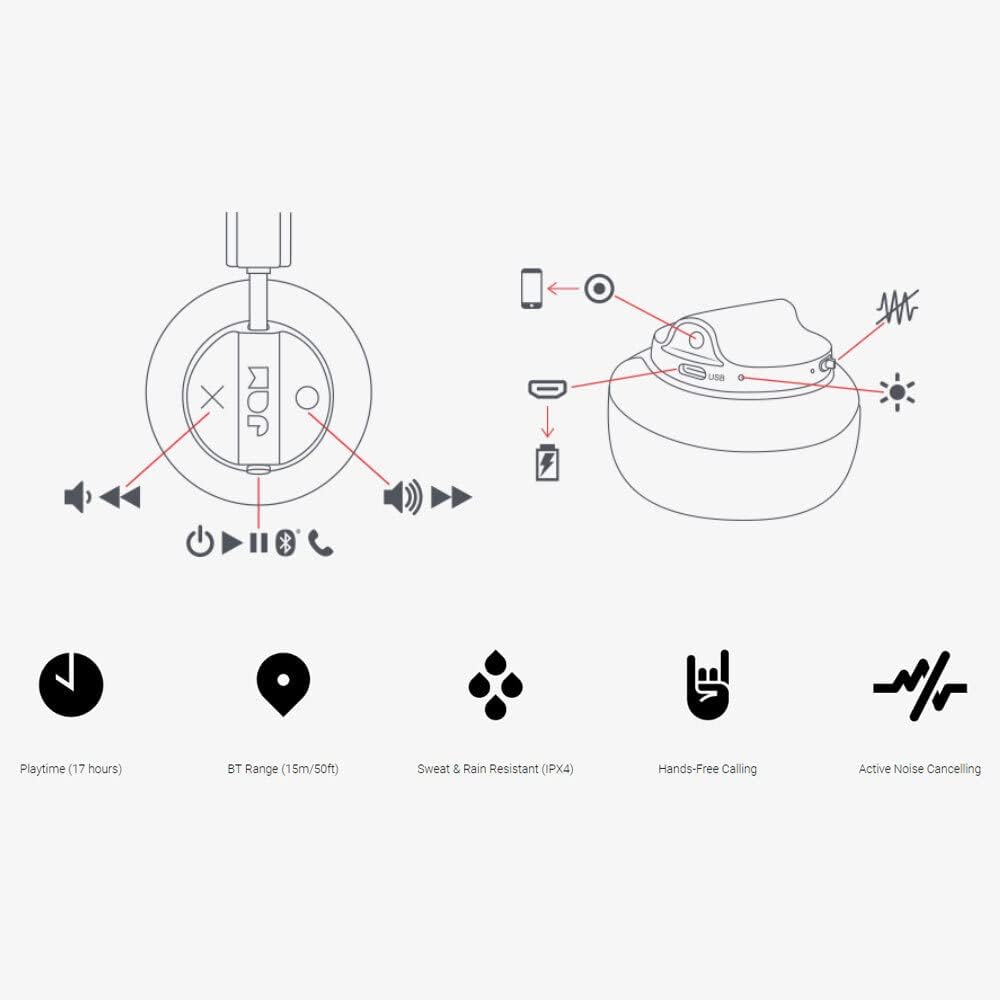
Image: Detailed diagram illustrating the control buttons and ports on the Jam Audio Out There headphones, including power, volume, track navigation, call management, and the charging port.
- Strømknapp: Trykk og hold for å slå på/av.
- Volum opp/neste spor: Kort trykk for volum opp, langt trykk for neste spor.
- Volum ned/Forrige spor: Kort trykk for volum ned, langt trykk for forrige spor.
- Spill av/pause/besvar anrop: Single press to play/pause music or answer/end a call.
- Active Noise Cancelling (ANC) Switch: Toggle to activate or deactivate noise cancellation.
- Ladeport: Mikro-USB-port for lading.
- AUX-inngang: 3.5 mm-kontakt for kablet lydtilkobling.
Oppsett
1. Lading av hodetelefonene
Before first use, fully charge your headphones. Connect the provided USB charging cable to the charging port on the headphones and the other end to a USB power source. The LED indicator will show charging status and turn off when fully charged. A full charge takes approximately 2 hours and provides up to 17 hours of playtime.

Image: The Jam Audio Out There headphones provide up to 17 hours of playtime on a single charge.
2. Slå på/av
- To power on: Press and hold the Power button for 3 seconds. The LED indicator will flash.
- To power off: Press and hold the Power button for 3 seconds. The LED indicator will turn off.
3. Bluetooth-paring
- Sørg for at hodetelefonene er slått av.
- Press and hold the Power button for 5 seconds until the LED indicator flashes red and blue, indicating pairing mode.
- Aktiver Bluetooth på enheten din (smarttelefon, nettbrett, datamaskin) og søk etter tilgjengelige enheter.
- Select "JAM Out There" from the list of devices.
- Once paired, the LED indicator on the headphones will turn solid blue.
- Hodetelefonene har en Bluetooth-rekkevidde på opptil 15 meter.

Image: The Jam Audio Out There headphones offer Bluetooth compatibility, allowing a range of up to 15 meters or 50 feet from your connected device.
Bruksanvisning
Musikkavspilling
- Spill av/pause: Trykk på Play/Pause-knappen én gang.
- Neste spor: Trykk lenge på volum opp-knappen.
- Forrige spor: Trykk lenge på volum ned-knappen.
- Volumjustering: Short press the Volume Up or Volume Down buttons.
Håndfri oppringing
- Svar/avslutt samtale: Trykk på Play/Pause-knappen én gang.
- Avvis anrop: Trykk og hold nede Play/Pause-knappen i 2 sekunder.
- Ta en telefon: Initiate the call from your connected device. The audio will automatically transfer to the headphones.
- Music will automatically pause during a call and resume after the call ends.
Aktiv støyreduksjon (ANC)
- To activate ANC: Slide the ANC switch to the ON position. The ANC indicator light will illuminate.
- To deactivate ANC: Slide the ANC switch to the OFF position. The ANC indicator light will turn off.
- Using ANC can reduce ambient noise, enhancing your listening experience. Note that ANC can be used independently or with Bluetooth audio.
Wired Connection (AUX-in)
For a wired connection, use the provided 3.5mm AUX cable. Plug one end into the headphone's AUX-in port and the other into your audio device. This allows you to continue listening even if the headphone battery is depleted or if Bluetooth is not available.
Vedlikehold
- Rengjøring: Tørk av hodetelefonene med en myk, tørr klut. Ikke bruk sterke kjemikalier eller slipende materialer.
- Lagring: Oppbevar hodetelefonene på et kjølig og tørt sted, unna ekstreme temperaturer.
- Vannmotstand: These headphones are IPX4 rated, meaning they are resistant to sweat and light splashes of water. Do not submerge them in water or expose them to heavy rain. Ensure the charging port cover is securely closed when not charging to maintain water resistance.
- Batteripleie: For å forlenge batterilevetiden, unngå å utlade hodetelefonene helt ofte. Lad dem regelmessig, selv om de ikke er i bruk over lengre tid.
Feilsøking
| Problem | Løsning |
|---|---|
| Hodetelefonene slår seg ikke på | Sørg for at hodetelefonene er ladet. Koble til en strømkilde med USB-kabelen. |
| Kan ikke pares via Bluetooth |
|
| Ingen lyd eller lite volum |
|
| Active Noise Cancelling not working | Ensure the ANC switch is in the ON position and the ANC indicator light is illuminated. |
| Headphones falling apart or breaking | While the product is designed for durability, excessive force or improper handling can cause damage. Handle with care. If issues persist, refer to warranty information. |
Spesifikasjoner
- Modellnavn: Der ute
- Modellnummer: HX-HP303BK
- Tilkobling: Bluetooth, 3.5 mm Jack (AUX-in)
- Trådløs rekkevidde: Opptil 15 meter (50 fot)
- Batterilevetid: Opptil 17 timer
- Støykontroll: Aktiv støyreduksjon
- Vannmotstand: IPX4 Rated (Sweat and Rain Resistant)
- Øreplassering: On Ear
- Materiale: Gummi, silikon
- Varevekt: 5.1 unser (0.32 pund)
- Produktdimensjoner: 8.58 x 3.19 x 8.66 tommer
- Inkluderte komponenter: Headphones, Charging Cord, AUX Cable
Produktvideo overview
Se denne offisielle produktvideoen for en visuell oversiktview of the Jam Audio product line, including the Out There headphones.
Video: An official Jam Audio sizzle video showcasing various products, including the Out There headphones, highlighting their design and features.
Garanti og støtte
For warranty information, product registration, or technical support, please refer to the official Jam Audio webnettstedet eller kontakt kundeservicen deres. Ta vare på kjøpsbeviset for garantikrav.