
1. Produktet er overview
The Sharp EL-531TG-GY is a scientific calculator designed for students and professionals requiring advanced mathematical functions. It features a 2-line display and Multi-Line Playback, facilitating the input and review of complex equations. This model is suitable for general math, algebra, geometry, trigonometry, statistics, biology, chemistry, and general science applications.
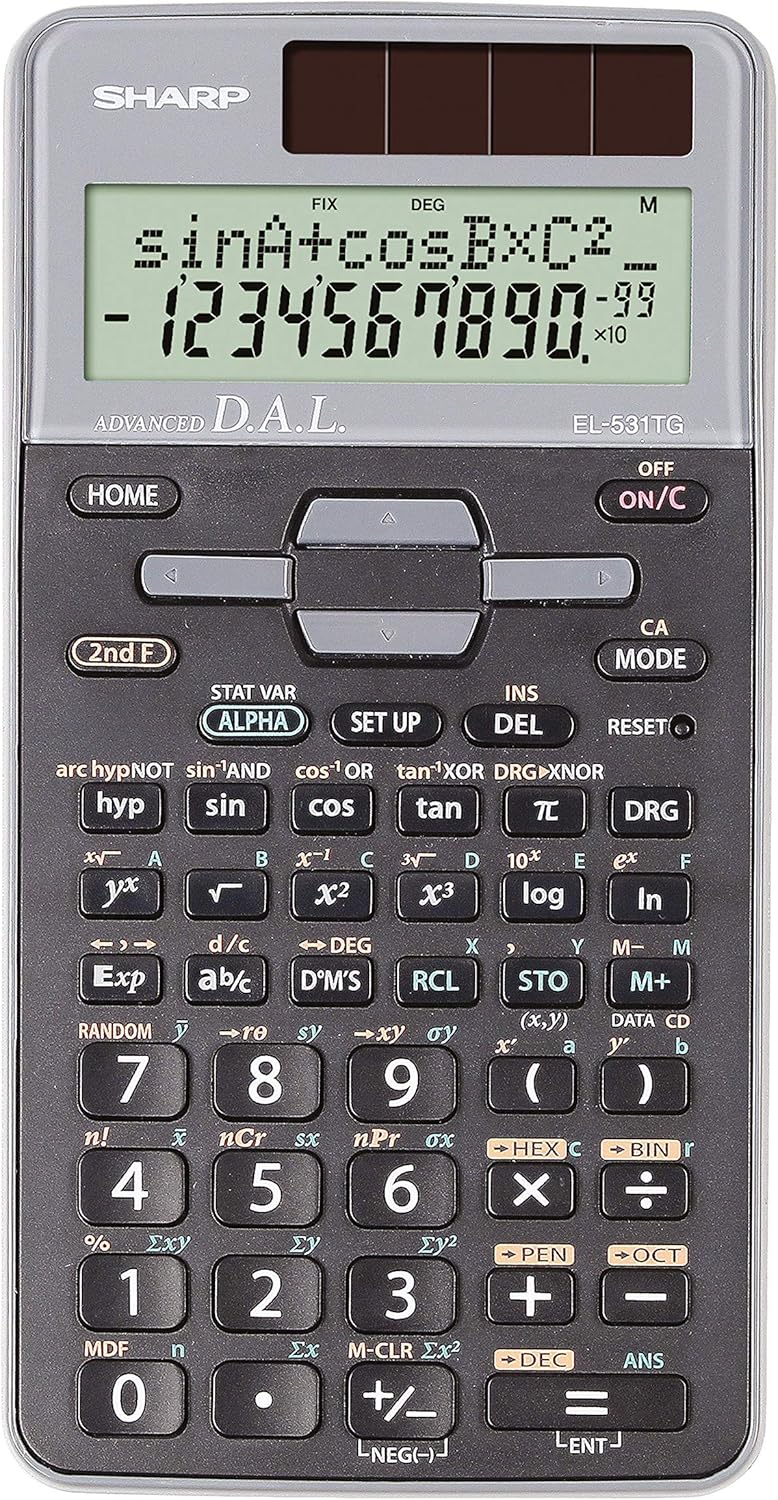
Figur 1: Foran view of the Sharp EL-531TG-GY Scientific Calculator, showing the display, keypad, and solar panel.
2. Oppsett og første gangs bruk
2.1 Strømkilde
The EL-531TG-GY calculator operates using both solar power and a single LR44 button cell battery. The solar panel provides power in well-lit environments, while the battery ensures operation in low-light conditions or when solar power is insufficient. An LR44 battery is included with the calculator.
2.2 Slå på/av
- For å slå på kalkulatoren ON, trykk på PÅ/C nøkkel.
- For å slå på kalkulatoren AV, trykk på 2. klasse tasten etterfulgt av AV key (which is typically the same as PÅ/C).
2.3 Initial Display Settings
Upon first use or after a reset, the calculator will typically default to certain settings (e.g., DEG for angle units). Refer to Section 3.3 for details on changing mode settings.
3. Bruksanvisning
3.1 Grunnleggende aritmetiske operasjoner
Skriv inn tall med det numeriske tastaturet. Bruk +, -, ×, og ÷ keys for addition, subtraction, multiplication, and division, respectively. Press = to obtain the result.
3.2 Vitenskapelige funksjoner
The calculator performs over 273 advanced scientific functions. Many functions are accessed by pressing the 2. klasse key before the desired function key.
- Trigonometriske funksjoner: Bruk synd, cos, tan. Inverse functions (synd⁻¹, cos⁻¹, brunfarge⁻¹) nås via 2. klasse.
- Logaritmiske funksjoner: Bruk logg (grunntall 10) og ln (naturlig logaritme).
- Potenser og røtter: Bruk x², √, x³, ³√.
- Brøker: Bruk d/c nøkkel for brøkinntasting og konvertering.
3.3 Mode Settings (DEG/RAD/GRAD)
To change the angle unit mode (Degrees, Radians, Gradians):
- Trykk på DRG nøkkel.
- Trykk gjentatte ganger DRG to cycle through DEG (Degrees), RAD (Radians), and GRAD (Gradians). The current mode is indicated on the display.
3.4 Minnefunksjoner
Kalkulatoren har minnefunksjoner for lagring og gjenkalling av verdier.
- STO (Store): Pressen STO followed by a variable key (e.g., A, B) to store the displayed value.
- RCL (Recall): Pressen RCL followed by the variable key to recall the stored value.
- M+ (Memory Plus): Legger den viste verdien til det uavhengige minnet.
- M- (minne minus): Trekker den viste verdien fra det uavhengige minnet.
3.5 Multi-Line Playback
The 2-line display allows for Multi-Line Playback, enabling users to review previous calculations and expressions. Use the directional arrow keys (up/down) to scroll through past entries and results. This feature is useful for checking work or re-using parts of previous calculations.
4. Vedlikehold
4.1 Rengjøring
To clean the calculator, wipe the surface gently with a soft, dry cloth. Do not use abrasive cleaners, solvents, or excessive moisture, as these can damage the display or internal components.
4.2 Batteribytte
The calculator uses one LR44 button cell battery. If the display becomes dim or erratic in low-light conditions, the battery may need replacement. To replace the battery:
- Sørg for at kalkulatoren er slått av.
- Finn batterirommet på baksiden av kalkulatoren.
- Åpne forsiktig dekselet på kammeret.
- Ta ut det gamle LR44-batteriet og sett inn et nytt. Sørg for riktig polaritet (+/-).
- Lukk batteridekselet godt.
4.3 Oppbevaring
When not in use, store the calculator in a cool, dry place away from direct sunlight and extreme temperatures. The hard cover included with the calculator provides protection from scratches and minor impacts.
5. Feilsøking
5.1 Visningsproblemer
- Blank eller svak skjerm: Ensure sufficient light for the solar panel. If the issue persists, replace the LR44 battery.
- Erratic Display: This may indicate a low battery. Replace the LR44 battery.
5.2 Incorrect Results
- Check Mode Settings: Verify that the angle unit (DEG, RAD, GRAD) is set correctly for trigonometric calculations.
- Input Error: Review your input using the Multi-Line Playback feature to ensure the expression was entered correctly.
- Memory Contents: If using memory functions, ensure the stored values are correct.
5.3 Calculator Not Responding
If the calculator becomes unresponsive, try performing a reset. Locate the TILBAKESTILL button (often a small recessed button requiring a thin object like a paperclip to press). Pressing this button will clear all memory and return the calculator to its factory default settings.
6. Spesifikasjoner

Figur 2: Foran view of the Sharp EL-531TG-GY Scientific Calculator, illustrating its dimensions.
| Trekk | Beskrivelse |
|---|---|
| Modellnummer | SH-EL531TGGY |
| Visningstype | 2-line LCD with Multi-Line Playback |
| Funksjoner | Over 273 avanserte vitenskapelige funksjoner |
| Strømkilde | Solar and 1 x LR44 battery (included) |
| Materiale | Plast |
| Dimensjoner (L x B x H) | 16.1 x 8 x 1.5 cm (ca.) |
| Vekt | 100 g (ca.) |

Figur 3: Side view of the Sharp EL-531TG-GY Scientific Calculator, showing its slim profile.
7. Garanti og støtte
7.1 Garantiinformasjon
This product is covered by a manufacturer's warranty. Please refer to the warranty card included with your purchase or visit the official Sharp webnettstedet for detaljerte garantivilkår og -betingelser som er spesifikke for din region.
7.2 Kundestøtte
For technical assistance, troubleshooting not covered in this manual, or service inquiries, please contact Sharp customer support. Contact information can typically be found on the Sharp official webnettstedet eller på produktemballasjen.