
Bytech BCAUBS134BK
Bytech Massive Bluetooth Long Bar Speaker-BK brukerhåndbok
Model: BCAUBS134BK
1. Introduksjon
Takk for kjøpetasing the Bytech Massive Bluetooth Long Bar Speaker-BK. This manual provides essential information for the proper setup, operation, and maintenance of your new speaker. Please read this manual thoroughly before using the product to ensure optimal performance and longevity.
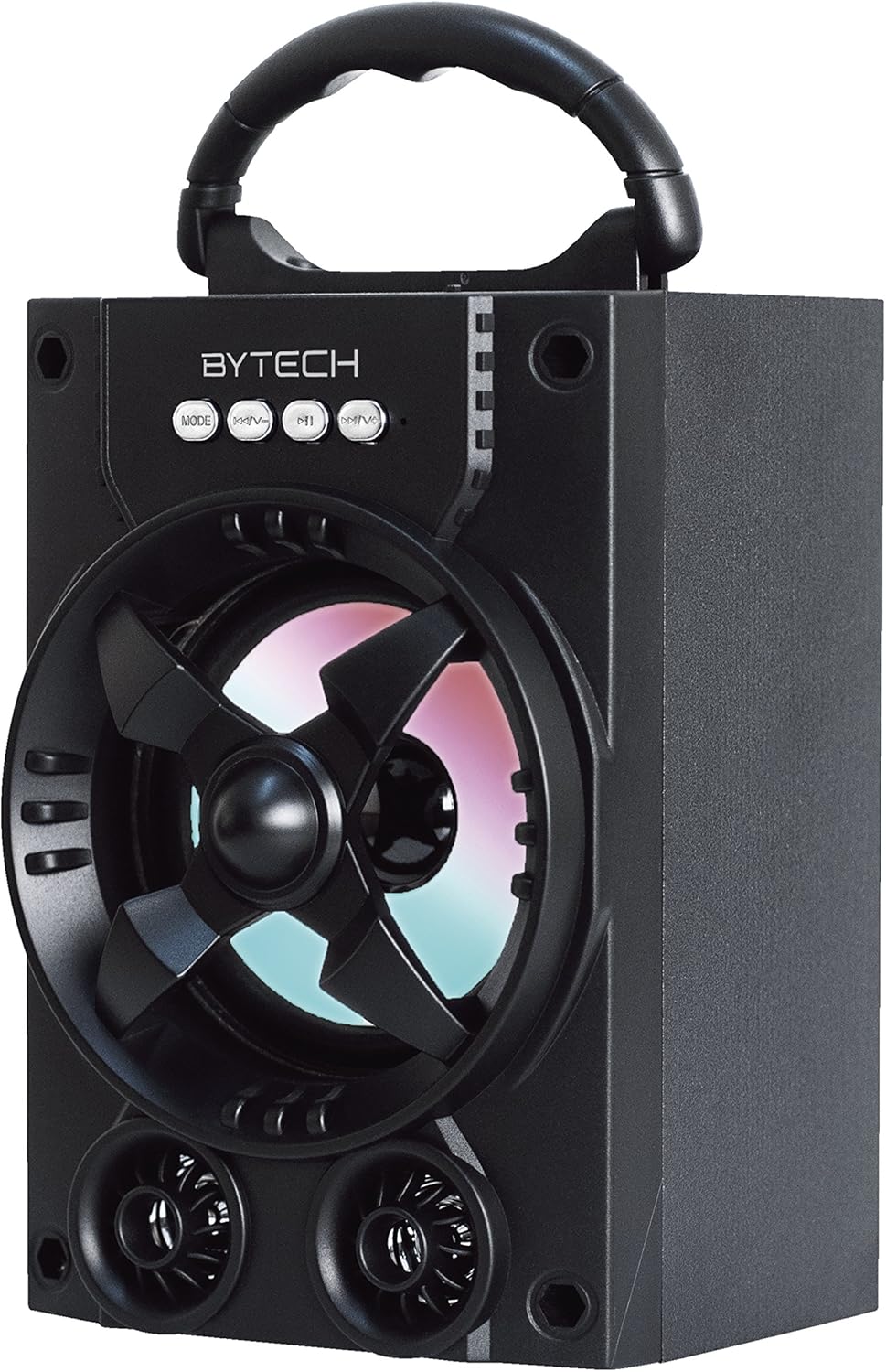
Figur 1.1: Foran view of the Bytech Massive Bluetooth Long Bar Speaker-BK, showcasing its design, handle, and speaker grille with LED lights.
2. Pakkens innhold
Vennligst sjekk pakken for følgende varer:
- Bytech Massive Bluetooth Long Bar Speaker-BK
- USB ladekabel
- Brukerhåndbok (dette dokumentet)
Hvis noen varer mangler eller er skadet, vennligst kontakt kundestøtte.
3. Produktfunksjoner
- LED Performance Lights: Dynamic LED lights that synchronize with your music for an enhanced audio-visual experience.
- Convenient Carrying Handle: Integrated handle for easy portability, allowing you to take your music anywhere.
- Universal Bluetooth Connectivity: Seamlessly connect wirelessly to your smartphone, tablet, or other Bluetooth-enabled devices.
- Surroundlyd: Designed to deliver a high-quality surround sound experience.
- Bærbar design: Ideal for various settings, including parties, outdoor gatherings, and personal use.

Figure 1.2: The speaker shown with its retail packaging, illustrating its key features such as multi-color LED lights, Bluetooth connectivity, and surround sound capability.
4. Kontroller og indikatorer
The speaker features intuitive controls and indicators for easy operation:
- MODUS-knapp: Press to switch between available input modes (e.g., Bluetooth).
- V-knapp: Press to decrease volume. Long press to skip to the previous track.
- V+-knapp: Press to increase volume. Long press to skip to the next track.
- M-knapp: (Function not explicitly detailed, typically for mode or mute)
- LED-lys: Indicate power status, charging status, and provide dynamic light effects during audio playback.
5. Oppsettveiledning
5.1 Lade høyttaleren
- Koble den lille enden av USB-ladekabelen til ladeporten på høyttaleren.
- Koble den store enden av USB-ladekabelen til en USB-strømadapter (ikke inkludert) eller en datamaskins USB-port.
- LED-indikatoren viser ladestatus (f.eks. rød for lading, av når den er fulladet).
- Vent omtrent 3–4 timer for full lading før første gangs bruk.
5.2 Slå på/av
- To power on, press and hold the Power button (location not specified, typically near charging port or on control panel) for a few seconds until you hear an audible prompt or see the LED lights activate.
- For å slå av, trykk og hold inne av/på-knappen igjen til høyttaleren slår seg av.
5.3 Bluetooth-paring
- Ensure the speaker is powered on and in Bluetooth pairing mode (indicated by a flashing LED light or audible prompt).
- Naviger til Bluetooth-innstillingene på smarttelefonen eller nettbrettet.
- Søk etter available devices. The speaker will appear as "BYTECH" or a similar name.
- Velg høyttaleren fra listen for å starte paringen.
- Once successfully paired, the LED indicator will typically become solid, and you may hear a confirmation tone.
6. Bruksanvisning
6.1 Spille av lyd via Bluetooth
- After successful Bluetooth pairing, open your preferred music application on your connected device.
- Select and play your desired audio. The sound will be streamed wirelessly to the speaker.
- Use the V+ and V- buttons on the speaker or your connected device to adjust the volume.
- Long press V+ or V- to skip tracks.
6.2 LED Performance Lights
The speaker features integrated LED lights that enhance your listening experience. These lights typically activate automatically when the speaker is powered on and playing audio. Specific controls for light modes are not detailed, but they are designed to provide dynamic visual effects.
6.3 Modusbytte
Trykk på MODUS button to cycle through available input modes. While Bluetooth is the primary connectivity, other modes (if available, such as FM radio or AUX input) can be accessed via this button.
7. Vedlikehold og stell
- Rengjøring: Bruk en myk, tørr klut til å rengjøre høyttalerens utside. Ikke bruk slipende rengjøringsmidler, voks eller løsemidler.
- Lagring: Når høyttaleren ikke er i bruk over lengre tid, bør den oppbevares kjølig og tørt, unna direkte sollys og ekstreme temperaturer.
- Batteripleie: For å forlenge batterilevetiden, unngå å utlade batteriet helt ofte. Lad opp høyttaleren regelmessig, selv om den ikke er i bruk, for å opprettholde batterilevetiden.
- Vannmotstand: Dette produktet er IKKE waterproof. Avoid exposure to water, rain, or excessive moisture to prevent damage.
8. Feilsøking
Hvis du støter på problemer med høyttaleren, kan du se følgende vanlige problemer og løsninger:
| Problem | Mulig årsak | Løsning |
|---|---|---|
| Høyttaleren slår seg ikke på. | Lavt batteri. | Lad høyttaleren helt opp. |
| Ingen lyd fra høyttaleren. | Volume too low; Not paired; Incorrect mode. | Increase volume on speaker and device; Ensure successful Bluetooth pairing; Press MODE button to select correct input. |
| Bluetooth-tilkoblingen er ustabil eller feiler. | Device too far; Interference; Pairing issue. | Move device closer to speaker (within 33 ft/10m); Avoid obstacles; Forget device on your phone and re-pair. |
| LED-lysene fungerer ikke. | Speaker not powered on or playing audio. | Ensure speaker is on and audio is playing. |
9. Spesifikasjoner
| Trekk | Detalj |
|---|---|
| Merke | Bytech |
| Modellnavn | BYTECH |
| Vare modellnummer | BCAUBS134BK |
| Høyttalertype | Surround Sound |
| Tilkoblingsteknologi | Bluetooth |
| Trådløs kommunikasjonsteknologi | Bluetooth |
| Kompatible enheter | Smarttelefon |
| Høyttaler Maksimal utgangseffekt | 20 watt |
| Frekvensrespons | 20 KHz |
| Impedans | 1 Ohm |
| Høyttalerstørrelse | 5 tommer |
| Strømkilde | Ledningsbasert elektrisk (for lading) |
| Batteritype | 1 litiumionbatteri kreves |
| Farge | Svart |
| Produktdimensjoner | 4.75 x 5.5 x 8.5 tommer |
| Varevekt | 1.3 pund |
| Er vanntett | Ingen |
| Opprinnelsesland | Kina |
| UPC | 805112038121 |
10. Garantiinformasjon
Bytech products are manufactured to the highest quality standards. For specific warranty terms and conditions, please refer to the warranty card included with your purchase or visit the official Bytech webnettstedet. Ta vare på kjøpsbeviset for garantikrav.
11. Kundestøtte
For technical assistance, troubleshooting, or general inquiries, please contact Bytech customer support. Contact information can typically be found on the product packaging, the official Bytech webnettstedet eller kjøpskvitteringen din.
Merk: Ingen offisielle produktvideoer fra selgeren var tilgjengelige for innebygging basert på de oppgitte dataene.
Ask a question about this manual
Ask about setup, troubleshooting, compatibility, parts, safety, or missing instructions. Manuals+ will review the question and use this page’s manual context to help answer it.