
Introduksjon
The Teesa Hypercare T300 rotary shaver (model TSA0520) is designed for efficient and comfortable facial hair removal. Its three flexible blades adapt to facial contours, and the integrated pop-up trimmer allows for precise styling of sideburns and moustaches. This manual provides essential information for safe operation, maintenance, and optimal performance of your device.
Sikkerhetsinformasjon
Please read these safety instructions carefully before using the appliance and keep them for future reference.
- Dette apparatet er kun beregnet for husholdningsbruk.
- Do not immerse the shaver in water or other liquids. Keep it dry.
- Ikke bruk apparatet hvis strømledningen eller støpselet er skadet.
- Always disconnect the shaver from the power supply before cleaning.
- Oppbevar apparatet utilgjengelig for barn.
- Use only the power cable supplied with the device.
- Do not use the shaver if the shaving heads are damaged, as this may cause injury.
Pakkeinnhold
Vennligst sjekk innholdet i pakken. Hvis noen gjenstander mangler eller er skadet, kontakt forhandleren din.
- Teesa Hypercare T300 Rotary Shaver
- Strømkabel
- Beskyttende hette
- Rengjøringsbørste
- Smøreolje
- Bruksanvisning
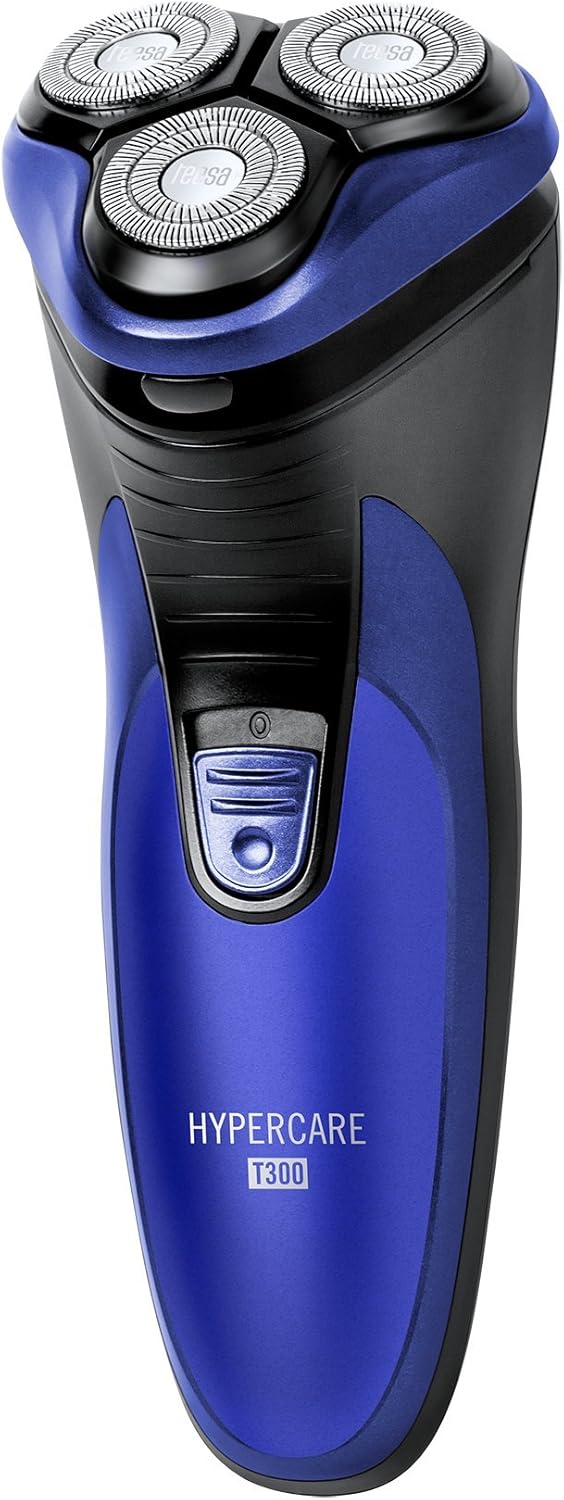
Produkt overview
Familiarize yourself with the components of your Teesa Hypercare T300 Rotary Shaver.


Oppsett
Lader barbermaskinen
- Sørg for at barbermaskinen er slått av før lading.
- Connect the power cable to the charging port on the shaver.
- Plug the other end of the power cable into a standard electrical outlet (220-240V; 50/60Hz).
- Ladeindikatorlampen vil lyse, noe som indikerer at barbermaskinen lader.

A full charge takes approximately 8 hours and provides up to 45 minutes of cordless operation. Do not leave the shaver connected to the charger for extended periods after it is fully charged.
Drift
Barbering
- Sørg for at barbermaskinen er fulladet.
- Trykk på strømknappen for å slå på barbermaskinen.
- Hold barbermaskinen i rett vinkel mot huden din.
- Move the shaver in small, circular motions over your face and neck. For optimal results, shave against the direction of hair growth.
- The flexible shaving heads will adapt to the contours of your face for a close shave.
- Etter barbering, trykk på av/på-knappen for å slå av barbermaskinen.
Bruk av popup-trimmeren
- Slå på barbermaskinen.
- Locate the pop-up trimmer release button on the side of the shaver.
- Slide the release button upwards to extend the pop-up trimmer.

- Use the trimmer to precisely shape sideburns, moustaches, or beard lines.
- After use, push the trimmer back down until it clicks into its closed position.
Vedlikehold
Rengjøring av barbermaskinen
Regelmessig rengjøring sikrer optimal ytelse og hygiene.
- Turn off the shaver and disconnect it from the power supply.
- Press the release button on the front of the shaver to open the shaving head unit.
- Use the provided cleaning brush to remove any accumulated hair clippings from the shaving heads and the hair chamber.
- For a more thorough cleaning, you may rinse the shaving heads under running water. Ensure the main body of the shaver does not get wet.
- Allow all parts to air dry completely before reassembling the shaving head unit.
- Periodically apply a small drop of the provided lubricating oil to the shaving foils and cutters to maintain smooth operation and prolong blade life.
- Always replace the protective cap over the shaving heads after each use to prevent damage.
Feilsøking
If you encounter any issues with your shaver, refer to the following common problems and solutions:
- Barbermaskinen slår seg ikke på:
- Sørg for at barbermaskinen er fulladet.
- Trykk godt på strømknappen.
- Dårlig barberingsytelse:
- The blades may be clogged with hair. Clean the shaver thoroughly as described in the Maintenance section.
- Ensure the shaver is fully charged. Performance may decrease with low battery.
- Blades may be dull. Consider replacing the shaving heads after extended use (replacement parts sold separately).
- Barbermaskinen lader ikke:
- Check that the power cable is securely connected to both the shaver and the electrical outlet.
- Kontroller at stikkontakten fungerer som den skal.
- Ensure the charging indicator light illuminates when connected.
Hvis problemet vedvarer etter at du har prøvd disse løsningene, kan du kontakte kundestøtte.
Spesifikasjoner
| Trekk | Spesifikasjon |
|---|---|
| Modellnummer | TSA0520 |
| Makt | 3 W |
| Rotasjonshastighet | 6000 RPM |
| Kjøretid | Opptil 45 minutter |
| Ladetid | Opptil 8 timer |
| Batteri | 2.4 V; 2/3 AA 600 mAh x2 (Rechargeable) |
| Strømforsyning | 220 – 240 V; 50/60 Hz |
| Vekt | 165 g |
| Dimensjoner (L x B x H) | 58.2 x 46.8 x 150.9 mm |
| Bladmateriale | Legert stål |
| Antall kniver | 3 (Rotary Type) |
| Spesialfunksjon | Ergonomisk design |
Garanti og støtte
For warranty information, technical assistance, or to inquire about replacement parts, please refer to the documentation included with your purchase or visit the official Teesa webnettstedet. Ta vare på kjøpsbeviset for garantikrav.