
1. Introduksjon
Takk for kjøpetasing the GooDee Mini Projector GD-DE-9. This manual provides essential information for setting up, operating, and maintaining your projector. Please read it thoroughly before use to ensure optimal performance and safety.
The GooDee GD-DE-9 is a portable LED projector designed for home entertainment, gaming, and presentations. It features a native resolution of 800x480p, supports up to 1080p input, and offers multiple connectivity options including HDMI, VGA, USB, AV, and SD card. Its advanced cooling system ensures quiet operation, and the integrated 2W speaker provides clear audio.

Figur 1.1: Foran view of the GooDee Mini Projector GD-DE-9.
2. Sikkerhetsinformasjon
For å unngå brann, elektrisk støt eller skade, må du følge følgende sikkerhetsregler:
- Ikke åpne projektoren casing. Overlat all service til kvalifisert servicepersonell.
- Ikke utsett projektoren for regn eller fuktighet for å forhindre brann eller elektrisk støt.
- Sørg for tilstrekkelig ventilasjon. Ikke blokker ventilasjonsåpningene.
- Bruk kun strømadapteren som følger med projektoren.
- Unngå å se direkte inn i projektorlinsen når lamp er på.
- Plasser projektoren på en stabil, jevn overflate.
- Trekk ut projektorens støpsel fra stikkontakten under tordenvær eller når den ikke brukes over lengre tid.
3. Pakkens innhold
Vennligst sjekk at alle varene er inkludert i pakken din:
- GooDee Mini Projector GD-DE-9
- Strømadapter
- Fjernkontroll
- HDMI-kabel
- AV-kabel
- Brukerhåndbok
4. Produktet er overview
4.1 Projektorkomponenter

Figur 4.1: Side view with input/output ports.
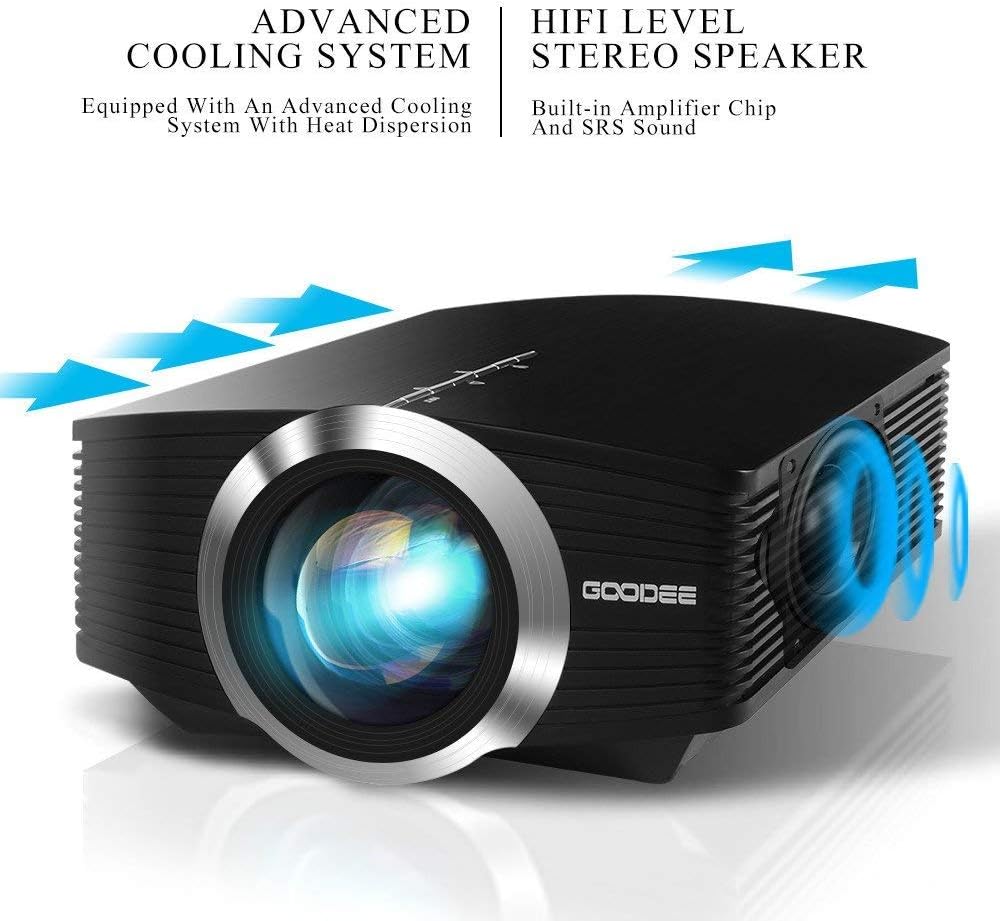
The projector features a direct light path optical technology for enhanced brightness and an advanced cooling system for quiet operation.

Figure 4.2: Advanced Cooling System and HIFI Stereo Speaker.
4.2 Fjernkontroll
The remote control allows you to operate the projector from a distance. Insert two AAA batteries (not included) into the remote control before use.

Figur 4.3: Fjernkontroll.
5. Oppsett
5.1 Plassering og projeksjonsavstand
The image size is adjusted by changing the projection distance. For optimal viewing, a projection distance between 1.5 to 4 meters is recommended, yielding screen sizes from 50 to 130 inches. The best projection size is typically 80-100 inches at a distance of 6.6-8 feet.

Figure 5.1: Projection Distance and Screen Size Chart.
Figur 5.2: Eksample Projector Placement.
5.2 Strømtilkobling
Koble strømadapteren til projektorens strøminngang, og koble deretter adapteren til en stikkontakt.
5.3 Koble til inndataenheter
The projector supports various input sources including HDMI, VGA, USB, AV, and SD card. It can connect to PCs, laptops, DVD players, PS3/4, Xbox ONE, and smartphones/tablets (via MHL cable and adapter, not included).

Figure 5.3: Multimedia Connection Diagram.
To connect a smartphone or tablet, ensure your device supports MHL functionality. You will need an MHL cable and a suitable adapter (not included).

Figure 5.4: Connecting Smartphones/Tablets.
5.4 Focus Adjustment and Keystone Correction
Adjust the focus ring on the projector lens until the image is clear. Use the keystone correction feature to adjust the image if it appears trapezoidal. The projector supports a ±15° keystone correction.
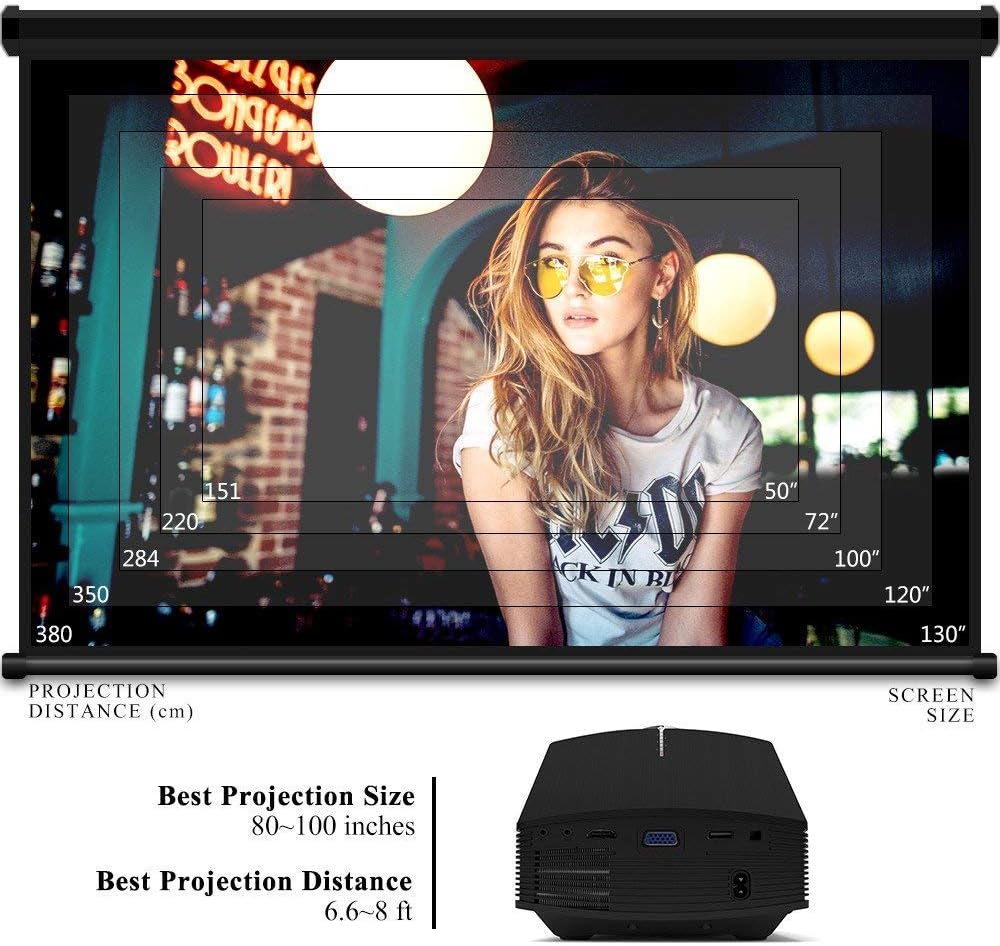
Figure 5.5: Focus and Keystone Adjustment.
6. Bruksanvisning
6.1 Strøm på/av
Press the power button on the projector or the remote control to turn the projector on or off.
6.2 Kildevalg
Press the 'Source' button on the projector or remote control to cycle through available input sources (HDMI, VGA, USB, AV, SD). Select the desired input source corresponding to your connected device.
6.3 Menynavigasjon
Use the arrow buttons on the projector or remote control to navigate through the on-screen menu. Press 'OK' or 'Enter' to confirm selections. Use the 'Menu' button to access settings and 'Exit' or 'Return' to go back.
6.4 Lydutgang
The projector has a built-in 2W speaker. For external audio, connect speakers or headphones to the 3.5mm audio output jack on the projector.
7. Vedlikehold
7.1 Rengjøring av linsen
Use a soft, lint-free cloth or lens cleaning paper to gently wipe the projector lens. Do not use abrasive cleaners or solvents.
7.2 Cleaning Air Vents
Regularly clean the air vents to ensure proper airflow and prevent overheating. Use a soft brush or compressed air to remove dust accumulation.
7.3 Oppbevaring
When not in use, store the projector in a cool, dry place, away from direct sunlight and extreme temperatures. Use the original packaging or a protective case to prevent dust and damage.
8. Feilsøking
| Problem | Mulig årsak | Løsning |
|---|---|---|
| Ingen bilder vises | Incorrect input source selected; Cable not connected properly; Device not powered on. | Select the correct input source; Check all cable connections; Ensure the source device is powered on. |
| Bildet er uklart | Fokus ikke justert; Projektoren er for nær/langt fra lerretet. | Juster fokusringen; Juster projeksjonsavstanden. |
| Bildet er trapesformet | Projektoren er ikke vinkelrett på lerretet. | Juster keystone-korrigering. |
| Ingen lyd | Volume too low; Muted; External audio device not connected/configured. | Øk volumet; Slå av dempingen; Sjekk eksterne lydtilkoblinger og innstillinger. |
| Fjernkontrollen virker ikke | Lave/døde batterier; Hindring mellom fjernkontroll og projektor; Fjernkontrollsensor blokkert. | Replace batteries; Remove obstructions; Ensure remote sensor is clear. |
9. Spesifikasjoner
| Trekk | Detalj |
|---|---|
| Merke | GooDee |
| Modellnummer | GD-DE-9 |
| Visningstype | LCD |
| Innfødt oppløsning | 800 x 480 piksler |
| Støttet oppløsning | Opptil 1080p |
| Lysstyrke | 3000 lumen (LED) |
| Lamp Liv | 30,000 timer |
| Tilkoblingsteknologi | HDMI, USB, VGA, AV, SD Card |
| Maskinvaregrensesnitt | HDMI, USB, VGA |
| Integrert høyttaler | 2W Stereo Speaker |
| Projeksjonsavstand | 1.5 - 4 meters (6.6 - 8 feet recommended) |
| Skjermstørrelse | 50 - 130 inches (80 - 100 inches recommended) |
| Keystone-korreksjon | ±15° Manuell |
| Formfaktor | Bærbar |
| Monteringstype | Bordfeste |
| Farge | Svart |
| Pakkedimensjoner | 33 x 21.6 x 11.8 cm |
| Varevekt | 1.48 kg |
| Anbefalt bruk | Gaming, Home Theater |
| Kompatible enheter | Smartphone, PC, Laptop, DVD Player, PS3/4, Xbox ONE, Fire TV Stick |
10. Garanti og støtte
GooDee offers a 3-year warranty for this projector. If you encounter any issues or are not completely satisfied with your purchase, please contact GooDee customer support. A refund or replacement is available within the first 2 months of purchase. Customer satisfaction is our top priority.
For support, please refer to the contact information provided on the GooDee official webnettstedet eller kjøpsplattformen din.