
Introduksjon
Thank you for choosing the Peakeep S8 Digital Alarm Clock. This manual provides detailed instructions for setting up, operating, and maintaining your new alarm clock. Please read this manual thoroughly before use to ensure proper function and to maximize your product experience.
Produktfunksjoner
- Stor LCD-skjerm: Features a clear, boldface number display for easy readability.
- Smart lyssensor: Built-in sensor automatically activates a soft backlight in dark environments, ensuring visibility without disturbing sleep.
- Gradually Strengthening Alarm: The alarm sound increases in volume gradually to gently wake you up.
- Snooze-funksjon: Provides an additional 5 minutes of sleep after the alarm sounds.
- Adjustable Time and Date Format: Customize time display (12/24 hour) and date format.
- Temperaturovervåking: Displays ambient temperature in Celsius or Fahrenheit.
- Batteridrevet: Operates on 3 x AAA batteries (not included).
Pakkeinnhold
- 1 x Peakeep S8 Digital Alarm Clock
- 1 x brukerhåndbok
Kontroller og visning
Display foran
The large LCD screen displays time, date, day of the week, alarm status, and temperature. The backlight activates automatically in low light conditions when the sensor is enabled.
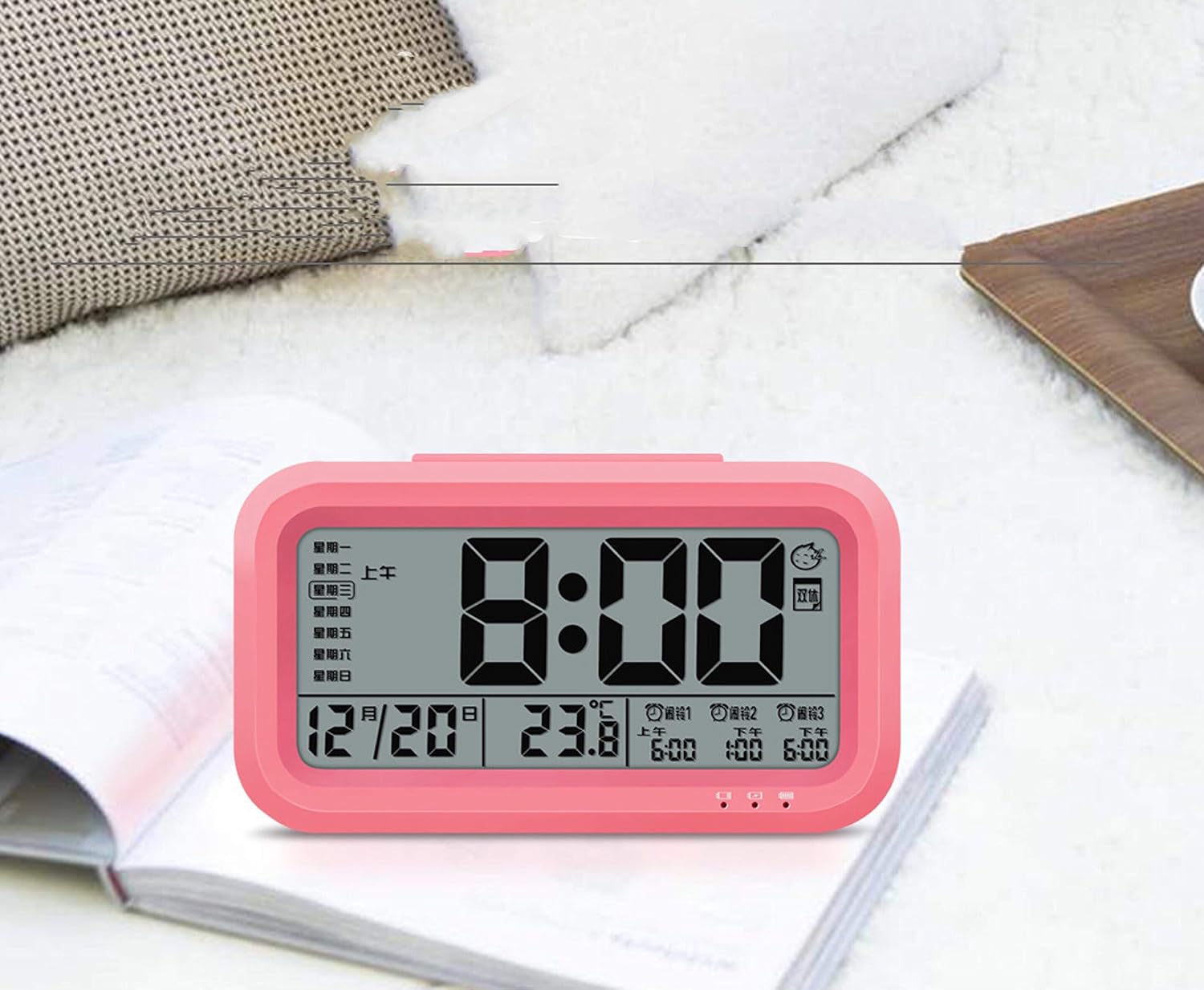
Bilde: Foran view of the Peakeep S8 Digital Alarm Clock. This image shows the large digital display with the time (8:00), date (12/20), and temperature (23.8°C). It also indicates alarm settings and day of the week.
Bakre kontroller
The back of the clock features several buttons and switches for setting time, date, alarm, and other functions.
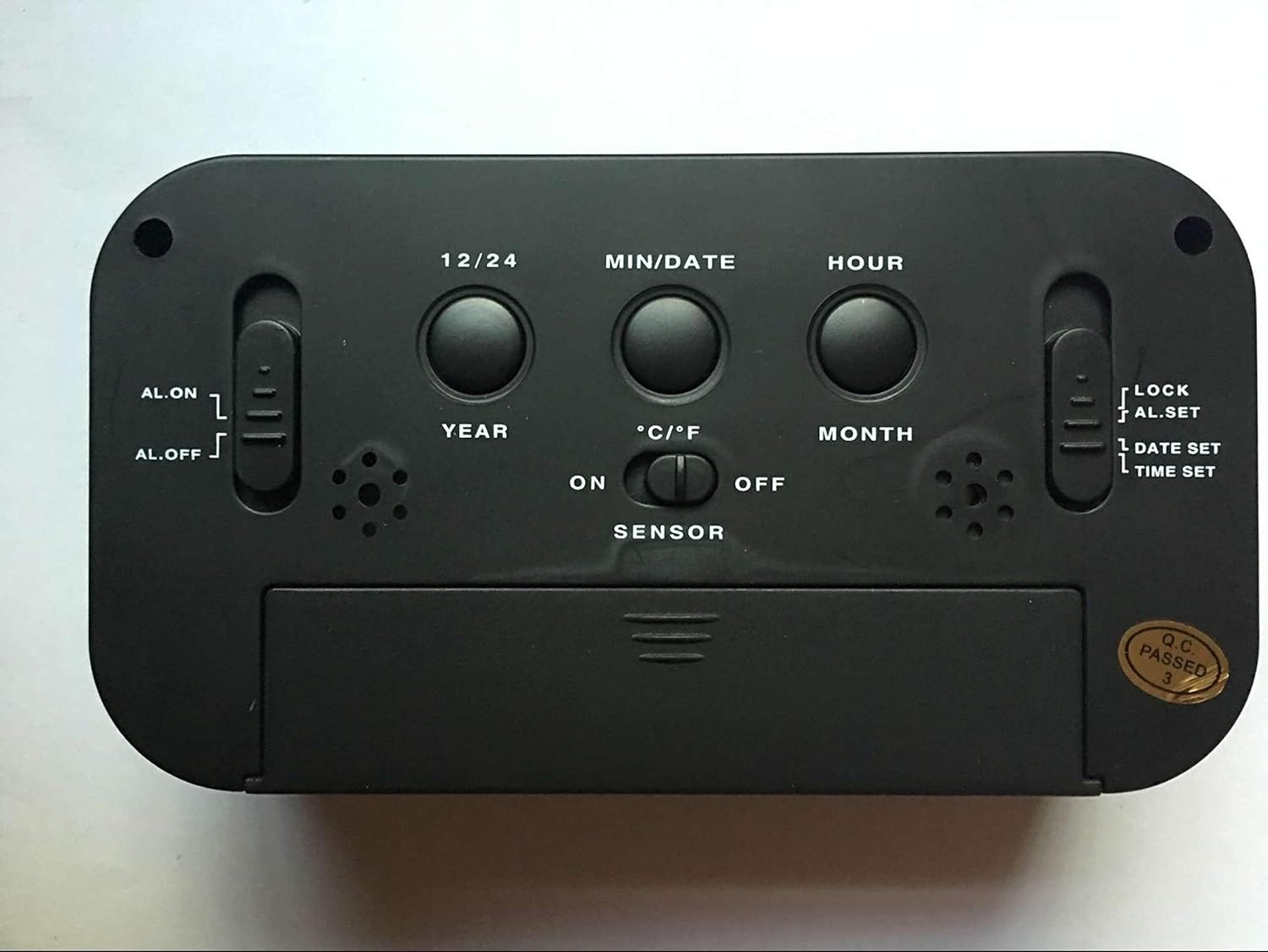
Bilde: Bak view of the Peakeep S8 Digital Alarm Clock. This image highlights the control panel on the back, including buttons for 12/24 hour format, MIN/DATE, HOUR, YEAR, MONTH, °C/°F, and switches for AL.ON/AL.OFF, LOCK/AL.SET/DATE SET/TIME SET, and SENSOR ON/OFF.
- 12/24-knapp: Veksler mellom 12-timers og 24-timers tidsvisning.
- MIN/DATE-knapp: Used to adjust minutes during time/alarm setting, and to view dato.
- TIME-knapp: Used to adjust hours during time/alarm setting.
- ÅR-knapp: Used to set the year.
- MÅNED-knapp: Used to set the month.
- °C/°F-knapp: Switches temperature display between Celsius and Fahrenheit.
- AL.ON/AL.OFF Switch: Turns the alarm function on or off.
- MODE Switch (LOCK/AL.SET/DATE SET/TIME SET):
- LÅSE: Locks current settings to prevent accidental changes.
- AL.SET: Går inn i alarminnstillingsmodus.
- DATE SET: Enters date setting mode.
- TIDEN SATT: Går inn i tidsinnstillingsmodus.
- SENSOR ON/OFF Switch: Activates or deactivates the smart light sensor for automatic backlight.
- SNOOZE/LIGHT Button (Top): Activates snooze when alarm sounds, or temporarily illuminates the display.
Oppsett
1. Installasjon av batteri
- Åpne batteridekselet på baksiden av klokken.
- Insert 3 new 1.5V AAA batteries, ensuring correct polarity (+ and -).
- Lukk batteridekselet godt.
- Merk: Batterier er ikke inkludert.
2. Innstilling av starttidspunkt
- Slide the MODE switch to TIDEN SATT.
- Trykk på TIME for å justere timen.
- Trykk på MIN/DATO for å justere minuttene.
- Once the correct time is set, slide the MODE switch back to LÅSE.
3. Initial Date Setting
- Slide the MODE switch to DATO ANGITT.
- Trykk på ÅR knappen for å justere året.
- Trykk på MÅNED knappen for å justere måneden.
- Trykk på MIN/DATO knappen for å justere dagen.
- Once the correct date is set, slide the MODE switch back to LÅSE.
Bruksanvisning
Stille inn alarmen
- Slide the MODE switch to AL.SET.
- Trykk på TIME -knappen for å justere alarmtiden.
- Trykk på MIN/DATO -knappen for å justere alarmminuttene.
- Once the desired alarm time is set, slide the MODE switch back to LÅSE.
- For å aktivere alarmen, skyv AL.ON/AL.OFF bytte til AL.ON. An alarm icon will appear on the display.
Bruke Snooze-funksjonen
Når alarmen går, trykker du på den store SNOOZE / LIGHT button on top of the clock. The alarm will pause for approximately 5 minutes and then sound again. This can be repeated.
Slå av alarmen
To turn off the alarm completely, slide the AL.ON/AL.OFF bytte til AL.OFF. The alarm icon will disappear from the display.
Activating the Smart Light Sensor
To enable the automatic backlight feature, slide the SENSOR bytte til ON. The display will automatically illuminate with a soft glow in dark environments. Slide the switch to AV for å deaktivere denne funksjonen.
Endre temperaturenhet
Trykk på ° C / ° F button on the back of the clock to switch the temperature display between Celsius and Fahrenheit.
Changing Time Format (12/24 Hour)
Trykk på 12/24 button on the back of the clock to toggle between 12-hour (with AM/PM indicator) and 24-hour time formats.
Vedlikehold
Rengjøring
Wipe the clock with a soft, dry cloth. Do not use abrasive cleaners or solvents, as they may damage the surface.
Batteribytte
When the display becomes dim or the clock functions erratically, it is time to replace the batteries. Follow the battery installation steps in the "Setup" section. Always replace all three AAA batteries at the same time with new ones.
Feilsøking
| Problem | Mulig årsak/løsning |
|---|---|
| Skjermen er tom eller svak. |
|
| Alarmen lyder ikke. |
|
| Clock is losing or gaining time. |
|
| Knappene reagerer ikke. |
|
Spesifikasjoner
- Merke: Peakeep
- Modellnummer: S8 (Item Model Number: Crazy Curry-030)
- Visningstype: Digital LCD
- Materiale: Plast
- Farge: Black (Black-a)
- Strømkilde: 3 x 1.5V AAA-batterier (ikke inkludert)
- Spesielle funksjoner: Alarm, Snooze, Smart Light Sensor, Temperature Display (°C/°F), 12/24 Hour Format
- Dimensjoner: (Approximate, based on typical alarm clock size and weight)
- Varevekt: 178 g
- Fraktvekt: 0.18 kilo
- UPC: 734602860235
Garanti og støtte
This product is designed for reliability and ease of use. For specific warranty information, please refer to the documentation provided at the time of purchase or contact your retailer.
If you encounter any issues not covered in this manual, please contact the retailer or manufacturer for assistance. Keep your purchase receipt as proof of purchase for any warranty claims.