
1. Introduksjon
This manual provides essential instructions for the safe and efficient operation of your SuperSonic IQ-6112DJBT Portable Bluetooth DJ Speaker. Please read this manual thoroughly before using the product and retain it for future reference.
2. Sikkerhetsinformasjon
For å sikre sikker drift og forhindre skade, følg følgende forholdsregler:
- Ikke utsett høyttaleren for vann, fuktighet eller ekstreme temperaturer.
- Ikke åpne høyttaler casing. Overlat all service til kvalifisert personell.
- Hold høyttaleren unna varmekilder og direkte sollys.
- Bruk kun strømadapteren som følger med enheten.
- Sørg for god ventilasjon rundt høyttaleren under drift.
- Unngå langvarig lytting på høyt volum for å forhindre hørselsskade.
3. Pakkens innhold
Bekreft at alle varene er til stede i pakken:
- SuperSonic IQ-6112DJBT Portable Bluetooth DJ Speaker
- Kablet mikrofon
- Fjernkontroll
- Strømadapter
- Brukerhåndbok (dette dokumentet)
4. Produktet er overview
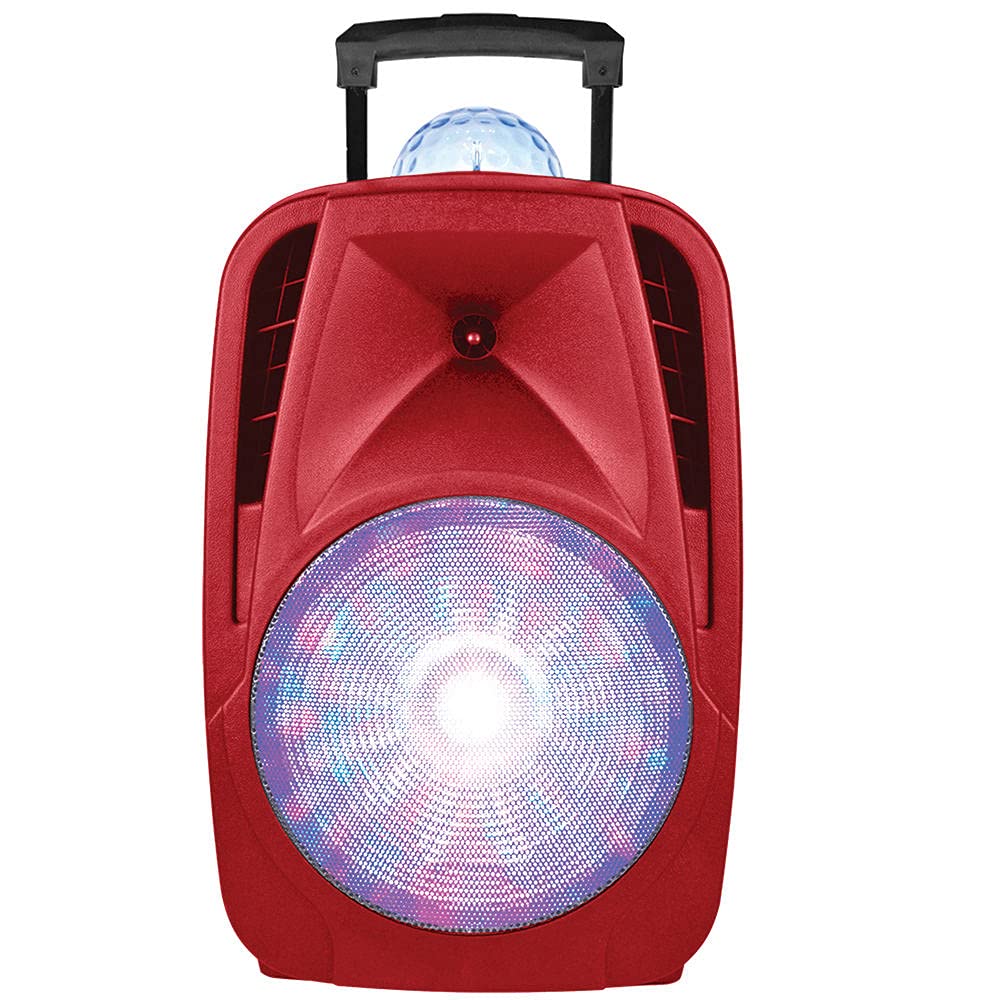
The SuperSonic IQ-6112DJBT is a versatile portable DJ speaker featuring a 12-inch high-efficiency woofer, built-in Bluetooth connectivity, USB/Micro SD card inputs, and an AUX input. It also includes a disco light feature for enhanced ambiance.
4.1 Included Accessories: Microphone and Remote Control
This image displays the included wired microphone and the multi-function remote control. The microphone features a standard 1/4 inch audio jack for connection to the speaker. The remote control includes buttons for mute, record, play, volume adjustment, track navigation, scan, and EQ settings, along with a numeric keypad for direct track selection.
4.2 Kontroller på frontpanelet
The speaker features various controls for audio playback, input selection, and light effects. These typically include:
- Hovedvolum: Justerer den generelle lydutgangen.
- Mikrofonvolum: Justerer mikrofoninngangsnivået.
- Ekkokontroll: Justerer ekkoeffekten for mikrofonen.
- Inngangsmodusknapp: Switches between Bluetooth, USB, Micro SD, and AUX inputs.
- Knapp for lysmodus: Controls the disco light effects.
- Avspillingskontroller: Spill av/pause, neste/forrige spor.
4.3 Tilkoblinger på bakpanelet
The rear panel provides ports for power and external devices:
- Strøminngang: Kobles til strømadapteren.
- AUX-inngang (3.5 mm): Connects external audio devices via an audio cable.
- USB-port: For USB-minnepinner.
- Micro SD -kortspor: For Micro SD-minnekort.
- Microphone Input (1/4 inch): Kobler til den kablede mikrofonen.
5. Oppsett
5.1 Strømtilkobling
- Connect the supplied power adapter to the speaker's power input port.
- Koble strømadapteren til en vanlig stikkontakt.
- Turn on the speaker using the power switch, usually located on the rear or front panel.
5.2 Initial Charging (Battery Powered)
The speaker is battery-powered. For optimal performance, fully charge the speaker before its first use. The charging indicator light will typically change color or turn off when charging is complete.
6. Bruksanvisning
6.1 Bluetooth-paring
- Slå på høyttaleren.
- Trykk på Modus button on the speaker or remote control until "Bluetooth" mode is selected. The speaker will indicate it is in pairing mode (e.g., a flashing LED or an audible prompt).
- Gå til Bluetooth-innstillingene på den Bluetooth-aktiverte enheten din (smarttelefon, nettbrett osv.) og søk etter tilgjengelige enheter.
- Velg «IQ-6112DJBT» fra listen over enheter.
- Once paired, the speaker will confirm the connection (e.g., a solid LED or an audible prompt). You can now play audio wirelessly from your device.
6.2 USB/Micro SD-avspilling
- Sett inn en USB-minnepinne eller et Micro SD-kort (forhåndslastet med MP3-lyd files) inn i den respektive porten/sporet på høyttaleren.
- Trykk på Modus button to select "USB" or "SD" mode. The speaker will automatically begin playing audio from the inserted media.
- Use the playback controls (Play/Pause, Next/Previous Track) on the speaker or remote control to manage your music.
6.3 AUX-inngang
- Koble den ene enden av en 3.5 mm lydkabel (ikke inkludert) til AUX-inngangen på høyttaleren.
- Connect the other end of the audio cable to the headphone jack or audio output of your external audio device (e.g., MP3 player, laptop).
- Trykk på Modus button to select "AUX" mode.
- Play audio from your external device. Adjust volume on both the speaker and the external device.
6.4 Bruk av mikrofon
- Plug the wired microphone into the 1/4 inch microphone input jack on the speaker.
- Adjust the microphone volume knob on the speaker to your desired level.
- Adjust the echo control knob for an echo effect, if desired.
6.5 Lyseffekter
The speaker features built-in disco lights. Press the Lysmodus button on the speaker or remote control to cycle through different light patterns or to turn the lights off.
6.6 Fjernkontrollfunksjoner
The included remote control provides convenient access to various speaker functions:
- STUM: Demper eller slår på lydutgangen.
- RECs: Initiates recording (if supported by the speaker's firmware and connected media).
- REC PLAY: Spiller av innspilt lyd.
- VOL+/VOL-: Increases or decreases the main volume.
- CH+/CH- (Next/Previous): Skips to the next or previous track/station.
- SKANNING: Scans for radio stations (if FM radio is supported).
- EQ: Blar gjennom forhåndsinnstillinger for equalizer.
- Numerisk tastatur (0-9): Direct selection of tracks on USB/SD media.
7. Vedlikehold
7.1 Rengjøring
Tørk av høyttalerens utside med en myk, tørr klut. Ikke bruk slipende rengjøringsmidler, voks eller løsemidler. Sørg for at ingen væsker kommer inn i høyttalerens åpninger.
7.2 Oppbevaring
When not in use for extended periods, store the speaker in a cool, dry place, away from direct sunlight and extreme temperatures. If battery-powered, charge the battery periodically to maintain its lifespan.
8. Feilsøking
| Problem | Mulig årsak | Løsning |
|---|---|---|
| Ingen strøm | Power adapter not connected; Battery depleted; Power switch off. | Ensure power adapter is securely connected and plugged into a working outlet. Charge the battery. Turn the power switch ON. |
| Ingen lyd | Volumet er for lavt; Feil inngangsmodus; Enheten er ikke paret (Bluetooth); Kabelen er ikke tilkoblet (AUX). | Increase volume on speaker and source device. Select the correct input mode. Re-pair Bluetooth device. Check AUX cable connection. |
| Bluetooth kobler ikke til | Høyttaleren er ikke i paringsmodus; Enheten er for langt unna; Interferens; Tidligere paret enhet er tilkoblet. | Sørg for at høyttaleren er i Bluetooth-paringsmodus. Flytt enheten nærmere høyttaleren. Slå av andre Bluetooth-enheter. Koble fra tidligere parede enheter. |
| Mikrofonen virker ikke | Microphone not plugged in; Microphone volume too low; Faulty microphone. | Ensure microphone is securely plugged into the correct input. Increase microphone volume. Test with another microphone if available. |
9. Spesifikasjoner
- Merke: Supersonisk
- Modellnummer: IQ-6112DJBT
- Basshøyttalerstørrelse: 12 tommer
- Tilkoblingsteknologi: AUX, Bluetooth, USB
- Strømkilde: Batteridrevet
- Impedans: 4 Ohm
- Antall kanaler: 2
- Lydinngang: Headphone jack (for AUX), 1/4 inch (for Microphone)
- Varevekt: 17.9 pund
- UPC: 639131861121
10. Garanti og støtte
10.1 Garantiinformasjon
This product is covered by a Manufacturer Warranty. For specific details regarding warranty coverage, duration, and terms, please refer to the warranty card included in your package or contact Supersonic customer support.
10.2 Kundestøtte
If you encounter any issues not covered in this manual or require further assistance, please contact Supersonic customer support. Contact information can typically be found on the product packaging, the official Supersonic webnettstedet eller garantikortet.