
1. Introduksjon
This manual provides essential information for the safe and effective operation of your Vangoa 65W Electric Drum Amplifier. Designed for electronic percussion products, this amplifier delivers 65 watts of power, suitable for various performance and practice environments. It features an 8-inch woofer and a 2-inch tweeter for balanced sound reproduction, along with multiple connectivity options including dual microphone inputs, instrument inputs, headphone output, USB, and wireless input.
2. Nøkkelfunksjoner
- 65W høy effekt: Provides sufficient amplification for electronic drum practice, studio rehearsals, street performances, karaoke, and live stage bruk.
- Rich and Dynamic Tone: Equipped with an 8-inch woofer and a 2-inch tweeter for expressive classic tones and responsive audio. Features 3-band EQ (High, Mid, Low) for sound shaping.
- Diverse tilkoblingsmuligheter: Includes dual independent microphone channels, headphone output, USB interface, and wireless input for devices like phones and audio players.
- Multiple Instrument Inputs: Two independent drum input interfaces for connecting electronic drums, electric guitars, keyboards, and other instruments.
- Intuitivt kontrollpanel: Simple and practical operating area on the top for easy adjustment of equalizer settings and volume.
3. Produktet er overview

Figur 1: Foran view of the Vangoa 65W Electric Drum Amplifier highlighting key features.
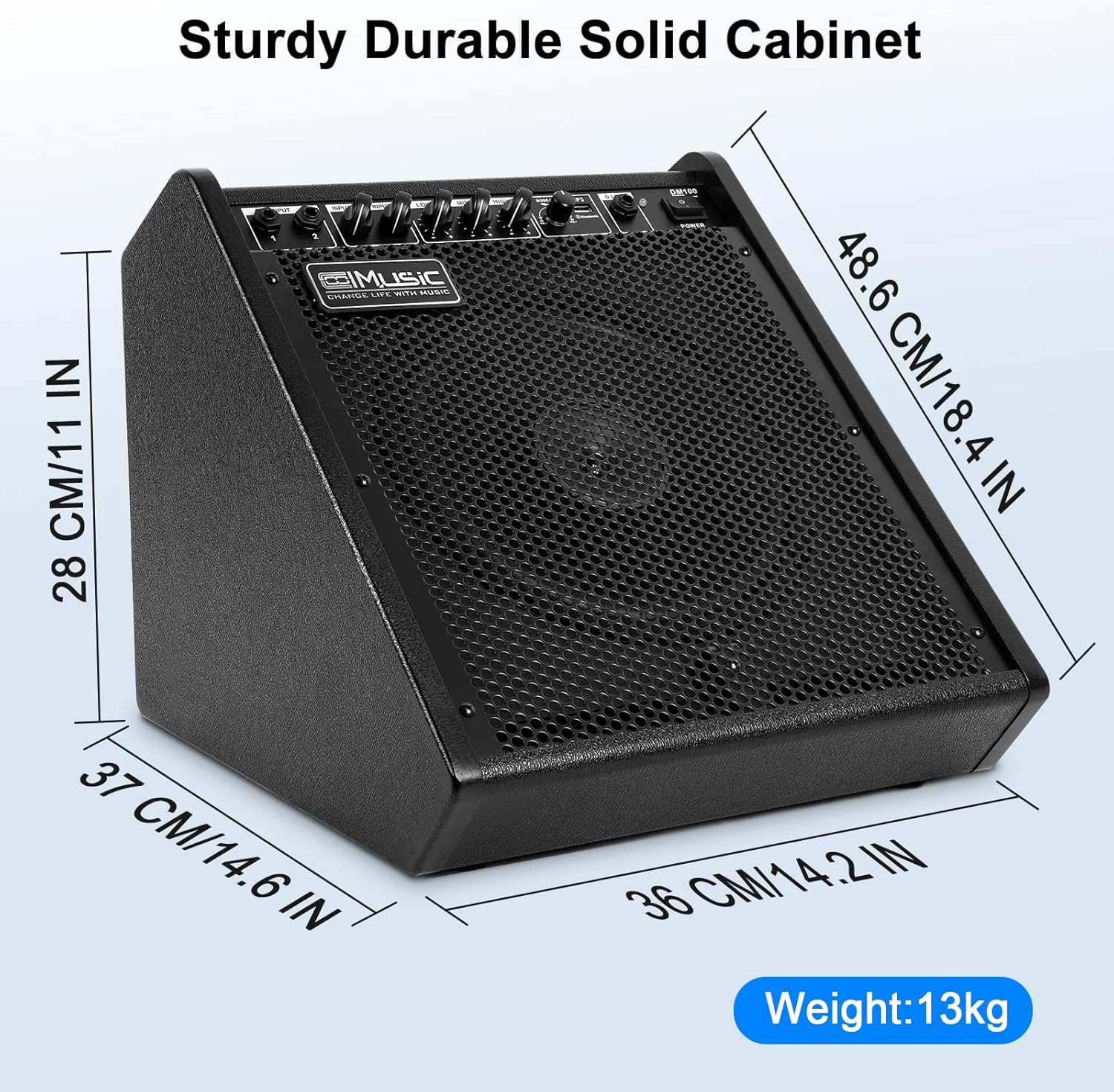
Figur 2: Amplifier dimensions (16.14 x 14.17 x 13.39 inches).

Figure 3: Top panel showing diverse connection options and controls.

Figure 4: Illustration of the 8-inch woofer and 2-inch tweeter for professional sound.

Figure 5: USB and Bluetooth connectivity for wide compatibility.

Figure 6: Detailed diagram of inputs for microphones, drums, line-in, and USB/Bluetooth.
Produktvideoer
Video 1: En kort produktgjennomgangview demonstrerer amplifier's features and design.
Video 2: Short demonstration of the Vangoa 65W Electric Drum Amp in action, showcasing its powerful sound.
4. Oppsettveiledning
- Utpakking: Fjern forsiktig ampTa ut emballasjen. Ta vare på all emballasje for fremtidig transport eller oppbevaring.
- Plassering: Plasser amplifier on a stable, flat surface. Ensure adequate ventilation around the unit. The amplifier is designed with an elevation angle for optimal sound projection towards the user.
- Strømtilkobling: Koble den medfølgende strømledningen til amplifier's power input and then to a suitable electrical outlet. Ensure the power switch is in the 'OFF' position before connecting.
- Første oppstart: Flip the power switch to the 'ON' position. The power indicator light should illuminate.
- Volumjustering: Before connecting any instruments, ensure all volume knobs (Master, Drum, Line, Mic) are set to their minimum positions to prevent sudden loud sounds.
5. Bruksanvisning
5.1 Connecting Instruments and Microphones
- Electronic Drums: Connect your electronic drum module's output to the 'DRUM IN' input using a standard instrument cable. Adjust the 'DRUM' volume knob to control the drum sound level.
- Other Instruments (Keyboard, Guitar): Use the 'LINE IN' inputs for connecting other instruments. Adjust the 'LINE' volume knob.
- Mikrofoner: Connect microphones to the 'MIC 1' or 'MIC 2' inputs. Each microphone input has an independent volume control ('MIC VOL').
- Hodetelefoner: For private practice, connect headphones to the 'PHONES' output. This will mute the main speaker output.
5.2 Justering av equalizer (EQ)
De amplifier features a 3-band equalizer to shape your sound:
- BASS: Adjusts the low-frequency response. Turn clockwise to boost bass, counter-clockwise to cut.
- MID: Adjusts the mid-range frequency response. Turn clockwise to boost mids, counter-clockwise to cut.
- DISKANT: Adjusts the high-frequency response. Turn clockwise to boost treble, counter-clockwise to cut.
Experiment with these controls to achieve your desired tone for different instruments and musical styles.
5.3 Wireless and USB Playback
- Trådløs (Bluetooth): Activate Bluetooth on your external device (e.g., smartphone, tablet). Select the amplifier from the list of available devices to pair. Once connected, you can play audio through the amplifier. Use the 'BT/MP3' volume control on the amplifier and your device's volume control.
- USB-avspilling: Sett inn en USB-stasjon som inneholder lyd files into the 'USB' port. The amplifier will automatically detect and begin playing the files. Use the playback controls (play/pause, next/previous track) and the 'BT/MP3' volume control.
5.4 Hovedvolum
The 'MASTER' volume knob controls the overall output level of the amplifier. Adjust this after setting individual input volumes to achieve the desired total loudness.
6. Spesifikasjoner
| Trekk | Spesifikasjon |
|---|---|
| Utgang Wattage | 65 watt |
| Høyttalerkonfigurasjon | 8-inch Woofer, 2-inch Tweeter |
| Frekvensrespons | 45 Hz til 20 kHz |
| Innganger | 2x Drum/Line Inputs (6.35mm Jack), 2x Mic Inputs, Aux Input, USB |
| Utganger | Hodetelefonutgang |
| Trådløs tilkobling | Bluetooth |
| Equalizer | 3-Band (Bass, Mid, Treble) |
| Dimensjoner (L x B x H) | 16.14 x 14.17 x 13.39 tommer |
| Varevekt | 17.06 pund |
| Materiale | Metall, plast |
| Farge | Svart |
7. Vedlikehold
- Rengjøring: Bruk en myk, tørr klut til å rengjøre utsiden av maskinen ampIkke bruk flytende rengjøringsmidler eller løsemidler, da disse kan skade overflaten eller de indre komponentene.
- Lagring: Når den ikke er i bruk over lengre tid, oppbevar den ampOppbevares kjølig og tørt, unna direkte sollys og ekstreme temperaturer.
- Ventilasjon: Sørg for at ampVentilasjonsåpningene på apparatet er ikke blokkert for å forhindre overoppheting.
- Kabelpleie: Regularly inspect all cables for signs of wear or damage. Replace any damaged cables immediately to ensure safe operation.
8. Feilsøking
- Ingen strøm:
- Sjekk om strømledningen er ordentlig koblet til begge amplifier and the electrical outlet.
- Kontroller at strømuttaket fungerer.
- Sørg for at strømbryteren på amplifier is in the 'ON' position.
- Ingen lydutgang:
- Confirm that all volume knobs (Master, Drum, Line, Mic, BT/MP3) are turned up to an audible level.
- Check all instrument and microphone cables for secure connections and proper functionality.
- If using headphones, ensure they are properly connected and that the main speaker output is not muted unexpectedly.
- If using wireless or USB input, ensure the device is properly paired/connected and playing audio.
- Forvrengt lyd:
- Reduce the volume levels of the input source, individual channels, and the Master volume.
- Adjust the EQ settings (Bass, Mid, Treble) to reduce excessive boosting of certain frequencies.
- Ensure instrument cables are not damaged or faulty.
- Problemer med trådløs tilkobling:
- Sørg for at amplifier's wireless function is active.
- Move the external device closer to the amplifier for å forbedre signalstyrken.
- Koble fra og par Bluetooth-enheten på nytt.
9. Garanti og støtte
Vangoa products are designed and manufactured to high-quality standards. For warranty information, please refer to the warranty card included with your product or visit the official Vangoa website. For technical support, troubleshooting assistance, or service inquiries, please contact Vangoa customer support through their official channels.
Vennligst ta vare på kjøpsbeviset for eventuelle garantikrav.