
Introduksjon
Thank you for choosing the MIFA A3 Soundbox Bluetooth Portable Speaker. This manual provides essential information for the safe and efficient use of your device. Please read it thoroughly before operating the speaker and retain it for future reference.
Sikkerhetsinformasjon
- Ikke utsett høyttaleren for ekstreme temperaturer, direkte sollys eller høy luftfuktighet.
- Unngå å miste eller utsett høyttaleren for sterke støt.
- Ikke demonter eller forsøk å reparere høyttaleren selv. Kontakt kvalifisert servicepersonell.
- Keep the speaker away from water and liquids, despite its waterproof rating, to prevent damage to charging ports or internal components.
- Bruk kun den spesifiserte ladekabelen og adapteren.
Pakkeinnhold
Vennligst sjekk pakken for følgende varer:
- MIFA A3 Bluetooth Portable Speaker
- USB ladekabel
- AUX lydkabel
- Brukerhåndbok (dette dokumentet)
Produkt overview
The MIFA A3 speaker features intuitive touch controls and multiple connectivity options. Familiarize yourself with the speaker's layout:
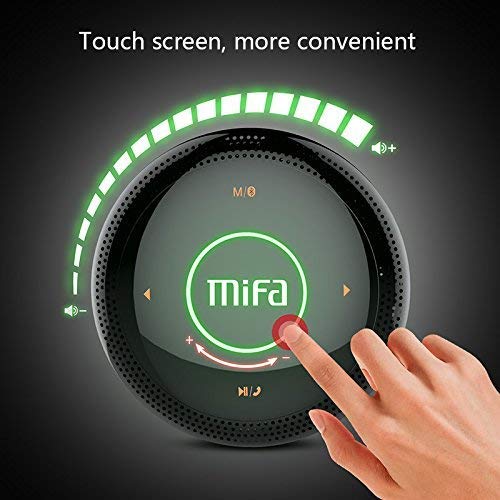
Figur 1: Topp view of the MIFA A3 speaker, highlighting the touch-sensitive control panel. The panel displays volume indicators, play/pause, and track navigation buttons. A central 'Mifa' logo is also visible.
- Berøringskontrollpanel: Located on the top surface for volume adjustment, playback control, and mode selection.
- Mikrofon: For håndfri telefoni.
- Ladeport: Mikro-USB-port for lading.
- AUX-inngang: 3.5 mm lydkontakt for kablet tilkobling.
- Micro SD -kortspor: For å spille av musikk direkte fra et minnekort.
Oppsett
1. Lading av høyttaleren
Lad høyttaleren helt opp før første gangs bruk. Koble den medfølgende USB-ladekabelen til høyttalerens ladeport og den andre enden til en USB-strømadapter (ikke inkludert) eller en datamaskins USB-port.
- Ladeindikatorlampen vil lyse under lading.
- The indicator will turn off or change color once fully charged.
- A full charge provides approximately 8 hours of continuous playtime.
2. Slå på/av
- For å slå på: Press and hold the Power button (usually integrated into the touch panel or a dedicated button) for 2-3 seconds until you hear an audible prompt or see an indicator light.
- Slik slår du av: Press and hold the Power button again for 2-3 seconds.
Bruksanvisning
1. Bluetooth-paring
- Ensure the speaker is powered on and in Bluetooth pairing mode (indicated by a flashing blue light or audible prompt).
- Aktiver Bluetooth på enheten din (smarttelefon, nettbrett, PC) og søk etter tilgjengelige enheter.
- Select "MIFA A3" from the list of devices.
- Once paired, the speaker will provide an audible confirmation, and the indicator light will become solid blue.
- The speaker will automatically connect to the last-paired device when powered on, if that device's Bluetooth is active and within range.
2. AUX-tilkobling
For devices without Bluetooth, use the provided 3.5mm AUX audio cable:
- Connect one end of the AUX cable to the speaker's AUX input port.
- Koble den andre enden til hodetelefonkontakten på lydenheten.
- Høyttaleren vil automatisk bytte til AUX-modus.
3. Avspilling fra mikro-SD-kort
Insert a Micro SD card (up to 32GB, FAT32 format) with music files inn i det angitte sporet. Høyttaleren vil automatisk oppdage kortet og starte avspillingen.
4. Touch Control Operations
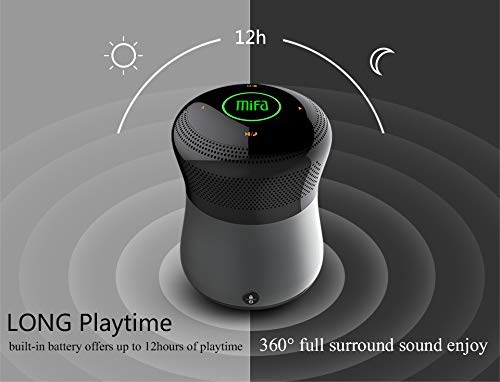
Figur 2: The MIFA A3 speaker shown with an overlay indicating "LONG Playtime" (up to 12 hours) and "360° full surround sound enjoy." This image emphasizes the speaker's battery life and audio dispersion.
- Volumkontroll: Slide your finger clockwise on the touch panel to increase volume, counter-clockwise to decrease.
- Spill av/pause: Tap the central Play/Pause icon.
- Neste spor: Tap the "Next" arrow icon.
- Forrige spor: Tap the "Previous" arrow icon.
- Modusbryter: Tap the "M/O" icon to cycle between Bluetooth, AUX, and Micro SD card modes.
- Låseknapp: Press the lock icon to prevent accidental touch inputs.
5. Call Handling (Bluetooth Mode)
- Svar på anrop: Tap the Play/Pause icon when a call comes in.
- Avslutt samtale: Tap the Play/Pause icon again.
- Avvis anrop: Press and hold the Play/Pause icon for 2 seconds.
Vedlikehold
- Rengjør høyttaleren med en myk, tørr klut. Ikke bruk slipende rengjøringsmidler eller løsemidler.
- Oppbevar høyttaleren på et kjølig og tørt sted når den ikke er i bruk over lengre tid.
- Charge the battery at least once every three months to maintain battery health.
Feilsøking
| Problem | Mulig løsning |
|---|---|
| Høyttaleren slår seg ikke på. | Sørg for at batteriet er ladet. Koble til en strømkilde og prøv på nytt. |
| Kan ikke pares via Bluetooth. |
|
| Ingen lyd. |
|
| Dårlig lydkvalitet. |
|
Spesifikasjoner
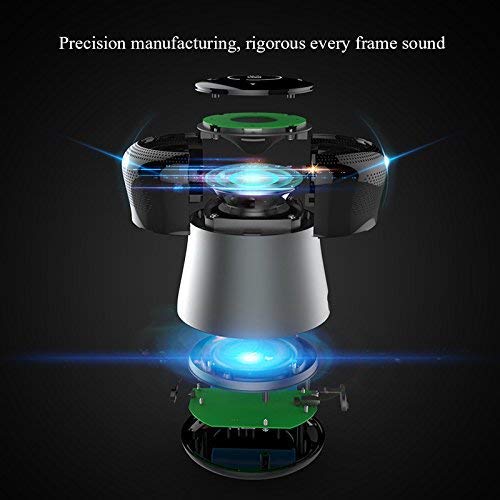
Figur 3: An exploded diagram of the MIFA A3 speaker, illustrating its internal components and structural design, emphasizing precision manufacturing.
| Modell | MIFA A3 |
| Utgangseffekt | 10W |
| Tilkobling | Bluetooth 4.2, AUX, Micro SD Card |
| Batteri | 1800 mAh Li-ion |
| Spilletid | Opptil 8 timer (ved 60 % volum) |
| Ladetid | Ca 3-4 timer |
| Mikrofon | Innebygd for håndfrie samtaler |
| Vanntett | Yes (as per product specifications, but general caution advised for ports) |
| Kontrollmetode | Røre |
| Kompatible enheter | Bærbar PC, PC, smarttelefon, nettbrett |
Garanti og støtte
MIFA products are designed to provide reliable performance. For warranty information or technical support, please refer to the warranty card included with your purchase or visit the official MIFA webnettstedet. Ta vare på kjøpsbeviset for garantikrav.
For further assistance, you may contact MIFA customer support through their official channels.