
Alpha EK 60
Alpha EK-60 61-Key Electronic Piano Keyboard User Manual
Portable Digital Keyboard with Audio Input, Microphone Input, Headphone Output, 255 Tones, Rhythms, LED Display
1. Introduksjon
Takk for kjøpetasing the Alpha EK-60 61-Key Electronic Piano Keyboard. This manual provides detailed instructions for the proper setup, operation, and maintenance of your new instrument. The EK-60 is designed to offer a rich musical experience with its versatile features, including a wide range of tones and rhythms, intelligent teaching functions, and various connectivity options. Please read this manual thoroughly before using the product to ensure optimal performance and longevity.
2. Sikkerhetsinformasjon
To prevent electric shock, fire, or damage to the unit, please observe the following precautions:
- Ikke utsett tastaturet for regn eller fuktighet.
- Ikke plasser gjenstander fylt med væske, som for eksempel vaser, på tastaturet.
- Ikke blokker noen ventilasjonsåpninger.
- Bruk kun den spesifiserte strømadapteren.
- Ikke demonter eller modifiser enheten. Overlat all service til kvalifisert personell.
- Oppbevares utilgjengelig for små barn.
3. Pakkens innhold
Vennligst sjekk at alle følgende varer er inkludert i pakken din:
- 1 x Alpha 61-Key Standard Keyboard EK-60
- 1 x Adjustable Stand
- 1 x notearkholder
- 1 x strømadapter
- 1 x brukerhåndbok (dette dokumentet)
4. Produktet er overview
Familiarize yourself with the components of your Alpha EK-60 keyboard.
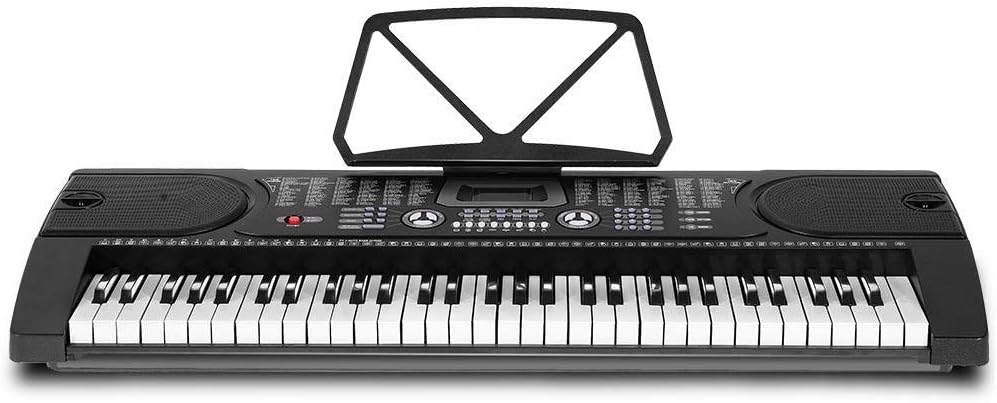
Figur 4.1: Ovenfra og ned view of the Alpha EK-60 keyboard, highlighting the control panel, integrated speakers, and the 61 standard piano keys.

Figure 4.2: Detail of the LED display for convenient settings adjustment and the battery compartment for portable use.

Figur 4.3: View of the multiple jacks including Audio Input, Microphone Input, and Headphone Output for versatile connectivity.
Nøkkelfunksjoner:
- 61-Key Standard Piano Keyboard
- LED display for easy navigation
- 24 demosanger
- 255 timbres (instrument sounds)
- 255 rhythms (accompaniment styles)
- 61 kinds of keyboard percussions
- 8 Panel Percussions
- Master volume, accompaniment volume, and tempo control
- Intelligent teaching function: one-key, follow and ensemble function
- Funksjon for rytmeprogrammering
- Auto chord and chord timbre option
- Opptaks- og avspillingsfunksjonalitet
- Sustain and vibrato effects
- Microphone input and speaker output
- Headphone jack for silent practice
- Battery powered option (6 x AA-size batteries, not included)
5. Oppsett
5.1 Montering av stativet
- Unpack all components of the adjustable stand.
- Connect the horizontal support bars to the vertical legs, ensuring they are securely fastened.
- Adjust the height of the stand to your preferred playing position using the adjustment knobs. The stand is adjustable from 59cm to 79cm in height.
- Place the keyboard securely on top of the assembled stand.
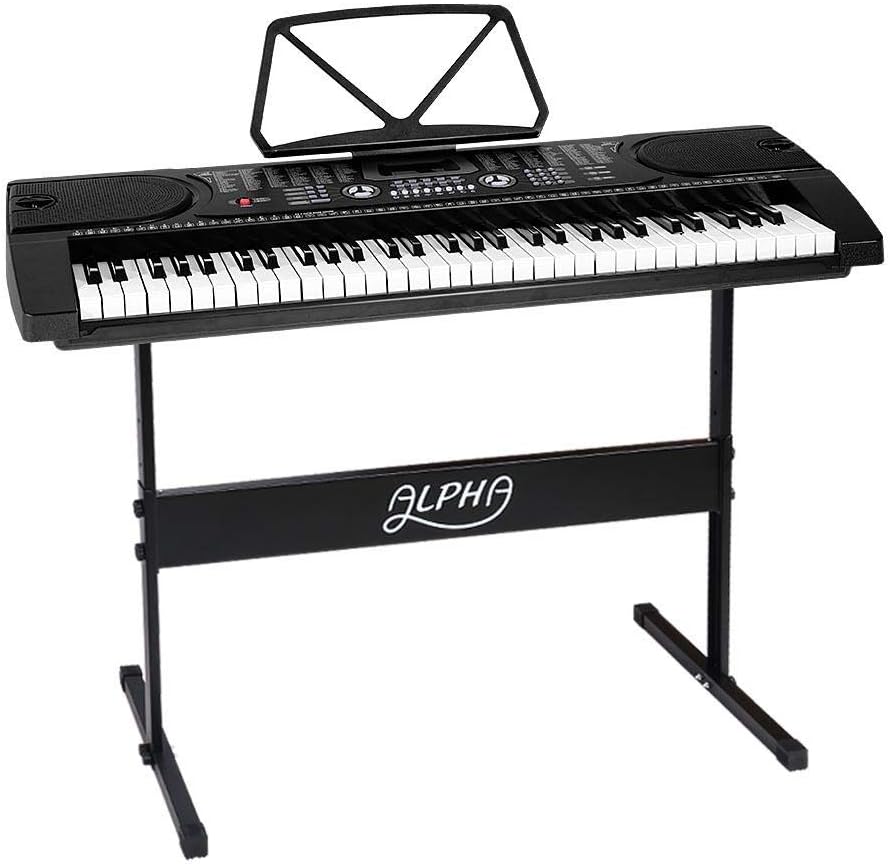
Figure 5.1: The Alpha EK-60 keyboard fully assembled on its adjustable stand, ready for use.
5.2 Slå på tastaturet
The Alpha EK-60 can be powered by the included AC adaptor or by batteries.
Bruke strømadapteren:
- Connect the DC plug of the power adaptor to the DC 9V input jack on the rear of the keyboard.
- Koble strømadapteren til en vanlig stikkontakt.
Bruk av batterier:
- Finn batterirommet på undersiden av tastaturet.
- Åpne batteridekselet.
- Insert 6 x AA-size batteries (not included), ensuring correct polarity (+/-).
- Lukk batteridekselet godt.
Note: When using batteries, disconnect the AC adaptor. The keyboard will automatically switch to battery power if the adaptor is removed.
6. Bruksanvisning
6.1 Grunnleggende betjening
- Slå på/av: Trykk på MAKT -knappen for å slå tastaturet av eller på.
- Volumkontroll: Bruk HOVEDVOLUM knotten for å justere det generelle lydnivået.
- Tempokontroll: Bruk TEMPO buttons to adjust the speed of rhythms and demo songs.
6.2 Valg av toner og rytmer
- Tones (Timbre): Trykk på STEMPLE button, then use the number pad or +/- buttons to select from 255 different instrument sounds. The selected timbre number will appear on the LED display.
- Rytmer: Trykk på RYTME button, then use the number pad or +/- buttons to select from 255 accompaniment rhythms. Press START/STOPP for å starte eller avslutte rytmen.
6.3 Intelligent Teaching Function
The EK-60 features a 3-step intelligent teaching system to help you learn to play.
- En nøkkel: Plays the melody of a demo song by pressing any key.
- Følge: Waits for you to play the correct note before proceeding with the melody.
- Sammen: Plays the accompaniment while you play the melody.
To use, select a demo song, then press the desired teaching mode button (EN NØKKEL, FØLGE, eller ENSEMBLE).
6.4 Opptak og avspilling
The keyboard allows you to record your performances.
- Trykk på REC button to start recording. The LED display will indicate recording mode.
- Spill av ønsket melodi.
- Trykk på SPILLE -knappen for å stoppe opptaket og spille av den innspilte fremføringen.
6.5 Tilkobling
- Hodetelefonkontakt: Koble hodetelefoner til HODETELEFON jack for silent practice.
- Mikrofoninngang: Koble en mikrofon til MIC-INNGANG jack to sing along while playing.
- Lydinngang/utgang: Bruk LYDINNGANG to connect external audio devices (e.g., MP3 player) and the LYDUTGANG to connect to external speakers or an amplivligere.
7. Vedlikehold
Proper care will ensure the longevity of your Alpha EK-60 keyboard.
- Rengjøring: Wipe the keyboard with a soft, dry cloth. For stubborn dirt, use a slightly damp cloth and then wipe dry immediately. Do not use abrasive cleaners, waxes, or solvents.
- Lagring: When not in use for extended periods, store the keyboard in a cool, dry place away from direct sunlight and extreme temperatures. If using batteries, remove them before long-term storage to prevent leakage.
- Håndtering: Unngå å miste tastaturet eller utsette det for harde støt.
8. Feilsøking
If you encounter any issues with your keyboard, refer to the following table for common problems and solutions.
| Problem | Mulig årsak | Løsning |
|---|---|---|
| Ingen lyd | Volume is too low; Power is off; Headphones connected; Faulty power connection. | Increase master volume; Turn on power; Disconnect headphones; Check power adaptor or replace batteries. |
| Taster svarer ikke | Keyboard is in a teaching mode; Internal malfunction. | Exit teaching mode; Power cycle the keyboard. If issue persists, contact support. |
| Rhythm/Demo song not playing | Rhythm/Demo song not selected; START/STOP button not pressed. | Select a rhythm/demo song; Press START/STOP. |
| Forvrengt lyd | Volume too high; External device connected incorrectly. | Reduce volume; Check connections of external devices. |
Hvis problemet vedvarer etter at du har prøvd disse løsningene, kan du kontakte kundestøtte.
9. Spesifikasjoner
| Trekk | Beskrivelse |
|---|---|
| Modell | EK-60 |
| Nøkler | 61 Standard Piano Keys |
| Key Width | 1.9 cm |
| Tones (Timbres) | 255 |
| Rytmer | 255 |
| Demosanger | 24 |
| Maksimal polyfoni | 8 |
| Tilkobling | Audio Input, Audio Output, Headphone Jack (3.5mm), Microphone Input (3.5mm) |
| Strømforsyning | AC Adaptor (DC 9V) or 6 x AA-size batteries (not included) |
| Dimensjoner (tastatur) | 86 cm (L) x 32.5 cm (B) |
| Dimensions (Overall with Stand) | 86cm (L) x 32.5cm (W) x 59-79cm (H) |
| Vekt | 6.2 kilo |
| Farge | Svart |

Figure 9.1: Detailed dimensions of the Alpha EK-60 keyboard and its adjustable stand.
10. Garanti og støtte
10.1 Garantiinformasjon
The Alpha EK-60 keyboard comes with a 1 års garanti from the date of purchase. This warranty covers manufacturing defects and ensures the product is free from defects in material and workmanship under normal use. It does not cover damage caused by misuse, accident, unauthorized modification, or normal wear and tear.
10.2 Kundestøtte
For any queries, technical assistance, or warranty claims, please contact the seller or manufacturer directly. Please have your purchase receipt and product model number (EK-60) ready when contacting support.
Ask a question about this manual
Ask about setup, troubleshooting, compatibility, parts, safety, or missing instructions. Manuals+ will review the question and use this page’s manual context to help answer it.